
BOMGE BM-07
Manual de instrucciones del mezclador de audio BOMGE BM-07
Comprehensive guide for setup, operation, and maintenance of your BOMGE BM-07 Audio Mixer.
Introducción
The BOMGE BM-07 is a versatile 7-channel audio mixer designed for recording, live streaming, and podcasting. It features digital USB and Bluetooth connectivity, echo and delay effects, and 48V phantom power. This manual provides detailed instructions to help you get the most out of your mixer.
Contenido del paquete
Antes de comenzar, asegúrese de que todos los artículos estén presentes en el paquete:
- 1x BOMGE BM-07 Audio Mixer
- 1 cable de alimentación USB a tipo C
- 1x Manual del propietario (este documento)
Guía de configuración
1. Encendido del mezclador
The BM-07 mixer can be powered in three ways using the provided USB to Type-C cable:
- Banco de energía: Connect the USB-C end to the mixer and the USB-A end to a power bank.
- Adaptador de corriente: Connect the USB-C end to the mixer and the USB-A end to a standard USB power adapter (e.g., phone charger).
- Computadora: Connect the USB-C end to the mixer and the USB-A end to a computer's USB port.

Image: The BOMGE BM-07 mixer showing its USB-C power input and three power source options: power bank, power adapter, and computer.
2. Conexión de dispositivos de entrada
The BM-07 offers various input options for microphones, instruments, and other audio sources.
- Entradas de micrófono/línea (canales 1-5): Use XLR or 6.35mm (1/4 inch) jacks for microphones or line-level instruments like guitars.
- Alimentación fantasma de 48 V: For condenser microphones, activate the 48V phantom power switch located near the XLR inputs for Channels 1-3.
- Stereo Line Inputs (Channels 6/7): Use the L/R 6.35mm or L/R RCA stereo inputs to connect devices such as CD players, keyboards, or computers.

Image: Detail of the mixer's input section, highlighting the XLR/6.35mm combo jacks and the 48V phantom power switches for individual channels.
3. Conexión de dispositivos de salida
Connect your monitoring or amplification systems to the mixer's outputs:
- Salida principal: Use the L/R 6.35mm jacks to connect to active speakers, power ampificadores, o sistemas de sonido activos.
- Salida RCA: An additional L/R RCA output is available for connecting to other recording or playback devices.
- Monitor de auriculares: Plug your headphones into the 3.5mm headphone jack for real-time audio monitoring.

Image: The mixer's headphone output, showing a 6.35mm cable connected for real-time monitoring.
4. Computer/Mobile Device Connection for Recording
The BM-07 features a built-in sound card for direct connection to computers, mobile phones, or tablets for recording.
- Conexión USB-B: Connect the mixer's USB-B port to your computer using a compatible cable. Ensure the "PC" switch on the mixer is engaged for computer audio.
- Conexión de dispositivo móvil: For mobile phones or tablets, a USB to Phone OTG Adapter is required for data transfer.

Image: Visual guide for connecting the mixer to a computer or mobile device, illustrating the USB-B port and the PC/USB switch.
5. Emparejamiento Bluetooth
To wirelessly stream music from a Bluetooth-enabled device:
- Ensure Bluetooth is enabled on your device (e.g., phone, tablet, computer).
- On the mixer, select the Bluetooth input mode. The display will show a Bluetooth icon.
- Buscar "BM-07" in your device's Bluetooth settings and pair.
- Once connected, you can stream audio to the mixer. Bluetooth range is approximately 1.5 feet.

Image: The mixer's display indicating Bluetooth mode and a smartphone successfully paired with the BM-07.
Instrucciones de funcionamiento
Familiarize yourself with the mixer's controls for optimal audio mixing.

Image: A comprehensive labeled diagram of the BOMGE BM-07 mixer's control panel, indicating the function of each knob and button.
Controles de canal (canales 1-5)
- Perilla de GANANCIA: Adjusts the input sensitivity for each channel. Use this to set the initial signal level.
- Ecualizador de 2 bandas (alta/baja): Controls the high and low frequencies for tone shaping. Turn clockwise to boost, counter-clockwise to cut.
- Perilla de efectos: Envía una parte de la señal del canal al procesador de efectos interno.
- Perilla VOL: Ajusta el volumen de salida para cada canal individual.
Master and Effect Controls
- DELAY/REPEAT Knob: Adjusts the parameters for the built-in delay and echo effects.
- Perilla EFF: Controla el nivel general de los efectos enviados a la mezcla principal.
- MONITOR VOL Knob: Ajusta el volumen de la salida de auriculares.
- MAIN VOL Knob: Controla el volumen de salida general del mezclador.
- LED Peak Level Indicator: Provides visual feedback on the audio signal levels, helping to prevent clipping.
USB-A Interface for Playback/Recording
The USB-A port allows for direct playback of MP3 music from a USB stick or recording of the mixer's output to a USB stick.
- Reproducción: Insertar una memoria USB con MP3 files. Use the built-in controls (Play/Pause/Next/Previous) to manage playback.
- Grabación: Insert a USB stick. Press the "REC" button to start recording the main mix to the USB stick.
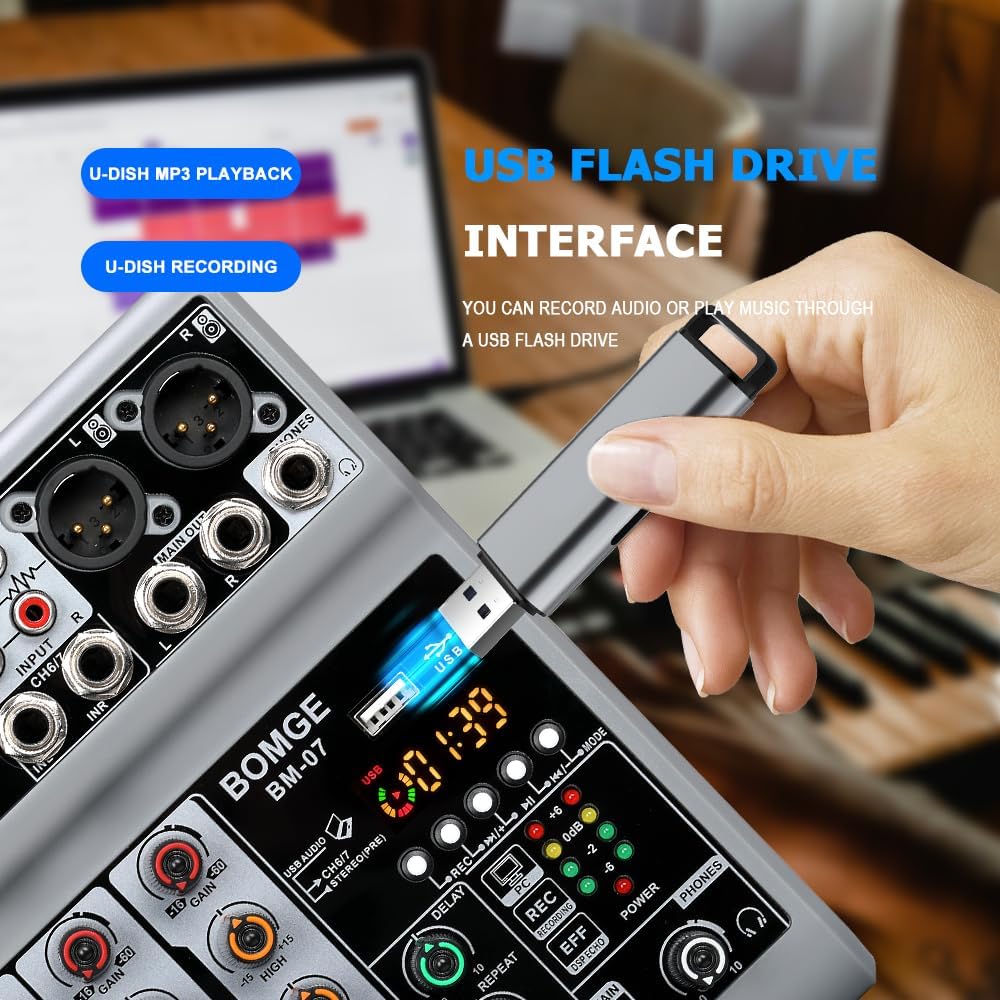
Image: The mixer's USB-A port with a flash drive connected, illustrating its function for both music playback and audio recording.
Important Note on Input Modes
The Bluetooth, USB (for computer/mobile), and 4/5 channel functions (referring to the stereo line inputs) are available as one of three options and cannot be used simultaneously. Select the desired input mode using the appropriate switch or button.
Vídeo oficial del producto
Video: An official product video demonstrating the features and operation of the BOMGE BM-07 Audio Mixer. This video is 23 seconds long and provides a visual overview of the mixer's capabilities.
Mantenimiento
- Limpieza: Utilice un paño suave y seco para limpiar la superficie de la batidora. Evite usar limpiadores líquidos o disolventes, ya que pueden dañar el acabado o los componentes internos.
- Almacenamiento: Guarde la batidora en un lugar fresco y seco, alejado de la luz solar directa y de temperaturas extremas.
- Manejo: Evite dejar caer la batidora o someterla a impactos fuertes.
Solución de problemas
- Sin salida de sonido:
- Verifique todas las conexiones de cables (entradas, salidas, alimentación).
- Ensure the MAIN VOL knob is turned up.
- Verify individual channel VOL knobs are turned up.
- Confirm the correct input mode (USB, Bluetooth, Line) is selected.
- Si utiliza alimentación fantasma, asegúrese de que esté activada para los micrófonos de condensador.
- Sonido distorsionado:
- Reduzca la perilla GAIN para el canal de entrada.
- Lower the individual channel VOL knob.
- Check the LED Peak Level Indicator; if it's consistently red, the signal is clipping.
- Ensure output devices (speakers, headphones) are not overdriven.
- Problemas de conexión Bluetooth:
- Asegúrese de que el mezclador esté en modo Bluetooth.
- Check that Bluetooth is enabled on your device and "BM-07" is selected.
- Move your device closer to the mixer (within 1.5 feet).
- Intente desvincular y volver a vincular el dispositivo.
- USB Recording/Playback Problems:
- Ensure the USB stick is properly formatted and contains compatible MP3 files para la reproducción.
- Verify the USB stick has sufficient free space for recording.
- Confirm the correct USB mode (USB-A for stick, USB-B for computer) is selected.
- For mobile recording, ensure the OTG adapter is correctly connected and functioning.
Presupuesto
| Marca | BOMBA |
| Modelo | BM-07 |
| Número de canales | 7 (5 Mic/Line, 2 Stereo Line/USB/Bluetooth) |
| Dimensiones del producto (Pr. x An. x Al.) | 1.8" x 5.9" x 7.4" (4.57 cm x 14.99 cm x 18.8 cm) |
| Peso del artículo | 550 gramos |
| Tecnología de conectividad | Auxiliar, Bluetooth, USB |
| Fuente de poder | Corded Electric (5V USB-C) |
| Respuesta de frecuencia | 24 kHz |
| Tipos de conectores de salida | 6.35mm (1/4 inch), RCA, USB |
| Tipos de entrada de audio | Microphone, Computer, Musical Instruments, Electric Guitar, Mobile Phone |
| Potencia Phantom | +48V (on select XLR inputs) |
| Efectos | Eco, Retraso |
Información de garantía
The BOMGE BM-07 Audio Mixer comes with a 1 año de garantía Desde la fecha de compra. Esta garantía cubre defectos de fabricación y mal funcionamiento en condiciones normales de uso. No cubre daños causados por mal uso, accidentes, modificaciones no autorizadas o instalación incorrecta.
Conserve su comprobante de compra para reclamos de garantía.
Atención al cliente
For technical assistance, troubleshooting, or warranty inquiries, please contact BOMGE customer support through the retailer's platform or the official BOMGE website. Please have your product model (BM-07) and purchase details ready when contacting support.
You can visit the official BOMGE store on Amazon for more information: Estudio de música BOMGE
Ask a question about this manual
Ask about setup, troubleshooting, compatibility, parts, safety, or missing instructions. Manuals+ will review the question and use this page’s manual context to help answer it.