
1. Introducción
Thank you for choosing the Gawfolk 32-inch 4K 144Hz Gaming Monitor. This monitor is designed to provide an immersive visual experience with its 4K UHD resolution, high refresh rate, and adaptive synchronization technology. This manual provides essential information for setting up, operating, maintaining, and troubleshooting your monitor to ensure optimal performance and longevity.
2. Información de seguridad
- Lea todas las instrucciones atentamente antes de utilizar el monitor.
- Mantenga el monitor alejado del agua, la humedad y temperaturas extremas.
- No bloquee las aberturas de ventilación.
- Utilice únicamente el adaptador de corriente proporcionado con el monitor.
- Evite colocar objetos pesados sobre el cable de alimentación.
- Desconecte el enchufe de alimentación de la toma de corriente si no va a utilizar el monitor durante un período prolongado.
- Deje todo servicio a personal de servicio calificado.
3. Configuración
3.1 Desempaquetado y contenido del paquete
Retire con cuidado todos los componentes del embalaje. Asegúrese de que estén presentes todos los elementos enumerados a continuación:
- Gawfolk 32-inch 4K 144Hz Monitor
- Soporte para monitor (base y mástil)
- Adaptador de corriente
- Cable HDMI
- Cable DisplayPort
- Manual de usuario
3.2 Montaje del soporte
- Coloque el monitor boca abajo sobre una superficie suave y limpia para evitar rayones.
- Attach the stand neck to the back of the monitor using the provided screws. Ensure it is securely fastened.
- Attach the stand base to the stand neck, tightening the screw at the bottom of the base.
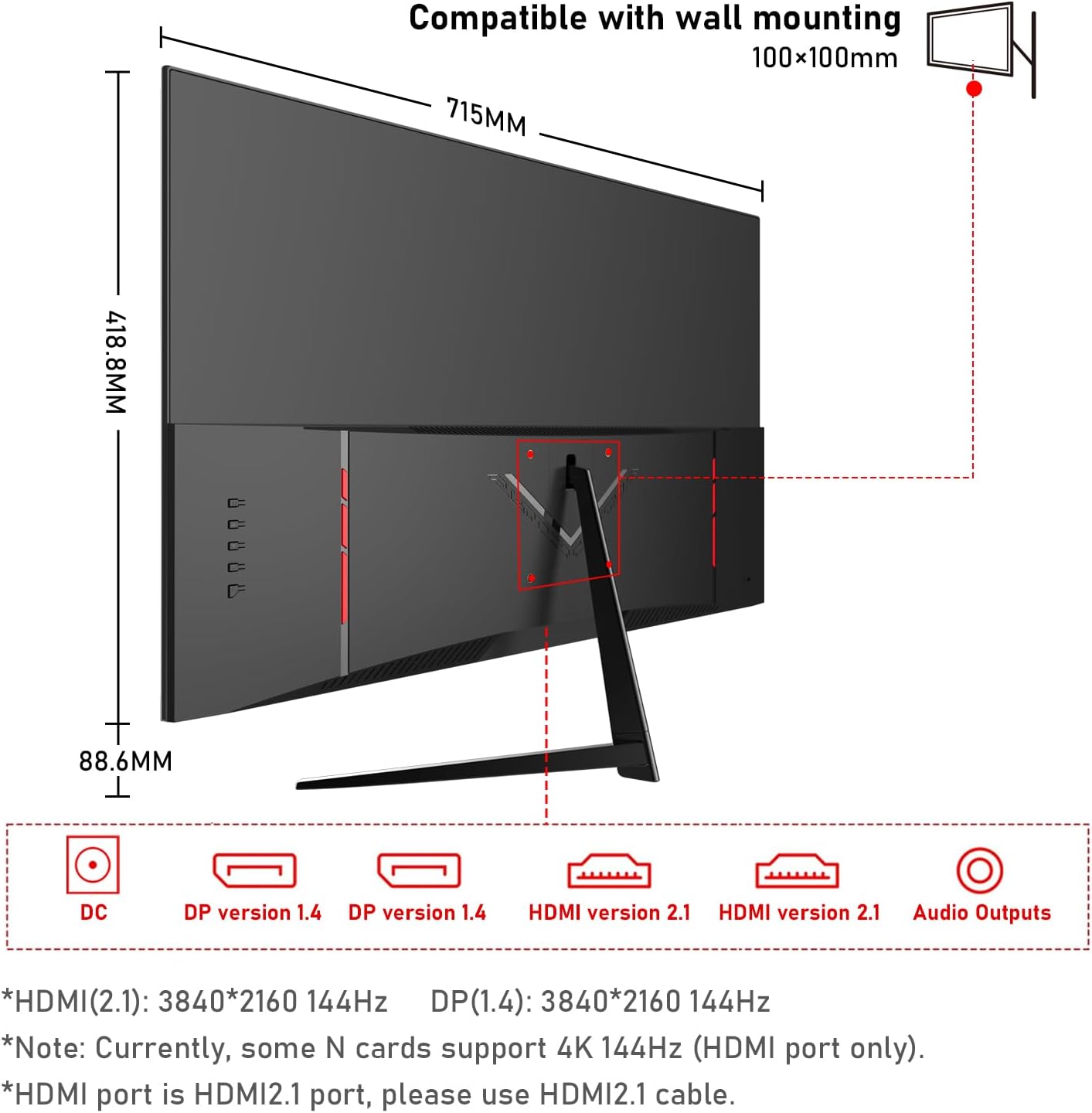
3.3 Conexión del monitor
Conecte el monitor a su computadora u otros dispositivos usando los cables apropiados.
- Conexión de energía: Conecte el adaptador de corriente al puerto de entrada de CC del monitor y luego enchufe el adaptador a una toma de corriente.
- Conexión de vídeo:
- For 4K@144Hz, use an HDMI 2.1 cable (if your graphics card supports it) or a DisplayPort 1.4 cable.
- Connect one end of the HDMI or DisplayPort cable to the corresponding port on your monitor and the other end to your computer's graphics card.
- Conexión de audio: If you wish to use external speakers or headphones, connect them to the 3.5mm audio output port on the monitor.
3.4 Encendido inicial
Press the power button on the monitor. The monitor should display the Gawfolk logo and then your computer's desktop. If no image appears, ensure all cables are securely connected and the correct input source is selected in the monitor's On-Screen Display (OSD) menu.
4. Funcionamiento del monitor
4.1 Menú de visualización en pantalla (OSD)
The OSD menu allows you to adjust various monitor settings. Typically, buttons are located on the back or bottom edge of the monitor. Use these buttons to navigate the menu and select options.
4.2 Configuración de pantalla
- Resolución: The monitor supports 4K UHD (3840 x 2160) resolution. Ensure your computer's display settings are configured to this resolution for the sharpest image.
- Frecuencia de actualización: For smooth visuals, especially in gaming, set the refresh rate to 144Hz in your computer's display settings.
- Configuración de color: This monitor offers 100% sRGB coverage and 16.7 million colors for vibrant and accurate color reproduction. Adjust brightness, contrast, and color temperature via the OSD menu to suit your preference.

4.3 Características de juego
- Tiempo de respuesta de 1 ms: The monitor features a 1ms response time (GTG), minimizing motion blur and ghosting for a more responsive gaming experience.
- Sincronización adaptativa (FreeSync): This technology synchronizes the monitor's refresh rate with your GPU's frame rate, eliminating screen tearing and stuttering. Enable FreeSync in your graphics card settings and the monitor's OSD menu.

4.4 Tecnología para el cuidado de los ojos
The monitor incorporates low blue light and flicker-free technology to reduce eye strain during prolonged use. These features are designed to enhance viewing comodidad.
4.5 Altavoces duales incorporados
The monitor includes built-in dual speakers, providing convenient audio without the need for external speakers. You can adjust the volume through your computer's audio settings or the monitor's OSD menu.

5. Mantenimiento
- Limpieza de la pantalla: Utilice un paño suave y sin pelusa ligeramente seco.ampLimpie con agua o un limpiador de pantallas específico. No rocíe el limpiador directamente sobre la pantalla.
- Limpieza de la Casing: Utilice un paño suave y seco para limpiar el monitor.asing. Evite utilizar limpiadores abrasivos o disolventes.
- Ventilación: Ensure the ventilation openings on the monitor are clear and not obstructed to prevent overheating.
6. Solución de problemas
- Sin energía: Compruebe que el cable de alimentación esté bien conectado tanto al monitor como a la toma de corriente. Asegúrese de que el adaptador de corriente funcione.
- Sin imágen: Verify that the video cable (HDMI/DisplayPort) is correctly connected to both the monitor and the computer. Ensure the correct input source is selected in the OSD menu.
- Pantalla parpadeante: Check the video cable connection. Ensure the refresh rate is set correctly in your computer's display settings. Enable Adaptive Sync if supported by your graphics card.
- Mala calidad de imagen: Adjust resolution, brightness, contrast, and color settings via the OSD menu. Ensure the video cable is not damaged.
- Sin sonido: Check the audio cable connection (if using external speakers/headphones). Adjust volume settings on both the monitor and your computer. Ensure the correct audio output device is selected on your computer.
7. Especificaciones
| Característica | Especificación |
|---|---|
| Marca | Gente de la calle |
| Número de modelo | GF320L |
| Tamaño de pantalla | 32 pulgadas |
| Resolución | 4K UHD 2160p (3840 x 2160 píxeles) |
| Frecuencia de actualización | 144 Hz |
| Tiempo de respuesta | 1 milisegundo (GTG) |
| Relación de aspecto | 16:9 |
| Tipo de pantalla | LED (VA Technology) |
| Descripción de la superficie de la pantalla | Lustroso |
| Característica especial | Curvo |
| Viewángulo de ing | 178 grados |
| Brillo | 320 cd/m² |
| Color Gamut Value | 120 % sRGB |
| Mejora de la calidad de la imagen | Eye-Care + Adaptive Sync |
| hardware de conectividad | 2x HDMI, 2x DisplayPort, 3.5mm Audio |
| Adaptive Synchronization | Sincronización libre |
| Color | Negro |
| Peso del artículo | 6.34 kilogramos |
| Dimensiones del artículo (Pr. x An. x Al.) | 50.7 x 71.5 x 19 centímetros |
8. Garantía y soporte
Gawfolk provides a 12-month after-sales service for this monitor. If you encounter any issues during use, please do not hesitate to contact our customer support for assistance. Our team is dedicated to ensuring your satisfaction.