
1. Producto terminadoview
The plplaaoo FS8233 is an ultra-thin, full-screen intelligent automatic digital multimeter designed for electricians, engineers, and technicians. It features intelligent auto-ranging technology for precise detection of voltage, current, resistance, and continuity without manual adjustments. Built with durable ABS and silicone materials, it offers reliable performance in various environments.
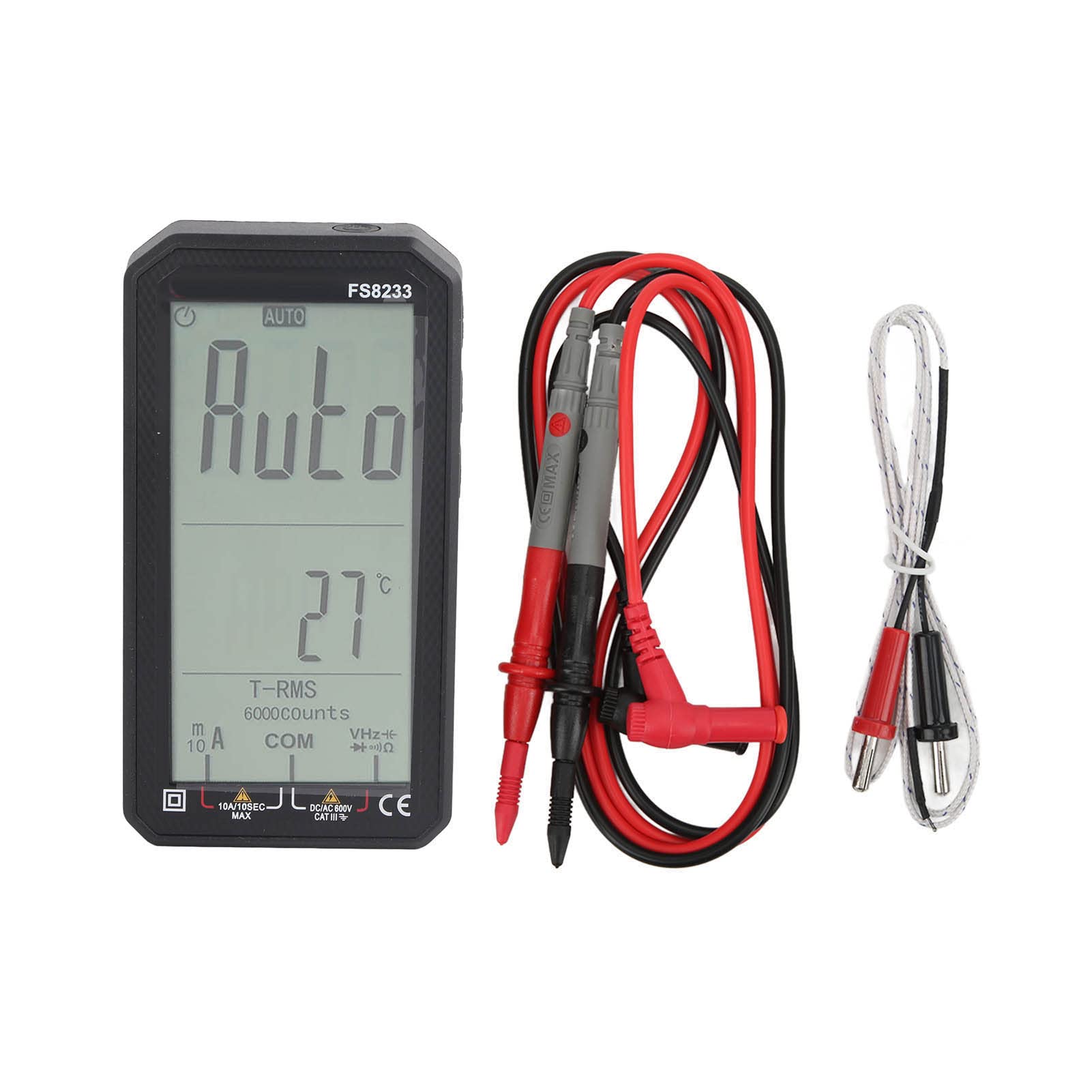
Imagen 1.1: Frente view of the plplaaoo FS8233 Digital Multimeter, showcasing its full-screen display.
Características principales:
- Automatic Testing: Intelligent auto-ranging for voltage, corriente, resistencia y continuidad.
- Alta precisión: Advanced chip ensures ±0.5% DC voltagprecisión.
- Construcción duradera: Made from premium ABS and wear-resistant silicone for industrial-grade durability.
- Multifuncional: Mide volumen CA/CCtage (up to 600V), current (10A max), resistance (60MΩ), capacitance (60mF), and temperature.
- Características de seguridad: Anti-burn protection and 600V CAT III safety rating.
- Diseño fácil de usar: Large backlit screen for clear readings in low-light conditions.
2. Información de seguridad
Always adhere to safety precautions when using electrical testing equipment. Failure to do so may result in injury or damage to the device or equipment being tested.
- Asegúrese de que el multímetro esté en buenas condiciones de funcionamiento antes de usarlo.
- No exceda los valores de entrada máximos especificados para cada función.
- Verify the correct function and range are selected before making measurements.
- Utilice equipo de protección personal (EPP) adecuado, como guantes aislantes y gafas de seguridad.
- Evite tocar conductores o componentes del circuito expuestos durante las mediciones.
- Reemplace las baterías rápidamente cuando aparezca el indicador de batería baja para garantizar lecturas precisas.
- The device has a 600V CAT III safety rating. Always respect this rating and do not use it in circuits exceeding this category.
3. Configuración
3.1 Instalación de la batería
The FS8233 multimeter requires two 1.5V AAA batteries (not included) for operation.
- Localice la tapa del compartimiento de la batería en la parte posterior del multímetro.
- Use un destornillador para abrir el compartimiento de la batería.
- Inserte dos pilas AAA, asegurándose de la polaridad correcta (+ y -).
- Cierre bien la tapa del compartimento de la batería.
3.2 Conexión de cables de prueba
The multimeter comes with two test leads. Connect them to the appropriate input jacks:
- Insertar el negro cable de prueba en el COM (común) jack.
- Insertar el rojo cable de prueba en el VHzΩmA jack for most voltage, resistance, frequency, capacitance, and current measurements (up to 600mA).
- Para mediciones de corriente alta (hasta 10 A), inserte el rojo cable de prueba en el 10A Jacobo.

Imagen 3.2: Abajo view of the multimeter, illustrating the input jacks for test lead connection.
4. Instrucciones de funcionamiento
The FS8233 features intelligent auto-ranging, simplifying most measurements. Power on the device and it will automatically detect the measurement type.
4.1 Encendido y apagado
- Press the power button (usually marked with a circle and a vertical line) to turn the multimeter on.
- Mantenga presionado el botón de encendido para apagar el multímetro.

Image 4.1: The multimeter display indicating 'AUTO' mode, ready for automatic measurement.
4.2 Medición automática
In auto mode, the multimeter will automatically identify and measure AC/DC voltage, resistance, and continuity. Simply connect the test leads to the circuit or component you wish to measure.
4.3 Medidas específicas
While the device is largely auto-ranging, it supports specific measurements:
- Volumentage (CA/CC): Connect test leads in parallel to the circuit. The multimeter will automatically detect AC or DC voltage.
- Corriente (CA/CC): Connect test leads in series with the circuit. Ensure the red lead is in the correct current jack (mA or 10A).
- Resistencia: Conecte los cables de prueba al componente. Asegúrese de que el componente esté desenergizado.
- Capacidad: Conecte los cables de prueba al condensador. Asegúrese de que el condensador esté descargado antes de realizar la prueba.
- Temperatura: Connect the included temperature probe to the appropriate jacks (usually VΩmA and COM) and place the probe tip on the object to be measured.

Image 4.3: An electrician using the FS8233 multimeter to perform tests on an electrical panel, demonstrating practical application.
4.4 Lectura de la pantalla
The large backlit screen displays readings clearly. The unit of measurement (V, A, Ω, F, °C) will be shown alongside the numerical value. The 'AUTO' indicator confirms auto-ranging is active.

Imagen 4.4: Primer plano view of the multimeter's display, showing a clear numerical reading and measurement units.
5. Mantenimiento
5.1 Limpieza
To maintain the multimeter's performance and appearance:
- Limpia la casing con anuncioamp paño y detergente suave. No use limpiadores abrasivos o solventes.
- Ensure no moisture enters the device through the input jacks or seams.
5.2 Reemplazo de batería
Cuando aparezca el indicador de batería baja en la pantalla, reemplace las baterías como se describe en la Sección 3.1. Utilice siempre baterías AAA nuevas de 1.5 V.
5.3 Almacenamiento
Guarde el multímetro en un lugar fresco y seco, alejado de la luz solar directa y de temperaturas extremas. Si lo va a guardar durante un periodo prolongado, retire las pilas para evitar fugas.
6. Solución de problemas
If you encounter issues with your FS8233 Digital Multimeter, refer to the following common troubleshooting steps:
- No hay pantalla/El dispositivo no se enciende:
- Compruebe que las baterías estén correctamente instaladas y tengan suficiente carga. Reemplácelas si es necesario.
- Asegúrese de que el botón de encendido esté presionado firmemente.
- Lecturas incorrectas o inestables:
- Verify that the test leads are securely connected to the correct input jacks.
- Ensure good contact between the test probes and the circuit/component being measured.
- Check for damaged test leads and replace if necessary.
- Ensure the component being measured is within the multimeter's specified range.
- Indicación de 'OL' o sobrecarga:
- This indicates the measured value exceeds the current range. Ensure the red test lead is in the appropriate high-current jack (10A) if measuring high current, or that the voltage/resistance is within the device's maximum limits.
7. Especificaciones
| Parámetro | Especificación |
|---|---|
| Modelo | FS8233 |
| Material | ABS + Silicona |
| Batería | 2 pilas AAA de 1.5 V (no incluidas) |
| Rango de corriente CA | 6000mA (1mA, ±(1.0% + 8 digits)), 10A (0.01A) |
| Rango de corriente DC | 6000mA (1mA, ±(1.0% + 5 digits)), 10A (0.01A) |
| Vol DCtage Rango | 6V (0.001V, ±(0.5% + 3 digits)), 60V (0.01V), 600V (0.1V) |
| Rango de resistencia | Hasta 60 MΩ |
| Rango de capacitancia | Hasta 60 mF |
| Clasificación de seguridad | 600 V CAT III |
| Componentes incluidos | 2 Test Leads, 1 Temperature Probe, User Manual |