
1. Introducción
Gracias por la compraasing the Sharp PS-916 Bluetooth Party Speaker System. This system includes two identical portable Bluetooth speakers designed to deliver powerful audio with versatile connectivity options. Please read this manual carefully before using the product to ensure proper operation and to maximize your listening experience.
Contenido del paquete:
- 2 x Sharp PS-916 Party Speakers
- 1 x cable de carga
- 1 x control remoto
- 1 x Manual de usuario

Image: The Sharp PS-916 system includes two speakers for a complete stereo experience.
2. Configuración
2.1 Carga de los altavoces
The PS-916 speakers are equipped with rechargeable batteries, providing up to 12 hours of playback. Before initial use, fully charge both speakers.
- Connect the charging cable to the DC IN port on the rear of each speaker.
- Plug the other end of the charging cable into a suitable power adapter (not included) or USB power source.
- The charging indicator light will illuminate. It will change color or turn off once charging is complete.
2.2 Encendido / Apagado
To power on or off each speaker, press and hold the ON/STAND BY INPUT botón ubicado en el panel de control.
2.3 Emparejamiento Bluetooth (un solo altavoz)
- Ensure the speaker is powered on and in Bluetooth mode. The Bluetooth indicator will flash, indicating it is ready for pairing.
- En su dispositivo móvil, habilite Bluetooth y busque dispositivos disponibles.
- Select "Sharp PS-916" from the list of devices.
- Una vez conectado, el indicador de Bluetooth dejará de parpadear y permanecerá fijo.
2.4 Emparejamiento estéreo inalámbrico verdadero (TWS) (dos altavoces)
TWS allows you to connect two PS-916 speakers wirelessly for a stereo sound experience.
- Power on both PS-916 speakers.
- Ensure neither speaker is currently connected to a Bluetooth device.
- En uno de los altavoces (este será el altavoz principal), presione el botón TWS Botón. El altavoz entrará en el modo de emparejamiento TWS.
- The primary speaker will automatically search for the secondary speaker. Once connected, you will hear an audible confirmation, and the TWS indicator lights on both speakers will illuminate.
- Ahora, conecta tu dispositivo móvil al altavoz principal mediante Bluetooth, como se describe en la sección 2.3. El audio se reproducirá en estéreo por ambos altavoces.
3. Operando
3.1 Panel de control terminadoview

Image: Main control panel for the Sharp PS-916 speaker.
- ON/STAND BY INPUT: Power on/off, switch input modes (Bluetooth, USB, TF, AUX, FM).
- PLAY/PAUSE (►/∕∕): Reproducir o pausar la reproducción de audio.
- PREVIOUS (◀◀): Salta a la pista anterior.
- SIGUIENTE (▶▶): Salta a la siguiente pista.
- PERILLA DE VOLUMEN: Gire para ajustar el volumen principal.
- TWS: Iniciar o desconectar el emparejamiento estéreo inalámbrico verdadero.
- IGUALADA: Cycle through preset equalizer modes.
- BAJO: Activate or deactivate bass boost.
- LUZ: Change or turn off the LED light effects.
- MIC CONTROL: Adjust microphone volume or echo (if applicable).
3.2 Puertos de entrada
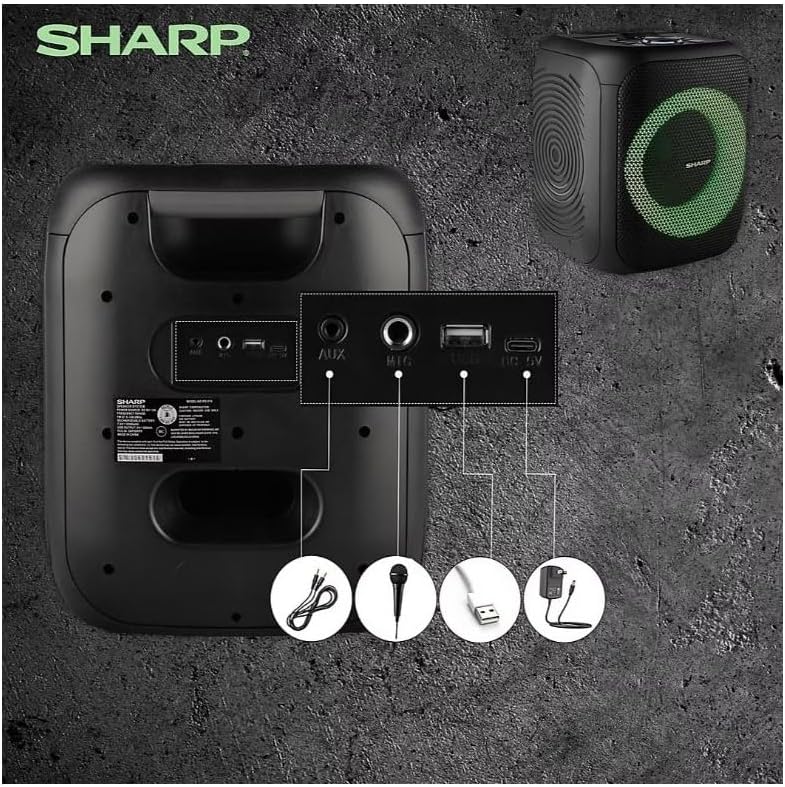
Image: Rear panel with various input and charging ports.
- ENTRADA AUX: Conecte dispositivos de audio externos mediante un cable de audio de 3.5 mm.
- ENTRADA DE MICRÓFONO: Connect a microphone (sold separately) for karaoke or announcements.
- USB: Inserte una unidad flash USB para reproducir audio.
- TARJETA TF: Inserte una tarjeta TF (microSD) para reproducir audio.
- DC EN: Connect the charging cable to power and charge the speaker.
3.3 Playing Audio from USB/TF Card
- Insert a USB flash drive or TF card into the corresponding port.
- Presione el ON/STAND BY INPUT button repeatedly until the display shows the USB or TF mode.
- La reproducción comenzará automáticamente. Utilice el REPRODUCIR/PAUSA, ANTERIOR, y PRÓXIMO Botones para controlar la reproducción.
3.4 Uso de la entrada AUX
- Connect one end of a 3.5mm audio cable to the AUX IN port on the speaker.
- Conecte el otro extremo al conector de auriculares o a la salida de audio de su dispositivo externo.
- Presione el ON/STAND BY INPUT button repeatedly until the display shows AUX mode.
- Controle la reproducción y el volumen desde su dispositivo externo.
3.5 Funcionamiento de la radio FM

Image: The PS-916 features an integrated FM Tuner.
- Presione el ON/STAND BY INPUT button repeatedly until the display shows FM mode.
- Mantenga pulsado el REPRODUCIR/PAUSA Botón para escanear y guardar automáticamente las estaciones de FM disponibles.
- Utilice el ANTERIOR y PRÓXIMO botones para navegar por las estaciones guardadas.
3.6 Efectos de luz LED
Presione el LUZ button to cycle through different LED light modes or to turn the lights off.
4. Mantenimiento
4.1 Limpieza
- Siempre apague el altavoz y desconéctelo de la fuente de alimentación antes de limpiarlo.
- Utilice un paño suave y seco para limpiar las superficies exteriores.
- No utilice limpiadores líquidos, aerosoles o disolventes, ya que pueden dañar el acabado o los componentes internos.
4.2 Almacenamiento
- Guarde los altavoces en un lugar fresco y seco, alejado de la luz solar directa y de temperaturas extremas.
- Si lo almacenará durante un período prolongado, cargue la batería aproximadamente al 50 % cada pocos meses para mantener su salud.
5. Solución de problemas
If you encounter issues with your Sharp PS-916 speakers, please refer to the following common problems and solutions:
| Problema | Posible solución |
|---|---|
| El altavoz no se enciende. | Asegúrese de que la batería esté cargada. Conecte el cable de carga y vuelva a intentarlo. |
| No sale sonido del altavoz. | Comprueba el volumen tanto del altavoz como del dispositivo conectado. Asegúrate de que esté seleccionado el modo de entrada correcto. |
| El dispositivo Bluetooth no se puede emparejar. | Ensure the speaker is in Bluetooth pairing mode (indicator flashing). Move your device closer to the speaker. Disconnect from other Bluetooth devices. |
| El emparejamiento de TWS falla. | Ensure both speakers are powered on and not connected to any other Bluetooth devices. Try initiating TWS pairing again. |
| Sonido distorsionado. | Reduce the volume on both the speaker and your connected device. Ensure the audio source is not distorted. |
6. Especificaciones
| Característica | Detalle |
|---|---|
| Marca | Afilado |
| Nombre del modelo | PS-916 |
| Configuración de altavoces | 8" Woofer, 1" Tweeter (per speaker) |
| Potencia máxima de salida | 400 vatios (por altavoz) |
| Potencia de salida RMS | 40 vatios (por altavoz) |
| Tecnología de conectividad | Bluetooth |
| Entradas adicionales | USB, TF Card, 3.5mm AUX, Microphone Input |
| Duración de la batería | Hasta 12 horas |
| Características especiales | True Wireless Stereo (TWS) Pairing, Bass Boost, LED Light Effects, FM Tuner |
| Color | Negro |
| Peso del artículo | 6.5 libras (por altavoz) |
| Código Postal | 728434122111 |
| GTIN | 728434122111 |
7. Garantía y soporte
7.1 Información de garantía
This Sharp PS-916 product comes with a 90-day limited warranty. This warranty covers manufacturing defects under normal use. It does not cover damage caused by misuse, accidents, unauthorized modifications, or normal wear and tear.
7.2 Atención al cliente
For technical assistance, warranty claims, or further inquiries, please refer to the contact information provided with your purchase documentation or visit the official Sharp support websitio.