
Introducción
The KZ Phantom In-Ear Monitors (IEMs) are engineered for high-fidelity audio, offering exceptional sound separation and clarity. They are particularly effective for gaming, allowing users to precisely locate in-game sounds like footsteps and gunfire. This design ensures an immersive audio experience without compromising comfort.
Featuring a comfortable and lightweight design, the KZ Phantom IEMs are built with a robust all-metal cavity. The ergonomic ear-hook design minimizes fatigue, allowing for extended wear during long gaming sessions or professional audio monitoring. The durable construction also helps reduce resonant interference, ensuring clear sound.
These IEMs provide excellent noise isolation, achieving up to 37 dB of passive noise reduction through deep in-ear sealing and high-quality ear tips. This ensures consistent sound performance regardless of the environment, making them suitable for professionals (musicians, studio engineers) and personal use (audiophiles, gamers) while reducing the risk of hearing damage.
The KZ Phantom features a high-definition detachable silver-plated cable, allowing for easy replacement and upgrades. An integrated dual high-definition silicone microphone provides clear voice communication, essential for team-based gaming or professional calls. The 3.5mm connector ensures broad compatibility with various gaming platforms including PC, Switch, PS5, and Xbox.
Built for durability and reliability, the KZ Phantom IEMs are constructed with high-quality materials designed for long-term use. All components are serviceable, ensuring the product's longevity and reducing waste.
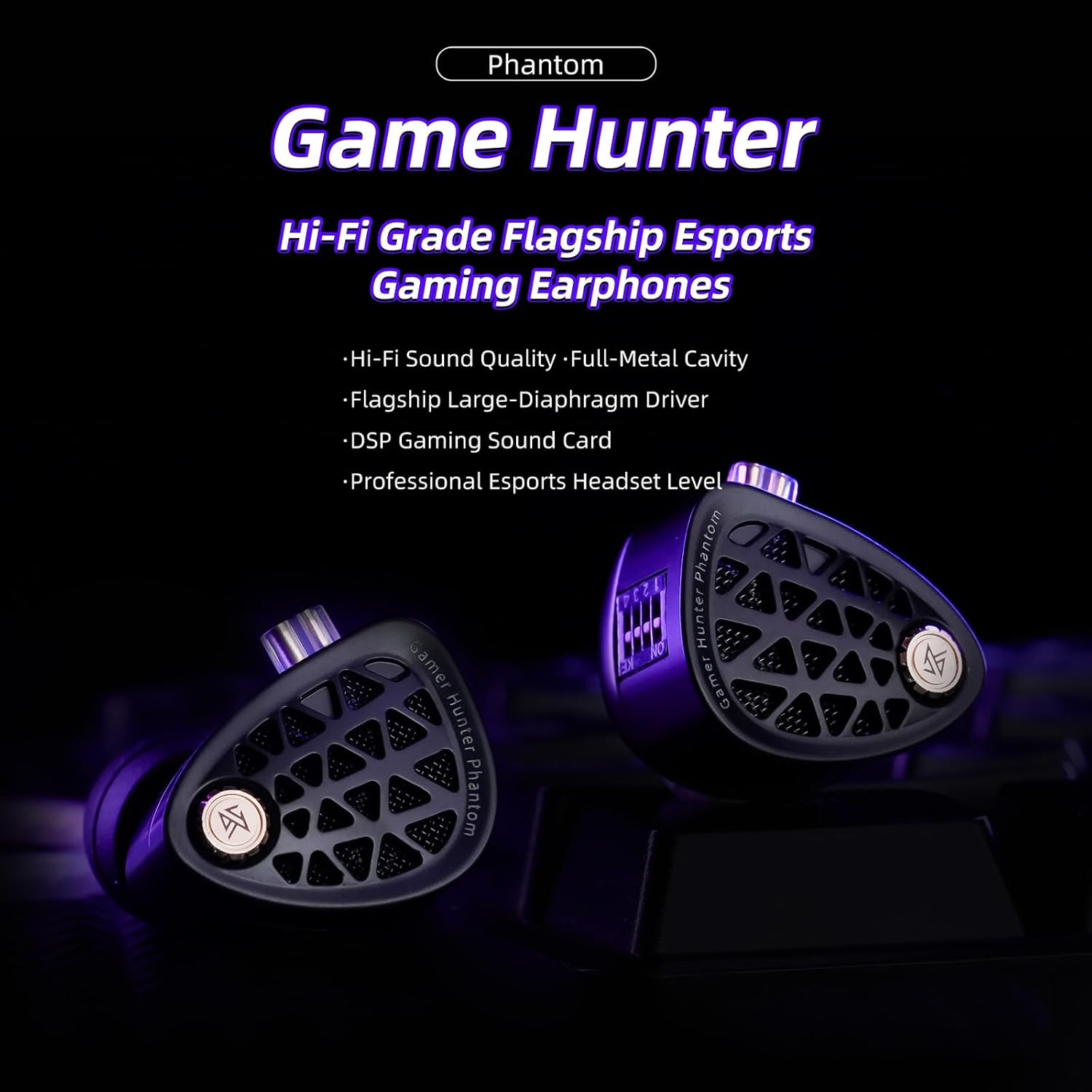
Image: KZ Phantom In-Ear Monitors, showcasing the full metal cavity and detachable cable.
Contenido del paquete
- KZ Phantom In-Ear Monitors
- Detachable Silver-Plated Cable with 3.5mm Connector
- Puntas de oído surtidas (varios tamaños)
- Manual de usuario
Instrucciones de instalación
- Seleccione las puntas de los oídos: Choose the ear tips that provide the most comfortable and secure fit, ensuring optimal sound isolation. A good seal is crucial for bass response and noise reduction.
- Conectar el cable: Carefully align the detachable cable connectors with the IEM units. Ensure the left (L) and right (R) indicators on the cable match the respective IEM units. Push firmly until they click into place. Do not force the connection.
- Wear the IEMs: Place the IEMs into your ears, guiding the cable over and behind your ears for a secure, ergonomic fit. The ear-hook design helps keep the IEMs in place during movement.
- Conectar al dispositivo: Plug the 3.5mm jack of the cable into your audio source (e.g., gaming console, PC, laptop, smartphone).

Image: Proper wearing of the KZ Phantom In-Ear Monitors, demonstrating the over-ear cable routing for a secure fit.
Operating Instructions: Tuning Switches
The KZ Phantom In-Ear Monitors feature a dedicated tuning switch system, allowing users to customize the sound profile. These switches can be combined to create up to 12 distinct sound signatures, catering to various listening preferences and applications, from gaming to stage monitoring and studio mixing.
Each IEM unit has a set of small switches. Use a small tool (e.g., a SIM ejector tool or a toothpick) to adjust the switches. Refer to the diagram below for common configurations:
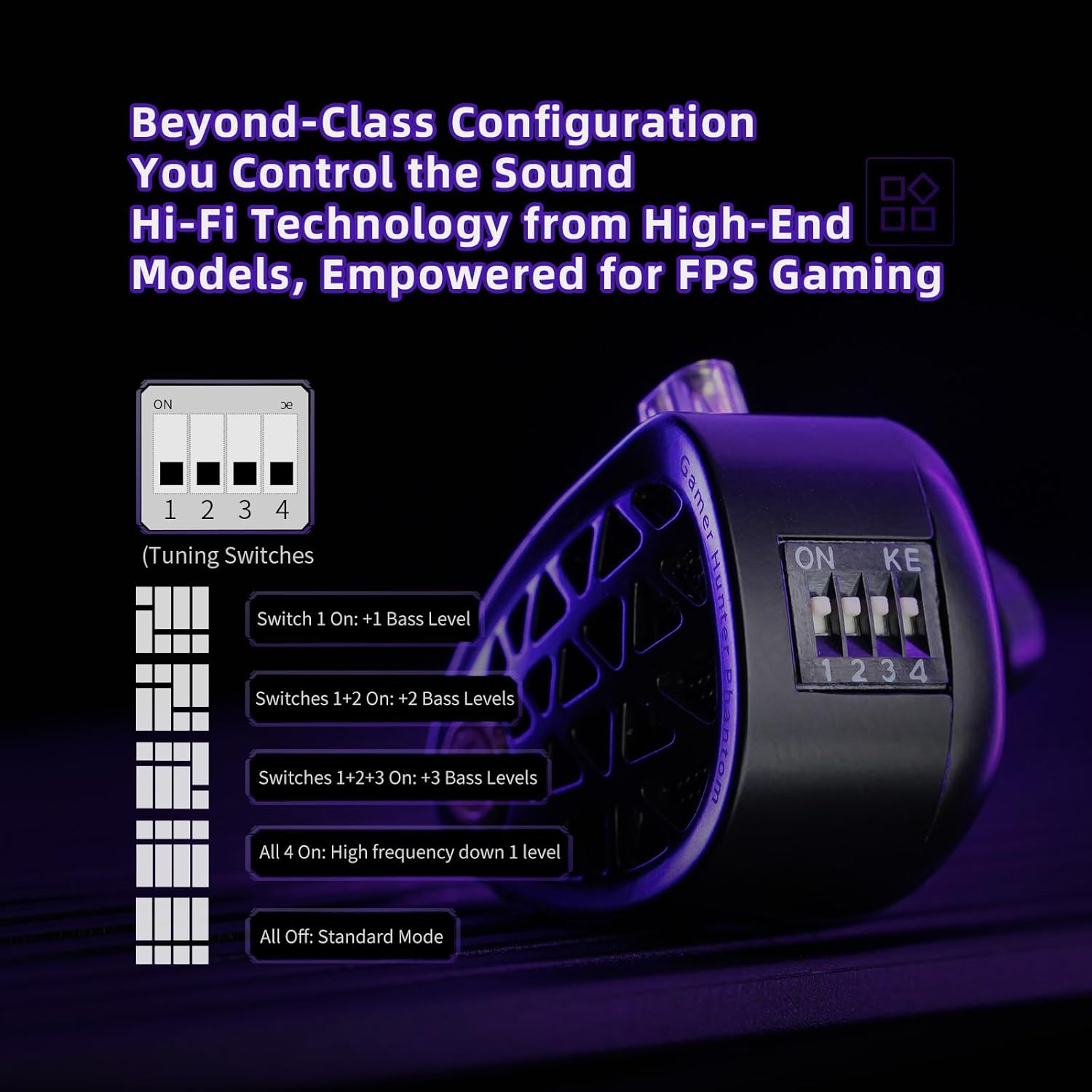
Imagen: Detallada view of the tuning switches on the KZ Phantom IEMs, illustrating various sound profile ajustes.
| Configuración del conmutador | Sonido Profile |
|---|---|
| Todo apagado | Modo estándar |
| Encender 1 | +1 Bass Level |
| Switches 1+2 On | +2 Bass Levels |
| Switches 1+2+3 On | +3 Bass Levels |
| All 4 On | High Frequency Down 1 Level |
Experiment with different switch combinations to find the sound signature that best suits your audio content and personal preference.
Mantenimiento
- Limpieza: Regularly clean the ear tips with a soft, dry cloth. For deeper cleaning, remove the ear tips and wash them with mild soap and water, ensuring they are completely dry before reattaching. Gently wipe the IEM body with a soft, slightly damp paño. No utilice productos químicos agresivos ni materiales abrasivos.
- Cuidado de cables: Avoid sharp bends or excessive pulling on the cable. When storing, coil the cable loosely. The detachable design allows for easy replacement if the cable becomes damaged.
- Almacenamiento: Store your KZ Phantom IEMs in a clean, dry place, preferably in a protective case, to prevent dust accumulation and physical damage.
- Humedad: Keep the IEMs away from moisture and extreme temperatures. Do not submerge them in water.
Solución de problemas
| Problema | Posible causa | Solución |
|---|---|---|
| Sin sonido o sonido intermitente | Loose cable connection, incorrect audio source, damaged cable, dirty jack. | Ensure cable is securely attached to both IEMs and audio source. Check audio source volume and settings. Test with another audio device or cable. Clean the 3.5mm jack. |
| Mala calidad de sonido (por ejemplo, graves débiles, sonido apagado) | Improper ear tip seal, incorrect tuning switch settings, dirty ear tips/nozzles. | Try different ear tip sizes for a better seal. Adjust tuning switches. Clean ear tips and IEM nozzles. |
| El micrófono no funciona | Microphone muted, incorrect input device selected, damaged cable. | Check microphone settings on your device. Ensure the correct input device is selected. Test with another device or cable. |
| Ajuste incómodo | Wrong ear tip size, improper wearing. | Experiment with different ear tip sizes. Ensure the IEMs are inserted correctly and the cable is routed over the ear. |
Si el problema persiste después de probar estas soluciones, comuníquese con el servicio de atención al cliente.
Presupuesto
| Característica | Detalle |
|---|---|
| Marca | KZ |
| Nombre del modelo | Fantasma |
| Color | Negro |
| Colocación de orejas | En la oreja |
| Factor de forma de los auriculares | En la oreja |
| Impedancia | 41 ohmios |
| Tecnología de conectividad | Con cable (conector de 3.5 mm) |
| Control de ruido | Sound Isolation (up to 37 dB passive) |
| Respuesta de frecuencia | 20 Hz - 40,000 Hz |
| Sensibilidad | 128 dB |
| Características especiales | Dedicated Tuning Switches (up to 12 sound profiles) |
| Función del cable | Detachable, Silver-Plated |
| Dispositivos compatibles | Gaming Consoles, Desktops, Laptops |
| Componentes incluidos | Ear Tips, Cable, User Manual |
| Material | Full-Metal Cavity |

Image: The full-metal premium die-cast cavity of the KZ Phantom, highlighting its robust build quality.
Garantía y soporte
Para obtener información sobre la garantía y atención al cliente, consulte la documentación incluida con su compra o póngase en contacto con su vendedor. Conserve el comprobante de compra para cualquier reclamación de garantía.
For technical assistance or further inquiries, please visit the official KZ websitio o comuníquese con su departamento de servicio al cliente.