
Introducción
This manual provides essential information for setting up, operating, maintaining, and troubleshooting your REDMI Note 15 Pro+ 5G smartphone. Please read this guide thoroughly to ensure optimal performance and longevity of your device.
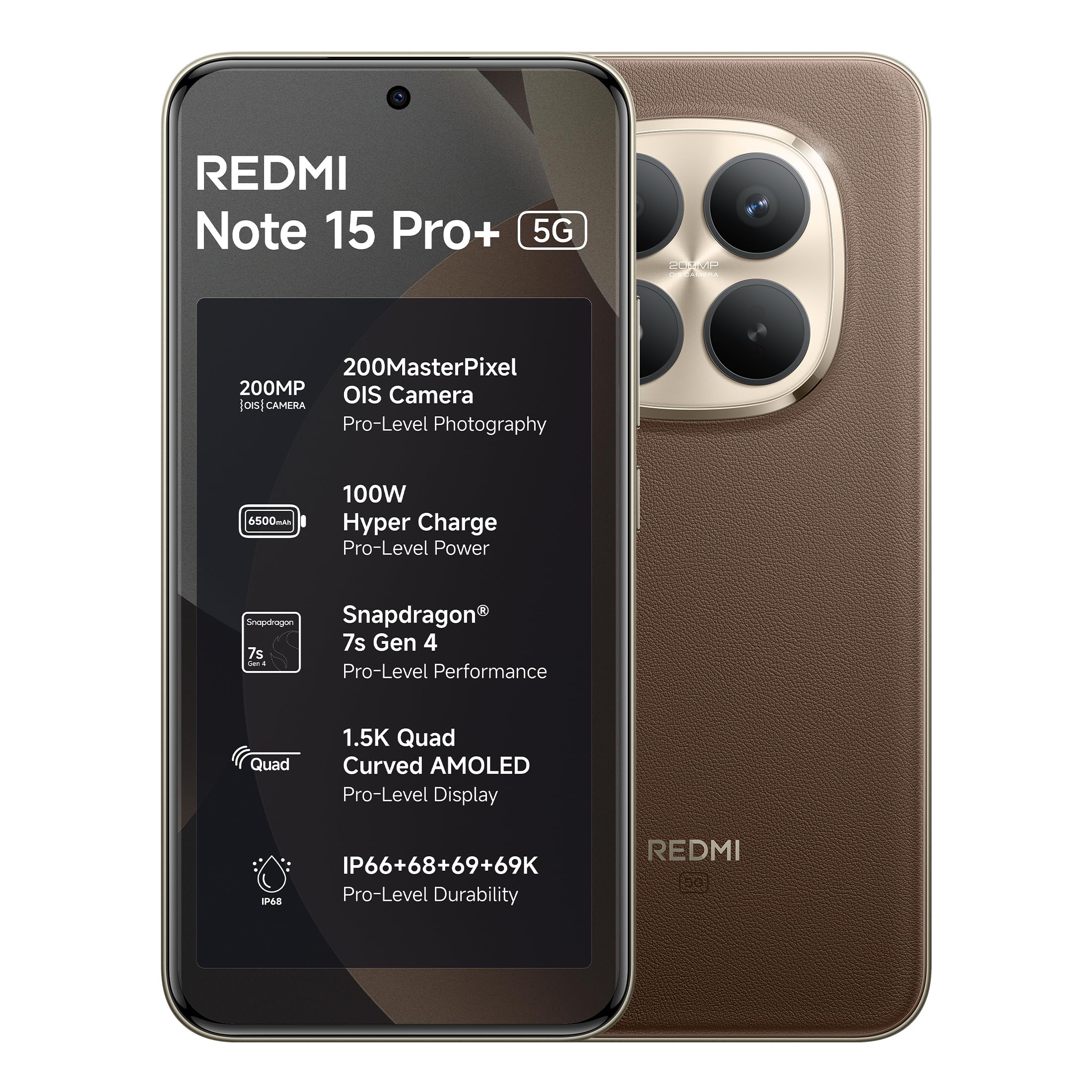
Figure 1: REDMI Note 15 Pro+ 5G (Coffee Mocha)
1. Configuración
1.1 Contenido de la caja
Verifique que todos los elementos estén presentes en el embalaje del producto:
- REDMI Note 15 Pro+ 5G Smartphone
- Cargador
- Cable USB tipo C
- Herramienta de expulsión de SIM
- Guía del usuario (este documento)
- Tarjeta de garantía
- Estuche protector
1.2 Inserción de la tarjeta SIM
- Localice la bandeja de la tarjeta SIM en el costado del dispositivo.
- Inserte la herramienta de expulsión de SIM en el pequeño orificio al lado de la bandeja y presione suavemente hasta que la bandeja salga.
- Coloque la(s) tarjeta(s) Nano-SIM en la bandeja con los contactos dorados hacia abajo. Asegúrese de que estén bien orientadas.
- Empuje con cuidado la bandeja dentro de la ranura hasta que quede al ras del dispositivo.
1.3 Encendido inicial y configuración
- Press and hold the Power button until the REDMI logo appears.
- Siga las instrucciones en pantalla para seleccionar su idioma, región y conectarse a una red Wi-Fi.
- Inicia sesión con tu cuenta de Google o crea una nueva.
- Complete el proceso de configuración, incluida la configuración de funciones de seguridad como desbloqueo de huellas dactilares o facial.
2. Operar su dispositivo
2.1 Pantalla y navegación
The device features a 6.83-inch Quad curved 1.5K Ultra QHD AMOLED display with up to 3200 nits peak brightness. It supports a 120Hz adaptive refresh rate for smooth scrolling and interaction. Eye Protect 2.0 with Triple TÜV Certifications helps reduce eye strain.

Figure 2: Immersive AMOLED Display
Sistema de cámara 2.2
Your REDMI Note 15 Pro+ 5G is equipped with an advanced 200MP ultimate clarity camera system featuring OIS (Optical Image Stabilization) and an HPE 1/1.4" sensor. This camera is designed for capturing detailed photos and 4K videos with natural depth and steady motion.
- Capture Ultra-Sharp Details: Utilize the 200MP mode for maximum resolution.
- Steady Videos: OIS ensures stable video recording, even when moving.
- Retratos: Use portrait mode for natural depth-of-field effects.

Figure 3: 200MasterPixel Camera System
2.3 Rendimiento y juegos
Powered by the Snapdragon 7s Gen 4 processor, the device offers smooth performance for daily tasks and gaming. IceLoop cooling technology helps maintain optimal temperatures during intensive use.

Figura 4: Procesador Snapdragon 7s Gen 4
2.4 Batería y carga
The 6500mAh Silicon-Carbon battery supports 100W HyperCharge, allowing for rapid charging. It also features 22.5W reverse charging. The battery is designed for advanced 1600 lifecycles, ensuring long-term reliability.

Figure 5: 6500mAh Silicon-Carbon Battery
2.5 Funciones de audio
Experience enhanced audio with symmetric stereo speakers and Dolby Atmos® support. The speakers deliver clear sound, suitable for music and calls.

Figure 6: Ultra-Loud, Ultra-Clear Sound
2.6 Xiaomi HyperOS and AI Features
The device runs on Android 15 with Xiaomi HyperOS, offering intelligent AI features and seamless cross-device connectivity. Key features include:
- Comunicación fuera de línea: Enables device-to-device calling even without cellular or Wi-Fi network coverage, ideal for travel or areas with poor signal.
- Herramientas de IA: Integrated AI features like Circle to Search and Gemini Assistance enhance user interaction and productivity.

Figure 7: Powered by Xiaomi HyperOS

Figure 8: Smarter Help with AI Tools

Figure 9: Xiaomi Offline Communication
3. Mantenimiento
3.1 Limpieza del dispositivo
To clean your device, use a soft, lint-free cloth. Avoid using abrasive cleaners, solvents, or aerosol sprays directly on the phone. For stubborn marks, slightly dampEnjuague el paño con agua o con un limpiador de pantalla diseñado para dispositivos electrónicos.
3.2 Cuidado de la batería
The 6500mAh Silicon-Carbon battery is designed for extended longevity with 1600 lifecycles. To maximize battery life:
- Evite temperaturas extremas.
- Use the provided 100W HyperCharge charger and cable for optimal charging.
- Evite descargar completamente la batería con frecuencia.
3.3 Actualizaciones de software
Your device will receive regular software updates, including OS updates for up to 4 years and security patches for up to 6 years. Ensure your device is connected to Wi-Fi and has sufficient battery before initiating updates.
4. Durabilidad y protección
The REDMI Note 15 Pro+ 5G features a fiberglass back panel and Corning Gorilla Glass Victus 2 for enhanced durability. It boasts an IP69K rating, providing high-level protection against dust and water ingress, including high-pressure water jets and steam cleaning. AI Wet Touch 2.0 ensures screen responsiveness even when wet.

Figura 10: Funciones de protección integradas
5. Solución de problemas
Si tiene problemas con su dispositivo, pruebe los siguientes pasos básicos de solución de problemas:
- El dispositivo no responde: Mantenga presionado el botón de encendido durante aproximadamente 10 segundos para forzar el reinicio.
- Problemas de red: Check if your SIM card is properly inserted. Try toggling Airplane Mode on and off.
- Mal funcionamiento de la aplicación: Cierra y vuelve a abrir la aplicación. Si el problema persiste, borra la caché de la aplicación o reinstálala.
- Problemas de carga: Asegúrese de que el cargador y el cable estén bien conectados y sin daños. Pruebe con otra toma de corriente.
- Errores de software: Asegúrese de que el software de su dispositivo esté actualizado.
Para problemas más complejos, consulte la sección de soporte o comuníquese con el servicio de atención al cliente.
6. Especificaciones
| Característica | Detalle |
|---|---|
| Marca | Redmi |
| Modelo | Nota 15 Pro+ 5G |
| Sistema operativo | Android 15, Xiaomi HyperOS |
| Tamaño de la memoria RAM instalada | 12 GB |
| Capacidad de almacenamiento de memoria | 256 GB |
| Tamaño de pantalla | 6.83 pulgadas (17.35 cm) |
| Tipo de pantalla | AMOLED |
| Color | Café Moca |
| Tipo de conector | USB tipo C |
| Nivel de resistencia al agua | Impermeable (IP69K) |
| Rear Facing Camera Photo Sensor Resolution | 200 MP |
| Capacidad de la batería | 6500 miliamp Horas |
| Peso del artículo | 208 gramos |
| Dimensiones del artículo (largo x ancho x alto) | 16.3 x 7.8 x 0.8 centímetros |
| Proveedor de servicios inalámbricos | Desbloqueado para todos los operadores |
| Tecnología celular | 5G |
| Contenido de la caja | Charger, cable, SIM eject tool, Warranty card, User guide, Protective case |
7. Información de garantía
Your REDMI Note 15 Pro+ 5G comes with a Garantía del fabricante por 1 año para el dispositivo a partir de la fecha de compra. Los accesorios incluidos en la caja, incluidas las baterías, están cubiertos por una Garantía del fabricante de 6 meses a partir de la fecha de compra.
Conserve su comprobante de compra para reclamos de garantía.
8. Soporte y Servicio
For technical assistance, service, or warranty claims, please contact Redmi customer support. You can find contact information on the official Redmi website or through the provided warranty card.
Información del fabricante:
DBG Technology (India) Pvt Ltd
PLOT NO-2, BAWAL, SECTOR-8, Rewari, Haryana, 123501.
Información del importador:
Xiaomi Technology India Private Limited
Building Orchid. Block E, Embassy Tech Village, Marathahalli Outer Ring Road, Devarabisanahalli, Bengaluru 560103
Redmi aims for efficient service, with many issues resolved quickly. For more details on repair services, refer to the official Redmi support channels.

Figure 11: Support and Repair Services
For information on potential benefits and subscriptions, please scan the QR code provided in your product packaging or visit the official Redmi websitio para más detalles. Scan for benefits