
1. Introducción
This manual provides essential information for using your REDMI Note 15 Pro+ 5G smartphone. Please read it carefully to ensure proper operation and to maximize the device's features. Keep this manual for future reference.

Image: The REDMI Note 15 Pro+ 5G smartphone in Mirage Blue, showcasing su elegante diseño.
2. ¿Qué hay en la caja?
Verifique que todos los artículos estén presentes en el embalaje de su producto:
- REDMI Note 15 Pro+ 5G Smartphone
- Cargador
- Cable USB tipo C
- Herramienta de expulsión de SIM
- Tarjeta de garantía
- Guía del usuario (este documento)
- Estuche protector
3. Configuración
3.1. Inserción de la tarjeta SIM
- Localice la bandeja de la tarjeta SIM en el costado de su dispositivo.
- Inserte la herramienta de expulsión de SIM en el pequeño orificio al lado de la bandeja y presione suavemente hasta que la bandeja salga.
- Coloque la(s) tarjeta(s) Nano-SIM en la bandeja con los contactos dorados hacia abajo.
- Empuje con cuidado la bandeja hacia el dispositivo hasta que encaje en su lugar.

Imagen: Trasera view of the REDMI Note 15 Pro+ 5G, indicating the location of the SIM card tray.
3.2. Encendido inicial y configuración básica
- Press and hold the Power button until the REDMI logo appears.
- Siga las instrucciones en pantalla para seleccionar su idioma, región, conectarse a Wi-Fi y configurar su cuenta de Google.

Imagen: Frente view of the REDMI Note 15 Pro+ 5G, displaying the screen during initial setup.
3.3. Carga del dispositivo
Connect the provided USB Type-C cable to the phone's charging port and the other end to the 100W HyperCharge adapter. Plug the adapter into a power outlet. The device supports 100W fast charging and 22.5W reverse charging.

Image: Visual representation of the 6500mAh Silicon-Carbon battery and 100W HyperCharge technology.
4. Operar su dispositivo
4.1. Características de la pantalla
The REDMI Note 15 Pro+ 5G features a 6.83-inch Quad curved 1.5K CrystalRes AMOLED display with 3200 nits peak brightness. It supports a 120Hz adaptive refresh rate for smooth visuals and Eye Protect 2.0 with Triple TÜV Certifications to reduce eye strain.

Image: The vibrant 1.5K Quad-curved AMOLED display of the REDMI Note 15 Pro+ 5G, highlighting its brightness.

Image: Information on the advanced eye protection features, including TÜV triple certification, for comfortable viewEn.
4.2. Sistema de cámara
Capture stunning photos and videos with the advanced 200MP OIS camera system. It features a 1/1.4" sensor for exceptional detail and clarity, even in low light. The camera supports 4K video recording, ultra-sharp details, steady videos with OIS, and portraits with natural depth.

Imagen: Más alláview of the 200MasterPixel OIS Camera system, emphasizing its clarity and capabilities.
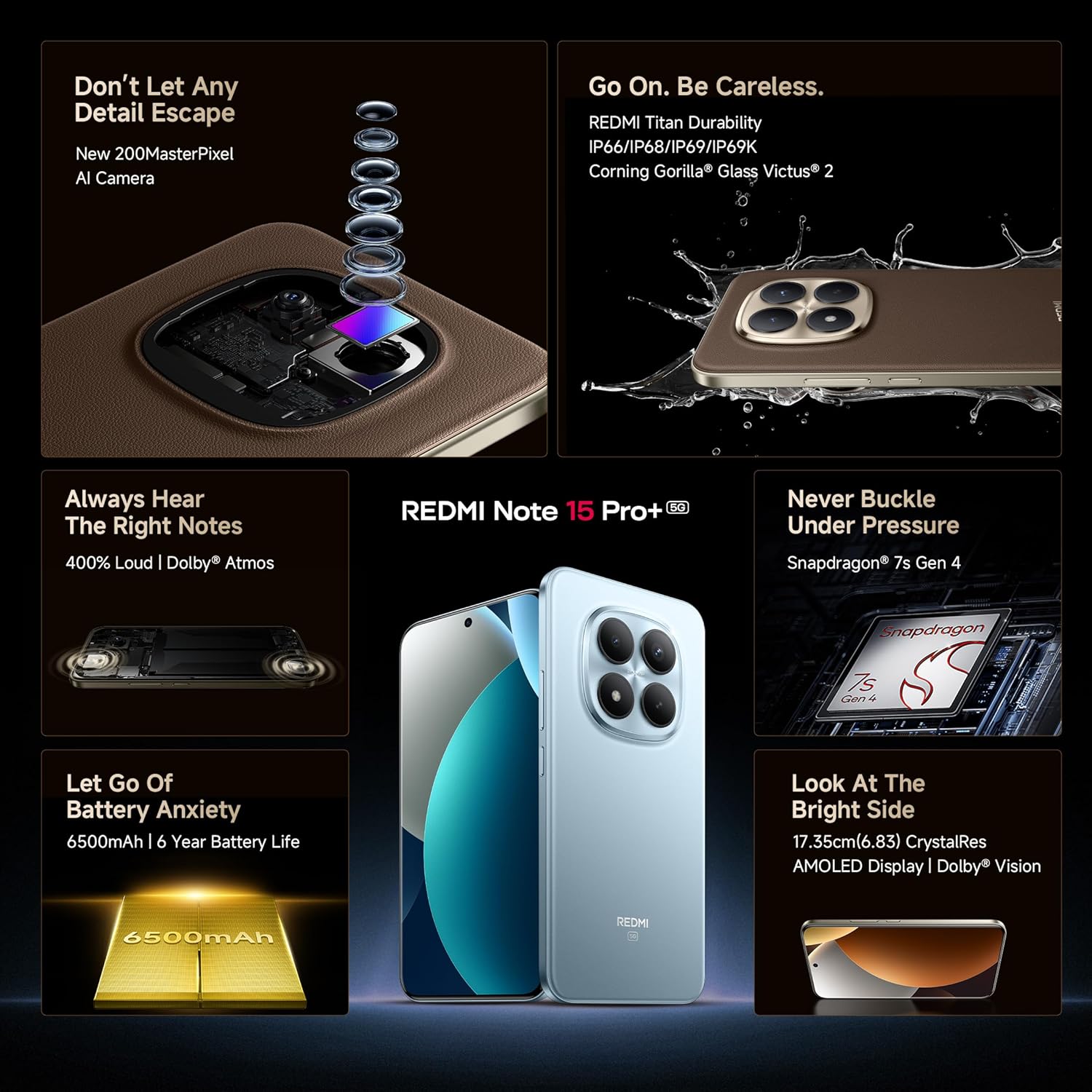
Imagen: Un primer plano view of the 200MP camera module, showing its intricate lens arrangement.
4.3. Rendimiento
Powered by the Snapdragon 7s Gen 4 processor, the device delivers smooth and efficient performance for gaming and multitasking. The IceLoop cooling technology helps maintain optimal temperatures during intensive use.

Image: Graphic illustrating the Snapdragon 7s Gen 4 processor, highlighting its advanced performance.
4.4. audio
Experience immersive sound with symmetric stereo speakers and Dolby Atmos support, providing up to 400% louder and clearer audio for media consumption and calls.

Image: Diagram showing the symmetric stereo speakers and Dolby Atmos sound enhancement.
4.5. Funciones de software e inteligencia artificial
The REDMI Note 15 Pro+ 5G runs on Android 15 with Xiaomi HyperOS 2, offering a seamless and intelligent cross-device experience. It includes AI features like Circle to Search, Gemini Assistance, and Xiaomi HyperAI Tools for enhanced user interaction. The device also supports Xiaomi Offline Communication for device-to-device calling without cellular or Wi-Fi in certain zones.

Image: The Xiaomi HyperOS 2 logo, representing the device's operating system.

Image: Visuals demonstrating AI features such as Circle to Search and Gemini Assistance on the smartphone.

Image: Illustration of the Xiaomi Offline Communication feature, showing device-to-device calling without network.
5. Mantenimiento
5.1. Limpieza del dispositivo
Utilice un paño suave y sin pelusa para limpiar la pantalla y el cuerpo del teléfono. Evite usar productos químicos agresivos o materiales abrasivos que puedan dañar el acabado. Para manchas difíciles, limpie ligeramente...ampEnjuague el paño con agua o con un limpiador de pantalla diseñado para dispositivos electrónicos.
5.2. Actualizaciones de software
Revise e instale periódicamente las actualizaciones de software para asegurarse de que su dispositivo cuente con las últimas funciones, parches de seguridad y mejoras de rendimiento. Vaya a Ajustes > Acerca del teléfono > Versión de MIUI para comprobar si hay actualizaciones.
5.3. Cuidado de la batería
The device is equipped with a 6500mAh Silicon-Carbon battery designed for long life, supporting 1600 charge cycles. To prolong battery health:
- Evite temperaturas extremas.
- No deje que la batería se descargue completamente antes de recargarla.
- Use the original 100W HyperCharge adapter and cable for optimal charging.
5.4. Durabilidad y protección
The REDMI Note 15 Pro+ 5G features a high-strength fiberglass back panel and Corning Gorilla Glass Victus 2 for enhanced durability. It boasts IP66/IP68/IP69/IP69K protection against dust and water, making it resistant to drops, splashes, and high-pressure water jets.
Image: Visual highlighting the durability features, including Corning Gorilla Glass Victus 2 and IP69K water resistance.
6. Solución de problemas
6.1. El dispositivo no se enciende
- Asegúrese de que la batería esté cargada. Conecte el cargador y espere unos minutos antes de intentar encenderlo.
- Mantenga presionado el botón de encendido durante al menos 10 a 15 segundos para forzar el reinicio.
6.2. Las aplicaciones se bloquean o se congelan
- Cierre la aplicación problemática y vuelva a abrirla.
- Borre el caché y los datos de la aplicación (Configuración > Aplicaciones > [Nombre de la aplicación] > Almacenamiento > Borrar caché/Borrar datos).
- Reinicie su dispositivo.
6.3. Problemas de conectividad de red
- Activa y desactiva el modo avión.
- Compruebe si su tarjeta SIM está insertada correctamente.
- Restablecer la configuración de red (Configuración > Conexión y uso compartido > Restablecer Wi-Fi, redes móviles y Bluetooth).
6.4. Restablecimiento de fábrica
Si los problemas persisten, es posible que deba realizar un restablecimiento de fábrica. Advertencia: Esto borrará todos los datos de su dispositivo. Haga una copia de seguridad de los datos importantes antes de continuar.
- Ir a Configuración > Acerca del teléfono > Restablecimiento de fábrica.
- Siga las instrucciones en pantalla para confirmar el restablecimiento.
7. Especificaciones
| Característica | Detalle |
|---|---|
| Marca | Redmi |
| Nombre del modelo | REDMI Note 15 Pro+ 5G |
| Sistema operativo | Android 15, Xiaomi HyperOS |
| Memoria RAM | 12 GB |
| Capacidad de almacenamiento | 256 GB |
| Color | Mirage Blue |
| Tipo de pantalla | AMOLED, 1.5K Quad curved, 3200 nits peak brightness |
| Procesador | Snapdragon 7s de 4.ª generación |
| Energía de la batería | 6500 mAh |
| Cargando | HyperCharge de 100 W, carga inversa de 22.5 W |
| Cámara | 200MP OIS Camera |
| Resistencia al agua/polvo | IP66/IP68/IP69/IP69K |
| Dimensiones | 16.3 x 7.8 x 0.8 centímetros |
| Peso | 207 gramos |
| Tipo de conector | USB tipo C |
| Tecnología celular | 5G |
8. Garantía y soporte
8.1. Información de garantía
Your REDMI Note 15 Pro+ 5G comes with a Garantía del fabricante por 1 año for the device and 6 meses de garantía del fabricante para accesorios incluidos en la caja, incluidas las baterías, a partir de la fecha de compra.
8.2. Manufacturer and Importer
Fabricante: DBG Technology (India) Pvt Ltd, PLOT NO-2, BAWAL, SECTOR-8, Rewari, Haryana, 123501.
Importador: Xiaomi Technology India Private Limited, Building Orchid. Block E, Embassy Tech Village, Marathahalli Outer Ring Road, Devarabisanahalli, Bengaluru 560103.
8.3. Soporte en línea
For additional support, FAQs, and service center locations, please visit the official Redmi websitio o el Tienda Redmi en Amazon.
9. Información de seguridad
Tenga en cuenta las siguientes pautas de seguridad para evitar dañar su dispositivo o lesionarse usted mismo:
- No exponga el dispositivo a temperaturas extremas, luz solar directa o fuego.
- Evite dejar caer o someter el dispositivo a impactos fuertes.
- Utilice únicamente cargadores y accesorios aprobados.
- No intente desmontar ni reparar el dispositivo usted mismo. Consulte a personal de servicio técnico autorizado.
- Keep the device away from water and liquids, despite its water resistance, to prevent potential damage.
- Deseche el dispositivo y su batería de forma responsable según las regulaciones locales.