
1. Introducción
Thank you for choosing the Luminous Zelio M 1600 Sine Wave Inverter. This inverter is designed to provide reliable and efficient power backup for your home, office, or shop. It features advanced technology to ensure stable power output and protection for your appliances. Please read this manual carefully before installation and operation to ensure safe and optimal performance.
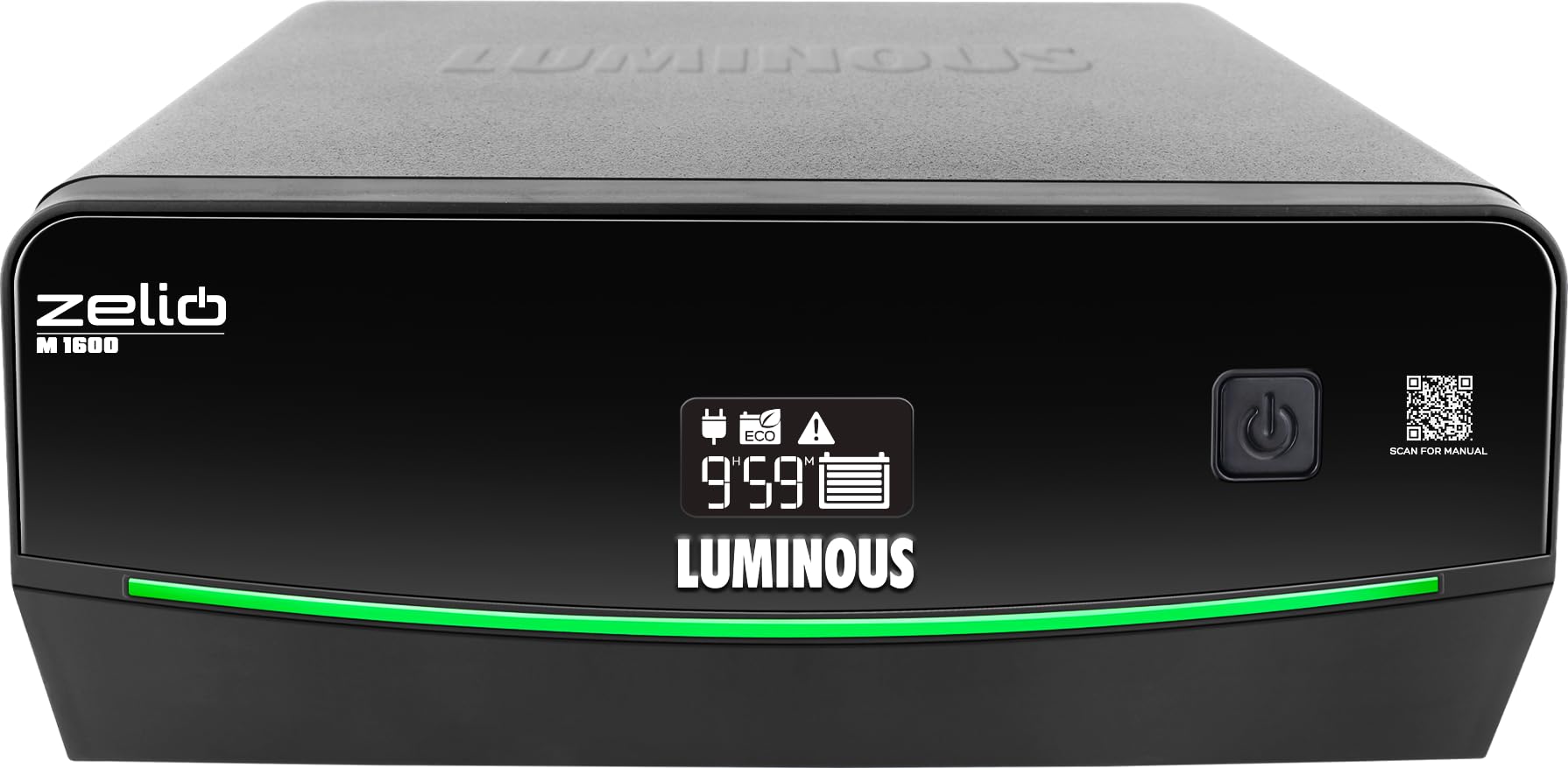
Figura 1: Frente view of the Luminous Zelio M 1600 Sine Wave Inverter.
2. Información de seguridad
Always follow these safety precautions to prevent injury or damage to the inverter and connected equipment:
- Peligro eléctrico: No abra el inversor casing. No hay piezas que el usuario pueda reparar en el interior. Encargue cualquier reparación a personal cualificado.
- Ventilación adecuada: Asegúrese de que el inversor esté instalado en un área bien ventilada para evitar el sobrecalentamiento.
- Agua y humedad: Keep the inverter away from water, rain, snow, or any liquids.
- Materiales inflamables: No opere el inversor cerca de líquidos o gases inflamables.
- Seguridad de la batería: Batteries contain corrosive acid. Wear protective eyewear and gloves when handling batteries. Ensure proper battery connections to avoid short circuits.
- Toma de tierra: El inversor debe estar conectado a tierra correctamente para evitar descargas eléctricas.
- Niños: Keep the inverter and batteries out of reach of children.
3. Producto terminadoview y características clave
The Zelio M 1600 Inverter combines modern design with advanced functionality for reliable power backup.

Figure 2: Front panel details showing Tri-Color Battery Indicator, LED Backlit Display, and QR Code for manual access.
Características principales:
- Salida de alta capacidad: 1400VA / 1176W, suitable for higher load requirements in homes and small offices.
- Modos de funcionamiento duales: UPS/REG mode for stable output to sensitive electronics and ECO mode for wide voltage operation during fluctuations.
- Quick Changeover: Less than 20 milliseconds changeover time ensures uninterrupted power for computers and sensitive appliances.
- Compatibilidad de batería de 12 V: Supports tubular, SMF, and flat plate batteries ranging from 80Ah to 250Ah.
- Advanced Monitoring & Protection: LCD screen with fault indicators and audio alerts for overload, low battery, wrong wiring, short circuit, and over-temperature protection.
- Tri-Color Battery Indicator: Provides instant visual status of the battery.
- LED Backlit Segment Display: For simplified power monitoring and status updates.
- Tecnología de onda sinusoidal: Ensures peaceful, noise-free operation and is safe for all types of appliances.
- ABCC Technology: For sustained backup and savings.
- Vol bajotage Fast Charging: Reliable power anytime, with charging starting at low voltages (por ejemplo, 95 V).
- Tecnología SR: For optimized power and lower electricity bills.
4. Instalación y configuración
Proper installation is crucial for the safe and efficient operation of your inverter. It is recommended to have installation performed by a qualified technician.
4.1 Desembalaje
- Carefully remove the inverter from its packaging.
- Inspeccione si hay algún daño durante el envío. Si está dañado, contacte a su distribuidor inmediatamente.
- Asegúrese de que todos los accesorios estén presentes.
4.2 Colocación
- Place the inverter on a flat, stable surface.
- Ensure adequate ventilation around the unit. Maintain at least 10 cm clearance from walls or other objects.
- Evite la luz solar directa, fuentes de calor y áreas con alta humedad o polvo.
4.3 Conexión de la batería
- Ensure the inverter is switched OFF and disconnected from the mains supply.
- Connect the positive (+) terminal of the battery to the positive (+) terminal of the inverter using the red cable.
- Connect the negative (-) terminal of the battery to the negative (-) terminal of the inverter using the black cable.
- Ensure connections are tight and secure. Incorrect polarity can cause severe damage.
4.4 Mains and Load Connection
- Connect the inverter's input power cord to a grounded wall outlet.
- Connect your appliances (load) to the output sockets of the inverter. Do not overload the inverter beyond its rated capacity (1176W).
5. Instrucciones de funcionamiento
The Zelio M 1600 Inverter offers flexible operating modes to suit your power needs.
5.1 Encendido / Apagado
- Para encender, mantenga presionado el botón de encendido hasta que se ilumine la pantalla.
- Para apagar, mantenga presionado el botón de encendido hasta que la pantalla se apague.
Modos de funcionamiento de 5.2
The inverter features two operating modes: UPS/REG and ECO.
- UPS/REG Mode: Provides a narrow input voltage window (e.g., 180V-260V) for sensitive appliances like computers. This mode ensures a stable and precise output voltage.
- Modo ecologico: Offers a wider input voltage window (e.g., 100V-280V), allowing the inverter to operate on mains power even during significant voltage fluctuations. This mode is energy-efficient and suitable for less sensitive appliances.
You can switch between modes using the dedicated mode selection button on the inverter's front panel. The current mode will be indicated on the LED display.

Figure 3: Inverter features like Sine Wave Technology for quiet operation and ABCC Technology for sustained backup.
5.3 Capacidad de carga
The Zelio M 1600 can power various essential appliances. Ensure the total wattagLa potencia de los dispositivos conectados no supera los 1176W.

Figura 4: Example load capacity for common household essentials.
6. Mantenimiento
Regular maintenance ensures the longevity and optimal performance of your Luminous Zelio M 1600 Inverter and battery.
- Manténlo limpio: Regularly clean the inverter's exterior with a dry cloth. Ensure ventilation openings are free from dust and obstructions.
- Comprobación de la batería: For lead-acid batteries, periodically check the electrolyte level and top up with distilled water if necessary. Keep battery terminals clean and free from corrosion.
- Verificación de conexión: Periodically inspect all cable connections (battery, mains, load) to ensure they are tight and secure. Loose connections can cause power loss or overheating.
- Evite la sobrecarga: Do not connect appliances that exceed the inverter's rated capacity.
- Ventilación: Always ensure the inverter is in a well-ventilated area.
7. Solución de problemas
Esta sección ofrece soluciones a problemas comunes que podrías encontrar. Si tienes problemas que no aparecen aquí, contacta con atención al cliente.
| Problema | Posible causa | Solución |
|---|---|---|
| El inversor no se enciende | No mains power, battery discharged, loose battery connections. | Check mains supply. Ensure battery is charged. Verify battery cable connections. |
| Sin potencia de salida | Overload, short circuit, low battery, inverter fault. | Reduce load. Check for short circuits in wiring. Charge battery. Check inverter display for fault codes. |
| Alarma de sobrecarga | La carga conectada excede la capacidad del inversor. | Desconecte algunos electrodomésticos para reducir la carga. |
| Alarma de batería baja | La carga de la batería es críticamente baja. | Connect to mains power to recharge the battery. |
| Alarma de sobrecalentamiento | Inverter is overheating. | Ensure proper ventilation. Clear any obstructions from vents. Allow inverter to cool down. |
| Wrong wiring indicator | Incorrect battery or mains wiring. | Switch off the inverter and mains. Recheck all wiring connections according to the manual or consult a technician. |
8. Especificaciones
Technical details for the Luminous Zelio M 1600 Sine Wave Inverter.
| Especificación | Valor |
|---|---|
| Marca | Luminoso |
| Nombre del modelo | Zelio M 1600 |
| Inverter Capacity (VA) | 1400 VA |
| Quétage | 1176 vatios |
| Volumentage | 12 voltios |
| Compatibilidad de la batería | 80Ah to 250Ah (Tubular, SMF, Flat Plate) |
| Usos recomendados | Oficina en casa |
| Fuente de poder | Funciona con pilas |
| Dimensiones del artículo (largo x ancho x alto) | 27.5L x 28.1W x 14H Centímetros |
| Peso del artículo | 12.2 kilogramos |
| Color | Negro |
| País natal | India |
9. Garantía y atención al cliente
Luminous is committed to providing reliable products and excellent customer service.
9.1 Información de garantía
The Luminous Zelio M 1600 Sine Wave Inverter comes with a 36 meses de garantía A partir de la fecha de compra. Conserve el recibo de compra para reclamaciones de garantía. La garantía cubre defectos de fabricación en condiciones normales de uso.

Figure 5: Luminous's commitment to reliable power and expert care, including comprehensive installation, trained service engineers, nationwide service network, warranty assurance, and 24/7 customer support.
9.2 Atención al cliente
For any queries, technical assistance, or warranty claims, please contact Luminous customer support:
- Contacto del fabricante: Luminous Power Technologies Pvt. Ltd., Village-Malpur, Baddi, District-Solan, Himachal Pradesh-173205
- Packer Contact: Luminous Power Technologies Private Limited, Plot No 150, Sector- 44, Gurugram, Haryana -122003
- Correo electrónico: Care@luminousindia.com