
1. Producto terminadoview
The ATK N9 Tri-Mode Gaming Headset is designed for gamers requiring flexible connectivity, clear audio, and reliable communication across multiple devices. It supports 3.5 mm wired, 2.4G wireless, and Bluetooth connections, allowing seamless switching between gaming consoles, PC, and mobile devices. Stereo-tuned dynamic drivers deliver balanced sound, enhancing in-game audio cues such as footsteps, gunfire, and environmental effects. The detachable noise-canceling microphone improves voice clarity for team communication, online gaming, and voice calls. Its over-ear design, with soft ear cushions and an adjustable headband, ensures a comfortable fit for extended gaming sessions. The headset is compatible with PS5, PS4, PC, Nintendo Switch, and mobile devices. For Xbox Series X|S, audio and microphone functions are supported via the 3.5 mm wired connection.

2. Contenido del paquete
Verifique que todos los artículos enumerados a continuación estén incluidos en su paquete:
- ATK N9 Pro/White Gaming Headset
- Micrófono desmontable con cancelación de ruido
- Cable de carga USB-C
- Cable de audio de 3.5 mm
- Adaptador USB inalámbrico 2.4G
- Manual de usuario (este documento)

3. Configuración inicial
3.1. Cargar los auriculares
Before first use, fully charge the headset using the provided USB-C charging cable. Connect the USB-C end to the headset's charging port and the USB-A end to a compatible USB power source (e.g., PC, wall adapter). The LED indicator will show charging status.
3.2. Conexión del micrófono
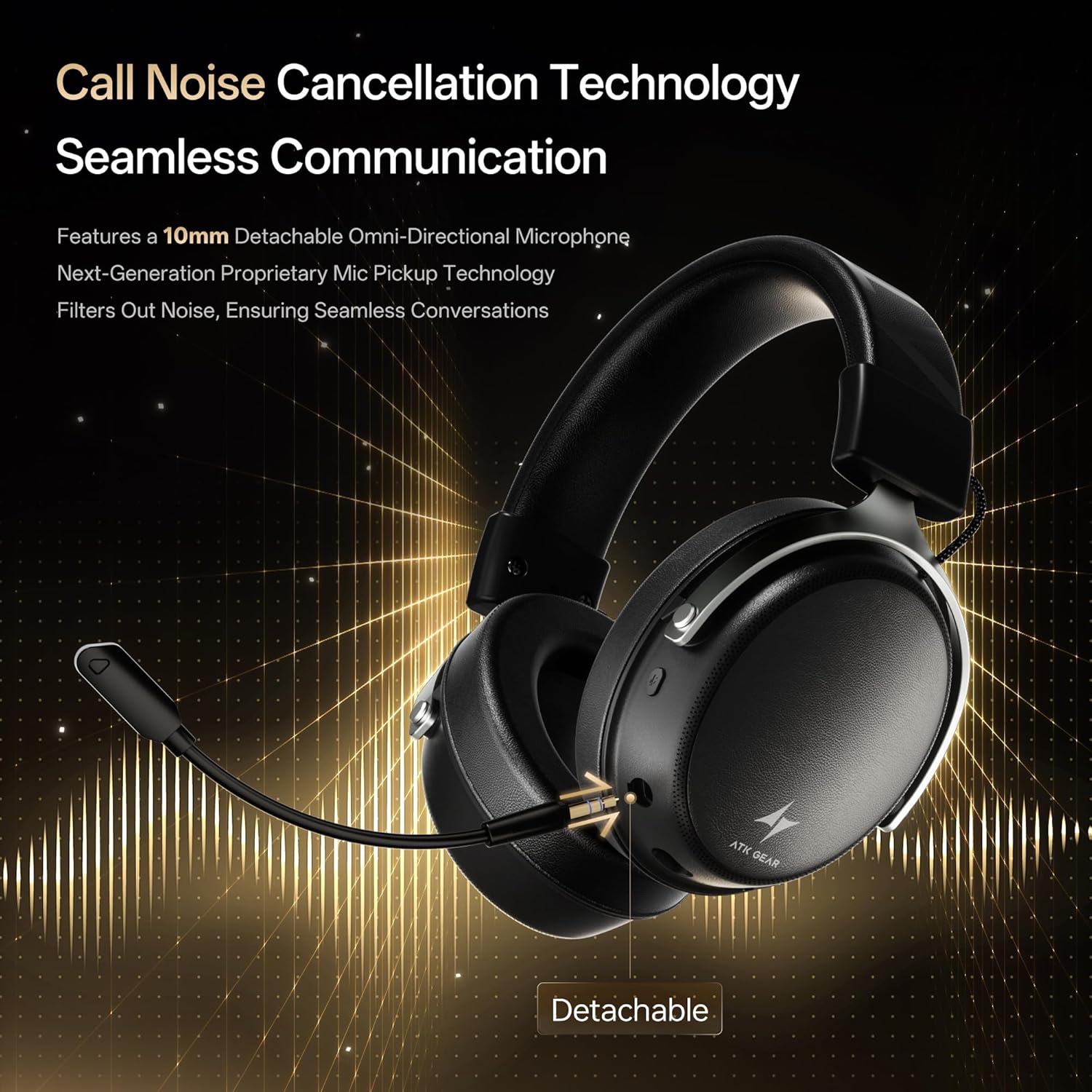
Insert the detachable boom microphone into the microphone port on the left earcup until it clicks into place. Ensure it is securely connected for optimal voice pickup.
3.3. Opciones de conectividad
The ATK N9 Pro/White headset offers three connectivity modes:
- Modo inalámbrico 2.4G: For PC, PS4, PS5, and Nintendo Switch (docked mode).
- Plug the 2.4G wireless USB adapter into an available USB port on your device.
- Encienda los auriculares.
- Switch the headset to 2.4G mode using the mode switch. The headset will automatically pair with the adapter.
- Adjust audio output settings on your device if necessary to select the headset.
- Modo Bluetooth: For mobile devices, PC, and Nintendo Switch (handheld mode).
- Power on the headset and switch to Bluetooth mode. The LED indicator will flash, indicating pairing mode.
- On your device, go to Bluetooth settings and select "ATK N9 Pro" from the list of available devices.
- Una vez conectado, el indicador LED mostrará una luz fija.
- Modo cableado de 3.5 mm: For Xbox Series X|S, PS4, PS5, PC, Nintendo Switch, and mobile devices.
- Conecte un extremo del cable de audio de 3.5 mm al conector de 3.5 mm del auricular.
- Connect the other end to the 3.5mm audio port on your device (e.g., controller, PC audio jack).
- Los auriculares funcionarán en modo cableado, omitiendo las funciones inalámbricas.

4. Instrucciones de funcionamiento
4.1. Controles de los auriculares
The ATK N9 Pro/White headset features intuitive controls located on the earcups:
- Botón de encendido: Press and hold to power on/off. Short press for play/pause (in 2.4G/Bluetooth mode).
- Cambio de modo: Toggle between 2.4G wireless, Bluetooth, and wired modes.
- Rueda para subir/bajar el volumen: Gire para ajustar el volumen del audio.
- Botón de silencio del micrófono: Presione para silenciar/activar el micrófono.
- Spatial Audio Button: Press to activate/deactivate 3D Spatial Audio.
- Mic Monitoring Button: Press to enable/disable microphone monitoring (sidetone).
4.2. Uso del micrófono
The detachable noise-canceling microphone is designed for clear communication. Position the microphone approximately 1-2 inches from your mouth for optimal voice pickup. Use the microphone mute button on the headset to quickly mute your voice when needed.
4.3. Ajuste de ajuste
The headset features an adjustable headband and soft ear cushions for comfort. Extend or retract the headband to achieve a snug yet comfortable fit. The earcups are designed to fully enclose your ears for passive noise isolation and comfort during long gaming sessions.
5. Especificaciones técnicas
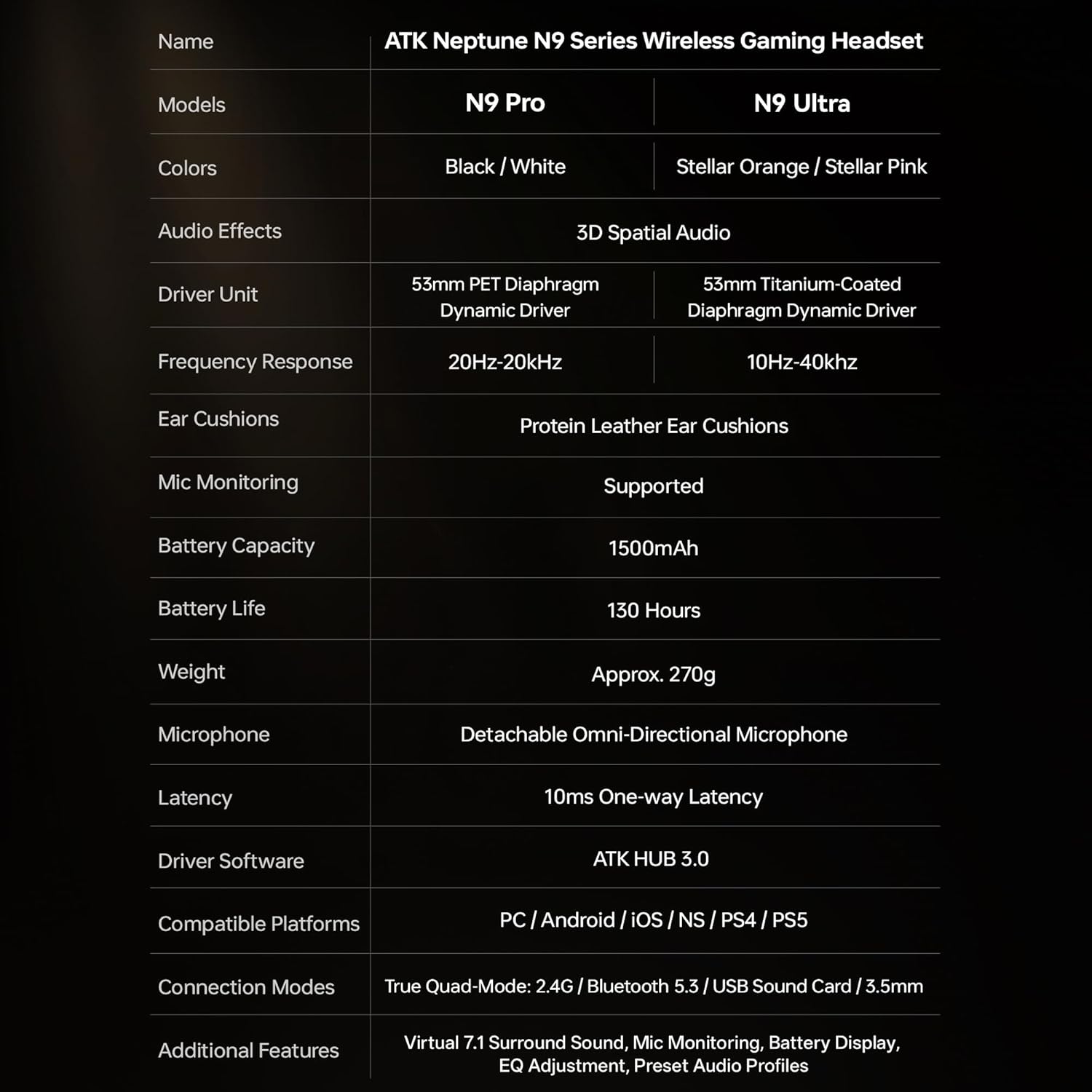
| Característica | Especificación |
|---|---|
| Nombre del modelo | ATK N9 Pro |
| Conectividad | 3.5mm Wired, 2.4G Wireless, Bluetooth 5.3 |
| Tipo de controlador | Controlador dinámico |
| Tamaño del controlador | 53 milímetros |
| Rango de frecuencia | 20 Hz - 20,000 Hz |
| Impedancia | 64 ohmios |
| Micrófono | Detachable Noise-Canceling Omni-Directional |
| Capacidad de la batería | 1500 mAh |
| Duración de la batería | Hasta 130 horas |
| Latencia (2.4 G) | 10 Milliseconds (one-way) |
| Peso | 270 gramos |
| Colocación de orejas | Sobre la oreja |
| Dispositivos compatibles | PS5, PS4, PC, Nintendo Switch, Mobile Devices, Xbox Series X|S (wired) |
| Características adicionales | 3D Spatial Audio, Mic Monitoring, Volume Control |

6. Cuidado y mantenimiento
- Limpieza: Utilice un paño suave y seco para limpiar los auriculares. Evite utilizar productos químicos agresivos o materiales abrasivos.
- Almacenamiento: Guarde los auriculares en un lugar fresco y seco, alejado de la luz solar directa y de temperaturas extremas.
- Cuidado de la batería: Para prolongar la vida útil de la batería, evite descargar completamente los auriculares con frecuencia. Cárguelos regularmente, incluso si no los usa durante períodos prolongados.
- Resistencia al agua: Los auriculares no son resistentes al agua. Evite la exposición a líquidos.
7. Solución de problemas
7.1. No Audio / Low Volume
- Ensure the headset is powered on and connected in the correct mode (2.4G, Bluetooth, or 3.5mm wired).
- Verifique la rueda de volumen de los auriculares y la configuración de volumen de su dispositivo.
- For wireless modes, ensure the headset is paired correctly and selected as the audio output device in your system settings.
- Si utiliza un cable de 3.5 mm, asegúrese de que el cable esté completamente insertado tanto en el auricular como en el dispositivo.
7.2. El micrófono no funciona
- Asegúrese de que el micrófono esté bien conectado al auricular.
- Compruebe si el botón de silencio del micrófono en los auriculares está activado.
- Verify that the headset microphone is selected as the input device in your device's sound settings.
- For Xbox Series X|S, ensure you are using the 3.5mm wired connection for microphone support.
7.3. Problemas de conectividad
- 2.4G inalámbrico: Ensure the USB adapter is firmly plugged in. Try a different USB port.
- Bluetooth: Ensure the headset is in pairing mode. Forget the device on your phone/PC and re-pair. Keep the headset within the 5-meter Bluetooth range.
- General: Power cycle both the headset and your connected device.
8. Garantía y soporte
8.1. Información de garantía
The ATK N9 Pro/White Gaming Headset comes with a Garantía de 6 meses Desde la fecha de compra. Esta garantía cubre defectos de fabricación y mano de obra en condiciones normales de uso. No cubre daños causados por mal uso, accidentes, modificaciones no autorizadas ni desgaste normal.
8.2. Atención al cliente
For further assistance, technical support, or warranty claims, please contact ATK customer service through the retailer where the product was purchased or visit the official ATK websitio para obtener información de contacto de soporte.
