
Introducción
This manual provides essential information for setting up, operating, maintaining, and troubleshooting your Google Pixel 10a smartphone. Please read it carefully to ensure optimal performance and longevity of your device.

The Google Pixel 10a smartphone, showcasing su exhibición y diseño general.
¿Qué hay en la caja?
Verifique que todos los artículos estén presentes en el embalaje de su producto:
- Google Pixel 10a Smartphone
- USB-C to USB-C Cable (1m, USB 2.0)
- Quick Start Guide / Safety and Warranty Booklet
- Herramienta de expulsión de SIM
The Google Pixel 10a smartphone alongside its included USB-C to USB-C cable and SIM ejector tool, representing the contents of the product box.
Configuración
1. Inserte la tarjeta SIM
- Locate the SIM card tray on the side of your Pixel 10a.
- Insert the SIM ejector tool into the small hole on the tray and press firmly until the tray pops out.
- Coloque su tarjeta Nano-SIM en la bandeja con los contactos dorados hacia abajo.
- Empuje con cuidado la bandeja hacia el teléfono hasta que encaje en su lugar.
2. Encendido inicial y configuración
- Press and hold the power button until the Google logo appears.
- Siga las instrucciones en pantalla para seleccionar su idioma, conectarse a Wi-Fi y configurar su cuenta de Google.
3. Data Transfer from Old Device
The Google Pixel 10a simplifies the transfer of data from your previous smartphone. Connect your new Pixel to your old device and follow the on-screen prompts to transfer apps, contacts, photos, and more.

The Google Pixel 10a display showing the data transfer interface, allowing users to easily copy applications, contacts, photos, and other data from their old smartphone.
Operar su dispositivo
Características de la cámara
The Pixel 10a features advanced camera capabilities, including Photo Coach and Magic Editor for enhanced photo editing.
- Photo Coach: Learn to take better photos with on-screen guidance for composition.
- Magic Editor: Retouch photos directly in Google Photos to remove objects, change backgrounds, and more.
- Group Photo Optimization: Automatically combine multiple similar shots to create a superb group photo.

This image demonstrates the Photo Coach feature on the Google Pixel 10a, guiding users to compose photos easily, such as 'Look towards the horizon,' 'High perch,' and 'Face to sky.'
Gemini Live AI Assistant
Gemini, your integrated AI assistant, simplifies daily tasks and helps with organization. It can assist with task lists, provide information, and offer recommendations.

The Google Pixel 10a screen showing an interaction with Gemini, the integrated AI assistant, providing recommendations based on user queries.
Pixel Security
Your Pixel 10a is equipped with advanced security features. Google's AI can detect theft and automatically lock your device to protect your personal data.

An illustration on the Google Pixel 10a screen depicting the theft protection feature, which automatically locks the device if stolen.
Batería y carga
The Google Pixel 10a offers over 30 hours of battery life on a single charge and supports fast charging. The actual battery life may vary based on usage and network conditions.
- Capacidad de la batería: 5051 mAh
- Duración media de la batería: Hasta 30 horas
- Cargando: Use the included USB-C to USB-C cable for optimal charging.

A visual representation highlighting the Google Pixel 10a's extended battery life of over 30 hours and the commitment to seven years of software updates and new features.
Durabilidad y diseño
The Pixel 10a features a satin finish and a durable design, built to withstand daily use. It is equipped with Corning Gorilla Glass 7i for scratch resistance.
- Protección de pantalla: Vidrio Corning Gorilla 7i
- Resistencia al agua: Clasificación IP68 de resistencia al polvo y al agua.

This image illustrates the Google Pixel 10a's satin finish and durable construction, emphasizing its robust build quality.
Mantenimiento
Actualizaciones de software
Google provides 7 years of software updates for the Pixel 10a, including security updates and new features. Ensure your device is connected to Wi-Fi to download and install updates.
Cuidados generales
- Clean your device regularly with a soft, lint-free cloth.
- Avoid exposing the phone to extreme temperatures or direct sunlight for extended periods.
- Proteja la pantalla con un protector de pantalla y utilice una funda protectora para evitar daños físicos.
Solución de problemas
Problemas comunes
- El dispositivo no responde: Mantenga presionado el botón de encendido durante aproximadamente 30 segundos para forzar el reinicio.
- La batería se agota rápidamente: Check background app usage, reduce screen brightness, and ensure software is up to date.
- Problemas de conectividad de red: Restart your device, check SIM card insertion, or contact your wireless carrier.
Servicios de emergencia
In areas without mobile network or Wi-Fi, you can contact emergency services via satellite to get help and share your location with contacts.
Presupuesto
| Característica | Detalle |
|---|---|
| Marca | |
| Sistema operativo | Androide 16 |
| Modelo de CPU | Google Tensor G2 |
| Capacidad de almacenamiento | 128 GB |
| Tamaño de pantalla | 6.3 pulgadas |
| Resolución de pantalla | 1080 x 2424 píxeles |
| Frecuencia de actualización | 60 Hz |
| Nombre del modelo | Píxel 10a |
| Operador inalámbrico | Desbloqueado |
| Tecnología celular | 5G |
| Color | Negro volcánico |
| Número de ranuras para SIM | SIM única |
| Tipo de puerto | USB tipo C |
| Factor de forma | Pizarra |
| Tamaño de la tarjeta SIM | Nano |
| Nivel de resistencia al agua | No es impermeable |
| Toma de auriculares | [Desconocido] |
| Disponibilidad de repuestos | 7 años |
| Tasa de absorción específica (SAR) | 2.79 Watts per kilogram |
| Number of Front Cameras | 1 |
| Capacidad de la batería | 5051 mAh |
| Peso del artículo | 184.7 gramos |
| Dimensiones del artículo | 15.4 x 7.3 x 0.9 centímetros |
| Duración media de la batería | 30 horas |
| Talk Time Battery Life | 30 horas |
| GPS Geopositioning Feature | FALSO |
| Tipo de pantalla | Pantalla OLED |
| Resolución máxima de pantalla | 1080 x 2424 píxeles |
| Densidad de píxeles | 422.2 Pixels per inch (PPI) |
| Tecnología de conectividad | USB, Wi-Fi |
| Screen Capture Resolution | 1080p |
| Velocidad de cuadros | 120, 30, 60 |

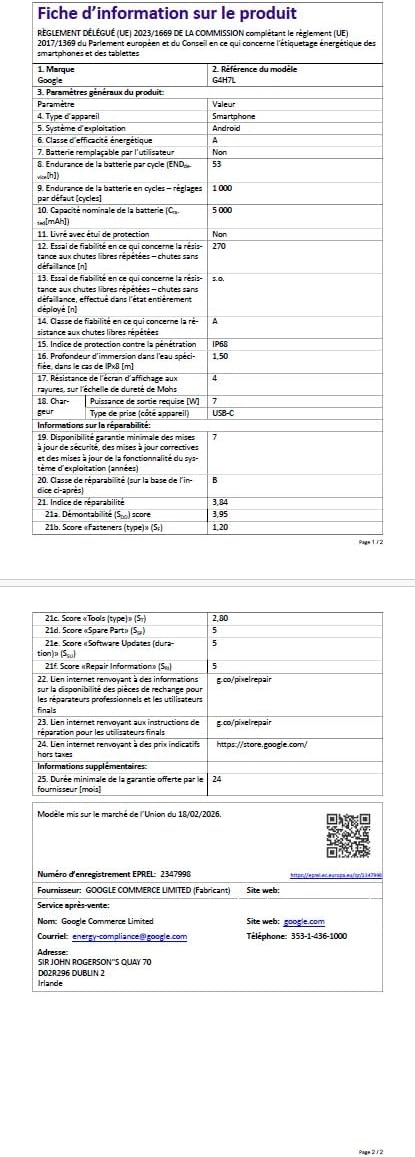
A detailed product information sheet for the Google Pixel 10a, providing technical specifications, regulatory compliance, and other essential data.
Garantía y soporte
Información de garantía
Your Google Pixel 10a comes with a Garantía del fabricante de 2 años. Please refer to the included warranty booklet for full terms and conditions.
Recursos adicionales
- Guía del usuario (PDF): Descargar la Guía Oficial del Usuario
- Data Transparency Statement (PDF): Download Data Transparency Statement
- EU Energy Label Information: For detailed energy efficiency information, visit the Base de datos EPREL.
- Fabricante: Google
- Disponibilidad de repuestos: 7 años


