
Introducción
Gracias por la compraasing the FERIETELF T29 Drone with Camera. This manual provides essential information for the safe operation, setup, and maintenance of your drone. Please read this manual thoroughly before operating the drone to ensure proper use and to prevent damage or injury.
The T29 Drone features a 1080P HD camera, WiFi FPV live video transmission, voice and gesture control, and a foldable design for portability. It comes with two batteries and a carrying case for convenience.
Pautas de seguridad
Always prioritize safety when operating your drone. Failure to follow these guidelines may result in injury, damage to the drone, or property damage.
- Opere el dron en áreas abiertas, lejos de personas, animales, edificios y obstáculos.
- Do not fly near airports or restricted airspace. Check local regulations before flying.
- Mantenga una línea de visión con el dron en todo momento.
- Evite volar con vientos fuertes o condiciones climáticas adversas.
- Asegúrese de que las baterías estén completamente cargadas y correctamente instaladas antes de cada vuelo.
- Mantenga los dedos y la ropa suelta alejados de las hélices giratorias.
- No opere el dron bajo la influencia del alcohol o drogas.
- Los niños sólo deben operar el dron bajo la supervisión directa de un adulto.
Contenido del paquete
Verifique que todos los artículos estén presentes en su paquete:
- FERIETELF T29 Drone
- Control remoto
- Cámara HD 1080P (integrada)
- Baterías recargables para drones (x2)
- Cable de carga USB
- Hélices de repuesto
- Protectores de hélice
- Destornillador
- Manual de usuario (este documento)
- Estuche de transporte
Configuración
1. Despliegue del dron
Despliegue con cuidado los brazos del dron hasta que encajen en su posición. Asegúrese de que los cuatro brazos estén completamente extendidos.
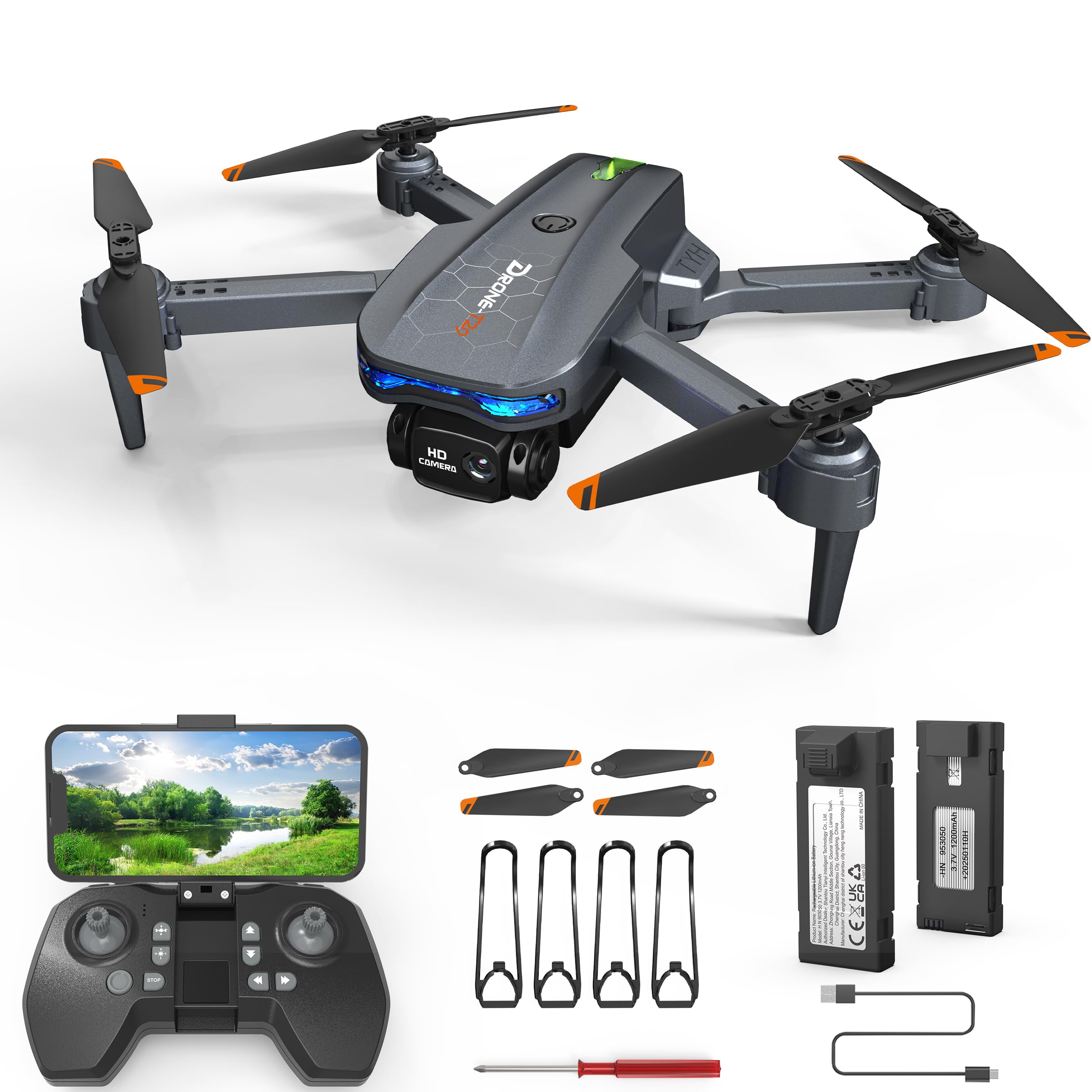
Image: The FERIETELF T29 Drone with its arms unfolded, ready for flight. The propellers are visible at the end of each arm.
2. Instalación de protectores de hélice
For beginner pilots, it is recommended to install the propeller guards. Attach each guard to the corresponding motor arm by snapping it into place.
3. Carga de la batería del dron
Connect the drone battery to the USB charging cable. Plug the USB cable into a 5V/1A USB adapter (not included). The indicator light on the cable will show charging status. A full charge typically takes 60-90 minutes.
- Indicador de carga: Red light ON during charging, OFF when fully charged.
Importante: Always use the provided charging cable. Do not leave batteries unattended while charging. Disconnect once fully charged.
4. Instalación de la batería del dron
Insert the fully charged battery into the battery compartment on the back of the drone until it clicks securely into place.
5. Instalación de las pilas del mando a distancia
Abra la tapa del compartimento de las pilas en la parte posterior del control remoto. Inserte 3 pilas AAA (no incluidas) respetando la polaridad. Cierre la tapa.
Instrucciones de funcionamiento
1. Encendido y emparejamiento
- Coloque el dron sobre una superficie plana y nivelada.
- Mantenga presionado el botón de encendido del dron hasta que las luces indicadoras parpadeen.
- Encienda el control remoto. La luz indicadora parpadeará.
- Push the left joystick (throttle) up to the maximum position, then pull it down to the minimum position. The drone and remote lights will become solid, indicating successful pairing.
2. Calibrating the Gyroscope
After pairing, place the drone on a flat surface. Push both joysticks down and to the right simultaneously for 2-3 seconds. The drone lights will flash rapidly and then become solid, indicating successful calibration.
3. Connecting to WiFi FPV (First Person View)
- Download the "FERIETELF Drone" app from your smartphone's app store (iOS/Android).
- Enciende el dron.
- Go to your smartphone's WiFi settings and connect to the network named "FERIETELF-T29-XXXXXX".
- Open the FERIETELF Drone app. You should see the live video feed from the drone's camera.
4. Despegue y aterrizaje
- Despegue con una sola tecla: Press the One-Key Take-off button on the remote controller. The drone will automatically ascend to a certain height and hover.
- Despegue manual: Push both joysticks down and outwards to start the propellers. Then, gently push the left joystick (throttle) upwards to ascend.
- Aterrizaje con una sola tecla: Press the One-Key Landing button. The drone will slowly descend and land automatically.
- Aterrizaje manual: Gently pull the left joystick (throttle) downwards to descend. Once landed, pull both joysticks down and inwards to stop the propellers.
5. Controles básicos de vuelo
| Joystick/Botón | Función |
|---|---|
| Joystick izquierdo (arriba/abajo) | Ascend / Descend (Throttle) |
| Joystick izquierdo (izquierda/derecha) | Rotate Left / Rotate Right (Yaw) |
| Joystick derecho (arriba/abajo) | Fly Forward / Fly Backward (Pitch) |
| Joystick derecho (izquierda/derecha) | Fly Left / Fly Right (Roll) |
| Recortar botones | Adjust drone drift (forward/backward, left/right) |
6. Control por voz
With the app connected, activate voice control. Speak commands such as "Take off", "Land", "Forward", "Backward", "Left", "Right". Ensure you are in a quiet environment for best results.
7. Control de gestos
In the app, enable gesture control. Perform specific hand gestures in front of the drone's camera to trigger actions:
- Gesto de "V": Toma una fotografía.
- Gesto de la palma: Iniciar / detener la grabación de video.
Asegúrese de que haya una buena iluminación y un espacio despejado. view of your hand for accurate gesture recognition.
8. Modo sin cabeza
Press the Headless Mode button on the remote. In this mode, the drone's orientation is relative to the pilot, making it easier to control regardless of which way the drone is facing. Press again to exit.
9. Ajuste de velocidad
Press the Speed button to cycle through different speed modes (low, medium, high). Adjust according to your skill level and flying environment.
Mantenimiento
- Limpieza: Use a soft, dry cloth to clean the drone and remote controller. Do not use water or solvents.
- Inspección de la hélice: Regularly check propellers for damage (cracks, bends). Replace damaged propellers immediately using the provided screwdriver and spare parts.
- Cuidado de la batería:
- Guarde las baterías en un lugar fresco y seco.
- No sobrecargue ni sobrecargue las baterías.
- Si no se utilizan durante un período prolongado, cargue las baterías hasta aproximadamente el 50 % de su capacidad.
- Almacenamiento: When not in use, fold the drone and store it in its carrying case to protect it from dust and damage. Remove batteries from the remote controller if storing for long periods.
Solución de problemas
| Problema | Posible causa | Solución |
|---|---|---|
| El dron no responde al control remoto. | No emparejado; batería baja (dron/control remoto). | Re-pair drone and remote. Charge drone battery. Replace remote batteries. |
| El dron se desplaza durante el vuelo. | Gyroscope not calibrated; uneven surface at take-off; wind interference. | Recalibrate gyroscope on a flat surface. Use trim buttons to adjust. Fly in calm conditions. |
| Las hélices no giran. | Drone not powered on; propellers obstructed; motor issue. | Ensure drone is on. Check for obstructions. Contact support if motors are faulty. |
| No hay transmisión de video FPV. | Not connected to drone's WiFi; app not open; weak signal. | Verify WiFi connection. Restart app. Move closer to drone. |
| Corto tiempo de vuelo. | Batería no completamente cargada; batería vieja; vuelo agresivo. | Ensure full charge. Consider replacing old batteries. Fly more conservatively. |
Presupuesto
- Modelo: TY29
- Marca: FERIETELF
- Dimensiones (desplegado): 30.5 x 25.4 x 4.8 cm (12 x 10 x 1.9 pulgadas)
- Peso: 185 gramos
- Cámara: Alta definición 1080P
- Conectividad: Wi-Fi FPV
- Características de control: Voice Control, Gesture Control, Headless Mode, One-Key Take-off/Landing
- Baterías: 2 x Lithium Ion (P76 type, included)
- Baterías del control remoto: 3 x AAA (no incluido)
- Fabricante: SHANTOU TIANYI INTELLIGENT TECHNOLOGY CO.,LTD.
Información de garantía
This product comes with a standard manufacturer's warranty. For specific details regarding warranty coverage, duration, and claims process, please refer to the warranty card included in your product packaging or contact FERIETELF customer support directly. Keep your proof of purchase for warranty validation.
Atención al cliente
If you encounter any issues or have questions not covered in this manual, please contact FERIETELF customer support. For the most up-to-date contact information, please visit the official FERIETELF websitio o consulte los datos de contacto que se proporcionan en el embalaje de su producto.
Recursos en línea: For additional tips, FAQs, and video tutorials, please visit the official FERIETELF support page.