
Introducción
This manual provides essential instructions for setting up, operating, and maintaining your XINDADA H12 2025 4G Smartwatch. Please read this manual thoroughly before using the device to ensure proper function and to maximize your user experience.
Contenido del paquete
Verifique que todos los artículos estén presentes en el paquete de su producto:
- 1 x XINDADA H12 2025 Smartwatch
- 1 x Correa de reloj
- 1 x cable de carga
- 1 x Manual del producto
Producto terminadoview
The XINDADA H12 2025 is a 4G Android 9.0 OS smartwatch featuring a 1.51-inch AMOLED display, a 500W HD camera, GPS, Wi-Fi, and comprehensive health monitoring capabilities. It supports app downloads from the Google Play Store.
Características principales:
- Full 4G Netcom: Supports 4G connectivity (EU/UK countries only).
- CPU de alto rendimiento: SL8541E quad-core processor for smooth operation.
- Sistema operativo Android 9.0: Enhanced performance and security.
- Large AMOLED Display: 1.51-inch screen with 466x466 resolution, wide color gamut, and 178° viewángulo de ing.
- 500W HD Camera: Rotatable front/rear camera.
- Batería de 800 mAh: Mayor duración de la batería.
- Vigilancia de la salud: Heart rate, blood oxygen, sleep detection, sedentary reminders, step counting.
- Modos deportivos: Running, walking, hiking, mountaineering, rope skipping.
- Soporte App: Download apps like WhatsApp, YouTube, Facebook, Instagram, TikTok from Google Play Store.
- Intelligent Crown: Rotating crown for menu navigation.

Image: The smartwatch features a 1.51-inch AMOLED display with 466x466 resolution, offering a wide color gamut (98% Adobe RGB) and a 178-degree ultra-wide viewÁngulo de visión para obtener imágenes claras.
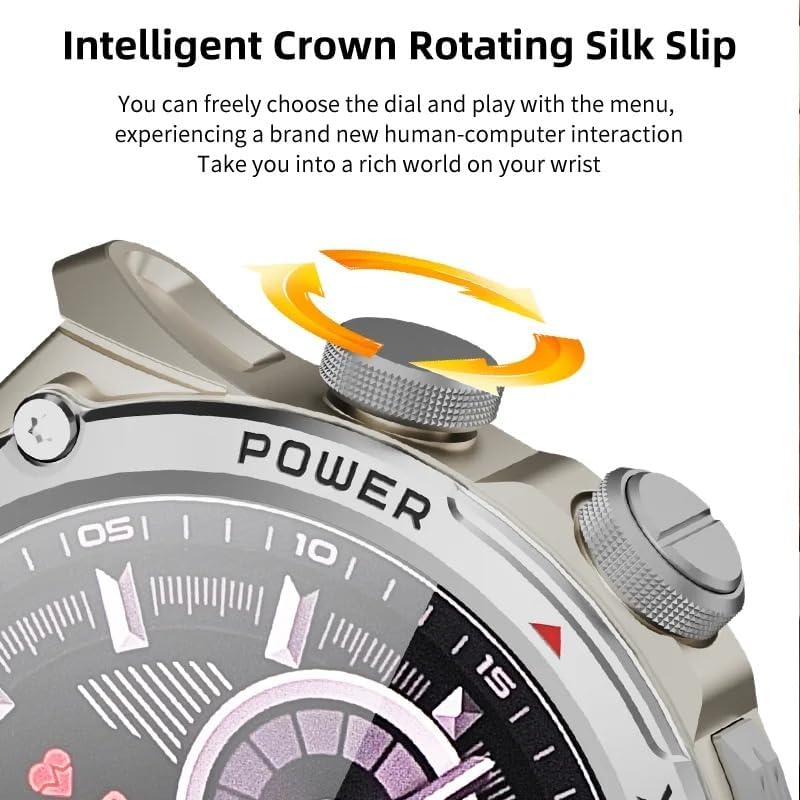
Image: Close-up of the smartwatch's intelligent rotating crown, which allows for intuitive navigation through menus and watch faces.

Image: The smartwatch is equipped with a 500W HD camera that can rotate 180 degrees, functioning as both a front and rear camera.
Configuración
1. Carga del dispositivo
Before first use, fully charge your smartwatch. Connect the provided charging cable to the charging port on the watch and to a standard USB power adapter (not included). The watch display will indicate charging status.
2. SIM Card Installation (for 4G connectivity)
The smartwatch supports 4G Netcom. Ensure your SIM card is compatible with the supported network bands (2G: B3+B5+B8; 3G: B1+B5+B8; 4G_FDD: B1+B3+B5+B7+B8+B20; 4G_TDD: B34+B38+B39+B40+B41). This feature is primarily for EU/UK countries. Refer to the watch's manual for specific SIM card tray access and insertion instructions.
3. Encendido inicial
Press and hold the Power button (usually located on the side of the watch) until the XINDADA logo appears. Follow the on-screen prompts to select your language and initial settings.
4. Connecting to the HiSportPro App
To synchronize data and receive notifications from your mobile phone, download and connect to the HiSportPro application.
- Paso 1: Enable Bluetooth on both your smartwatch and your mobile phone.
- Paso 2: On your smartwatch, access the app market and download the "Bluetooth Assistant" application.
- Paso 3: On your mobile phone, download the "HiSportPro" app from your phone's app store (Google Play Store for Android, Apple App Store for iOS).
- Paso 4: Open the Bluetooth Assistant on your smartwatch and enable Bluetooth service.
- Paso 5: In the HiSportPro app on your phone, use the scan function to scan the QR code displayed on your smartwatch to establish the connection.
- Paso 6: Once connected, you can configure notification push settings within the HiSportPro app to receive mobile phone information on your watch.

Image: The smartwatch on a wrist, displaying a message, illustrating its capability for 4G calls and real-time message viewEn.
Instrucciones de funcionamiento
Navegación básica
- Pantalla táctil: Tap to select, swipe to navigate through menus and screens.
- Corona giratoria: Gire la corona para desplazarse por las listas o ajustar la configuración. Pulse la corona para volver a la pantalla de inicio o confirmar las selecciones.
- Botón de encendido: Press to wake/sleep the screen. Long press to power on/off or restart.
- Levantar para despertar: The screen can be activated by raising your wrist.
Características de comunicación
- Llamadas telefónicas: With a SIM card installed, you can make and receive calls directly from the watch. Access the "Phone" application.
- Mensajería: View and reply to messages (SMS, WhatsApp, etc.) directly on the watch.
- Contactos: Access your synchronized contacts.
Uso de la cámara
The smartwatch features a 500W HD camera. Open the "Camera" application. The camera can rotate 180 degrees to function as both a front-facing and rear-facing camera. Tap the screen to take photos or start video recording.
Monitoreo de la salud y la condición física
- Monitoreo del ritmo cardíaco: Access the "Heart Rate" app to measure your heart rate.
- Monitoreo de oxígeno en sangre: Use the "Blood Oxygen" app to check your SpO2 levels.
- Detección del sueño: The watch automatically monitors your sleep patterns when worn during sleep. View data in the "Sleep Detection" app or HiSportPro.
- Recordatorio de sedentarismo: Enable this feature in settings to receive alerts when you have been inactive for too long.
- Conteo de pasos: The watch automatically tracks your daily steps.
Modos deportivos
The smartwatch supports various sports modes to track your exercise data.
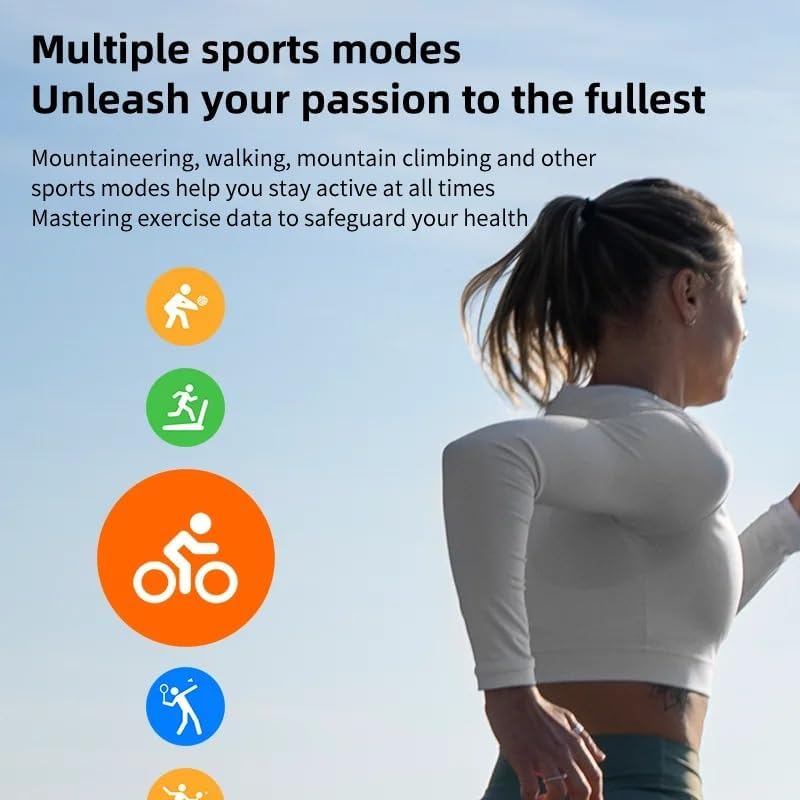
Image: Icons representing various sports modes available on the smartwatch, including running, walking, cycling, mountaineering, and rope skipping.
Para iniciar un entrenamiento:
- Navigate to the "Sports" application.
- Select your desired activity (e.g., Running, Walking, Mountaineering, Rope Skipping).
- Tap to start the activity. The watch will begin tracking relevant metrics like duration, distance, and calories burned.
- Tap to pause or end the activity. Your exercise data will be saved and can be viewed on the watch or in the HiSportPro app.
Otras aplicaciones y funciones
- Tienda Google Play: Download and install additional applications such as WhatsApp, YouTube, Facebook, Instagram, and TikTok directly from the Play Store on your watch.
- Clima: View condiciones climáticas actuales.
- Reproductor de música: Play music stored on the watch or control music on your phone.
- Navegador: Acceda a Internet mediante el navegador integrado.
- Calendar, Calculator, Alarm: Aplicaciones de utilidad estándar.
- Actualización en línea de OTA: The watch supports Over-The-Air software updates. Check for updates periodically in the settings menu to ensure optimal performance and access to new features.
Mantenimiento
- Limpieza: Limpie regularmente su reloj inteligente y su correa con un paño suave y seco. Evite usar productos químicos agresivos o materiales abrasivos.
- Resistencia al agua: While the watch may have some water resistance, avoid prolonged exposure to water, swimming, or showering with the watch unless explicitly stated otherwise in the product specifications.
- Cuidado de la batería: Para prolongar la vida útil de la batería, evite descargarla por completo con frecuencia. Cargue el reloj cuando el nivel de batería sea bajo. Guarde el reloj en un lugar fresco y seco cuando no lo use durante períodos prolongados.
- Actualizaciones de software: Keep your watch's software updated to ensure optimal performance and security.
Solución de problemas
| Problema | Posible solución |
|---|---|
| El reloj no se enciende. | Ensure the watch is fully charged. Connect it to the charger for at least 30 minutes. If it still doesn't turn on, try a long press (10-15 seconds) of the power button. |
| Cannot connect to HiSportPro app. |
|
| 4G network not working. |
|
| La pantalla no responde. | Restart the watch by long-pressing the power button. If the issue persists, ensure the screen is clean and dry. |
| Datos de salud inexactos. | Asegúrese de que el reloj esté bien ajustado a su muñeca, ni demasiado apretado ni demasiado suelto. Limpie los sensores de la parte trasera del reloj. Evite movimientos excesivos durante las mediciones. |
Presupuesto
| Característica | Detalle |
|---|---|
| Marca | XINDADA |
| Modelo | H12 2025 |
| Sistema operativo | Androide 9.0 |
| UPC | SL8541E Quad-core |
| Mostrar | AMOLED de 1.51 pulgadas, resolución de 466x466 |
| Cámara | 500W HD, 180° rotation |
| Capacidad de la batería | 800 mAh |
| Conectividad | 4G (EU/UK bands), Wi-Fi, Bluetooth |
| Bandas de red | 2G: B3+B5+B8; 3G: B1+B5+B8; 4G_FDD: B1+B3+B5+B7+B8+B20; 4G_TDD: B34+B38+B39+B40+B41 |
| Compatibilidad de aplicaciones | HiSportPro (for phone sync), Google Play Store apps |
| Peso del producto | 100 gramos |
| Dimensiones del paquete | 5 x 5 x 5 cm |
Garantía y soporte
Para obtener información sobre la garantía y atención al cliente, consulte la documentación incluida con su compra o póngase en contacto directamente con el vendedor o fabricante. Conserve el comprobante de compra para reclamaciones de garantía.
Manufacturer: XINDADA