
1. Producto terminadoview
The ULANZI MA93 is a versatile 10000mAh battery grip designed to extend the operational time of your camera and provide stable handheld or tabletop support. It features an integrated tripod, a real-time LCD battery display, and a universal 1/4-inch screw mount for broad compatibility.
Características principales:
- Capacidad de 10000 mAh: Provides extended power for long shooting sessions.
- Pantalla LCD en tiempo real: Muestra el porcentaje exacto de batería restantetagmi (1-100%).
- Integrated Hidden Tripod: Fold-out legs provide instant tabletop stability.
- Universal 1/4"-20 Mount: Compatible with action cameras, mirrorless cameras, and smartphone rigs.
- Diseño ergonómico: Comfortable for handheld use, reducing fatigue during extended vlogging or shooting.
- Cable de carga incorporado: Allows for effortless charging of connected devices.
- Listo para viajar: 10000mAh (approx. 37 Wh) capacity is within FAA carry-on limits for U.S. domestic flights.
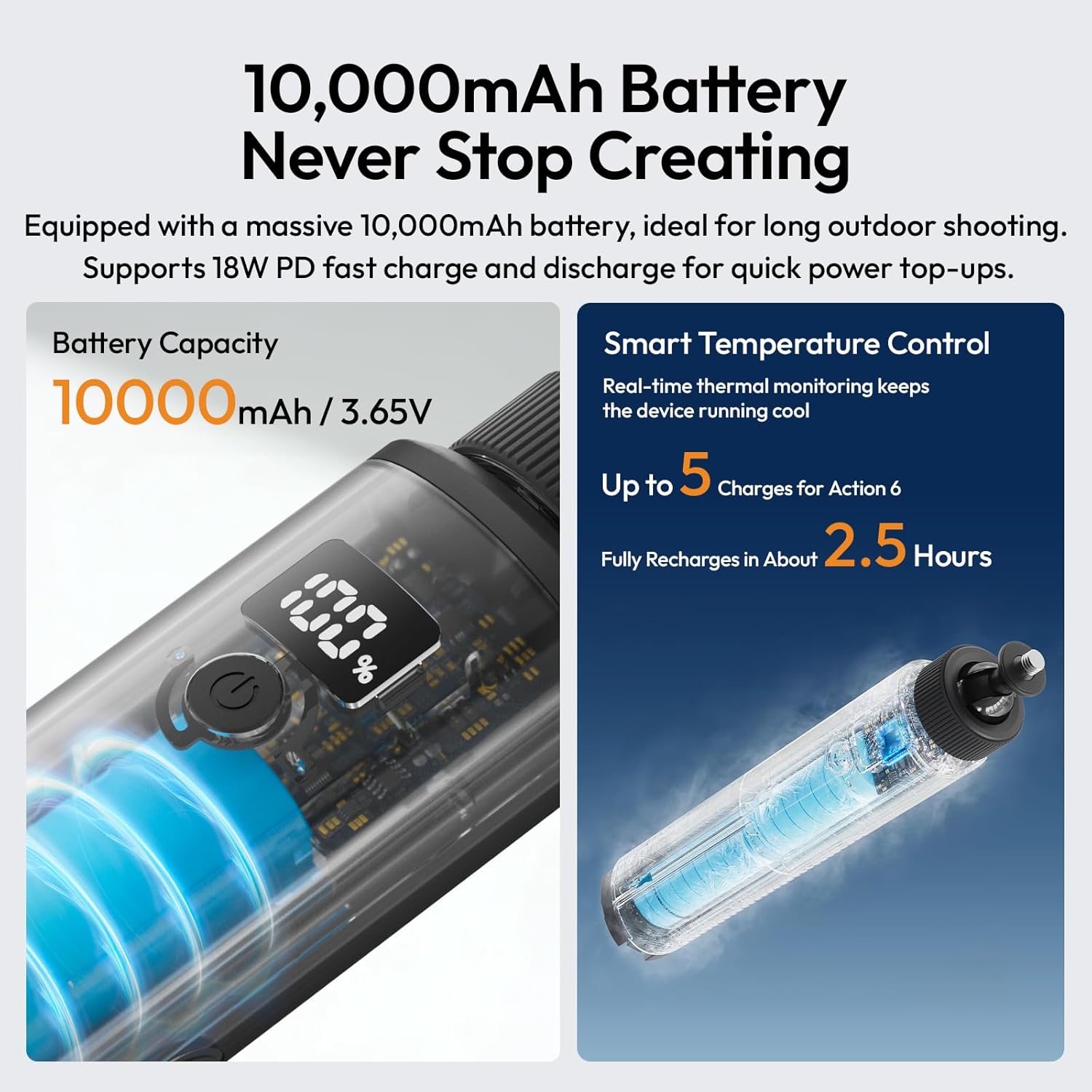
Image 1.1: The ULANZI MA93 Battery Grip with a camera attached, demonstrating its use as a handheld power source.
2. Contenido del paquete
Verifique que todos los artículos estén presentes en el paquete:
- ULANZI MA93 Handheld Battery Grip x 1
- (Additional accessories may vary based on specific product bundles)
3. Identificación de componentes

Image 3.1: Diagram showing the ULANZI MA93 Battery Grip with its main features highlighted, including the LCD display, power button, and integrated cable.
- 1/4"-20 Screw Mount: Located at the top for attaching cameras and accessories.
- Pantalla LCD: Muestra el porcentaje de bateríatage.
- Botón de encendido: Activa la pantalla e inicia la carga.
- Cable USB-C integrado: For connecting to devices for power.
- Puerto de entrada USB-C: For charging the MA93 battery grip.
- Hidden Tripod Legs: Fold out from the base for tabletop stability.
- Orificio roscado de 1/4"-20: Located at the bottom for mounting on larger tripods or stands.
4. Instrucciones de configuración
4.1 Charging the Battery Grip
- Locate the USB-C input port on the side of the MA93 Battery Grip.
- Connect a USB-C charging cable (not included) to this port and to a compatible USB power adapter (e.g., 18W PD fast charger).
- The LCD display will show the charging status and current battery percentage.
- A full charge takes approximately 2.5 hours with an 18W PD charger.

Image 4.1: The LCD screen displaying battery percentage during charging, indicating the 10000mAh capacity and fast charging capability.
4.2 Conexión de una cámara o dispositivo
- Ensure your camera or device has a standard 1/4"-20 threaded hole.
- Align the 1/4"-20 screw mount on top of the MA93 with the threaded hole on your device.
- Rotate the camera or the grip until it is securely fastened. Do not overtighten.
- For devices requiring power, connect the integrated USB-C cable from the grip to your device's charging port.
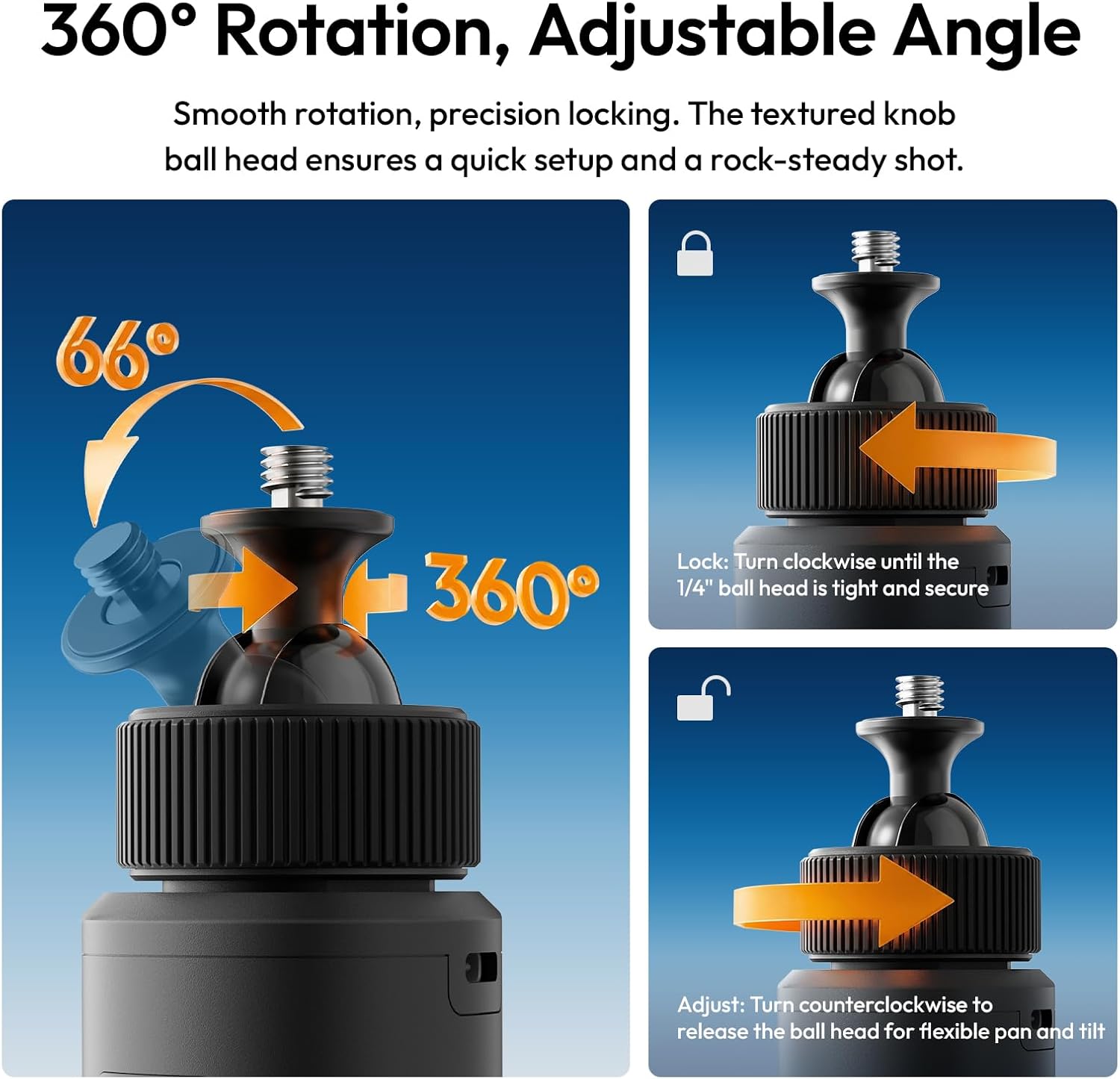
Image 4.2: A camera securely mounted on the ULANZI MA93 Battery Grip, ready for use.
4.3 Deploying the Integrated Tripod
- Locate the three hidden legs at the bottom of the grip.
- Gently pull the three support feet outwards until they are fully extended and locked into position.
- Place the grip on a flat, stable surface for tabletop use.
- To retract, push the legs back into the grip until they are flush.

Image 4.3: The ULANZI MA93 Battery Grip with its integrated tripod legs extended, supporting a camera on a flat surface.
5. Instrucciones de funcionamiento
5.1 Comprobación del nivel de la batería
Tap the power button once to activate the LCD display. The screen will show the exact remaining battery percentage (1-100%). The display will automatically turn off after a few seconds to conserve power.

Image 5.1: Close-up of the MA93's LCD screen indicating a full 100% charge.
5.2 Powering/Charging External Devices
- Connect your camera, smartphone, or other compatible device to the MA93 using the integrated USB-C cable.
- Press the power button on the MA93 to initiate power delivery. The grip will begin charging the connected device.
- The MA93 supports pass-through charging, allowing it to be charged while simultaneously powering an external device.
5.3 Adjusting the Camera Angle (360° Rotation)
The top 1/4"-20 mount features a ball head for flexible positioning:
- Para ajustar: Turn the textured knob counter-clockwise to loosen the ball head. Adjust your camera to the desired angle (360° pan, 66° tilt).
- Para bloquear: Turn the textured knob clockwise until the ball head is tight and secure, preventing movement.

Image 5.2: Illustration of the 360-degree rotation and adjustable angle feature of the MA93's ball head mount.
6. Mantenimiento
- Mantenga el dispositivo limpio y seco. Evite la exposición al agua o a la humedad excesiva.
- Utilice un paño suave y seco para limpiar el exterior. No utilice productos químicos agresivos ni materiales abrasivos.
- Guarde la empuñadura en un lugar fresco y seco cuando no esté en uso.
- Evite dejar caer el dispositivo o someterlo a fuertes impactos.
- No intente desmontar o reparar la unidad usted mismo, ya que esto anulará la garantía.
7. Solución de problemas
| Problema | Posible causa | Solución |
|---|---|---|
| Device not charging from MA93. |
|
|
| MA93 not charging. |
|
|
| La pantalla LCD no funciona. |
|
|
| Tripod legs not deploying/retracting smoothly. |
|
|
8. Especificaciones
| Característica | Detalle |
|---|---|
| Nombre del modelo | MA93 Battery Grip |
| Capacidad de la batería | 10000 mAh (aprox. 37 Wh) |
| Entrada/Salida | 18W PD Fast Charge/Discharge (USB-C) |
| Interfaz de montaje | Universal 1/4"-20 Screw Mount (top), 1/4"-20 Threaded Hole (bottom) |
| Mostrar | Real-time LCD Percentage Pantalla |
| Funciones integradas | Hidden Tripod, Built-in USB-C Cable |
| Dimensiones del producto | 8.86" de profundidad x 1.66" de ancho x 2.29" de alto |
| Peso del artículo | 12 onzas |
| Dispositivos compatibles | Cameras, Action Cameras, MagSafe Phones (with adapter) |
| Fabricante | Shenzhen Vijim Technology Co.,Ltd. |
9. Garantía y soporte
9.1 Información de garantía
The ULANZI MA93 Battery Grip comes with a Garantía de 12 meses Desde la fecha de compra. Esta garantía cubre defectos de fabricación y mal funcionamiento en condiciones normales de uso. No cubre daños causados por mal uso, accidentes, modificaciones no autorizadas ni desastres naturales.
Conserve su comprobante de compra para reclamos de garantía.
9.2 Atención al cliente
For technical assistance, warranty claims, or product inquiries, please contact ULANZI customer support through the official ULANZI websitio o su punto de compra.
You can also visit the official ULANZI Store on Amazon for more information and products: Tienda oficial de ULANZI en EE. UU.
10. Vídeos de productos
ULANZI MA93 Handheld Battery Grip Overview
Video 10.1: An official video from ULANZI demonstrating the features and usage of the MA93 Handheld Battery Grip.