
1. Instrucciones de seguridad importantes
Lea atentamente todas las instrucciones antes de usar este aparato y consérvelas para futuras consultas. El incumplimiento de estas instrucciones podría provocar una descarga eléctrica, un incendio o lesiones graves.
- Coloque siempre el ventilador sobre una superficie plana y estable para evitar que se vuelque.
- No utilice el ventilador si el cable o el enchufe están dañados. Si el cable de alimentación está dañado, debe ser reemplazado por el fabricante, su agente de servicio técnico o personal cualificado para evitar riesgos.
- Mantenga el ventilador alejado del agua y otros líquidos. No lo sumerja en agua.
- Do not insert fingers or foreign objects into the fan grille during operation.
- Desenchufe el ventilador de la toma de corriente cuando no esté en uso, antes de limpiarlo o antes de moverlo.
- Este aparato no está diseñado para ser utilizado por personas (incluidos niños) con capacidades físicas, sensoriales o mentales reducidas, o con falta de experiencia y conocimientos, a menos que hayan recibido supervisión o instrucciones sobre el uso del aparato por parte de una persona responsable de su seguridad.
- Se debe supervisar a los niños para garantizar que no jueguen con el aparato.
- Do not use the fan near curtains, plants, or other objects that could be drawn into the fan.
- Asegúrese del volumentage indicated on the fan matches the local power supply voltagy antes de conectar.
2. Contenido del paquete
Verifique que todos los artículos estén presentes y en buenas condiciones al abrir el paquete.
- 1 x DREO Tower Fan (DR-HTF024S)
- 1 x Remote Control (includes 2 x AAA Batteries)
- 1 x Manual de usuario
- A Set of Accessories (for base assembly)
3. Diagrama del producto
Familiarize yourself with the components of your DREO Smart Tower Fan.

Imagen: General view of the DREO Smart Tower Fan, highlighting its sleek design and powerful airflow.

Image: The fan demonstrating its adjustable height feature, extending from 40 to 45 inches.
The fan features a control panel on top, a main tower body with air outlets, and a stable circular base. The adjustable height mechanism is located at the base of the tower.
4. Configuración
Follow these steps to assemble and prepare your tower fan for use.
- Conjunto base: Take the two halves of the circular base. Align them and rotate until they securely snap together to form a single unit.
- Adjuntar torre: Carefully place the main tower fan body onto the assembled base. Ensure it is firmly seated and locked into position. The cord can be routed through designated channels underneath the base.
- Conexión de energía: Conecte el cable de alimentación a una toma eléctrica estándar.

Image: Illustration of the fan's one-step height adjustment, allowing it to extend from 40 to 45 inches.
5. Instrucciones de funcionamiento
Your DREO Smart Tower Fan offers multiple ways to control its functions.
5.1 Panel de control
The intuitive control panel located on the top of the fan allows for direct operation.
- Botón de encendido: Enciende y apaga el ventilador.
- Botón de modo: Cycles through Normal, Natural, Sleep, and Auto modes.
- Botones de velocidad (+/-): Ajusta la velocidad del ventilador de 1 a 9.
- Botón de oscilación: Activa/desactiva la oscilación de 90°.
- Botón del temporizador: Establece el temporizador de apagado automático (hasta 12 horas).
5.2 control remoto
The included remote control provides convenient access to all fan functions from a distance.
- Ensure the remote control batteries (2 x AAA) are correctly installed.
- Apunte el control remoto directamente al receptor del ventilador para obtener una respuesta óptima.
5.3 DREO App Control & Smart Integration
For enhanced control and smart features, download the DREO app and connect your fan.
- Descargue la aplicación DREO desde la tienda de aplicaciones de su teléfono inteligente.
- Follow the in-app instructions to pair your fan via Bluetooth or Wi-Fi.
- Once connected, you can control all fan functions, set schedules, and customize modes from your phone.
- The fan is compatible with Google Assistant and Amazon Alexa for voice control. Refer to the DREO app for instructions on linking your fan to these smart home platforms.

Image: A user controlling the DREO Smart Tower Fan via the DREO mobile application.

Image: Screenshot of the DREO app demonstrating customizable sleep modes and scheduling options.
5.4 Modos y velocidades
The fan offers 4 distinct modes and 9 speed settings for personalized comfort.
- Modo normal: Provides a constant airflow at your selected speed.
- Modo natural: Simula una brisa natural variando la velocidad del ventilador.
- Modo de sueño: Operates at a lower speed with reduced noise for undisturbed rest.
- Modo automático: Ajusta la velocidad del ventilador automáticamente según la temperatura ambiente de la habitación.
- 9 velocidades: Fine-tune the airflow intensity from a gentle breeze (Speed 1) to powerful cooling (Speed 9).
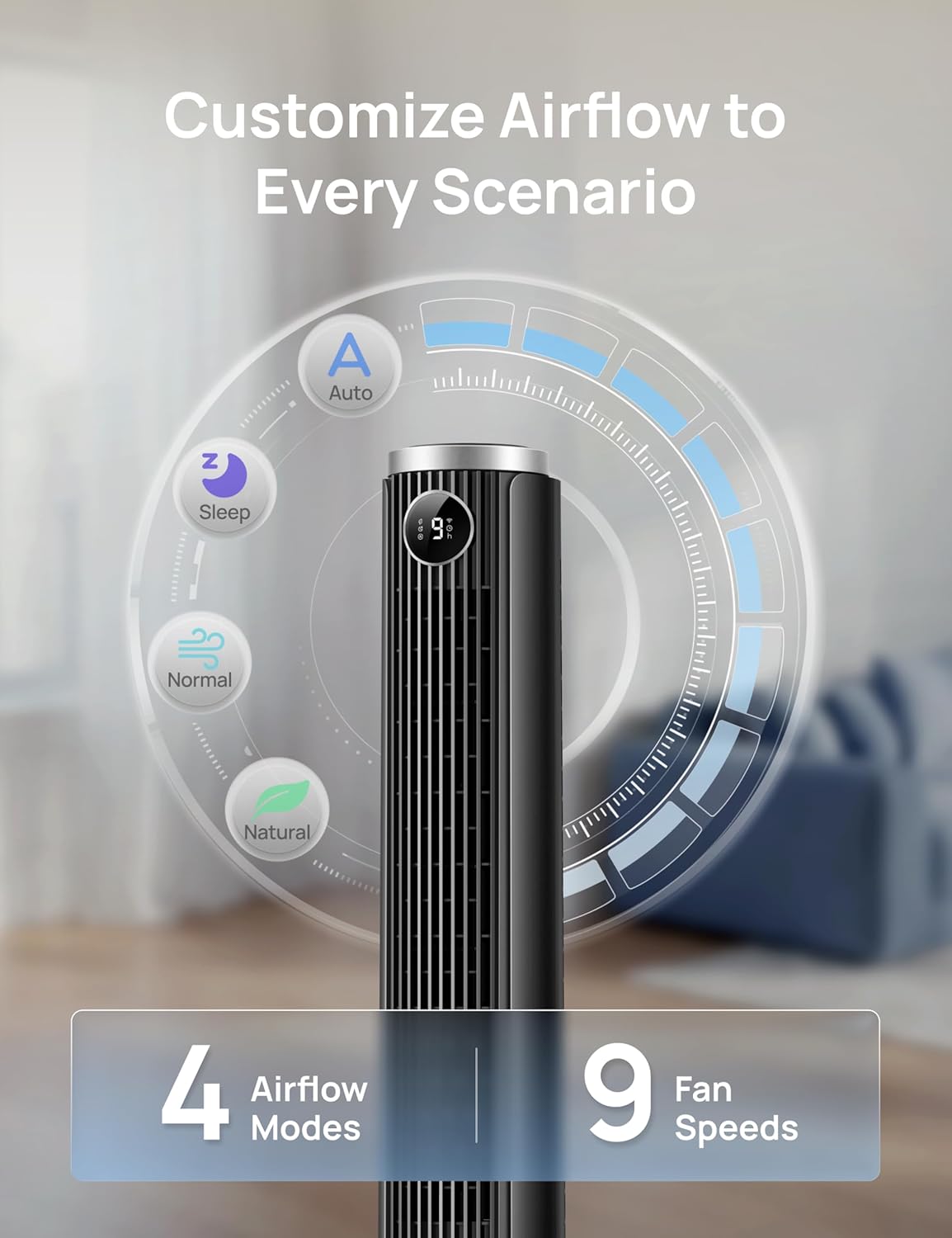
Image: Visual representation of the fan's 4 airflow modes (Auto, Sleep, Normal, Natural) and 9 speed settings.
5.5 Oscilación
Activate oscillation for wider air distribution.
- The fan oscillates 90° to cover a larger area, ensuring even air circulation throughout the room.

Image: The DREO Smart Tower Fan demonstrating its 90-degree oscillation feature, distributing air across a wide area.
temporizador 5.6
Configure el ventilador para que se apague automáticamente después de un período específico.
- The timer can be set for up to 12 hours, allowing you to conserve energy and enjoy cooling as you fall asleep.
5.7 Altura ajustable
Customize the fan's height to suit your needs.
- The fan's height can be adjusted from 40 inches to 45 inches by pressing the foot pedal at the base. This allows you to direct airflow effectively whether you are sitting or standing.
6. Mantenimiento
El mantenimiento regular garantiza un rendimiento óptimo y la longevidad de su ventilador.
6.1 Limpieza
- Desenchufe siempre el ventilador antes de limpiarlo.
- Utilice un paño suave y seco.amp Paño para limpiar las superficies exteriores. No utilice limpiadores abrasivos ni disolventes.
- Utilice una aspiradora con un accesorio de cepillo para eliminar suavemente el polvo de las rejillas de entrada y salida de aire.
- No permita que entre agua en el interior del ventilador.
6.2 Almacenamiento
- Si va a guardar el ventilador durante un período prolongado, límpielo bien.
- Guarde el ventilador en su embalaje original o en una caja adecuada en un lugar fresco y seco.
- Avoid placing heavy objects on top of the fan during storage.
7. Solución de problemas
Consulte esta sección para obtener soluciones a problemas comunes.
| Problema | Posible causa | Solución |
|---|---|---|
| El ventilador no se enciende. | No hay suministro de energía. El cable de alimentación no está enchufado correctamente. Las baterías del control remoto están agotadas. | Compruebe si la toma de corriente funciona. Asegúrese de que el cable de alimentación esté bien enchufado a la toma de corriente y al ventilador. Reemplace las baterías del control remoto. |
| Flujo de aire débil. | La velocidad del ventilador es demasiado baja. Las entradas/salidas de aire están bloqueadas. | Aumente la configuración de velocidad del ventilador. Limpie el polvo y las obstrucciones de las rejillas. |
| El ventilador hace ruido. | Fan is on a high speed setting. El ventilador no está sobre una superficie estable. Obstrucción interna. | Reduzca la velocidad del ventilador. Coloque el ventilador sobre una superficie plana y estable. Unplug and check for any foreign objects inside the grilles. |
| El control remoto no funciona. | Las baterías están agotadas o insertadas incorrectamente. Obstrucción entre el control remoto y el ventilador. | Reemplace las baterías y asegúrese de la polaridad correcta. Ensure a clear line of sight between the remote and the fan. |
| El control de la aplicación no funciona. | Fan not connected to Wi-Fi/Bluetooth. La aplicación requiere actualización. | Check app for connection status and re-pair if necessary. Ensure Wi-Fi is active. Update the DREO app to the latest version. |
8. Especificaciones
Detailed technical specifications for the DREO Smart Tower Fan (DR-HTF024S).
| Característica | Especificación |
|---|---|
| Marca | DREO |
| Nombre del modelo | DR-HTF024S |
| Color | Negro |
| Diseño de ventilador eléctrico | Ventilador de piso (torre) |
| Fuente de poder | Eléctrico con cable |
| Dimensiones del producto (Pr. x An. x Al.) | 33D x 33W x 115H Centímetros |
| Altura ajustable | 40" - 45" |
| Características especiales | App Operable, Oscillating, Portable, Quiet Operation, Remote Controlled |
| Usos recomendados | Circulación de aire, refrigeración, ventilación |
| Tipo de controlador | App Control, Remote Control, Touchpad Control |
| Número de velocidades | 9 |
| Nivel de ruido | 20 decibelios (mínimo) |
| Quétage | 50 vatios |
| Capacidad de flujo de aire | 1473 pies cúbicos por minuto |
| Ángulo de oscilación | 90° |
| Minutero | 12 horas |
| Tipo de material | Plástico |
| Peso del artículo | 7.92 libras |
| Proceso de dar un título | ETL |
9. Garantía y soporte
DREO provides a warranty for this product. Please refer to the official DREO websitio o su documentación de compra para obtener la información de garantía más actualizada y detallada.
- Periodo de garantía: Typically, DREO products come with a 1-year limited warranty from the date of purchase.
- Devoluciones: Products purchased from Amazon.ca generally have a 30-day return policy for refund or replacement.
- Atención al cliente: For technical assistance, warranty claims, or general inquiries, please contact DREO customer support through their official websitio o la información de contacto proporcionada en el embalaje de su producto.
- Recursos en línea: Visit the official DREO webSitio para preguntas frecuentes, registro de productos y recursos de soporte adicionales.