
1. Introducción
This manual provides detailed instructions for the setup, operation, maintenance, and troubleshooting of your Aigo AG98 Wireless Mechanical Keyboard. Please read this manual thoroughly before using the product to ensure optimal performance and longevity.
2. Información de seguridad
- No exponga el teclado a líquidos o humedad excesiva.
- Evite temperaturas extremas.
- No intente desmontar ni reparar el teclado usted mismo. Esto podría anular la garantía y causar daños.
- Utilice únicamente el cable USB tipo C proporcionado para cargar.
- Mantener fuera del alcance de los niños.
3. Contenido del paquete
Verifique que todos los artículos estén presentes en su paquete:
- Aigo AG98 Wireless Mechanical Keyboard
- Cable USB tipo C
- Manual de usuario
4. Producto terminadoview
The Aigo AG98 is a versatile 98-key mechanical keyboard featuring triple-mode connectivity (Bluetooth, 2.4G Wireless, USB Type-C Wired), RGB backlighting, and hot-swappable switches. Its compact design and durable ABS construction make it suitable for both gaming and daily use across various devices.

Figure 1: Aigo AG98 keyboard demonstrating its triple-mode connectivity with various devices.
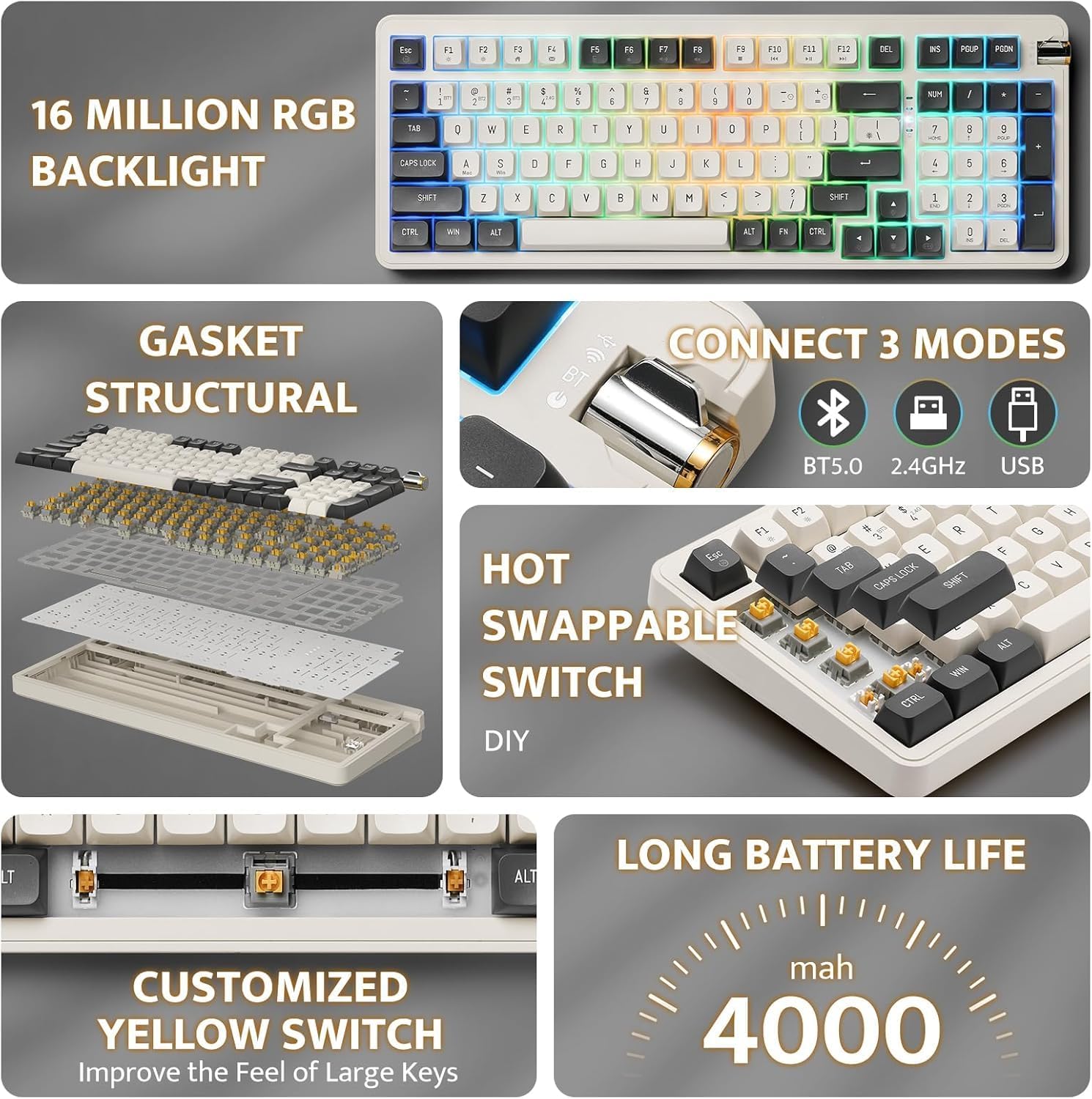
Figure 2: Key features of the Aigo AG98, including structural design, connectivity options, and battery capacity.
5. Configuración
5.1. Carga del teclado
Before initial use, fully charge the keyboard using the provided USB Type-C cable. Connect the cable to the keyboard's USB-C port and the other end to a powered USB port (e.g., computer, wall adapter).

Figure 3: USB-C port and mode switch location.
5.2. Modos de conexión
The Aigo AG98 supports three connection modes: Bluetooth, 2.4G Wireless, and USB Type-C Wired. Use the switch on the side of the keyboard to select your desired mode.
5.2.1. Conexión por cable USB tipo C
- Asegúrese de que el interruptor de modo del teclado esté en la posición cableada (USB).
- Conecte el cable USB Tipo-C al teclado y a su computadora.
- El teclado será reconocido automáticamente por su sistema operativo.
5.2.2. Conexión inalámbrica 2.4G
- Ensure the mode switch on the keyboard is set to the 2.4G wireless position.
- Plug the 2.4G USB receiver into an available USB port on your device.
- The keyboard should connect automatically. If not, press and hold the Fn + 4 key combination to initiate pairing.
5.2.3. Conexión Bluetooth
- Ensure the mode switch on the keyboard is set to the Bluetooth (BT) position.
- En su dispositivo (PC, tableta, teléfono inteligente), habilite Bluetooth y busque nuevos dispositivos.
- On the keyboard, press and hold Fn + 1, Fn + 2, or Fn + 3 to enter pairing mode for BT1, BT2, or BT3 respectively. The indicator light will flash.
- Select "Aigo AG98" from the list of available devices on your screen.
- Una vez emparejado, la luz indicadora dejará de parpadear.
6. Instrucciones de funcionamiento
6.1. Control de retroiluminación RGB
The Aigo AG98 features customizable RGB backlighting. Use the following key combinations to control the lighting effects:
- Fn +\|: Change backlight mode.
- Fn + ↑: Aumenta el brillo de la luz de fondo.
- Fn + ↓:Disminuye el brillo de la luz de fondo.
- Fn + ←: Slow down backlight effect speed.
- Fn + →: Speed up backlight effect speed.

Figure 4: Aigo AG98 with RGB backlighting activated.
6.2. Conmutadores intercambiables en caliente
The Aigo AG98 keyboard features hot-swappable switches, allowing you to change mechanical switches without soldering. This enables customization of typing feel and sound.

Figure 5: Hot-swappable yellow switches with details on pre-lubrication and stable shaft design.
Para reemplazar un interruptor:
- Apague el teclado o desconéctelo de su dispositivo.
- Use a switch puller tool (not included) to carefully grip the switch and pull it straight up.
- Align the pins of the new switch with the holes on the PCB and press it gently until it clicks into place. Ensure the pins are not bent.
7. Mantenimiento
7.1. Limpieza
- Desconecte el teclado antes de limpiarlo.
- Utilice un paño suave y seco para limpiar la superficie del teclado.
- For deeper cleaning, use a keycap puller (not included) to remove keycaps and clean dust or debris with compressed air or a small brush.
- No utilice productos químicos agresivos ni materiales abrasivos.
7.2. Cuidado de la batería
- Evite descargar completamente la batería con frecuencia.
- Charge the keyboard regularly, even if not in use, to maintain battery health.
- Guarde el teclado en un lugar fresco y seco si no lo utiliza durante períodos prolongados.
8. Solución de problemas
| Problema | Posible causa | Solución |
|---|---|---|
| El teclado no responde (inalámbrico) | Low battery, incorrect mode, pairing issue, receiver not connected. | Charge the keyboard. Ensure correct mode is selected. Re-pair the keyboard (Fn + 1/2/3 for BT, Fn + 4 for 2.4G). Check USB receiver connection. |
| El teclado no responde (con cable) | Cable issue, incorrect mode. | Ensure cable is securely connected. Try a different USB port or cable. Ensure wired mode is selected. |
| La retroiluminación RGB no funciona | Luz de fondo apagada, brillo configurado al mínimo. | Press Fn + \| to cycle modes. Increase brightness with Fn + ↑. |
| La tecla específica no funciona | Interruptor defectuoso, residuos debajo de la tecla. | Remove keycap and clean. If issue persists, replace the hot-swappable switch. |
| End key not working (Windows) | Mouse Keys enabled in OS accessibility settings. | Disable "Mouse Keys" in your operating system's accessibility settings. |
9. Especificaciones
- Modelo: AG98
- Marca: Aigo
- Conectividad: Bluetooth 5.0, conexión inalámbrica 2.4G, cable USB tipo C
- Número de llaves: 98
- Disposición: QWERTY (Inglés)
- Tipo de interruptor: Mechanical (Linear Yellow Switches)
- Características especiales: Hot-swappable switches, RGB Backlighting, Ergonomic Design
- Material: Acrilonitrilo butadieno estireno (ABS)
- Batería: Batería de litio recargable de 1200 mAh
- Sistema operativo compatible: Windows 10+, Android, iOS, Mac, Linux
- Dispositivos compatibles: PC, portátil, tableta, teléfono inteligente
- Peso del artículo: 425 gramos
10. Información de garantía
The Aigo AG98 keyboard comes with a 14-day warranty from the date of purchase. This warranty covers manufacturing defects. It does not cover damage caused by misuse, accidents, unauthorized modifications, or normal wear and tear. Please retain your proof of purchase for warranty claims.
11. Soporte
For further assistance or technical support, please refer to the contact information provided with your purchase or visit the official Aigo websitio.


