
1. Producto terminadoview
The TESSAN Power Strip Tower JW402-IT is a versatile power solution designed for home and office use. It features 8 Italian Schuko outlets, 3 USB-A ports, and 1 USB-C port, providing a total of 12 charging options. Equipped with a 5-meter extension cable and independent switches, this power strip offers convenience and safety for multiple devices.

Image: TESSAN Power Strip Tower, showcasing its 8 Schuko outlets and 4 USB ports, ready to power multiple devices.
Características principales:
- Solución de energía 12 en 1: 8 Italian Schuko outlets, 3 USB-A ports, and 1 USB-C port.
- Carga rápida PD de 20 W: USB-C port and one USB-A port (A3) deliver up to 20W for rapid charging of compatible devices.
- Cable de extensión de 5 metros: Provides extended reach for flexible placement.
- Interruptores independientes: Two separate ON/OFF switches for controlling groups of outlets, enhancing energy efficiency and safety.
- Protección de seguridad integral: Includes overload protection, short-circuit protection, lightning protection, and over-temperature protection.
- Diseño que ahorra espacio: Vertical tower design with 45-degree angled outlets prevents plugs from blocking each other.
2. Instrucciones de seguridad
- Do not exceed the maximum rated power of 2500W (10A, 110-250V~).
- No lo use en ambientes húmedos.
- Mantener alejado de los niños.
- No desmonte ni modifique el producto.
- Ensure plugs are fully inserted into the outlets.
- Desenchufe la regleta de enchufes del tomacorriente de pared cuando no la utilice durante períodos prolongados.
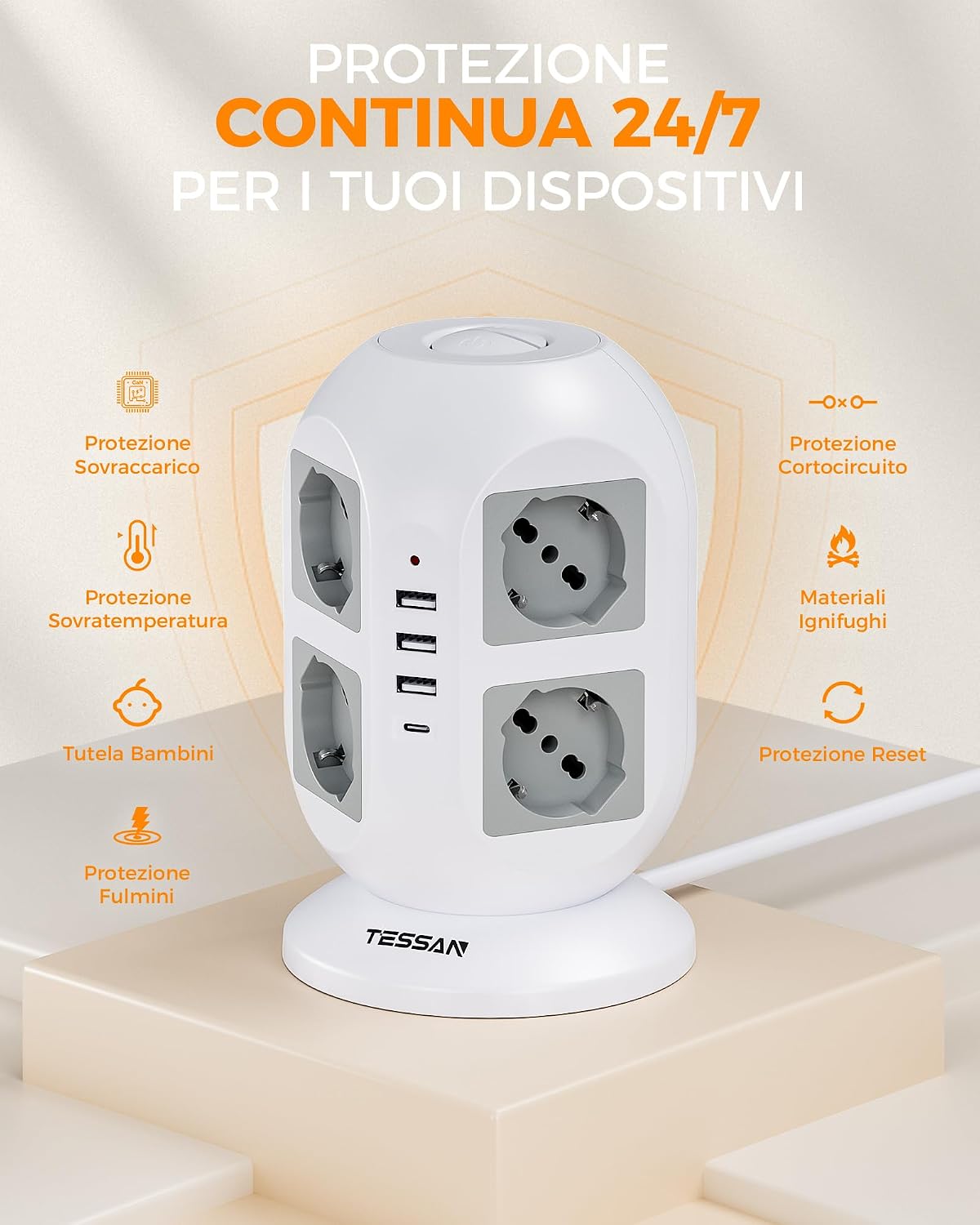
Image: Visual representation of the power strip's continuous 24/7 protection features, including overload, short-circuit, over-temperature, and lightning protection, along with child safety and fire-retardant materials.
3. Configuración
- Deshacer: Retire con cuidado la regleta de enchufes de su embalaje.
- Colocación: Place the power strip on a stable, dry surface, away from heat sources and direct sunlight. The 5-meter cable allows for flexible positioning.
- Conéctese al tomacorriente de pared: Conecte el enchufe principal de la regleta a una toma de corriente con conexión a tierra.
- Conectar dispositivos:
- Insert appliance plugs into the 8 Schuko outlets. The 45-degree angled design helps prevent overcrowding.
- Connect USB-powered devices to the 3 USB-A ports or the 1 USB-C port.

Image: The TESSAN Power Strip with its 5-meter extension cable, demonstrating its reach and flexibility for placement in various scenarios, such as a living room setup.
4. Instrucciones de funcionamiento
Dispositivos de alimentación:
- After plugging in your devices, press the corresponding ON/OFF switch to activate the outlets. The power strip features two independent switches, allowing you to control different sets of outlets.
- A red indicator light will illuminate when the power strip is active.

Image: Detail of the two independent ON/OFF switches located on the top of the power strip, allowing for separate control of connected devices.
Carga USB:
- Puerto USB-C: Provides up to 20W Power Delivery (PD) for fast charging compatible smartphones, tablets, and other USB-C devices.
- Puerto USB-A3: Also provides up to 20W for fast charging compatible devices.
- USB-A1 & USB-A2 Ports: Combined output of up to 12W for standard charging of various USB devices.
- Simply connect your device's USB charging cable to the appropriate port.

Image: The TESSAN Power Strip actively charging a tablet via USB-C and other devices, highlighting the 20W PD fast charging capability and the different USB port outputs.
5. Mantenimiento
- Limpieza: Desconecte la regleta de la toma de corriente antes de limpiarla. Utilice un paño seco y suave para limpiar la superficie. No utilice limpiadores líquidos ni productos abrasivos.
- Almacenamiento: When not in use, store the power strip in a cool, dry place, away from dust and moisture.
- Inspección: Periodically inspect the power cord and the power strip for any signs of damage. If damage is found, discontinue use and contact customer support.
6. Solución de problemas
| Problema | Posible causa | Solución |
|---|---|---|
| No hay energía en las tomas de corriente/puertos USB. |
|
|
| Dispositivos que no se cargan mediante USB. |
|
|
| La regleta de enchufes se siente caliente. |
|
|
7. Especificaciones
| Característica | Detalle |
|---|---|
| Número de modelo | JW402-IT |
| Marca | TESAN |
| Salidas AC | 8 Italian Schuko Sockets |
| Puertos USB | 3 USB-A, 1 USB-C |
| Salida USB-C | 20W Max |
| Salida USB-A3 | 20W Max |
| USB-A1 & USB-A2 Combined Output | 12W Max |
| Potencia nominal | 2500W (10A, 110-250V~) |
| Longitud del cable | 5 metros |
| Características especiales | Independent ON/OFF Switches, Overload Protection, Short-circuit Protection, Lightning Protection, Over-temperature Protection |
| Color | Gris |
| Dispositivos compatibles | General electronic devices |
8. Garantía y soporte
TESSAN products are designed for reliability and performance. This product typically comes with a standard manufacturer's warranty. Please refer to the warranty information provided with your purchase or visit the official TESSAN websitio para obtener detalles sobre los términos y condiciones de la garantía.
Para obtener asistencia técnica, asistencia para la resolución de problemas o reclamos de garantía, comuníquese con el servicio de atención al cliente de TESSAN a través de su sitio web oficial. website or the retailer from whom you purchased the product. Have your model number (JW402-IT) and purchase details ready when contacting support.
Fabricante: Dongguan JunWei Electronics Co.,Ltd