
1. Introducción
This manual provides comprehensive instructions for the setup, operation, and maintenance of your GOBOULT Mustang Racer Smart Watch. Please read this manual thoroughly before using the device to ensure proper functionality and to maximize your user experience. Keep this manual for future reference.
2. ¿Qué hay en la caja?
Verifique que todos los artículos estén presentes en el paquete:
- GOBOULT Mustang Racer Smart Watch
- Cable de carga
- Manual de usuario (este documento)
- Tarjeta de garantía
3. Producto terminadoview
Familiarize yourself with the key components of your GOBOULT Mustang Racer Smart Watch.
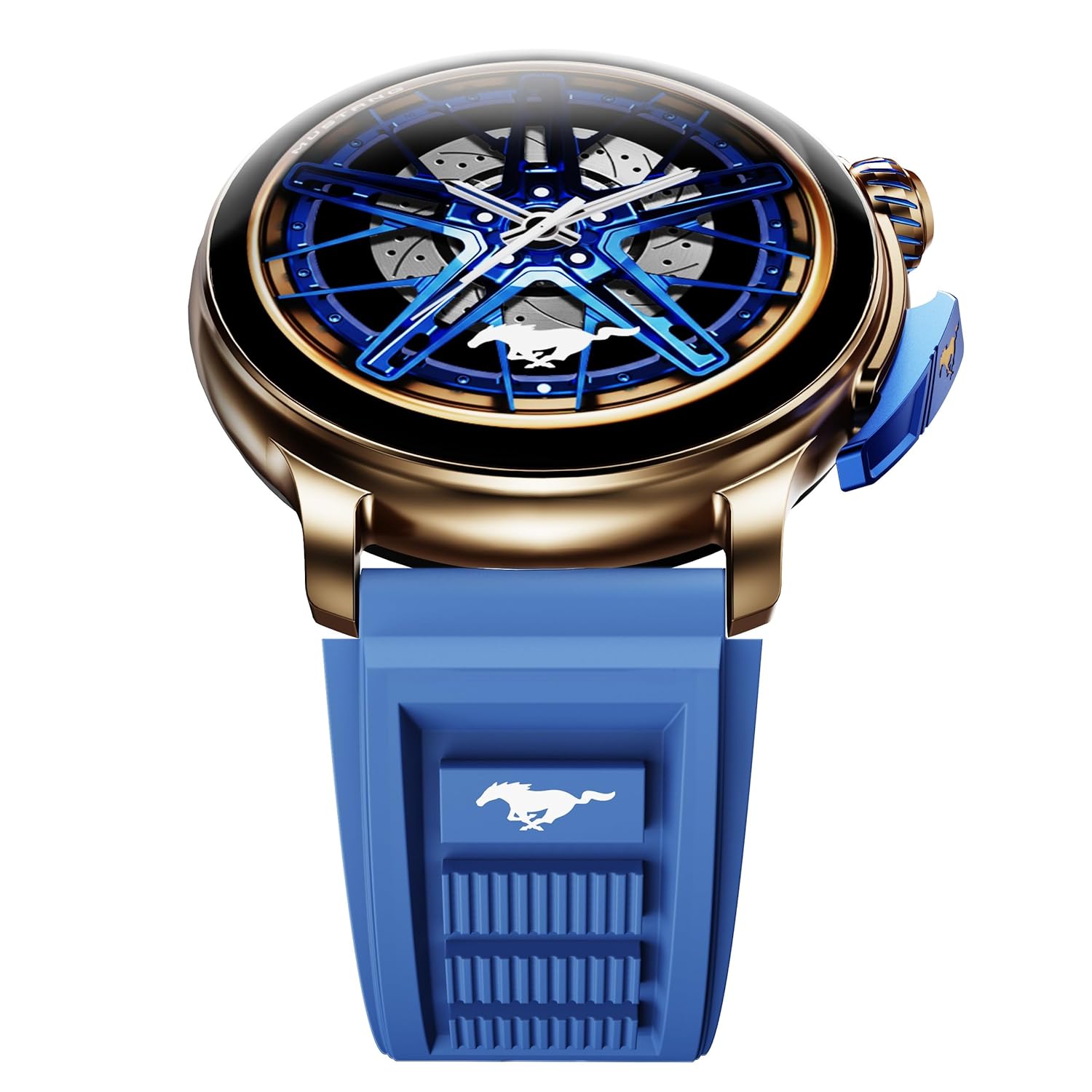
Image: The GOBOULT Mustang Racer Smart Watch, showcasing its 1.43-inch AMOLED display and overall design.
Display and Bezel
The watch features a 1.43-inch AMOLED display with 500 Nits brightness for clear visibility. The functional rotating bezel allows for intuitive navigation through menus and features.

Imagen: Un detalle view of the smartwatch's 1.43-inch AMOLED display and the rotating bezel, highlighting its design and brightness.
Buttons and Crown
The watch includes a rotating tyre-tread crown for navigation and selection, along with a functional paddle shifter button for quick access to features.

Image: The smartwatch featuring its functional paddle shifter and rotating crown, designed for enhanced control.
4. Configuración
4.1. Carga del reloj inteligente
Before initial use, fully charge your smartwatch. Connect the magnetic charging cable to the charging pins on the back of the watch and plug the USB end into a compatible power adapter (not included) or a computer's USB port. The watch will display a charging indicator. A full charge takes approximately 120 minutes.
4.2. Encendido / apagado
- Encendido: Press and hold the main power button (crown) for a few seconds until the GOBOULT logo appears.
- Apagado: From the watch face, swipe down to access quick settings, or navigate to the settings menu. Select "Power Off" and confirm. Alternatively, press and hold the main power button until the power-off option appears.
4.3. Emparejamiento con su teléfono inteligente
To unlock all features, pair your GOBOULT Mustang Racer Smart Watch with the companion app on your smartphone via Bluetooth.
- Download the official GOBOULT app from your smartphone's app store (iOS App Store or Google Play Store).
- Asegúrese de que Bluetooth esté habilitado en su teléfono inteligente.
- Open the GOBOULT app and follow the on-screen instructions to create an account or log in.
- In the app, select "Add Device" or similar option.
- Select "GOBOULT Mustang Racer" from the list of available devices.
- Confirme la solicitud de emparejamiento tanto en su teléfono inteligente como en el reloj inteligente.
Una vez emparejado, el reloj sincronizará los datos con tu teléfono y podrás personalizar la configuración a través de la aplicación.

Image: The smartwatch highlighting its Bluetooth V5.3 connectivity for quick syncing and IP67 water resistance.
5. Instrucciones de funcionamiento
5.1 Navegación
- Deslizar hacia arriba/abajo/izquierda/derecha: Navigate through menus, notifications, and quick access panels.
- Grifo: Seleccione un elemento o confirme una acción.
- Rotating Bezel/Crown: Rotate to scroll through lists or adjust settings. Press to select or return to the home screen.
- Paddle Shifter Button: Customizable shortcut for frequently used functions (e.g., sports modes).
5.2. Llamadas Bluetooth
With integrated speaker and microphone, you can make and receive calls directly from your wrist after pairing with your smartphone.
- Asegúrese de que su reloj esté conectado a su teléfono a través de Bluetooth.
- To make a call: Access the dialer or contacts list on your watch.
- To receive a call: An incoming call notification will appear on your watch. Tap to answer or decline.
5.3. Mira las caras
Customize your watch's appearance with over 150 watch faces, including exclusive Mustang designs. Long-press the watch face to change it, or use the companion app for more options.

Imagen: El reloj inteligente se muestraasing multiple watch face options, including exclusive Mustang designs.
5.4. Modos deportivos
The watch supports over 120 sports modes to track your physical activities. Access sports modes from the main menu or via the paddle shifter shortcut (if configured).
- Select your desired sport.
- Start the activity. The watch will record metrics such as duration, calories burned, and heart rate.
- End the activity to save data. Review your performance in the app.

Image: The smartwatch displaying a sports tracking interface, indicating its capability to monitor various physical activities.
5.5. Monitoreo de la salud
The GOBOULT Mustang Racer Smart Watch provides comprehensive health tracking features:
- Monitor de frecuencia cardíaca 24x7: Realiza un seguimiento continuo de tu frecuencia cardíaca.
- Monitor de saturación de oxígeno en sangre SpO2: Mide los niveles de oxígeno en sangre.
- Monitoreo del sueño: Analyzes sleep patterns (deep sleep, light sleep, awake time).
- Monitor de estrés: Proporciona información sobre sus niveles de estrés.
- Presión arterial: (Note: Smartwatch blood pressure measurements are for reference only and should not be used for medical diagnosis.)
Access these features from the watch's health menu or view Informes detallados en la aplicación complementaria.

Imagen: Un interno view of the smartwatch highlighting its health tracking sensors, with text indicating features like heart rate, SpO2, sleep, and stress monitoring.
5.6. Asistente de voz con IA
Activate the AI Voice Assistant on your watch to perform tasks, set reminders, or get information using voice commands. Ensure your watch is connected to your phone for this feature to function.
5.7. Notificaciones inteligentes
Receive notifications for calls, messages, and app alerts directly on your watch. Manage notification settings through the GOBOULT app.
5.8. Always On Display
The Always On Display feature allows the time and essential information to remain visible on the screen without needing to raise your wrist or press a button. This feature can be enabled or disabled in the watch settings to manage battery consumption.

Image: The smartwatch displaying the time and a car image, illustrating the Always On Display functionality.
6. Características y especificaciones
Características principales:
- 1.43" AMOLED Display with 500 Nits Brightness
- Bluetooth Calling (BT V5.3)
- Rotating Bezel for intuitive control
- 150+ Watch Faces, including exclusive Mustang designs
- Asistente de Voz AI
- Health Monitoring: SpO2, Heart Rate, Sleep, Stress, Blood Pressure
- Más de 120 modos deportivos
- Resistente al agua IP67
- Up to 7-day battery runtime with fast charging
Especificaciones técnicas:
| Marca | GOBOULT |
| Número de modelo | GOBOULT Mustang Racer |
| Tamaño de la pantalla | 1.43 pulgadas |
| Tipo inalámbrico | Bluetooth V5.3 |
| Tiempo de carga de la batería | 120 minutos |
| Contenido de energía de la batería | 1.11 vatios horas |
| Resistencia al agua | IP67 |
| Peso del artículo | 55 gramos |
| País natal | Porcelana |
7. Mantenimiento
7.1. Limpieza del reloj inteligente
La limpieza regular ayuda a mantener la apariencia y la funcionalidad del reloj:
- Limpie la pantalla y el cuerpo con un paño suave que no suelte pelusa.
- Para manchas difíciles, un poco deampEnjuague el paño con agua. Evite usar productos químicos agresivos o materiales abrasivos.
- Clean the charging contacts periodically with a dry cloth to ensure proper charging.
7.2. Resistencia al agua (IP67)
The GOBOULT Mustang Racer Smart Watch is IP67 water resistant, meaning it can withstand immersion in up to 1 meter of fresh water for up to 30 minutes. It is suitable for daily use and light splashes. However, it is not recommended for swimming, showering with hot water, or diving. Avoid exposure to saltwater or chemicals, as this may damage the device.
7.3. Cuidado de la batería
- Evite descargar completamente la batería con frecuencia.
- Guarde el reloj en un lugar fresco y seco cuando no lo utilice durante períodos prolongados.
- Utilice únicamente el cable de carga proporcionado.
8. Solución de problemas
| Problema | Posible solución |
|---|---|
| El reloj no se enciende. | Asegúrese de que el reloj esté completamente cargado. Conéctelo al cargador durante al menos 30 minutos. |
| No se puede emparejar con el teléfono inteligente. |
|
| Datos de salud inexactos. |
|
| Corta duración de la batería. |
|
9. Garantía y soporte
Your GOBOULT Mustang Racer Smart Watch comes with a warranty as specified on the included Warranty Card. Please refer to the card for details regarding warranty period, coverage, and terms and conditions.
For technical support, product inquiries, or warranty claims, please contact GOBOULT customer service through the contact information provided on your Warranty Card or visit the official GOBOULT websitio.
Componentes incluidos: Charging Cable, Mustang Racer Apex Blue Smart watch, User Manual, Warranty Card