
Introducción
This manual provides essential information for the proper setup, operation, and maintenance of your GOBOULT Mustang Racer Smart Watch. Please read these instructions carefully before using your device to ensure optimal performance and longevity.
¿Qué hay en la caja?
Upon unboxing your GOBOULT Mustang Racer Smart Watch, verify that all the following components are present:
- GOBOULT Mustang Racer Smart Watch (Black Blaze)
- Cable de carga
- Manual de usuario (este documento)
- Tarjeta de garantía

Image: The GOBOULT Mustang Racer Smart Watch packaging, showing the watch, charging cable, user manual, and warranty card.
Producto terminadoview
The GOBOULT Mustang Racer Smart Watch features a robust design with intuitive controls and a vibrant display.
Componentes clave:
- Pantalla AMOLED de 1.43 pulgadas: Pantalla de alta resolución para imágenes claras.
- Bisel giratorio: A functional bezel for navigating menus and features.
- Paddle Shifter: A unique side button for quick access to functions.
- Sensores: Ubicado en la parte trasera para monitoreo de salud.
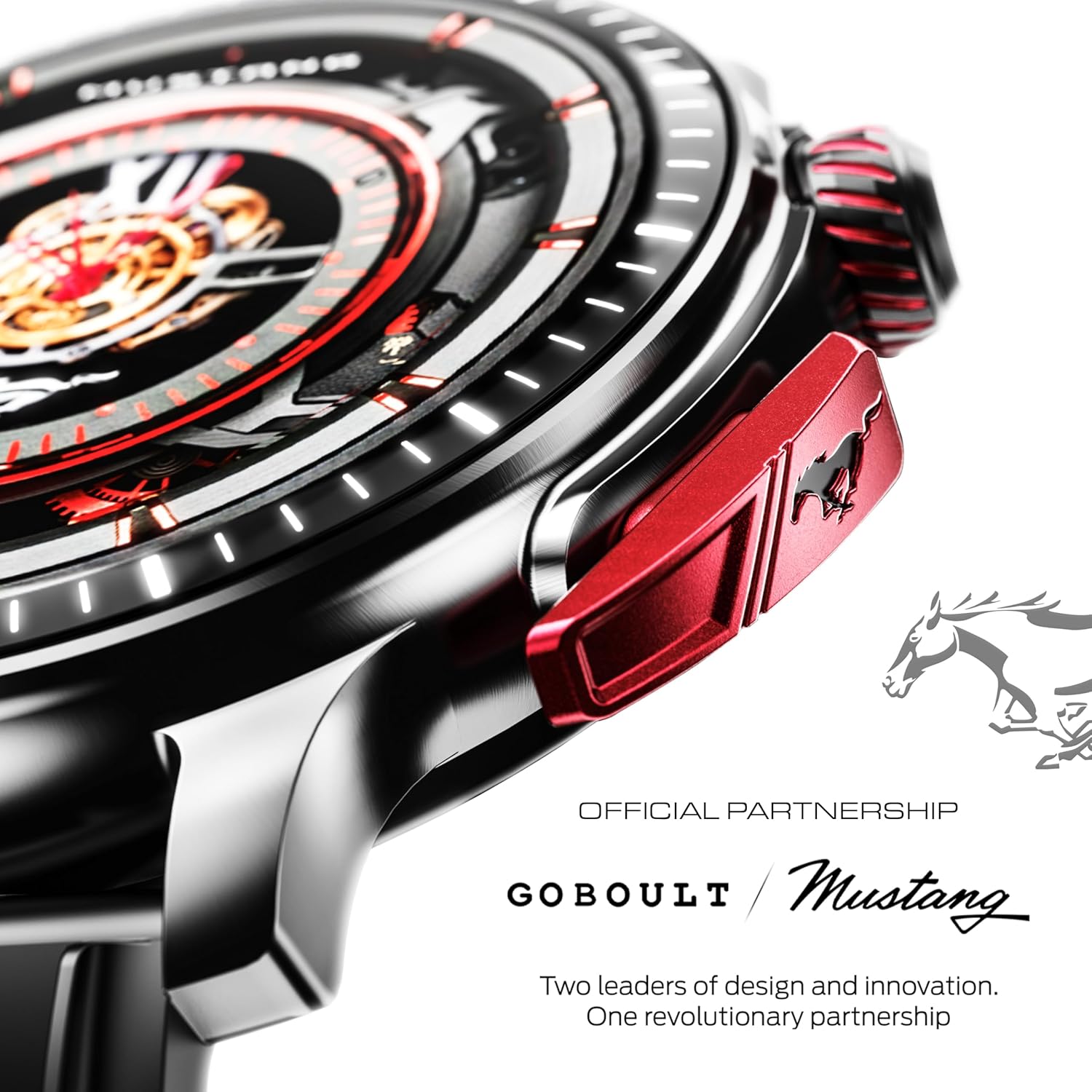
Imagen: Un detalle view of the watch's side, highlighting the red paddle shifter and the textured rotating crown.

Image: The watch face, showcasing the 1.43-inch AMOLED display and the functional paddle shifter.
Configuración
1. Carga del dispositivo
Before initial use, fully charge your smart watch. Connect the provided charging cable to the charging port on the back of the watch and to a standard USB power adapter (not included). A full charge typically takes approximately 120 minutes.
2. Emparejamiento con su teléfono inteligente
- Download the official GOBOULT companion app from your smartphone's app store.
- Asegúrese de que Bluetooth esté habilitado en su teléfono inteligente.
- Open the GOBOULT app and follow the on-screen instructions to search for and connect to your Mustang Racer Smart Watch. The watch uses Bluetooth V5.3 for stable connectivity.
- Confirme la solicitud de emparejamiento tanto en su reloj como en su teléfono inteligente.

Image: The watch on a wet surface, indicating its Bluetooth V5.3 and IP67 water resistance features.
Instrucciones de funcionamiento
Llamadas Bluetooth
The integrated speaker and microphone allow you to make and receive calls directly from your wrist. Once paired with your smartphone, access the call function through the watch interface.
Personalización de esferas de reloj
Your Mustang Racer Smart Watch offers over 150 watch faces, including exclusive Mustang-themed designs. You can change watch faces through the watch settings or the companion app to match your style.

Image: Various watch faces displayed on the GOBOULT Mustang Racer Smart Watch, demonstrating customization options.
Modos deportivos
Track your physical activities with over 120 performance sports modes. Select your desired sport from the watch menu to monitor metrics such as steps, distance, calories burned, and heart rate during your workout.

Image: The watch on a wrist, displaying the sports mode interface.
Asistente de Voz AI
Utilize the integrated AI Voice Assistant for hands-free control. Activate the assistant through the watch interface and issue commands for various functions.
Always On Display (AOD)
The Always On Display feature allows the watch face to remain visible at a low power state, providing continuous time and information without needing to raise your wrist or press a button.

Image: The watch face with Always On Display enabled, showing continuous time display.
Funciones de seguimiento de la salud
The GOBOULT Mustang Racer Smart Watch is equipped with advanced sensors to monitor various health metrics:
- Monitor de frecuencia cardíaca 24x7: Realiza un seguimiento continuo de tu frecuencia cardíaca durante todo el día y durante los entrenamientos.
- Monitor de saturación de oxígeno en sangre SpO2: Mide el nivel de oxígeno en la sangre.
- Monitoreo del sueño: Analiza tus patrones de sueño, incluido el sueño profundo, el sueño ligero y los tiempos de vigilia.
- Monitoreo de la presión arterial: Proporciona estimaciones de sus niveles de presión arterial.
- Monitor de estrés: Le ayuda a comprender y gestionar sus niveles de estrés.
Access detailed health data and trends through the companion app.

Image: The back of the watch, displaying the health monitoring sensors.
Presupuesto
| Característica | Especificación |
|---|---|
| Marca | GOBOULT |
| Número de modelo | GOBOULT Mustang Racer |
| Tamaño de la pantalla | 1.43 pulgadas AMOLED |
| Tipo inalámbrico | Bluetooth V5.3 |
| Tiempo de carga de la batería | 120 minutos |
| Contenido de energía de la batería | 1.11 vatios horas |
| Resistencia al agua | IP67 |
| Peso del artículo | 55 gramos |
| Componentes incluidos | Charging Cable, Smart Watch, User Manual, Warranty Card |
Mantenimiento
Limpieza
Regularly clean your watch and strap with a soft, dry cloth. For stubborn dirt, lightly dampEnjuague el paño con agua. Evite usar productos químicos agresivos o materiales abrasivos.
Resistencia al agua
The GOBOULT Mustang Racer Smart Watch is IP67 water resistant, meaning it can withstand immersion in up to 1 meter of water for 30 minutes. It is suitable for daily use and can resist splashes and sweat. However, it is not recommended for swimming, diving, or exposure to high-pressure water.
Cuidado de la batería
To prolong battery life, avoid fully discharging the watch frequently. Charge it when the battery level is low, and avoid leaving it uncharged for extended periods.
Solución de problemas
El reloj no se enciende
- Asegúrese de que el reloj esté completamente cargado. Conéctelo al cable de carga y déjelo cargar durante al menos 30 minutos.
- Mantenga presionado el botón de encendido durante varios segundos.
No se puede emparejar con el teléfono inteligente
- Verifique que Bluetooth esté habilitado en su teléfono inteligente y en el reloj.
- Asegúrese de que el reloj esté dentro del alcance Bluetooth de su teléfono inteligente.
- Reinicie tanto su teléfono inteligente como el reloj inteligente.
- Clear the Bluetooth cache on your smartphone and try pairing again.
Datos de salud inexactos
- Asegúrese de que el reloj esté ajustado cómodamente a su muñeca, pero no demasiado apretado.
- Limpie los sensores en la parte posterior del reloj.
- Evite movimientos excesivos durante las mediciones.
Problemas de visualización
- Reinicie el reloj.
- Ajuste la configuración de brillo.
Garantía y soporte
Your GOBOULT Mustang Racer Smart Watch comes with a warranty. Please refer to the included Warranty Card for details regarding coverage, terms, and conditions.
For further assistance, technical support, or warranty claims, please contact GOBOULT customer service through their official websitio o la información de contacto proporcionada en su tarjeta de garantía.