
TONOR TW-220
TONOR 2.4G Dual Wireless Microphones TW-220 User Manual
Modelo: TW-220
Introducción
Thank you for choosing the TONOR 2.4G Dual Wireless Microphones. This system is designed to provide a stable and clear audio experience for various applications such as karaoke, speeches, and performances. This manual will guide you through the setup, operation, and maintenance of your new wireless microphone system to ensure optimal performance and longevity.
Información importante de seguridad
- Lea atentamente todas las instrucciones antes de utilizar el producto.
- Conserve este manual para futuras consultas.
- No exponga el dispositivo al agua, la humedad o temperaturas extremas.
- Evite dejar caer o someter el dispositivo a impactos fuertes.
- Use only the provided charging cable and recommended 5V/2A charger.
- No intente desmontar ni reparar el dispositivo usted mismo. Si necesita asistencia técnica, póngase en contacto con el servicio de atención al cliente.
- Mantener fuera del alcance de los niños.
Contenido del paquete
Por favor revise el paquete para asegurarse de que todos los artículos estén presentes:
- 2 micrófonos de mano
- 1 x Receiver (with 6.35mm plug)
- 1 cable de carga USB 3 en 1
- 1 adaptador de 6.35 mm a 3.5 mm
- 1 x Manual de instrucciones

Image: All components included in the TONOR 2.4G Dual Wireless Microphones package, showing two microphones, one receiver, a charging cable, and an adapter.
Producto terminadoview
The TONOR TW-220 system consists of two handheld microphones and a compact receiver. Each microphone features a power button and indicator light. The receiver has a 6.35mm plug for direct connection to compatible audio equipment and a charging port.

Imagen: Un primer plano view of the TONOR 2.4G Dual Wireless Microphone and its receiver, highlighting their design and key features.
Guía de configuración
1. Carga de los dispositivos
Before first use, fully charge both microphones and the receiver. Use the included 3-in-1 USB charging cable and a 5V/2A charger (not included).
- Tiempo de carga: Aproximadamente 2 horas para una carga completa.
- Duración de la batería: Up to 30 hours for microphones, 20 hours for the receiver.
- Carga rápida: A 10-minute charge provides approximately 2 hours of use when the battery is low.

Image: Illustration of the microphones and receiver being charged simultaneously using the 3-in-1 USB cable. A note recommends a 5V/2A charger.
2. Conexión del receptor
The receiver features a 6.35mm (1/4") plug. Insert it directly into the MIC IN port of your compatible audio device (e.g., speaker, amplifier, PA system, karaoke machine, mixer). If your device has a 3.5mm (1/8") MIC IN port, use the included 6.35mm to 3.5mm adapter.
Note: This system is not compatible with phones, computers, or AUX/LINE-IN ports. Ensure you connect to a dedicated MIC IN port.
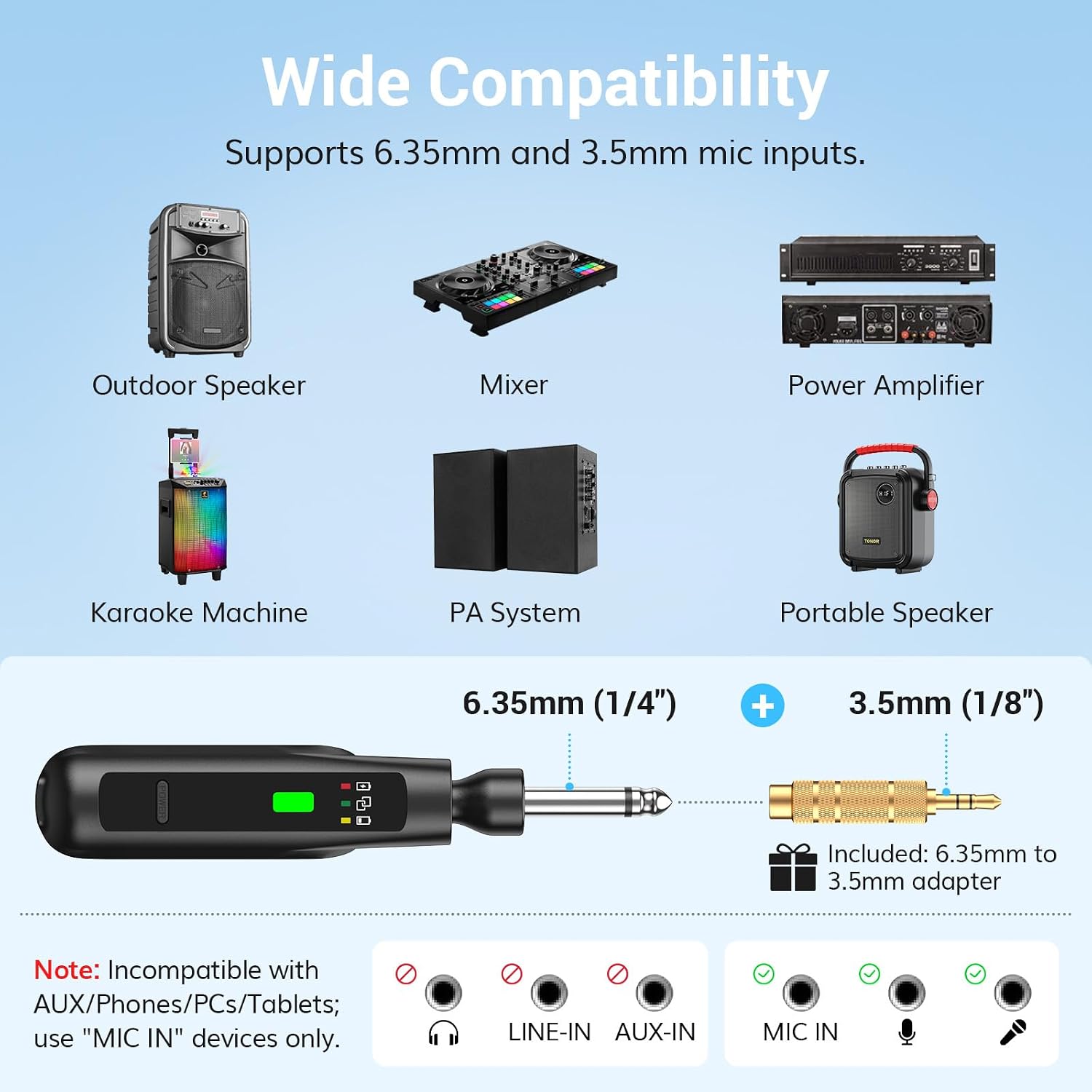
Image: A diagram illustrating the receiver's 6.35mm plug and the 3.5mm adapter, showing compatible devices like outdoor speakers, mixers, power amplifiers, karaoke machines, PA systems, and portable speakers. It also clearly indicates incompatibility with AUX/LINE-IN ports.

Image: The receiver's foldable design is shown, demonstrating how it can be adjusted for different angles and stored compactly. It is also shown plugged into a speaker's microphone input.
3. Encendido y emparejamiento
The microphones and receiver are designed for automatic pairing.
- Paso 1: Long press the power button on each microphone to turn it on. The indicator light will flash.
- Paso 2: Long press the power button on the receiver to turn it on.
- The microphones and receiver will automatically pair. Once paired, both indicator lights will turn solid green.

Image: A visual guide demonstrating the two-step "Plug and Play" process: long-pressing the microphone power button, then long-pressing the receiver power button, with an arrow indicating auto-pairing and solid green lights for successful connection.
Instrucciones de funcionamiento
Uso del micrófono
- Encendido/apagado: Mantenga presionado el botón de encendido.
- Función de silencio: Short press the power button to mute/unmute the microphone. The indicator light will flash when muted.
- Rendimiento óptimo: For best sound quality and to minimize feedback, hold the microphone 2-4 inches (5-10 cm) from your mouth.
- Patrón de captación cardioide: The microphone is designed to pick up sound primarily from the front, reducing background noise and feedback.

Image: A person singing into the TONOR microphone, illustrating the optimal holding distance and highlighting key specifications like latency, frequency response, S/N ratio, and cardioid pickup pattern.
Transmisión inalámbrica
The system operates on 2.4G wireless technology, providing a stable connection up to 50 feet (15 meters) in open areas. Ensure there are no major obstructions between the microphone and receiver for optimal performance.

Image: A person singing outdoors with the TONOR wireless microphone, demonstrating the 50ft/15m transmission distance and highlighting features like anti-interference, stable signal, and zero audio lag.
Video: An official product video demonstrating the features and usage of the TONOR 2.4G Dual Wireless Microphones, including setup and sound quality.
Mantenimiento
- Limpieza: Limpie los micrófonos y el receptor con un paño suave y seco. No utilice productos químicos agresivos ni limpiadores abrasivos.
- Almacenamiento: Guarde el sistema en un lugar fresco y seco, alejado de la luz solar directa y de temperaturas extremas cuando no esté en uso.
- Cuidado de la batería: Para prolongar la vida útil de la batería, evite descargarla por completo con frecuencia. Cárguela regularmente, incluso si no la usa constantemente.
Solución de problemas
| Problema | Posible causa | Solución |
|---|---|---|
| No hay sonido del micrófono |
|
|
| Interferencia o mala calidad de sonido |
|
|
| El micrófono no carga |
|
|
Presupuesto
| Característica | Detalle |
|---|---|
| Marca | TONIFICACIÓN |
| Nombre del modelo | TW220 |
| Tecnología de conectividad | 2.4GHz wireless, USB |
| Tipo de conector | 6.35mm jack, 3.5mm jack (with adapter) |
| Característica especial | Función de silencio |
| Dispositivos compatibles | Amplifier, Karaoke Machine, Speaker, Partybox, PA System, Mixer |
| Color | Negro |
| Peso del artículo | 340 gramos |
| Factor de forma del micrófono | Portátil |
| Fuente de poder | Funciona con pilas |
| Número de baterías | Se requieren 3 baterías de metal de litio (incluidas) |
| Número de canales | 2 |
| Dimensiones del artículo | 12.76 x 5.31 x 2.09 pulgadas |
| Rango de operación | Hasta 50 pies (15 m) |
| Duración de la batería del micrófono | Hasta 30 horas |
| Duración de la batería del receptor | Hasta 20 horas |
Información de garantía
TONOR provides a warranty for DOS AÑOS from the date of purchase for the TW-220 wireless microphone system. Please retain your proof of purchase for warranty claims.
Atención al cliente
If you encounter any issues or have questions regarding your TONOR 2.4G Dual Wireless Microphones, please contact TONOR customer support for assistance. Refer to the contact information provided on the official TONOR websitio web o su documentación de compra.
For more information, visit the official TONOR store: Tienda TONOR en Amazon
Ask a question about this manual
Ask about setup, troubleshooting, compatibility, parts, safety, or missing instructions. Manuals+ will review the question and use this page’s manual context to help answer it.