
1. Introducción
This manual provides essential instructions for setting up, operating, and maintaining your Nothing Phone (4a) Pro. Please read this guide thoroughly to ensure proper use and to maximize the performance of your device.
2. Configuración inicial
2.1. Unboxing y componentes
Al abrir el paquete, verifique que estén presentes todos los componentes:
- Nothing Phone (4a) Pro device
- Auriculares
Note: A USB Type-C cable and SIM ejector tool may be sold separately or included depending on region. A power adapter is typically sold separately.
2.2. Inserción de la tarjeta SIM
- Localice la bandeja de la tarjeta SIM en el costado de su teléfono.
- Insert a SIM ejector tool (not always included) into the small hole next to the tray and press gently until the tray pops out.
- Coloque la(s) tarjeta(s) Nano-SIM en la bandeja con los contactos dorados hacia abajo.
- Vuelva a insertar con cuidado la bandeja en el teléfono hasta que encaje en su lugar.
2.3. Encendido y configuración inicial
- Press and hold the Power button until the Nothing logo appears.
- Siga las instrucciones en pantalla para seleccionar su idioma, conectarse a una red Wi-Fi e iniciar sesión con su cuenta de Google.
- Complete the setup process, including data transfer (if applicable) and security settings.
3. Operación de su teléfono
3.1. Pantalla e interfaz de usuario
The Nothing Phone (4a) Pro features a 6.83-inch 1.5K Flexible AMOLED Display con un Frecuencia de actualización de 144 Hz, providing vibrant colors and smooth scrolling. Navigate the interface using touch gestures.
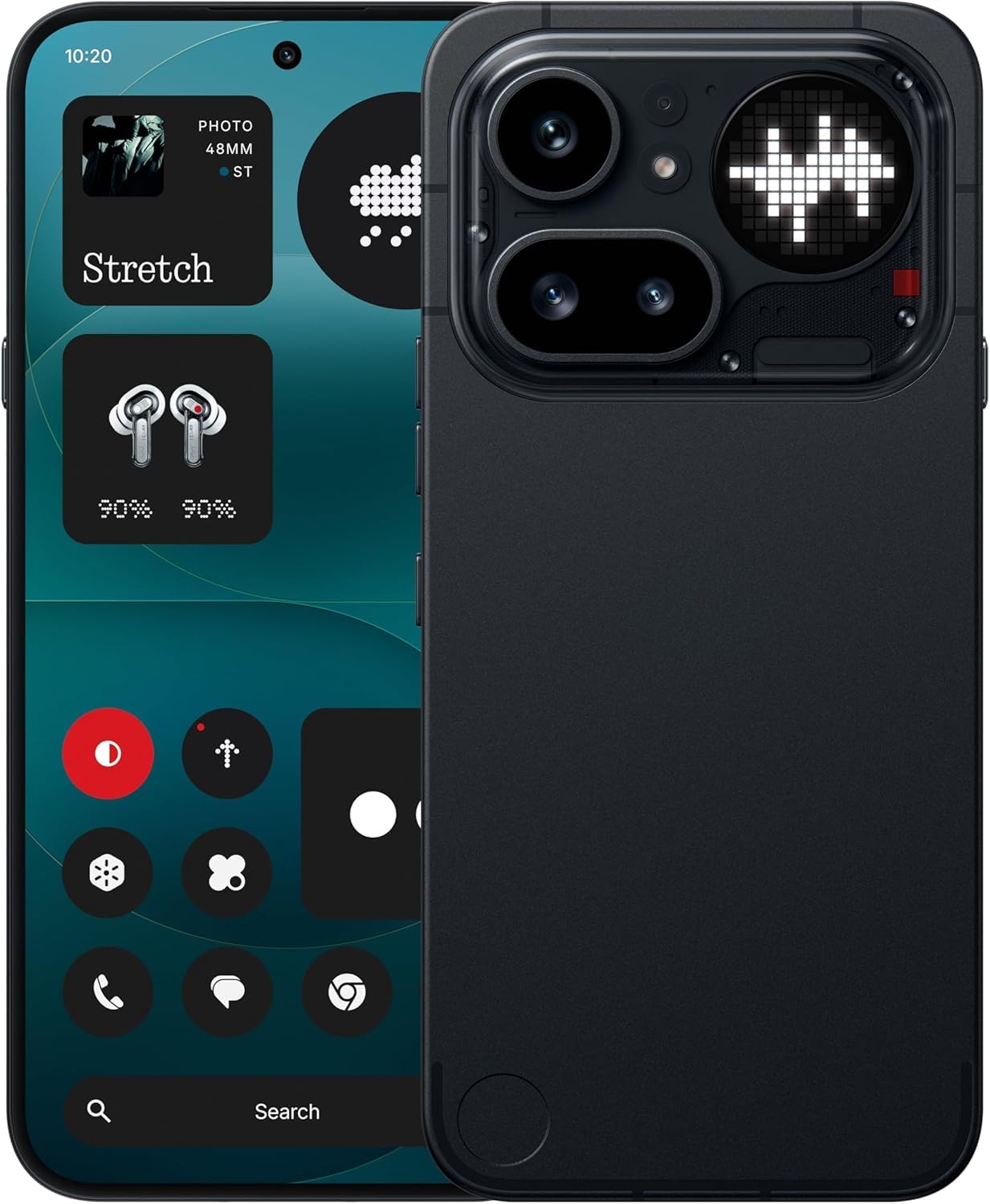
Image: The Nothing Phone (4a) Pro showcasing its flexible AMOLED display and sleek design.
3.2. Sistema de cámara
Su dispositivo está equipado con un Triple Camera System, allowing for versatile photography. The camera supports up to 140x ultra zoom for capturing distant subjects.
Image: Detail of the triple camera module and a screen showing 140x zoom capability.
3.3. Rendimiento
The Nothing Phone (4a) Pro is powered by the Snapdragon 7 de 4.ª generación processor, ensuring smooth multitasking and efficient performance for demanding applications and games. It comes with 12 GB de RAM for enhanced responsiveness.
Image: A visual representation of the Snapdragon 7 Gen 4 processor, highlighting the device's core performance component.
3.4. Batería y carga
El dispositivo incluye un Batería de 5080 mAh, lo que proporciona tiempos de uso prolongados. Es compatible. Carga rápida 50W technology, allowing for quick recharging.
Imagen: Un interno view of the phone, showing the battery component with its specifications.
3.5. Funciones de software e inteligencia artificial
Your Nothing Phone (4a) Pro runs on Nothing OS, Residencia en Androide 14, offering a clean and intuitive user experience. It integrates Essential AI tools y características Google Gemini + ChatGPT Integration for advanced assistance and productivity.
Image: Screenshots depicting the Nothing OS home screen, an AI tools interface, and the Google Gemini + ChatGPT integration menu.
3.6. Conectividad
El dispositivo admite Tecnología celular 5G for high-speed internet access. It uses a USB tipo C (USB 2.0) connector for charging and data transfer.
4. Mantenimiento
4.1. Limpieza del dispositivo
To clean your phone, use a soft, lint-free cloth. Avoid abrasive materials or harsh chemicals. For stubborn smudges, slightly dampEnjuague el paño con agua o con un limpiador de pantalla diseñado para dispositivos electrónicos.
4.2. Actualizaciones de software
Verifique e instale periódicamente actualizaciones de software para asegurarse de que su dispositivo tenga las últimas funciones, parches de seguridad y mejoras de rendimiento. Vaya a Configuración > Sistema > Actualización de software para comprobar si hay actualizaciones disponibles.
4.3. Cuidado de la batería
Para prolongar la vida útil de la batería, evite exponer el teléfono a temperaturas extremas. Se recomienda mantener la carga de la batería entre el 20 % y el 80 % para una salud óptima a largo plazo.
5. Solución de problemas
5.1. Problemas comunes y soluciones
- El dispositivo no enciende: Asegúrese de que la batería esté cargada. Conecte el dispositivo a un cargador durante al menos 15 minutos y luego vuelva a intentar encenderlo.
- Las aplicaciones se bloquean: Clear the cache of the problematic app (Settings > Apps > [App Name] > Storage & cache > Clear cache). If the issue persists, reinstall the app.
- Mala señal de red: Comprueba si tu tarjeta SIM está correctamente insertada. Prueba a reiniciar el teléfono o a activar y desactivar el modo avión.
- La batería se agota rápidamente: Reduce el brillo de la pantalla, desactiva las aplicaciones en segundo plano innecesarias y limita los servicios de ubicación.
5.2. Restablecimiento de fábrica
Si encuentra problemas de software persistentes, un restablecimiento de fábrica puede resolverlos. Advertencia: Esto borrará todos los datos de tu teléfono. Haz una copia de seguridad de los datos importantes antes de continuar. Ir a Configuración > Sistema > Opciones de reinicio > Borrar todos los datos (restablecimiento de fábrica).
6. Especificaciones
| Característica | Detalle |
|---|---|
| Modelo | Nothing Phone (4a) Pro |
| Sistema operativo | Android 14 (Nothing OS) |
| Procesador | Snapdragon 7 de 4.ª generación, 2.5 GHz |
| RAM | 12 GB |
| Almacenamiento interno | 256 GB |
| Mostrar | 6.83" 1.5K Flexible AMOLED, 144Hz refresh rate |
| Capacidad de la batería | Iones de litio de 5080 mAh |
| Cargando | 50W Fast Charge, USB Type-C (USB 2.0) |
| Cámara | Triple Camera System, up to 140x ultra zoom |
| Conectividad | 5G, GSM, LTE |
| Dimensiones | 16.4 x 7.8 x 0.8 centímetros |
| Peso | 250 gramos |
| Contenido de la caja | Auriculares |
7. Garantía y soporte
7.1. Garantía del producto
The Nothing Phone (4a) Pro comes with a Garantía del fabricante de 1 años from the date of purchase. This warranty covers manufacturing defects and workmanship under normal use. It does not cover damage caused by accidents, misuse, unauthorized modifications, or normal wear and tear.
7.2. Atención al cliente
For technical assistance, warranty claims, or service inquiries, please contact Nothing customer support. Refer to the official Nothing webSitio para obtener la información de contacto más actualizada.
Manufacturer: Nothing
Packer/Importer Contact: Essentially Nothing