
1. Introducción
Gracias por la compraasing the EUHOMY 2.6kW Portable Spot Cooler. This manual provides essential information for the safe and efficient operation of your appliance. Please read it thoroughly before use and retain it for future reference.

Image 1.1: The EUHOMY 2.6kW Portable Spot Cooler unit.
2. Información de seguridad
Para reducir el riesgo de incendio, descarga eléctrica o lesiones, siga siempre las precauciones básicas de seguridad al utilizar este aparato.
- Asegúrese de que la fuente de alimentación coincida con el volumen.tage especificado en la etiqueta de clasificación.
- No opere la unidad con un cable o enchufe dañado.
- Mantenga el aparato alejado del agua y otros líquidos.
- Do not block air inlets or outlets. Maintain at least 50cm clearance from the front and rear, and 30cm from the sides.
- Always ensure the exhaust duct is properly installed to vent hot air outside the room.
- Desenchufe la unidad antes de limpiarla o realizar cualquier mantenimiento.
- Este aparato no está diseñado para que lo utilicen personas con capacidades físicas, sensoriales o mentales reducidas, a menos que estén supervisadas.
3. Contenido del paquete
Verifique que todos los artículos estén presentes en el paquete:
- Spot Cooler Main Unit (1)
- Window Panels (4)
- Exhaust Duct (1)
- Manguera de drenaje (1)
- Exhaust Nozzle (1)
- Duct End Connector (1)
- Mando a distancia (1)
- Manual de usuario (1)

Image 3.1: Included components of the EUHOMY Portable Spot Cooler.
4. Características del producto
4.1. Powerful Cooling Performance
The EUHOMY Spot Cooler provides a powerful 2.6kW (60Hz) cooling capacity, capable of lowering room temperature by 5°C within 15 minutes. It is designed for effective cooling in areas up to 10 tatami (approximately 16.5 square meters), making it suitable for living rooms, bedrooms, garages, and warehouses.

Imagen 4.1: Másview of cooling capabilities and specifications.
4.2. Three Operating Modes
This unit offers three versatile operating modes to suit various seasonal needs:
- Modo de enfriamiento: Provides rapid cooling for hot environments.
- Modo de deshumidificación: Removes up to 28.98 liters of moisture per day, helping to maintain a comfortable humidity level between 40% and 60% RH, especially useful during rainy seasons.
- Modo de ventilador: Circulates air with two adjustable fan speeds (Weak/Strong) to provide ventilation.

Image 4.2: Three-in-one functionality for year-round comfort.
4.3. Modo de suspensión inteligente
The smart sleep mode adjusts the set temperature gradually to ensure comfortable sleep. After 1 hour, the temperature increases by 1°C, and after 2 hours, it increases by another 1°C (total 2°C increase from initial setting). The unit then maintains this temperature, preventing overcooling or overheating during the night. This mode also reduces power consumption by approximately 25% over 8 hours compared to normal operation.
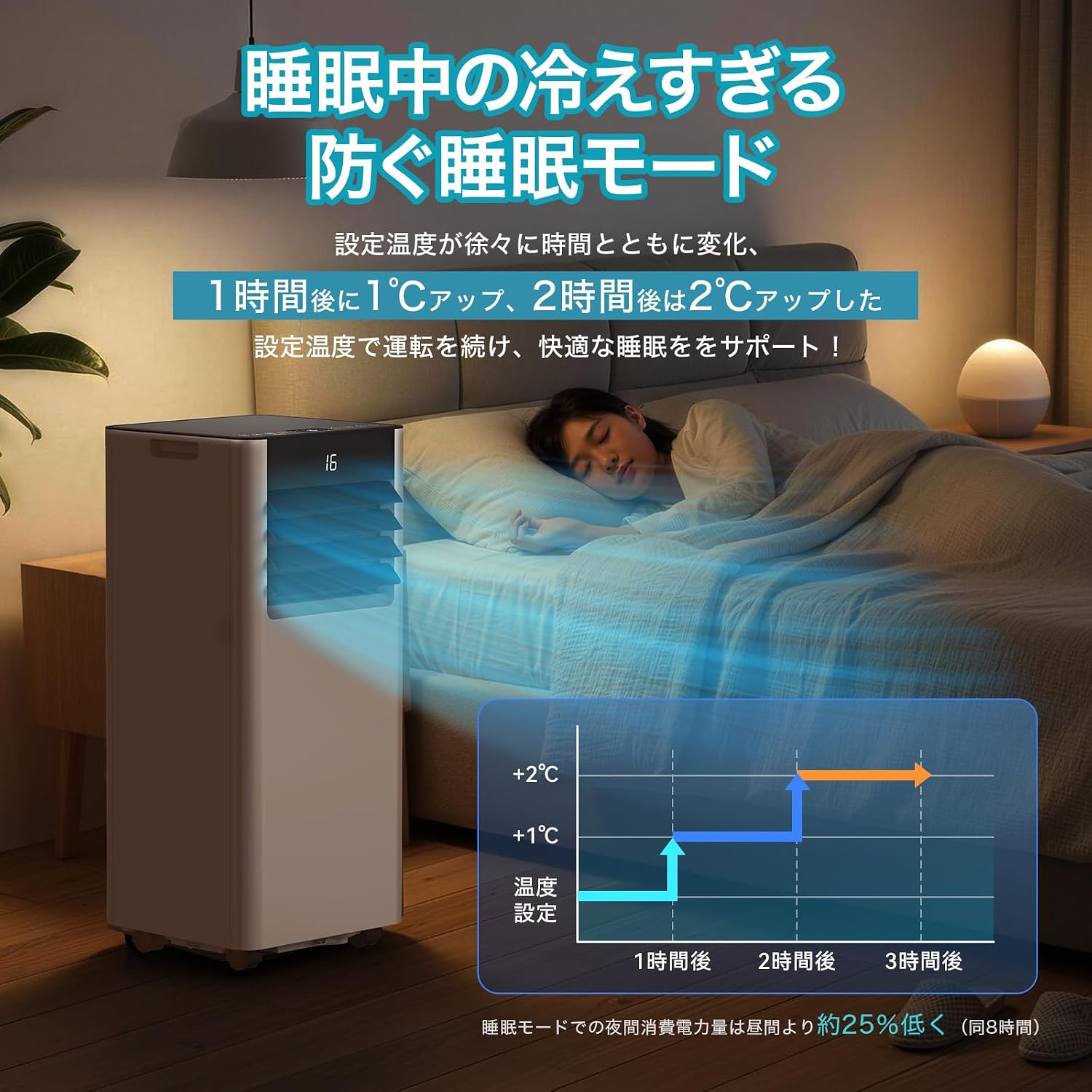
Image 4.3: Smart Sleep Mode for optimized overnight comfort and energy saving.
4.4. 24-Hour Timer Function
Set the unit to automatically turn on or off within a 1 to 24-hour period. This feature allows for efficient operation, ensuring the room is cooled before you arrive home or turns off after you leave, saving energy.
5. Configuración e instalación
The EUHOMY Spot Cooler is designed for easy installation without requiring professional construction. Follow these steps for setup:
5.1. Colocación de la unidad
Place the unit on a flat, stable surface. Ensure there is adequate clearance around the unit for proper airflow (at least 50cm from front/rear, 30cm from sides). The unit is equipped with casters for easy movement between rooms.
5.2. Window Panel Installation
Assemble the window panels according to your window size. The panels are adjustable from 50cm to 135cm to fit various window types (sliding or vertical sash windows). Secure the panels in the window frame using screws. The 2026 model includes four window panels for improved adaptability and sealing.

Image 5.1: Window panel installation guide.
5.3. Exhaust Duct Connection
Attach the exhaust duct to the unit's exhaust outlet and then connect the other end to the window panel. Ensure a secure connection to prevent hot air from re-entering the room. The improved exhaust duct design in the 2026 model enhances sealing performance by 50%.
6. Operación
The unit can be operated using the touch control panel on top of the unit or the included remote control.

Image 6.1: Control panel and remote control layout.
6.1. Encendido y apagado
Presiona el boton de poder (運転入/切) en el panel de control o en el control remoto para encender o apagar la unidad.
6.2. Selección de modo
Presione el botón Mode (モ ー ド) to cycle through Cooling (冷房モード), Dehumidifying (除湿モード), and Fan (送風モード) modos.
6.3. Ajuste de temperatura
In Cooling mode, use the Up (+) y abajo (-) buttons to set the desired temperature between 16°C and 32°C.
6.4. Ajuste de la velocidad del ventilador
In Fan mode, press the Fan Speed button (風量) to select between Weak (弱) and Strong (強) airflow.
6.5. Configuración del temporizador
Pulse el botón del temporizador (タイマー機能) to set the auto-on or auto-off time in 1-hour increments, from 1 to 24 hours.
6.6. Activación del modo de suspensión
Presione el botón de suspensión (睡眠) to activate the smart sleep mode for quiet and comfortable overnight operation.
6.7. Louver Adjustment
Manually adjust the vertical louvers to direct the airflow as desired.
7. Mantenimiento
Regular maintenance ensures optimal performance and longevity of your spot cooler.
7.1 Drenaje
The unit is designed with a non-drainage system for cooling mode, where condensed water is evaporated and expelled with the exhaust air. However, in high humidity conditions or during dehumidifying mode, significant water accumulation may occur. Connect the included drain hose to the drainage port for continuous drainage to prevent overflow.
7.2. Limpieza de filtros
Periodically clean the air filter to maintain air quality and unit efficiency. Refer to the detailed instructions in the printed user manual for filter removal and cleaning procedures.
7.3. Limpieza exterior
Limpie el exterior de la unidad con un paño suave yamp paño. No utilice productos químicos agresivos ni limpiadores abrasivos.
8. Solución de problemas
Antes de contactar con el servicio de atención al cliente, consulte los siguientes problemas y soluciones comunes:
| Problema | Posible causa | Solución |
|---|---|---|
| La unidad no se enciende | No hay suministro de energía; cable de alimentación no está enchufado; disyuntor disparado. | Verifique la conexión eléctrica; reinicie el disyuntor. |
| Refrigeración insuficiente | Windows/doors open; Exhaust duct not properly installed; Air filter dirty; Room size too large. | Close windows/doors; Ensure duct is sealed; Clean air filter; Use in recommended room size. |
| Fuga de agua | Drain hose not connected or blocked; Water tank full (if applicable). | Connect drain hose; Clear any blockages; Ensure continuous drainage in high humidity. |
| La unidad es ruidosa | Unit not on a flat surface; Air filter dirty; Normal operating sound. | Place on a flat surface; Clean air filter; Some operating noise is normal for portable ACs. |
9. Especificaciones
| Característica | Detalle |
|---|---|
| Marca | EUHOMY |
| Número de modelo | OL-A016UC26N4 |
| Capacidad de enfriamiento | 2.3kW (50Hz) / 2.6kW (60Hz) |
| Área de aplicación | 8-10 Tatami |
| Rango de ajuste de temperatura | De 16 °C a 32 °C |
| Fuente de alimentación | 100 V (50/60 Hz) |
| Consumo de energía de refrigeración | 750 W (50 Hz) / 800 W (60 Hz) |
| Capacidad de deshumidificación | 28.98 L/día |
| Nivel de ruido | 55dB (Operating Sound: 43dB) |
| Refrigerante | R-410A |
| Dimensiones de la unidad (Pr x An x Al) | 30.3 x 28.95 x 67.3 cm |
| Peso unitario | Aprox. 20.5 kg |
| Tipo de controlador | Control táctil |

Image 9.1: Detailed product specifications and dimensions.
10. Garantía y soporte
10.1. One-Year Quality Guarantee
This product comes with a one-year quality guarantee from the date of purchase. Please retain your proof of purchase for warranty claims.

Image 10.1: One-Year Quality Guarantee.
10.2. Atención al cliente
For any questions regarding the product or delivery, please contact our customer support. You can reach us via email or inquiry. For inquiries after purchase, navigate to 'Order History' > 'Problem with order' > 'View profile' > 'Ask a question' or refer to the contact information in the Japanese instruction manual.

Image 10.2: Customer support contact options.