
1. Introducción
The Zapco Z-OTG-BT C is a high-resolution audio converter designed to enhance your audio experience by converting digital audio signals to high-quality analog and digital outputs. This device supports various input and output formats, ensuring compatibility with a wide range of audio systems. It features a high-performance DAC and OP-amp for superior sound reproduction.
2. Información de seguridad
Lea y comprenda todas las instrucciones de seguridad antes de utilizar este dispositivo. Conserve este manual para futuras consultas.
- Fuente de alimentación: Use only the specified DC 9-16V power supply. Using an incorrect power adapter may damage the device and void the warranty.
- Humedad: Do not expose the device to water, moisture, or extreme humidity. This can cause electric shock or fire.
- Ventilación: Asegúrese de que haya una ventilación adecuada alrededor de la unidad. No obstruya las aberturas de ventilación. El sobrecalentamiento puede provocar un mal funcionamiento.
- Colocación: Coloque el dispositivo sobre una superficie estable y plana. Evite colocarlo cerca de fuentes de calor o expuesto a la luz solar directa.
- Servicio: No intente abrir ni reparar la unidad usted mismo. Encargue cualquier reparación a personal cualificado.
- Limpieza: Desconecte la alimentación antes de limpiar. Utilice un paño suave y seco. No utilice limpiadores líquidos ni en aerosol.
3. Contenido del paquete
Verifique que todos los artículos estén presentes en el paquete:
- Zapco Z-OTG-BT C Audio Converter Unit
- Power Adapter (DC 9-16V)
- Manual de usuario (este documento)
4. Configuración
Follow these steps to set up your Zapco Z-OTG-BT C audio converter:
- Conectar fuente de audio: Connect your digital audio source device (e.g., smartphone, tablet, computer) to the OTG input port on the Zapco Z-OTG-BT C. This input supports 192KHz/32bit audio and also supports a charging function for the connected device.
- Conecte la salida de audio: Elija el método de salida de audio que desee:
- Salidas RCA: Connect the Left and Right RCA outputs (1.5V RMS) to your amplifier or receiver's analog audio inputs.
- Digital Outputs (Optical/Coaxial): Connect either the Optical or Coaxial digital output to a compatible digital input on your external DAC or amplifier. These outputs support 48/96/192KHz digital inputs.
- Conecte la electricidad: Connect the provided power adapter to the DC 9-16V power input on the Zapco Z-OTG-BT C, then plug the adapter into a suitable power outlet.
- Encendido: The device will power on automatically once connected to power. Ensure all connections are secure before playing audio.
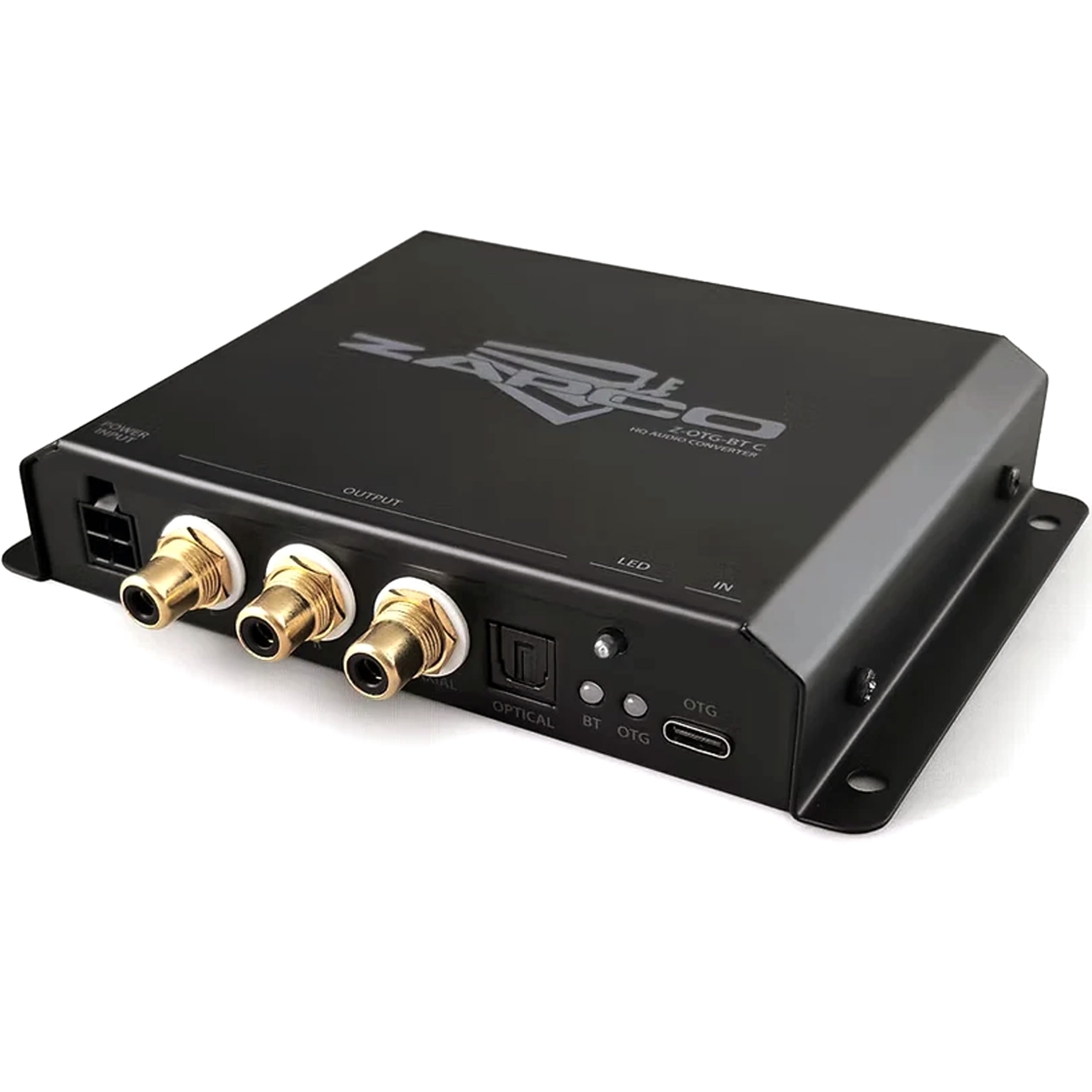
Imagen 1: Frente view of the Zapco Z-OTG-BT C Hi-Res HQ Audio Converter, showing its various input and output ports.
5. Operando
Once the Zapco Z-OTG-BT C is set up and powered on, it operates automatically:
- Ensure your audio source device is playing audio.
- The Z-OTG-BT C will convert the incoming digital audio signal from the OTG input to the selected analog (RCA) or digital (Optical/Coaxial) outputs.
- Ajuste el volumen en su dispositivo conectado amplifier or receiver. The Z-OTG-BT C does not have its own volume control.
6. Mantenimiento
Un mantenimiento adecuado garantiza la longevidad y el rendimiento óptimo de su dispositivo:
- Limpieza: Use a soft, dry, lint-free cloth to clean the exterior of the unit. Do not use abrasive cleaners, solvents, or chemical sprays.
- Almacenamiento: Si va a almacenar el dispositivo durante un período prolongado, desconéctelo de la alimentación y guárdelo en un lugar fresco y seco, alejado de la luz solar directa y de temperaturas extremas.
- Sistema de organización de cables: Ensure all cables are routed neatly and are not under strain or bent sharply, which can damage them over time.
7. Solución de problemas
If you encounter issues with your Zapco Z-OTG-BT C, refer to the following troubleshooting guide:
| Problema | Posible causa | Solución |
|---|---|---|
| Sin salida de audio |
|
|
| Poor audio quality / Distortion |
|
|
| Device not recognized by source (OTG) |
|
|
8. Especificaciones
Detailed technical specifications for the Zapco Z-OTG-BT C:
- Tipo: Convertidor de audio
- Modelo: Z-OTG-BT C
- Entrada OTG: 192KHz/32bit (Supports Charging function)
- OP-Amp: JRC 5532 (High Performance Low-Noise Dual OP)
- DAC: TI PCM5102A 384KHz/32bit
- Salidas digitales: Optical and Coaxial (for connection with 48/96/192KHz Digital Inputs)
- Salidas RCA: Left + Right (1.5V RMS)
- Fuente de alimentación: DC-9 16V
- Volumen mínimo de suministrotage: 9 voltios_de_corriente_directa
- Volumen máximo de suministrotage: 16 voltios_de_corriente_directa
- Tipo de interfaz: Coaxial, Optical, RCA
- Número de canales: 2
- Modo de salida de audio: Estéreo
- Dimensiones de la unidad (mm): 140 x 23 x 96
- Peso del artículo: 3 libras
9. Garantía
The Zapco Z-OTG-BT C Hi-Res HQ Audio Converter comes with a Garantía de 1 años A partir de la fecha de compra. Esta garantía cubre defectos de fabricación y mal funcionamiento en condiciones normales de uso. No cubre daños causados por mal uso, accidentes, modificaciones no autorizadas o instalación incorrecta. Conserve su comprobante de compra para reclamaciones de garantía.
10. Soporte
For technical assistance, warranty claims, or further inquiries regarding your Zapco Z-OTG-BT C, please contact Zapco customer support through their official website or the retailer from whom you purchased the product. Please have your model number (Z-OTG-BT C) and proof of purchase ready when contacting support.


