
1. Introducción
The Beelink SER5 5500U Mini PC is a compact and powerful desktop computer designed for various applications, including business, office tasks, creative design, and daily multitasking. It features an AMD Ryzen 5 5500U processor, high-speed DDR4 RAM, and expandable NVMe SSD storage. This manual provides essential information for setting up, operating, maintaining, and troubleshooting your Mini PC.

Image 1.1: The Beelink SER5 PRO 5500U Mini PC, a compact solution for work and entertainment.
Características principales:
- Powerful AMD Ryzen 5 5500U Processor: 6 Cores/12 Threads, up to 4.0GHz, 8MB L3 cache, built on 7nm architecture.
- High-Speed DDR4 RAM & Expandable Storage: Equipped with 16GB DDR4 RAM (expandable up to 64GB) and a 480GB M.2 NVMe SSD (expandable up to 4TB). Includes a 2.5-inch 7mm SATA HDD slot (max 2TB, not included).
- Stunning Triple 4K@60Hz Display: Supports simultaneous connection to three monitors via HDMI, DisplayPort, and Type-C (Data & Video) for 4K ultra-high-definition output.
- Ultra-Stable WiFi 6 & Bluetooth 5.2: Ensures faster speeds, lower latency, and stable connections for wireless peripherals.
- Diseño compacto y refrigeración eficiente: Measures 4.96 x 4.44 x 1.65 inches with an optimized thermal engineering system for quiet and stable operation.

Image 1.2: The Beelink SER5 Mini PC is versatile for various applications such as home theater, education, office work, and meetings.
2. Guía de configuración
2.1 Desempaquetado y contenido del paquete
Carefully unpack your Beelink SER5 5500U Mini PC and verify all components are present. The standard package includes:
- 1 miniordenador Beelink SER5 5500U
- 1 x adaptador de corriente (estándar de EE. UU.)
- 1 cable HDMI (100 cm)
- 1 soporte VESA
- 1 x Manual de usuario

Image 2.1: What's included in the Beelink SER5 Mini PC package.
2.2 Conexión de periféricos
- Conectar pantalla: Use the provided HDMI cable or a DisplayPort/Type-C cable to connect your monitor(s) to the Mini PC. The device supports up to three 4K@60Hz displays simultaneously.
- Conectar el teclado y el ratón: Plug your USB keyboard and mouse into any available USB ports. The Mini PC has USB 3.2 Gen2 and USB 2.0 ports. Wireless peripherals can be connected via Bluetooth 5.2.
- Conectar red: For a wired connection, plug an Ethernet cable into the 2.5G LAN port. For wireless, the Mini PC supports WiFi 6.
- Conecte la electricidad: Conecte el adaptador de corriente al puerto de entrada de CC de la mini PC y luego conecte el adaptador a una toma de corriente.

Image 2.2: Front and rear ports of the Beelink SER5 Mini PC for connecting various devices.
2.3 Encendido inicial y configuración del sistema operativo
- Presione el botón de encendido en la parte frontal de la Mini PC.
- The Mini PC comes with Windows 11 Pro pre-installed. Follow the on-screen instructions to complete the initial Windows setup, including language, region, network connection, and user account creation.
- Ensure all drivers are up to date for optimal performance. You can check for updates through Windows Update or the Beelink support websitio.
3. Instrucciones de funcionamiento
3.1 Funcionamiento básico
Once the initial setup is complete, your Beelink SER5 5500U Mini PC is ready for use. You can perform standard desktop tasks, browse the internet, run office applications, and enjoy multimedia content.
3.2 Configuración de pantalla triple
The Mini PC supports connecting up to three displays simultaneously for enhanced productivity or immersive entertainment. Use the HDMI, DisplayPort, and Type-C (Data & Video) ports. To configure multiple displays in Windows 11:
- Haga clic derecho en el escritorio y seleccione "Configuración de pantalla".
- Windows should automatically detect all connected displays.
- Arrange your displays, choose their orientation, and select display modes (e.g., Extend, Duplicate, Show only on 1).

Image 3.1: Maximize productivity with a triple screen workflow using the Beelink SER5 Mini PC.
3.3 Conectividad de red e inalámbrica
The Beelink SER5 5500U Mini PC offers robust connectivity options:
- Wi-Fi 6: For high-speed wireless internet access. Connect to your preferred Wi-Fi network through Windows settings.
- Bluetooth 5.2: For connecting wireless peripherals such as keyboards, mice, headphones, and game controllers. Pair devices through Windows Bluetooth settings.
- LAN 2.5G: Provides a fast and stable wired network connection, ideal for demanding network tasks.

Image 3.2: Fast, stable, and seamless connectivity with WiFi 6, Bluetooth 5.2, and 2.5G LAN.
4. Mantenimiento
4.1 Sistema de enfriamiento
The Beelink SER5 5500U Mini PC features an optimized cooling system with a cooling fan, heat sink, and full metal mesh design to ensure stable and efficient performance. To maintain optimal cooling:
- Asegúrese de que la mini PC esté colocada en un área bien ventilada.
- Evite bloquear las aberturas de ventilación.
- Limpie periódicamente el polvo de las rejillas de ventilación utilizando aire comprimido.

Image 4.1: The optimized cooling system of the Beelink SER5 Mini PC ensures stable performance.
4.2 Expansión del almacenamiento
La mini PC ofrece opciones flexibles de expansión de almacenamiento:
- Unidad SSD M.2 NVMe: The existing 480GB M.2 NVMe SSD can be upgraded to a larger capacity, up to 4TB.
- Disco duro/SSD SATA de 2.5 pulgadas: An additional 2.5-inch 7mm SATA HDD/SSD (up to 2TB) can be installed for massive internal capacity. This drive is not included and must be purchased separately.
Consult the detailed instructions for opening the chassis and installing new storage devices to avoid damage.

Image 4.2: The Beelink SER5 Mini PC offers expandable RAM and storage options.
4.3 Cuidados generales
- Keep the Mini PC away from liquids and excessive humidity.
- Evite exponer el dispositivo a temperaturas extremas.
- Utilice un paño suave y seco para limpiar el exterior.
5. Solución de problemas
This section addresses common issues you might encounter with your Beelink SER5 5500U Mini PC.
5.1 Sin energía
- Asegúrese de que el adaptador de corriente esté conectado de forma segura tanto a la mini PC como a una toma de corriente que funcione.
- Verifique que la toma de corriente funcione enchufando otro dispositivo.
- Compruebe si el adaptador de corriente presenta daños visibles.
5.2 No hay salida de pantalla
- Confirm that the HDMI, DisplayPort, or Type-C cable is securely connected to both the Mini PC and the monitor.
- Asegúrese de que el monitor esté encendido y configurado en la fuente de entrada correcta.
- Try connecting the Mini PC to a different monitor or using a different cable to rule out faulty components.
5.3 Problemas de conectividad de red
- Cableado (LAN): Check if the Ethernet cable is properly connected. Verify your router/modem is working correctly.
- Inalámbrico (WiFi): Ensure Wi-Fi is enabled in Windows settings. Check if you are connected to the correct network and that the password is accurate. Restart your router/modem.
5.4 Ralentización o congelamiento del sistema
- Cierre las aplicaciones innecesarias que se ejecutan en segundo plano.
- Busque e instale cualquier actualización de Windows pendiente.
- Asegúrese de que las rejillas de ventilación no estén obstruidas y que el dispositivo no se sobrecaliente.
- Ejecute una limpieza y desfragmentación del disco (para HDD) o TRIM (para SSD) para optimizar el almacenamiento.
6. Especificaciones
Detailed technical specifications for the Beelink SER5 5500U Mini PC:
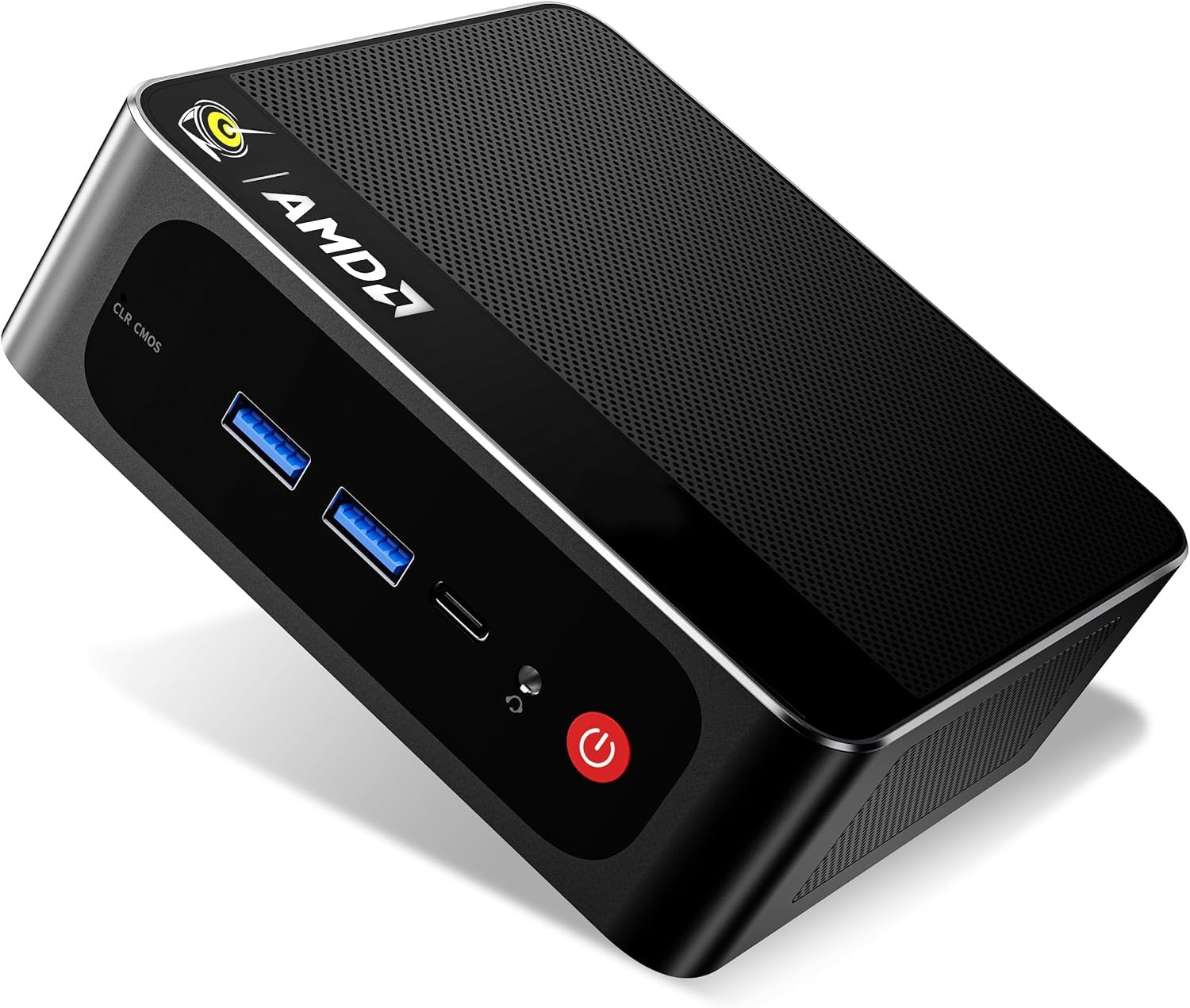
Imagen 6.1: Másview of the Beelink SER5 PRO 5500U Mini PC's core components and features.
| Característica | Detalle |
|---|---|
| Marca | Enlace de abeja |
| Nombre del modelo | SER5 5500U |
| Sistema operativo | Windows 11 Pro |
| Modelo de CPU | AMD Ryzen 5 5500U (6 núcleos/12 hilos) |
| Velocidad de la CPU | 2.1 GHz (Base) - 4.0 GHz (Max Boost) |
| Coprocesador gráfico | AMD Radeon Graphics 7CUs 1800MHz |
| Memoria RAM instalada | 16 GB DDR4 (Dual-channel) |
| Tamaño máximo de la memoria RAM | 64 GB |
| Velocidad de la memoria | 3200 MHz |
| Descripción del disco duro | SSD M.2 NVMe de 480 GB |
| Expansión de almacenamiento | M.2 slot (up to 4TB), 2.5-inch 7mm SATA HDD slot (up to 2TB) |
| Salida de vídeo | HDMI, DisplayPort, Type-C (Data & Video) |
| Resolución máxima de pantalla | 4K a 60 Hz (3840 x 2160) |
| Tecnología de conectividad | Bluetooth 5.2, HDMI, LAN (2.5Gbps), USB, Wi-Fi 6 (802.11ax) |
| Puertos USB totales | 5 (USB 3.2 Gen2, USB 2.0, Type-C) |
| Método de enfriamiento | Admirador |
| Dimensiones | 4.96 x 4.44 x 1.65 pulgadas |
| Dispositivos compatibles | Headphone, Monitor, Projector, Speaker, Television, Keyboard, Mouse |
7. Garantía y soporte
7.1 Garantía del producto
The Beelink SER5 5500U Mini PC comes with a Garantía de 3 añosEsta garantía cubre defectos de fabricación y mal funcionamiento del hardware en condiciones normales de uso. Conserve su comprobante de compra para reclamaciones de garantía.
7.2 Atención al cliente
For technical assistance, troubleshooting, or warranty inquiries, please contact Beelink customer support. You can typically find support contact information on the official Beelink websitio o a través del minorista donde compró el producto.
If purchased through Amazon, you can reach out to the seller "THYPC-Beelink" by logging into your Amazon account, navigating to "Your Orders," and selecting "Ask Product Question" for the Beelink SER5 5500U Mini PC.
Beelink offers:
- 7D + 24H Customer Service
- 1-Year New Replacement
- 2-Year Free Repair
- Soporte técnico de por vida


