
1. Introducción
The QCY MeloBuds A30 are advanced wireless earbuds designed to deliver a superior audio experience. They feature active noise cancellation, high-resolution audio support, and a robust wireless connection, making them suitable for various listening environments.
2. Producto terminadoview
Familiarize yourself with the components of your QCY MeloBuds A30 earbuds.

Image: QCY MeloBuds A30 earbuds and charging case.
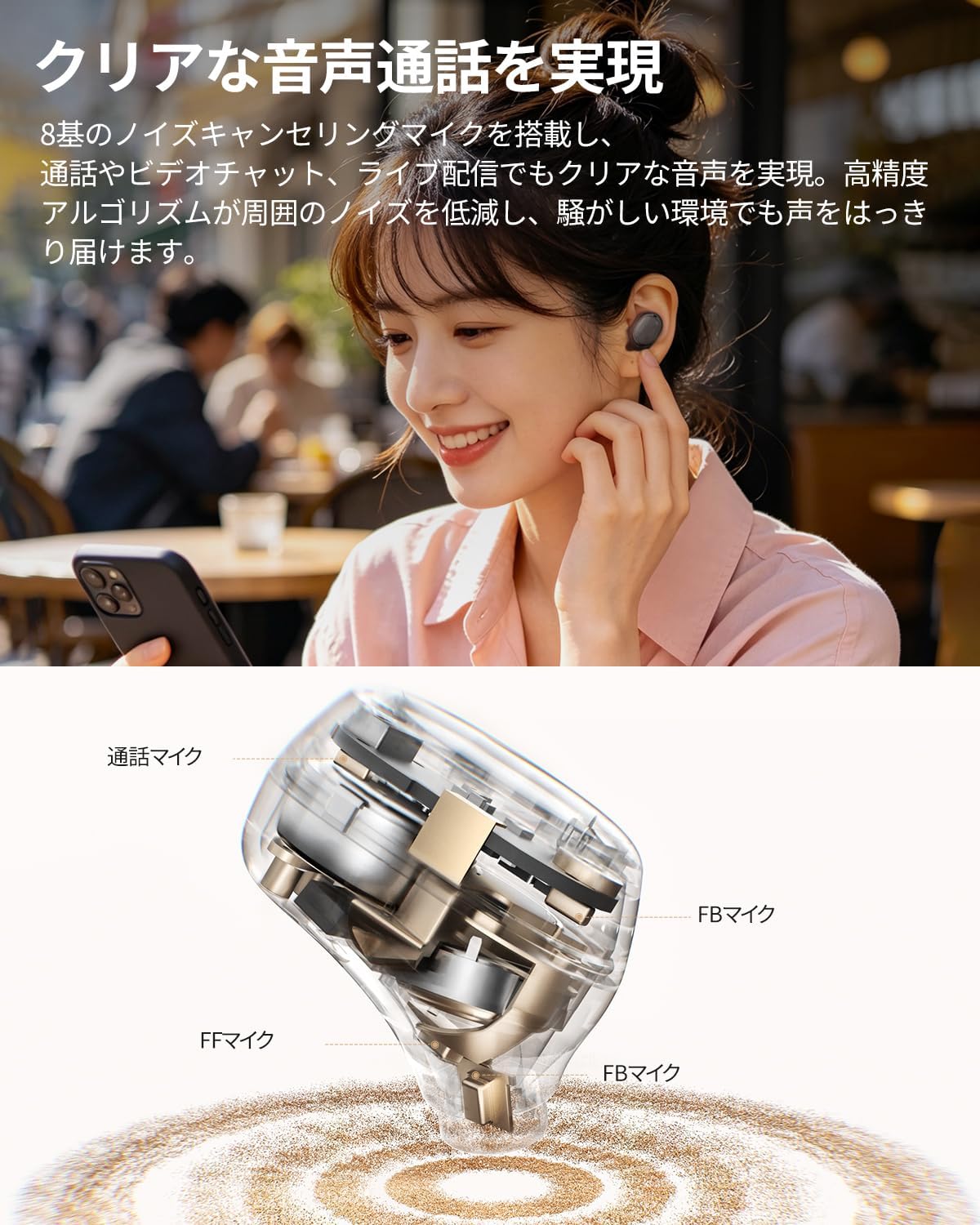
Imagen: Detalle interno view of a QCY MeloBuds A30 earbud, highlighting microphone components.
3. Configuración
3.1 Emparejamiento inicial
- Abre el estuche de carga. Los auriculares entrarán automáticamente en modo de emparejamiento.
- En su dispositivo (teléfono inteligente, tableta, PC), habilite Bluetooth.
- Buscar "QCY MeloBuds A30" in the list of available Bluetooth devices and select it to connect.
- Una vez conectado, un mensaje de voz confirmará que el emparejamiento se realizó correctamente.
3.2 Conexión multidispositivo
The MeloBuds A30 supports simultaneous connection with up to 3 devices. To switch between connected devices, simply play audio on the desired device. The earbuds will automatically switch to the active audio source.

Image: Man playing game with phone and QCY MeloBuds A30 earbuds, illustrating multi-device connection.
3.3 Instalación de la aplicación QCY
For full customization and advanced features, download the dedicated QCY app from your device's app store. The app allows for EQ adjustments, firmware updates, and personalized control settings.

Image: Smartphone displaying the QCY app interface for MeloBuds A30, showing various customization options and settings.
4. Instrucciones de funcionamiento
4.1 Controles táctiles
The MeloBuds A30 feature intuitive touch controls on each earbud. You can customize these controls via the QCY app.
- Reproducir/Pausa: Toque dos veces cualquiera de los auriculares.
- Pista siguiente: Toca tres veces el auricular derecho.
- Pista anterior: Toca tres veces el auricular izquierdo.
- Responder/Finalizar llamada: Toque dos veces cualquiera de los auriculares.
- Rechazar llamada: Mantenga presionado cualquiera de los auriculares durante 1.5 segundos.
- Asistente de voz: Toca tres veces el auricular izquierdo.
- ANC Mode Cycle: Press and hold the right earbud for 1.5 seconds to cycle through ANC ON → ANC OFF → Transparency Mode.

Image: Diagram illustrating touch controls for QCY MeloBuds A30 earbuds.
4.2 Cancelación activa de ruido (ANC)
The MeloBuds A30 feature up to 60dB hybrid ANC and 5.5kHz wideband noise cancellation. Adaptive ANC automatically adjusts to your environment and wearing conditions. AI scene-adaptive ANC and wind noise-adaptive ANC provide optimal noise cancellation, ensuring a clear listening experience even in windy conditions.

Image: Person wearing QCY MeloBuds A30 earbuds, demonstrating active noise cancellation.

Image: Diagram illustrating the effect of Active Noise Cancellation (ANC) on and off with sound waves around a person wearing QCY MeloBuds A30.
4.3 Funciones de llamada
Equipped with 8 noise-cancelling microphones and a high-precision algorithm, the MeloBuds A30 effectively reduce ambient noise during calls, video chats, and live streaming. This ensures your voice is clearly transmitted even in noisy environments.

Image: Woman talking on phone while wearing QCY MeloBuds A30 earbuds in an outdoor setting.
5. Carga
The earbuds provide approximately 11 hours of continuous playback on a single charge (ANC off), and up to 50 hours with the charging case. With ANC on, the earbuds offer about 6 hours of playback, extending to 27 hours with the charging case.

Image: QCY MeloBuds A30 earbuds and charging case, illustrating battery life with and without ANC.
Para cargar los auriculares, vuelva a colocarlos en el estuche de carga. Para cargar el estuche, conéctelo a una fuente de alimentación mediante el cable USB-C incluido.
6. Mantenimiento
- Limpie periódicamente los auriculares y el estuche de carga con un paño suave y seco.
- Evite el uso de materiales abrasivos o productos químicos agresivos.
- Ensure the charging contacts on both the earbuds and case are clean and dry to prevent charging issues.
- Guarde los auriculares en su estuche de carga cuando no los utilice para protegerlos del polvo y otros daños.
6.1 Resistencia al agua
The MeloBuds A30 are IPX5 water resistant, protecting them from sweat and water splashes. This makes them suitable for workouts and commuting. However, they are not designed for submersion in water.

Image: QCY MeloBuds A30 earbuds with water droplets, demonstrating IPX5 water resistance.
7. Solución de problemas
- Los auriculares no se emparejan: Asegúrate de que ambos auriculares estén en el estuche de carga y abre la tapa para activar el modo de emparejamiento. Revisa la configuración de Bluetooth de tu dispositivo e intenta volver a conectarlo.
- No hay sonido en un auricular: Vuelve a colocar ambos auriculares en el estuche de carga, cierra la tapa, espera unos segundos y vuelve a abrirla. Esto suele resincronizar los auriculares.
- Problemas de carga: Clean the charging contacts on both earbuds and the case. Ensure the charging cable is securely connected and the power source is working.
- Mala calidad de llamada: Ensure the microphones are not obstructed. Try adjusting the earbuds' position in your ears.
- Problemas de conexión de la aplicación: Ensure Bluetooth is enabled and the earbuds are connected to your device. Restart the QCY app or reinstall it if problems persist.
8. Especificaciones
| Marca | QCY |
| Nombre del modelo | MeloBuds A30 |
| Número de modelo | BH26HT22A |
| Color | Negro |
| Tecnología de conectividad | Inalámbrico |
| Versión de Bluetooth | 6.0 |
| Alcance de Bluetooth | 10 metros |
| Control de ruido | Active Noise Cancellation, Adaptive Noise Cancellation, Environmental Noise Cancellation |
| Códecs de audio | LDAC, audio inalámbrico de alta resolución |
| Micrófono | 8-mic system with AI Call Noise Cancelling |
| Tiempo de reproducción (auriculares) | Approx. 11 hours (ANC off), Approx. 6 hours (ANC on) |
| Tiempo total de reproducción (con estuche) | Hasta 50 horas (ANC desactivado), hasta 27 horas (ANC activado) |
| Resistencia al agua | IPX5 |
| Método de control | Control táctil |
| Dispositivos compatibles | Windows/Macbook Air/Pro PCs, iPads, iPhones, Android devices (Galaxy, Huawei, Xiaomi, OPPO, Xperia, Nexus, ASUS, Fujitsu, etc.) |
9. Garantía y soporte
QCY products come with a standard manufacturer's warranty. For detailed warranty information, please refer to the warranty card included in your product packaging or visit the official QCY websitio.
For technical support, troubleshooting assistance, or any product-related inquiries, please contact QCY customer service through their official websitio o la información de contacto proporcionada en la documentación de su producto.