
1. Introducción
Thank you for choosing the Thomson 24HQG3S15C Smart TV. This manual provides essential information for the safe and efficient operation of your new television. Please read these instructions thoroughly before using the product and retain them for future reference.
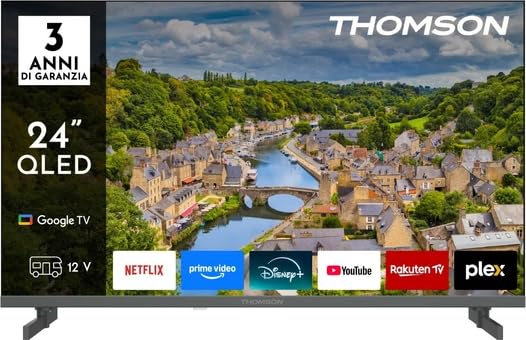
Figura 1: Frente view of the Thomson 24HQG3S15C Smart TV.
2. Información de seguridad
Observe siempre las siguientes precauciones de seguridad para evitar descargas eléctricas, incendios o daños al televisor.
- Fuente de energía: Asegúrese de que la fuente de alimentación voltage matches the rating label on the TV.
- Ventilación: No bloquee las aberturas de ventilación. Deje suficiente espacio alrededor del televisor para una ventilación adecuada.
- Agua y humedad: No exponga el televisor a la lluvia ni a la humedad. No coloque objetos con líquidos, como jarrones, sobre él.
- Limpieza: Desenchufe el televisor antes de limpiarlo. Utilice un paño suave y seco. No utilice limpiadores líquidos ni en aerosol.
- Colocación: Coloque el televisor sobre una superficie estable y nivelada. Evite exponerlo a la luz solar directa o cerca de fuentes de calor.
- Niños: Supervise a los niños para asegurarse de que no se suban ni jueguen con el televisor.
- Servicio: No intente reparar el televisor usted mismo. Deje todas las reparaciones a personal técnico cualificado.
3. Contenido del paquete
Carefully unpack your Thomson 24HQG3S15C Smart TV and check that all the following items are included:
- Thomson 24HQG3S15C Smart TV
- Mando a distancia
- Cable de alimentación
- Manual de usuario (este documento)
- TV Stand (if applicable, check packaging)
- Tornillos para soporte de TV (si corresponde)
Si falta algún artículo o está dañado, comuníquese con su distribuidor inmediatamente.
4. Configuración
4.1 Fijación del soporte (opcional)
If you are not wall-mounting the TV, you will need to attach the included stand. Follow these steps:
- Coloque el televisor boca abajo sobre una superficie suave y limpia para evitar dañar la pantalla.
- Alinee el soporte con los orificios de montaje en la parte inferior del televisor.
- Fije el soporte con los tornillos incluidos. Asegúrese de que estén bien apretados.
4.2 Montaje en pared (opcional)
The TV supports VESA standard mounting (100 x 100 mm). Use a compatible wall-mount bracket (not included) and follow the instructions provided with the bracket. Ensure the wall can support the weight of the TV.
Note: Remove the stand before wall mounting.
4.3 Conexión de dispositivos externos
Refer to the following connection options:
- HDMI (x3): Connect Blu-ray players, game consoles, or set-top boxes. The TV supports HDMI 1.4 and Audio Return Channel (ARC) on one port.
- USB 2.0 (x2): Conecte dispositivos de almacenamiento USB para reproducción multimedia.
- Entrada de antena/cable: Connect an antenna for DVB-T/T2 or a cable for DVB-C.
- Entrada de satélite: Connect a satellite dish for DVB-S/S2.
- Ethernet (LAN): Conecte un cable Ethernet para una conexión a Internet por cable.
- Ranura CI+: Insert a Common Interface Plus module for encrypted channels.
4.4 Encendido inicial y configuración inicial
- Conecte el cable de alimentación al televisor y luego a una toma de corriente.
- Presione el botón de encendido en el control remoto o en el televisor.
- The TV will guide you through the initial setup process, including language selection, network connection (Wi-Fi or Ethernet), channel scanning, and Google TV account setup.
5. Operación de su Smart TV
5.1 control remoto sobreview
The included remote control allows you to access all functions of your TV. Familiarize yourself with the buttons for power, volume, channel, input selection, and Smart TV navigation.
Note: Insert two AAA batteries (not included) into the remote control, observing polarity.
5.2 Funciones básicas del televisor
- Encendido/apagado: Presione el Fuerza botón.
- Control de volumen: Utilice el VOLUMEN +/- botones.
- Selección de canal: Utilice el CH +/- botones o teclado numérico.
- Fuente de entrada: Presione el Fuente Botón para cambiar entre HDMI, TV, USB, etc.
- Menú: Accede al menú de configuración del televisor.
5.3 Funciones de Smart TV (Google TV)
Your Thomson 24HQG3S15C runs on Google TV, offering a personalized entertainment experience.
- Pantalla de inicio: Access recommended content, installed apps (e.g., Disney+), and settings.
- Control de voz: Use the Google Assistant feature (if available on your remote) to search for content, control smart home devices, and more.
- Tienda de aplicaciones: Descargue aplicaciones adicionales de Google Play Store.
- Televisión por cable HBB: Access interactive services from broadcasters (if supported in your region).
- Modos inteligentes: Select from various picture and sound modes like Energy Saving, Game, Movie, Sport, Standard, and Vivid.
6. Conectividad
El televisor ofrece varias opciones de conectividad para una integración perfecta con su red doméstica y sus dispositivos.
- Wifi: Built-in Wi-Fi allows wireless connection to your home network for internet access and streaming.
- Bluetooth 5.1: Conecte auriculares inalámbricos, barras de sonido u otros dispositivos habilitados para Bluetooth.
- LAN Ethernet: Proporciona una conexión a Internet por cable estable.
- HDMI (x3): High-Definition Multimedia Interface for digital audio and video. One port supports ARC (Audio Return Channel) for simplified audio connections to compatible sound systems.
- USB 2.0 (x2): Universal Serial Bus ports for connecting external storage devices to play media files (3GP, AVI, FLV, MKV, MOV, MP4, MPG, WEBM for video; AAC, FLAC, MP3, WAV for audio; BMP, GIF, JPG, PNG for images).
- Digital Tuners: Supports DVB-C, DVB-S, DVB-S2, DVB-T, DVB-T2 for various digital broadcast standards.
7. Mantenimiento
7.1 Limpieza del televisor
- Pantalla: Limpie suavemente la pantalla con un paño suave que no deje pelusa. Para manchas difíciles, limpie ligeramenteampEnjuague el paño con agua o un limpiador de pantallas especializado (nunca rocíe directamente sobre la pantalla).
- Gabinete: Utilice un paño suave y seco para limpiar el mueble del televisor.
- NO utilizar: Abrasive cleaners, waxes, or solvents like alcohol, benzene, or thinners, as these can damage the TV's finish or screen.
- Desenchufe siempre el televisor antes de limpiarlo.
7.2 Actualizaciones de software
Your Smart TV may receive software updates to improve performance and add new features. Ensure your TV is connected to the internet. Updates can usually be checked and installed via the TV's settings menu (System > About > System update).
8. Solución de problemas
Si tiene problemas con su televisor, consulte los siguientes problemas y soluciones comunes:
| Problema | Posible causa / solución |
|---|---|
| Sin poder |
|
| No hay imagen, pero hay sonido |
|
| No hay sonido, pero hay imagen |
|
| El control remoto no funciona |
|
| No se puede conectar al wifi |
|
Si el problema persiste, póngase en contacto con el servicio de atención al cliente.
9. Especificaciones
| Característica | Detalle |
|---|---|
| Modelo | Thomson 24HQG3S15C |
| Tamaño de la pantalla | 24 pulgadas (61 cm en diagonal) |
| Resolución | 1366 x 768 píxeles (HD) |
| Tecnología de visualización | LED Q |
| Frecuencia de actualización | 60 Hz |
| Plataforma de televisión inteligente | Google TV |
| Sintonizador digital | DVB-C, DVB-S, DVB-S2, DVB-T, DVB-T2 |
| Wifi | Sí |
| Bluetooth | Versión 5.1 |
| Red local Ethernet | Sí |
| Puertos HDMI | 3 (HDMI 1.4, one with ARC) |
| Puertos USB 2.0 | 2 |
| Salida de audio (RMS) | 6 W (2 altavoces) |
| Compatibilidad con HDR | HDR10 |
| Montaje VESA | 100 x 100 mm |
| Dimensiones (con soporte) | 53.5 cm (ancho) x 15.1 cm (fondo) x 35.3 cm (alto) |
| Peso (con soporte) | 2.4 kilogramos |
| Clase de eficiencia energética (SDR) | E |
| Consumo de energía (SDR) | 17 kWh/1000 horas |
10. Garantía y soporte
For warranty information, please refer to the warranty card included in your product packaging or contact your retailer. Thomson provides customer support for technical assistance and service inquiries.
Please visit the official Thomson website or refer to your purchase documentation for contact details and further support resources.