Introducción
This manual provides essential instructions for the safe and efficient operation of your Sharper Image SO226 Compact CD Stereo with AM/FM Digital Tuner. Please read this manual thoroughly before using the unit and retain it for future reference.
Instrucciones de seguridad importantes
- Lea todas las instrucciones antes de operar el aparato.
- Conserve este manual para futuras consultas.
- No utilice este aparato cerca del agua.
- Limpiar únicamente con un paño seco.
- No obstruya las aberturas de ventilación. Instale el producto según las instrucciones del fabricante.
- No lo instale cerca de fuentes de calor como radiadores, rejillas de calefacción, estufas u otros aparatos (incluidos ampificadores) que producen calor.
- Proteja el cable de alimentación para que no sea pisado ni aplastado, especialmente en los enchufes, receptáculos y en el punto donde sale del aparato.
- Utilice únicamente accesorios especificados por el fabricante.
- Refiera todo el servicio a personal de servicio calificado. Se requiere servicio cuando el aparato ha sido dañado de alguna manera.
Contenido del paquete
Verifique que todos los artículos estén presentes al desembalar:
- Sharper Image SO226 Compact CD Stereo Unit
- AC Power Adapter (if applicable, check packaging)
- Manual de usuario (este documento)
Producto terminadoview
Familiarize yourself with the components and controls of your SO226 unit.
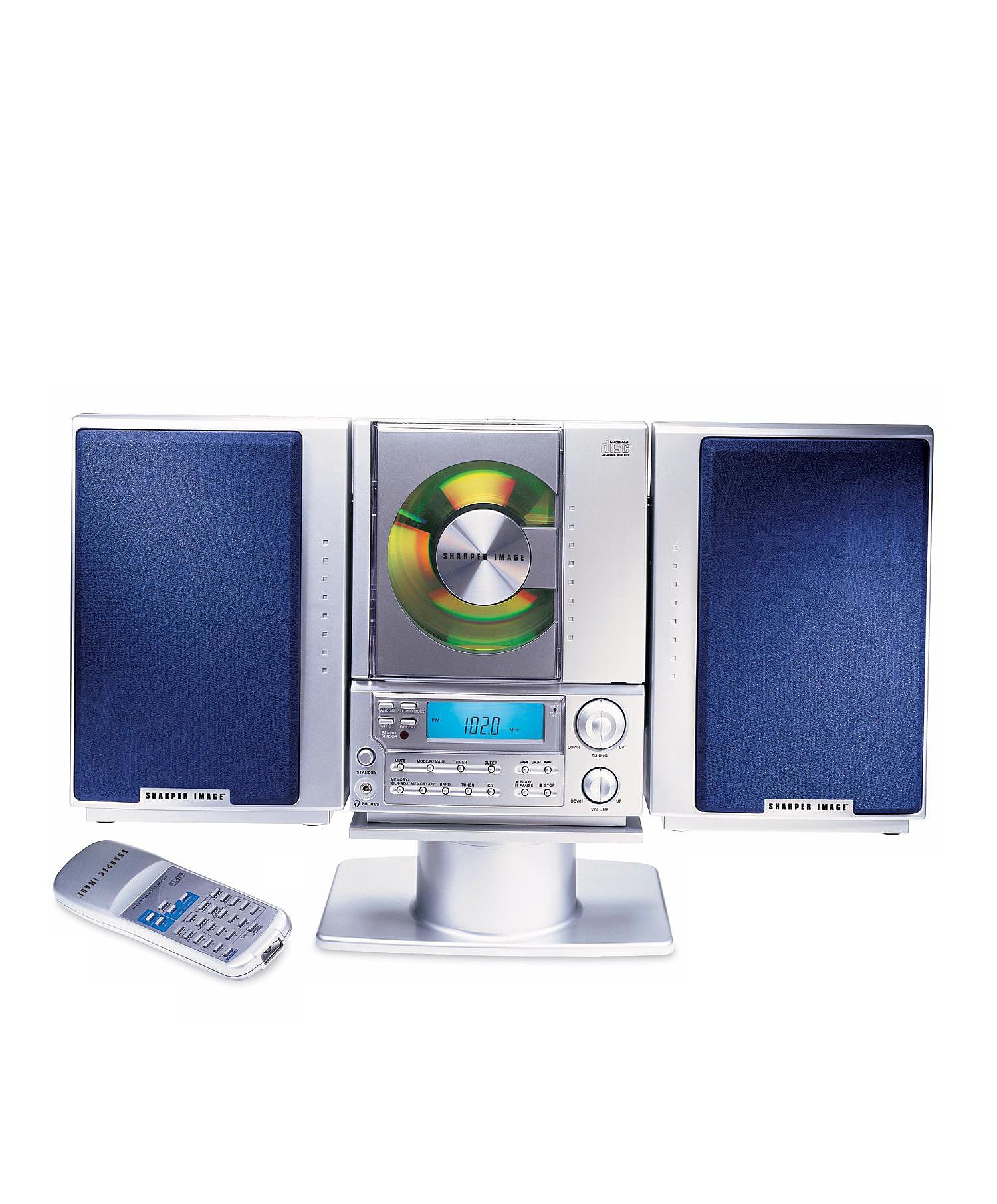
This image displays the front panel of the Sharper Image SO226 Compact CD Stereo. Visible features include the top-loading CD compartment, the digital display for radio frequencies and CD track information, and various control buttons for power, volume, CD playback, and radio tuning.
Panel de control (diseño típico)
- Botón de encendido: Enciende o apaga la unidad.
- Botón FUNCIÓN/MODO: Switches between CD, AM, and FM modes.
- Botones de VOLUMEN +/-: Ajusta el nivel de salida de audio.
- Botón REPRODUCIR / PAUSA: Inicia o pausa la reproducción del CD.
- Botón Detener: Detiene la reproducción del CD.
- Botones SALTAR/BUSCAR (◀◀ / ▶▶): Skips tracks on CD or tunes radio frequencies.
- Botón PROGRAMA: Se utiliza para programar pistas de CD.
- Botón de dormir: Activa la función de temporizador de apagado.
- Botones TUNING +/-: Ajusta con precisión las frecuencias de radio.
- Botones PRESET: Almacena y recupera estaciones de radio favoritas.
- Pantalla LCD: Muestra el modo actual, el número de pista, la frecuencia y el tiempo.
Configuración
Conexión de energía
- Asegúrese de que la unidad esté colocada sobre una superficie estable y plana.
- If using batteries (not included), open the battery compartment on the bottom or back of the unit and insert the required batteries, observing correct polarity.
- Alternatively, connect the AC power adapter (if supplied) to the DC IN jack on the unit and then plug the adapter into a standard wall outlet.
Configuración de la antena
- For FM reception, extend the telescopic antenna fully. Adjust its position for optimal reception.
- For AM reception, the unit has a built-in ferrite bar antenna. Rotate the entire unit for best AM reception.
Instrucciones de funcionamiento
Funcionamiento del reproductor de CD
- Presione el FUERZA para encender la unidad.
- Presione el FUNCIÓN / MODO botón repetidamente hasta que aparezca 'CD' en la pantalla.
- Abra la tapa del compartimiento del CD.
- Coloque un CD con la etiqueta hacia arriba en el compartimento.
- Close the CD compartment cover. The unit will read the CD, and the total number of tracks will be displayed.
- Presione el REPRODUCIR/PAUSA para iniciar la reproducción.
- Para pausar, presione REPRODUCIR/PAUSA de nuevo. Presiónelo una vez más para reanudar.
- Para detener la reproducción, presione el DETENER botón.
- Para saltar a la siguiente pista, presione el SKIP/SEARCH ▶▶ botón.
- Para volver al principio de la pista actual o a la pista anterior, presione el botón SKIP/SEARCH ◀◀ botón.
- Para avanzar o retroceder rápidamente dentro de una pista, mantenga presionada la tecla SKIP/SEARCH ▶▶ or ◀◀ durante la reproducción.
Operación de radio AM / FM
- Presione el FUERZA para encender la unidad.
- Presione el FUNCIÓN / MODO botón repetidamente hasta que aparezca 'AM' o 'FM' en la pantalla.
- Sintonización manual: Presione el SINTONIZACIÓN +/- Botones para ajustar la frecuencia paso a paso.
- Escaneo automático: Mantenga pulsado el SINTONIZACIÓN +/- buttons for a few seconds. The tuner will scan and stop at the next strong station.
- Almacenamiento de preajustes: Sintonice la estación deseada. Presione el botón PROGRAMA button. The preset number will flash. Use the SALTAR / BÚSQUEDA botones para seleccionar un número preestablecido, luego presione PROGRAMA De nuevo para confirmar.
- Recuperación de preajustes: En el modo de radio, presione el PROGRAMAR Botones para recorrer las estaciones almacenadas.
Función Sleep Timer
The unit features a convenient sleep timer that automatically turns off the sound after a set period.
- While the unit is playing (CD or Radio), press the DORMIR botón.
- Cada pulsación del DORMIR button will cycle through available sleep times (e.g., 10, 20, 30, 60, 90 minutes, or OFF).
- Select your desired sleep duration. The unit will automatically power off after the selected time has elapsed.
Mantenimiento
- Limpieza de la unidad: Limpie el exterior de la unidad con un paño suave y seco. No utilice limpiadores abrasivos ni disolventes.
- Cuidado del CD: Sujete los CD por los bordes. Manténgalos limpios y sin rayones. Si un CD está sucio, límpielo suavemente con un paño suave y sin pelusa desde el centro hacia afuera.
- Almacenamiento: When not in use for extended periods, disconnect the power adapter and remove batteries. Store the unit in a cool, dry place.
Solución de problemas
Si encuentra problemas, consulte los siguientes problemas y soluciones comunes:
- Sin energía:
- Ensure the AC power adapter is securely plugged into both the unit and a working wall outlet.
- If using batteries, check if they are inserted correctly and are not depleted. - Sin sonido:
- Check the volume level and increase it if necessary.
- Ensure the correct function mode (CD/AM/FM) is selected. - El CD no se reproduce o salta:
- Ensure the CD is inserted correctly with the label side up.
- Clean the CD for any dirt or scratches.
- Try a different CD to rule out a faulty disc.
- Ensure the CD compartment cover is fully closed. - Mala recepción de radio:
- For FM, fully extend and adjust the telescopic antenna.
- For AM, rotate the entire unit for better signal.
- Move the unit away from other electronic devices that may cause interference. - Botones que no responden:
- Try turning the unit off and on again.
- Disconnect power for a few minutes, then reconnect.
Presupuesto
| Número de modelo | SO226 |
| Dimensiones del producto (L x An x Al) | 1.3 x 19 x 5.5 pulgadas (3.3 x 48.3 x 14 cm) |
| Peso del artículo | 5 libras (2.27 kg) |
| Tipo de altavoz | Estéreo |
| Fuente de poder | Battery Powered (AC adapter typically included or sold separately) |
| Color (as per specific variant) | Azul |
Garantía y soporte
Para obtener información sobre la garantía y atención al cliente, consulte la documentación incluida con su compra o visite el sitio web oficial de Sharper Image. webSitio. Conserve su comprobante de compra para reclamaciones de garantía.