1. Introducción
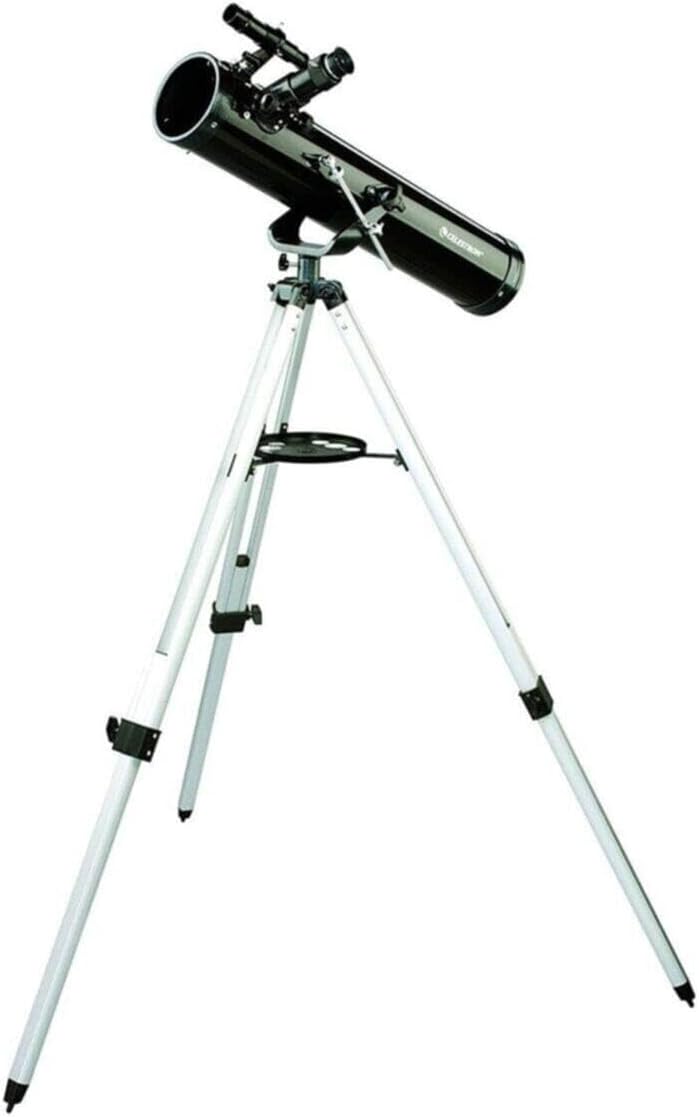
The Celestron PowerSeeker 76AZ telescope is designed for aspiring astronomers, offering a combination of quality and features for observing celestial objects. This Newtonian reflector telescope features a 76mm aperture and a 700mm focal length, providing enhanced image brightness and clarity through its fully coated glass optical components. Its altazimuth mount is suitable for both astronomical and terrestrial viewEn.
2. ¿Qué hay en la caja?
Desembale con cuidado todos los componentes y verifique que haya recibido los siguientes artículos:
- PowerSeeker 76 Telescope Optical Tube
- Monte Altazimuth
- Trípode de aluminio con bandeja para accesorios
- Buscador 5x24
- Ocular de 20 mm (1.25")
- Ocular de 4 mm (1.25")
- 3 lentes Barlow (1.25")
3. Configuración
Assembly of your PowerSeeker 76AZ telescope is straightforward and requires no tools. Follow these steps to prepare your telescope for observation:
- Montar el trípode: Extend the legs of the aluminum tripod to a stable position. Attach the accessory tray to the tripod's center brace.
- Coloque el soporte: Secure the altazimuth mount to the top of the tripod. Ensure it is firmly tightened.
- Monte el tubo óptico: Place the telescope optical tube onto the altazimuth mount. Secure it using the provided mounting screws or clamps.
- Instalar el Finderscope: Slide the 5x24 finderscope into its bracket on the optical tube and tighten the retaining screws.
- Insertar un ocular: Insert either the 20mm or 4mm eyepiece directly into the focuser. For higher magnification, you can first insert the 3x Barlow lens into the focuser, then insert an eyepiece into the Barlow lens.
4. Operación del telescopio
Once assembled, your telescope is ready for observation. Familiarize yourself with its controls for optimal viewEn.
4.1. Alineación del buscador
The finderscope helps locate objects before viewing them through the main telescope. To align it:
- Point the main telescope at a distant, easily identifiable terrestrial object (e.g., a treetop or street sign) during daylight hours.
- Center the object in the main telescope's 20mm eyepiece.
- Look through the finderscope and adjust its alignment screws until the crosshairs are centered on the same object.
4.2. Enfoque
To achieve a clear image, rotate the focuser knob until the object appears sharp. Always start with the lowest power eyepiece (20mm) for a wider field of view, then switch to higher power (4mm) or use the Barlow lens for more detailed observation.
4.3. Using Eyepieces and Barlow Lens
- Ocular de 20 mm: Proporciona un aumento menor y un campo de visión más amplio. view, ideal for locating objects and observing larger celestial bodies like the Moon or star clusters.
- Ocular de 4 mm: Offers higher magnification for detailed views of planets or lunar features. Use after locating the object with the 20mm eyepiece.
- Lente Barlow 3x: Increases the magnification of any eyepiece by three times. Insert the Barlow into the focuser first, then insert an eyepiece into the Barlow.

4.4. Altazimuth Mount Operation
The altazimuth mount allows for simple up-and-down (altitude) and left-and-right (azimuth) movement. Loosen the tension knobs slightly to move the telescope manually, then tighten them to hold its position. The slow-motion control rod provides fine adjustments for tracking objects.

4.5. Observing the Moon
The Moon is an excellent first target. Its bright surface and numerous craters offer spectacular views even with modest magnification. Start with the 20mm eyepiece to see the entire lunar disk, then switch to the 4mm eyepiece or use the Barlow lens to explore specific craters and mountain ranges.

5. Mantenimiento
Proper care and maintenance will ensure the longevity and performance of your telescope.
5.1. Limpieza de la óptica
Dust and moisture can accumulate on the telescope's lenses and mirrors. Handle optical surfaces with extreme care.
- Polvo: Use a camel's hair brush or a can of compressed air (never blow with your mouth) to gently remove loose dust.
- Huellas dactilares/Manchas: For stubborn marks, use a specialized optical cleaning solution and lens tissue. Apply a small amount of solution to the tissue, not directly to the lens, and wipe gently in a circular motion from the center outwards.
- Never touch optical surfaces with your fingers.

5.2. Almacenamiento
When not in use, store your telescope in a dry, dust-free environment. Keep all caps on the optical tube and eyepieces to prevent dust accumulation.
6. Solución de problemas
If you encounter issues with your telescope, consult the following common problems and solutions:
- La imagen está borrosa o desenfocada:
- Adjust the focuser knob slowly until the image is sharp.
- Ensure the eyepiece is fully inserted into the focuser or Barlow lens.
- Atmospheric conditions (heat waves, turbulence) can cause blurring, especially at high magnifications. - No se pueden encontrar objetos:
- Verify that the finderscope is properly aligned with the main telescope (refer to Section 4.1).
- Start with the 20mm eyepiece for a wider field of view to locate objects, then switch to higher magnification.
- Ensure you are observing from a dark location away from light pollution. - Image is dim or faint:
- This telescope has a 76mm aperture, which is suitable for brighter objects like the Moon and planets. Faint deep-sky objects may appear dim.
- Observe from a dark-sky site to maximize light gathering.
- Avoid using excessively high magnification, as it can dim the image. - View is wobbly or unstable:
- Ensure the tripod legs are fully extended and locked, and placed on a stable, level surface.
- Keep the tripod legs as short as possible while still allowing comfortable viewEn.
- Tighten all knobs and screws on the mount and optical tube.
7. Especificaciones
| Diseño óptico | Reflector Newtoniano |
| Abertura | 76 mm (3 pulgadas) |
| Longitud focal | 700 milímetros |
| Relación focal | f/9.2 |
| Tipo de montaje | altacimutal |
| Finderscope | 5x24 |
| Oculares | 20mm, 4mm (1.25") |
| Lente de Barlow | 3x (1.25") |
| Trípode | Aluminum with Accessory Tray |
| Dimensiones (montado) | 29 x 10 x 9 pulgadas (aproximadamente) |
| Peso del artículo | 13.97 libras |
8. Garantía y soporte
For technical assistance, warranty information, or customer service inquiries regarding your Celestron PowerSeeker 76AZ Telescope, please contact Celestron customer support directly. Refer to the official Celestron websitio o embalaje del producto para obtener los detalles de contacto y los términos de garantía más actualizados.


