1. Introducción
The Buffalo DriveStation HD-HB250U2 is an external hard drive designed for reliable data storage and backup. It offers a 250 GB capacity, allowing users to store large files, digital images, and documents without consuming space on a computer's main drive. This device features a fanless design for quiet operation and a heat sink chassis to maintain optimal internal temperatures. Its versatile design supports both vertical and horizontal placement.
This manual provides instructions for setting up, operating, and maintaining your DriveStation HD-HB250U2.
2. ¿Qué hay en la caja?
Verifique que todos los artículos estén presentes en el paquete:
- Buffalo DriveStation HD-HB250U2 External Hard Drive
- Cable de alimentación
- Cable USB
- Guía de configuración rápida
- Declaración de garantía
3. Configuración
The DriveStation HD-HB250U2 is designed for easy installation and is pre-formatted for immediate use.
-
Colocación: Position the DriveStation vertically or horizontally on a stable surface. The unique chassis design allows for flexible placement to conserve desktop space.
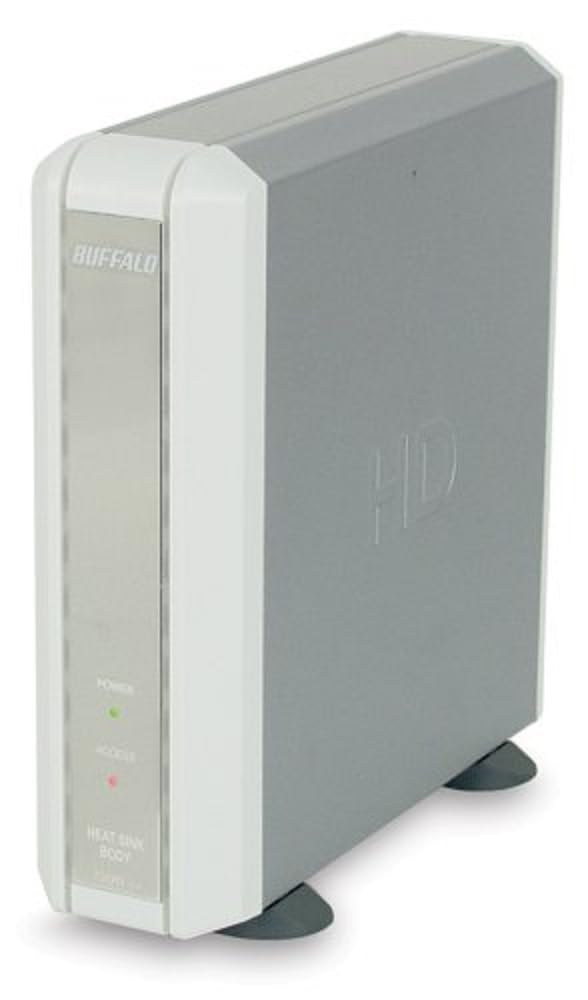
Image 1: Buffalo DriveStation HD-HB250U2. This image displays the Buffalo DriveStation HD-HB250U2 external hard drive in a vertical orientation. The front panel features the 'BUFFALO' logo, a green 'POWER' indicator light, and a red 'ACCESS' indicator light. The device has a sleek, grey and white design, with small black feet for stability.
- Conecte la electricidad: Connect the power cord to the DriveStation and then plug it into an electrical outlet.
- Conectar a la computadora: Use the provided USB cable to connect the DriveStation to an available USB port on your computer. The DriveStation supports both USB 2.0 and USB 1.1 interfaces.
- Configuración automática: For most operating systems (Windows 2000/XP/Vista/7/8/10, macOS), the DriveStation will be automatically detected and configured. No driver installation is typically required, except for older operating systems like Windows 98/98SE.
4. Operating the DriveStation
Once connected, the DriveStation is ready for use as an external storage device.
- Encendido automático: The DriveStation features an auto power-on function. It will automatically power on or off in conjunction with your attached computer's power state.
- Transferencia de datos: Puedes arrastrar y soltar files to and from the DriveStation, or use it as a target for backup software.
- Software de respaldo: The included backup utility allows you to customize backup scheduling for data protection. Refer to the Quick Setup Guide for instructions on using the backup software.
- Apagado para ahorro de energía: Utilize the power-saving shutdown feature to schedule when the DriveStation powers off, helping to conserve energy.
5. Mantenimiento
The DriveStation HD-HB250U2 is designed for minimal maintenance.
- Enfriamiento: The fanless design ensures silent operation, while the integrated heat sink chassis effectively cools internal components, preventing overheating. Ensure adequate airflow around the device.
- Limpieza: Utilice un paño suave y seco para limpiar el exterior del dispositivo. No utilice limpiadores líquidos ni disolventes.
- Actualizaciones de firmware: Periodically check the official Buffalo websitio para obtener actualizaciones de firmware disponibles para su modelo para garantizar un rendimiento y una compatibilidad óptimos.
6. Solución de problemas
If you encounter issues with your DriveStation, consider the following:
-
Dispositivo no detectado:
- Ensure the power cord is securely connected and the device is powered on.
- Verify the USB cable is firmly connected to both the DriveStation and your computer.
- Intente conectarse a un puerto USB diferente en su computadora.
- Reinicie su computadora.
-
Rendimiento lento:
- Ensure you are using a USB 2.0 port for optimal transfer speeds.
- Close any unnecessary applications running on your computer.
-
El indicador de encendido no está encendido:
- Verifique la conexión del cable de alimentación y la toma de corriente eléctrica.
- Ensure your computer is powered on if using the auto power-on feature.
Para obtener más ayuda, consulte la información de soporte en la Sección 8.
7. Especificaciones
| Característica | Detalle |
|---|---|
| Número de modelo | HD-HB250U2 |
| Marca | BÚFALO |
| Capacidad de almacenamiento digital | 250 GB |
| Velocidad de rotación del disco duro | 7200 RPM |
| Interfaz de hardware | USB 2.0, USB 1.1 |
| Dispositivos compatibles | Computadoras de escritorio |
| Características especiales | Compact, Fanless Design, Heat Sink Chassis, Auto Power-On, Power-Saving Shutdown |
| Color | Black (Note: Product image shows grey/white casing, but specification lists black) |
| Dimensiones (aprox.) | 34.04 x 22.35 x 12.19 cm (Dimensiones del paquete) |
| Peso (aprox.) | 2.06 kg (peso del paquete) |
8. Garantía y soporte
Your Buffalo DriveStation HD-HB250U2 is backed by a limited 1-year warranty.
For technical assistance, Buffalo offers toll-free 24/7 technical support. Please refer to the warranty statement included in your product package for detailed terms and contact information.
You can also visit the official Buffalo website for product registration, driver downloads, and frequently asked questions.


