1. Introducción
This manual provides detailed instructions for the installation, operation, and maintenance of your UNIVERSAL REMOTE MRF-250 RF Base Station Receiver. The MRF-250 is designed to extend the range and functionality of compatible Universal Remote Control systems, such as the MX-800RFS, by converting radio frequency (RF) signals from your remote into infrared (IR) commands for your audio/video components.
Please read this manual thoroughly before setting up and operating the device to ensure proper functionality and to maximize your home entertainment experience.
2. Producto terminadoview
The MRF-250 RF Base Station Receiver acts as a central hub for your Universal Remote Control system, allowing you to control components that are out of sight, such as those located in cabinets or other rooms. Key features include:
- Addressable RF Base Station: Capable of receiving RF signals and converting them to IR commands.
- Emisores de infrarrojos: Connects to multiple IR emitters to control various components.
- IR Routing: Directs IR signals to specific components.
- Rango de RF extendido: Expands the RF control range up to 100 feet.
- Soporte de montaje: Includes a bracket for flexible installation options.
- IR Flasher Port: Features a 2.5 Mono Mini Jack for IR flasher connection.

Figura 1: Frente view of the UNIVERSAL REMOTE MRF-250 RF Base Station Receiver. This image displays the top-down perspective of the device, highlighting the 'UNIVERSAL remote control' logo, 'MRF-250 RF BASE STATION' text, and the 'POWER' and 'STATUS' indicators on the front panel.
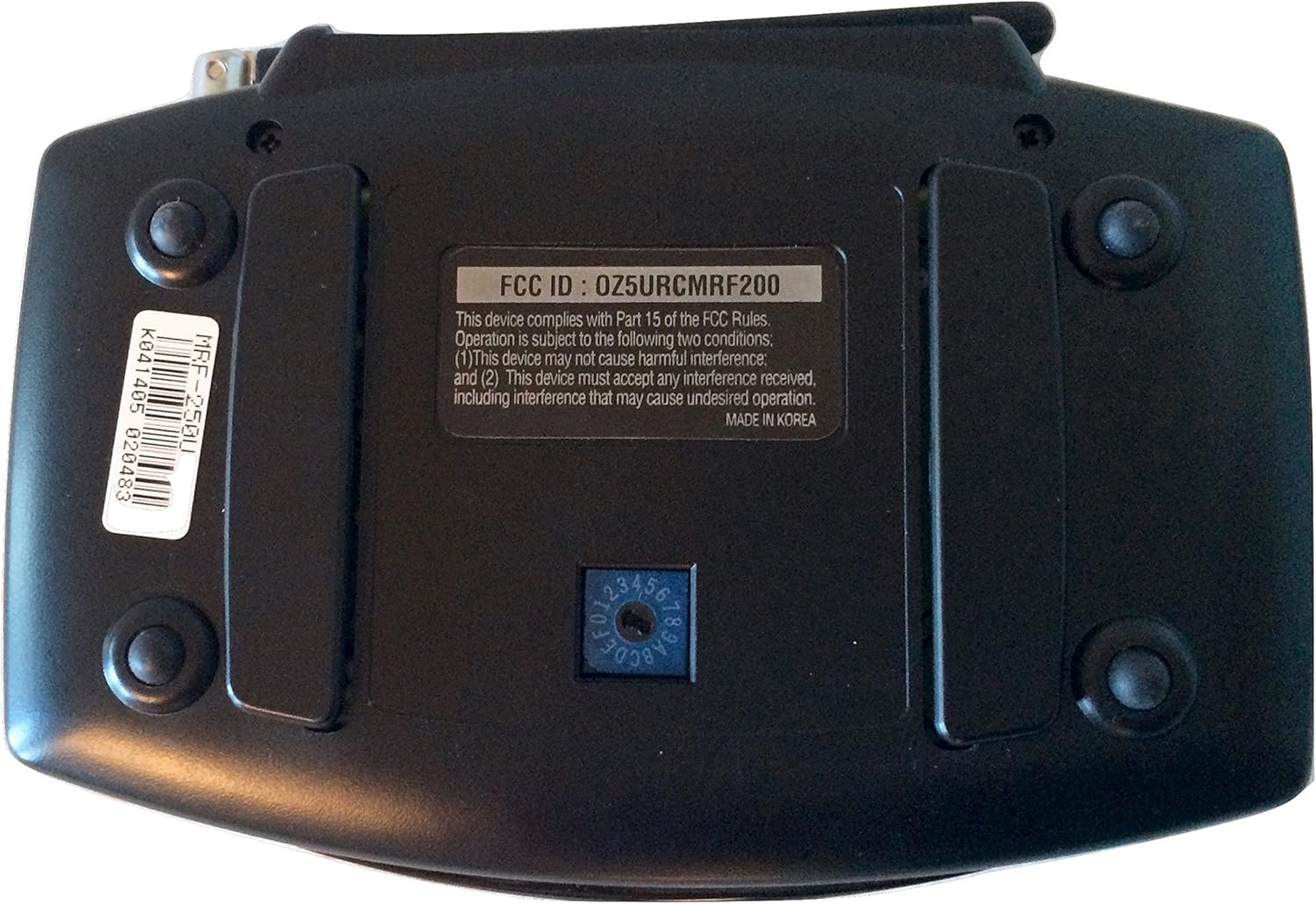
Figura 2: Abajo view of the UNIVERSAL REMOTE MRF-250 RF Base Station Receiver. This image shows the underside of the unit, including the FCC ID (OZ5URCMRF200), regulatory text, 'MADE IN KOREA' label, and a dial for settings, along with rubber feet and a product label.

Figura 3: The UNIVERSAL REMOTE MRF-250 RF Base Station Receiver shown with its accompanying AC power adapter. This image illustrates the complete package, including the power supply required for the receiver's operation.
3. Configuración
Follow these steps to set up your MRF-250 RF Base Station Receiver:
- Colocación: Position the MRF-250 in a central location within the area where you intend to use your remote control. Ensure it is not obstructed by large metal objects or other electronic devices that could interfere with RF signals. The included mounting bracket can be used for discreet installation.
- Conexión de energía: Connect the provided AC adapter to the MRF-250's power input and then plug the adapter into a standard electrical outlet. The 'POWER' indicator on the front panel should illuminate.
- IR Emitter Connection: Connect the IR emitters (sold separately or included with your remote system) to the IR output ports on the back of the MRF-250. Each emitter should be carefully placed over the IR sensor of the component you wish to control.
- IR Flasher Connection (Optional): If using an IR flasher, connect it to the 2.5 Mono Mini Jack port.
- Emparejamiento de control remoto: Refer to your specific Universal Remote Control (e.g., MX-800RFS) manual for instructions on how to pair it with the MRF-250 RF Base Station. This typically involves setting the remote to communicate via RF with the base station.
- Pruebas: Once all connections are made and your remote is paired, test the system by attempting to control your components. Ensure the 'STATUS' indicator on the MRF-250 responds to remote commands.
4. Instrucciones de funcionamiento
The MRF-250 operates by receiving radio frequency (RF) signals from your compatible Universal Remote Control and converting them into infrared (IR) signals. These IR signals are then transmitted via connected IR emitters to your audio/video components.
- Comunicación RF: When you press a button on your paired Universal Remote Control, it sends an RF signal to the MRF-250.
- Conversión de señal: The MRF-250 receives the RF signal, decodes it, and converts it into the appropriate IR command for the target component.
- IR Transmission: The IR command is then sent through the connected IR emitters to the IR sensor of your device (e.g., TV, DVD player, cable box).
- Indicador de estado: The 'STATUS' light on the MRF-250 will typically flash or change color to indicate that it is receiving and processing commands.
Ensure your remote control is configured to communicate with the MRF-250 via RF for seamless operation.
5. Mantenimiento
To ensure the longevity and optimal performance of your MRF-250 RF Base Station Receiver, follow these simple maintenance guidelines:
- Limpieza: Gently wipe the exterior of the unit with a soft, dry cloth. Avoid using liquid cleaners, solvents, or abrasive materials, as these can damage the finish or internal components.
- Ventilación: Asegúrese de que la unidad tenga ventilación adecuada. No obstruya ninguna abertura de ventilación.
- Ambiente: Keep the MRF-250 in a dry environment, away from direct sunlight, excessive heat, and moisture.
- Conexiones de cable: Periodically check all cable connections (power, IR emitters) to ensure they are secure.
6. Solución de problemas
If you encounter issues with your MRF-250, refer to the following troubleshooting tips:
- Sin energía:
- Ensure the AC adapter is securely plugged into both the MRF-250 and a working electrical outlet.
- Verifique si el tomacorriente recibe energía.
- Remote Not Controlling Devices:
- Verify that your Universal Remote Control is properly paired with the MRF-250 and configured for RF communication. Consult your remote's manual.
- Check that the IR emitters are correctly positioned over the IR sensors of your components.
- Ensure there are no obstructions between the MRF-250 and your remote, or between the IR emitters and your components.
- Confirm that the components themselves are powered on and functioning correctly.
- Intermittent Control or Poor Range:
- Relocate the MRF-250 to a more open area, away from potential sources of interference such as Wi-Fi routers, cordless phones, or large metal objects.
- Ensure the MRF-250's antenna is positioned correctly.
- Check for other electronic devices that might be causing RF interference.
- Status Light Not Responding:
- Confirm the MRF-250 has power.
- Ensure your remote is sending RF signals and is within range.
If problems persist after attempting these steps, contact Universal Remote Control, Inc. support or your original vendor for further assistance.
7. Especificaciones
| Característica | Especificación |
|---|---|
| Dimensiones del producto | 10.5 x 7.13 x 2.25 pulgadas |
| Peso del artículo | 1.1 libras |
| Fabricante | Control remoto universal, Inc. |
| ASIN | B0007UOFJU |
| Número de modelo del artículo | MRF-250 |
| Fecha de primera disponibilidad | 18 de abril de 2005 |
| Marca | MANDO UNIVERSAL |
| Característica especial | Universal |
| Número máximo de dispositivos compatibles | 6 (via compatible remote) |
| Tecnología de conectividad | Wi-Fi (RF communication) |
| Número de botones | 3 (on unit, likely for basic functions/setup) |
8. Garantía y soporte
Information regarding specific warranty terms for the UNIVERSAL REMOTE MRF-250 is not provided in this manual. Please refer to the documentation that accompanied your purchase or contact your original vendor for warranty details.
Please note that the MRF-250 has been discontinued by the manufacturer. While Universal Remote Control, Inc. may still offer some support resources, availability of parts or direct technical assistance may be limited. It is recommended to consult their official website or contact their customer service for any available support options.
For technical inquiries or support, please visit the Universal Remote Control, Inc. websitio o comuníquese con su departamento de servicio al cliente.


