Introducción
This manual provides essential information for the safe and efficient operation of your NEC VT37 1500-Lumen Portable Projector. Please read these instructions thoroughly before using the projector and retain them for future reference.
Contenido del paquete
Verifique que todos los artículos enumerados a continuación estén incluidos en su paquete:
- NEC VT37 Projector
- Tapa del objetivo
- Estuche blando para transporte
- Cable de alimentación
- RGB Cable (VGA)
- Mando a distancia
- Pilas AAA (x2)
- Guía de configuración rápida
- CD-ROM (User Manual)
- Tarjeta de garantía
Información de seguridad
WARNING: To prevent electric shock, do not open the top cover. No user-serviceable parts are inside. Refer all servicing to qualified service personnel.
ADVERTENCIA: Para reducir el riesgo de incendio o descarga eléctrica, no exponga este aparato a la lluvia ni a la humedad.
CAUTION HOT: The lamp and surrounding areas become extremely hot during operation. Allow the projector to cool down for at least 60 minutes after turning off before attempting any maintenance, especially lamp reemplazo.
CAUTION: Replace with same type number lamp (LAMP TYPE: VT70LP).
Always ensure proper ventilation around the projector. Do not block ventilation openings.

Configuración
1 Colocación
Place the projector on a stable, level surface. Ensure there is adequate space around the projector for ventilation. The versatile projection distance ranges from approximately 2 feet to 24 feet.
2. Conexión de energía
- Connect the power cable to the 'AC IN' port on the rear of the projector.
- Conecte el otro extremo del cable de alimentación a una toma eléctrica con conexión a tierra.
3. Conexión de fuentes de entrada
The NEC VT37 offers multiple input options. Connect your source device (computer, DVD player, etc.) to the appropriate port on the projector's rear panel.

- COMPUTER IN (VGA): Connect a computer using the supplied RGB (VGA) cable.
- S-VIDEO EN: Connect devices with S-Video output.
- VIDEO EN: Connect devices with composite video output.
- AUDIO EN: Connect audio cables from your source device to the corresponding audio input jacks.
Funcionamiento del proyector
1. Encendido / apagado
- Presione el FUERZA button on the projector's control panel or remote control to turn on the projector. The power indicator will illuminate.
- Para apagar, presione el FUERZA button again. The projector will enter a cool-down cycle before fully shutting down.
2. Controles básicos
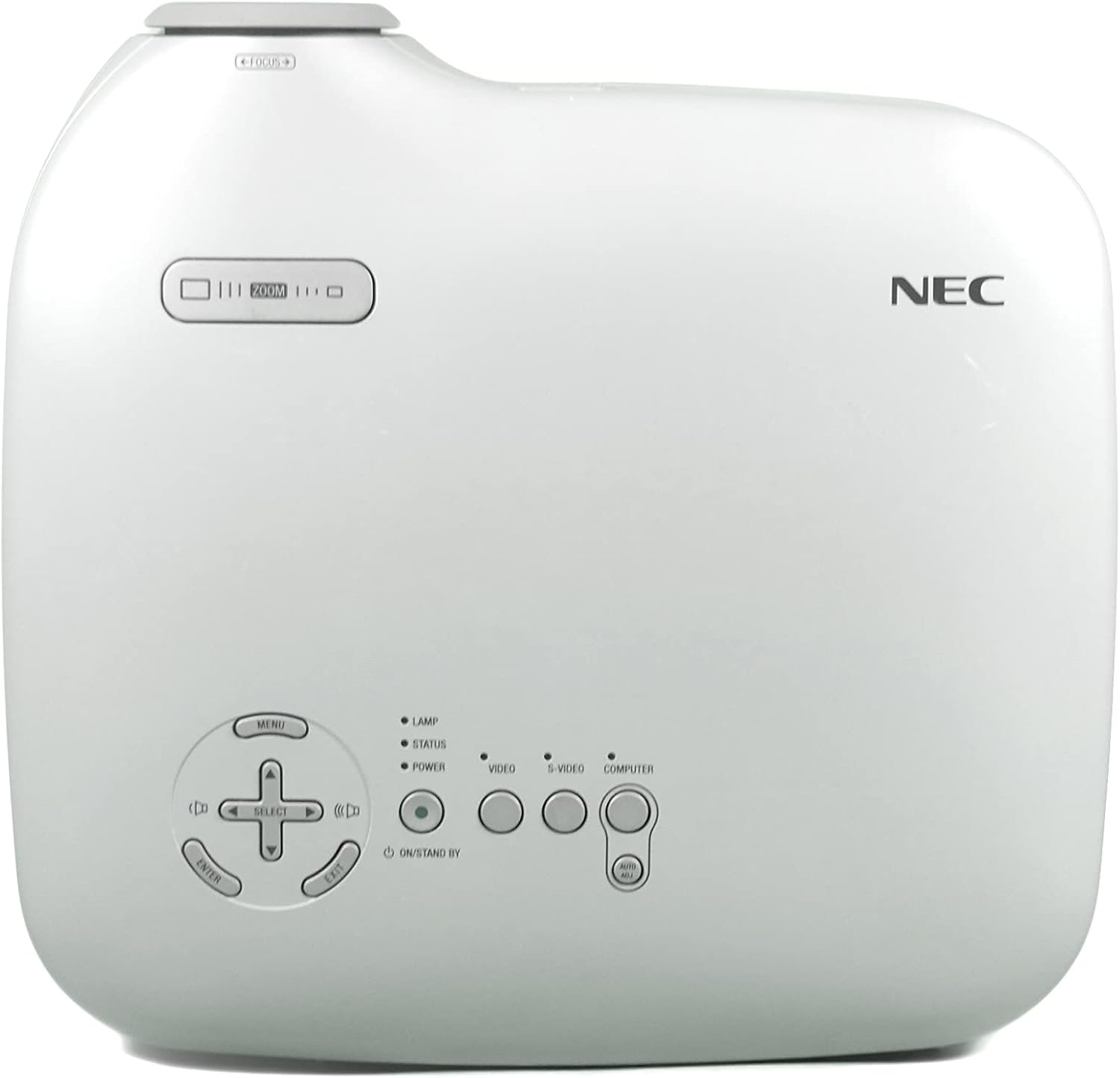
- MENÚ: Accede al menú de visualización en pantalla (OSD).
- SELECT / Arrow Buttons: Navegar por las opciones del menú.
- ENTRAR: Confirma selecciones.
- ENFOCAR: Ajusta el tamaño de la imagen.
- ATENCIÓN: Hace más nítida la imagen.
- VIDEO / S-VIDEO / COMPUTER: Selecciona la fuente de entrada.
3 Ajuste de imagen
- Enfocar: Gire el anillo de enfoque en la lente hasta que la imagen esté nítida.
- Zoom: Use the zoom lever near the lens to adjust the image size.
- Corrección trapezoidal: The projector features Square Shot Keystone Correction to instantly project a square image, even when the projector is set up at a steep offset angle to the screen. Access this function via the OSD menu.

Mantenimiento
1. Elamp Reemplazo
El lamp has an estimated life of 4,000 hours in eco-mode or 3,000 hours in normal mode. When the lamp La vida se acerca a su fin, puede aparecer un mensaje de advertencia o la lamp indicator may illuminate.
- Apague el proyector y desenchufe el cable de alimentación.
- Deje que el proyector se enfríe durante al menos 60 minutos.amp compartment becomes extremely hot.
- Refer to the detailed instructions in the full user manual (on CD-ROM) for specific steps on how to open the lamp cover and replace the lamp.
- Always use a genuine NEC replacement lamp (Type: VT70LP).
2. Limpieza del filtro de aire
Regular cleaning of the air filter is crucial for maintaining optimal performance and preventing overheating. The bottom label provides a reminder to clean the air filter.
- Apague el proyector y desenchufe el cable de alimentación.
- Locate the air filter cover, typically on the side or bottom of the projector.
- Remove the filter and gently clean it with a vacuum cleaner or soft brush. Do not wash the filter with water or any liquid.
- Vuelva a insertar el filtro limpio y cierre la tapa de forma segura.
3. Limpieza de la lente
Utilice un paño suave y sin pelusa, especialmente diseñado para lentes ópticas. No utilice limpiadores abrasivos ni disolventes.
Solución de problemas
Si tiene problemas con su proyector, consulte las siguientes soluciones comunes:
- Sin energía: Ensure the power cable is securely connected to both the projector and a working electrical outlet. Check the power indicator light.
- Sin imágen:
- Verify the input source is correctly selected (e.g., COMPUTER, VIDEO).
- Check the connection cable between the source device and the projector.
- Asegúrese de que el dispositivo fuente esté encendido y emitiendo una señal.
- La imagen está borrosa: Ajuste el anillo de enfoque en la lente.
- Image is Distorted (not square): Use the keystone correction feature in the OSD menu.
- Advertencia de sobrecalentamiento: Ensure the air filter is clean and ventilation openings are not blocked. Allow the projector to cool down.
For more detailed troubleshooting, consult the full user manual provided on the CD-ROM.
Presupuesto
| Característica | Especificación |
|---|---|
| Número de modelo | VT37 |
| Brillo | Lúmenes 1500 ANSI |
| Relación de contraste | 400:1 |
| Resolución de pantalla | 1920 x 1080 (Native, likely supports lower resolutions like SVGA) |
| Lamp Vida | 3,000 hours (Normal Mode), 4,000 hours (Eco-Mode) |
| Distancia de proyección | Approx. 2 to 24 feet |
| Projection Angles | 14-14.6 grados |
| Reproducción del color | 16.7 million simultaneous colors |
| Audio | Built-in Monaural Speaker |
| Nivel de ruido | Tan bajo como 28 dB |
| Tecnología de conectividad | HDMI, VGA (Note: HDMI is listed in specifications, but not explicitly on the rear panel image. Please verify actual unit.) |
| Peso del artículo | 11 pounds (Package Weight) |
| Dimensiones del paquete | 15 x 14.6 x 11.3 pulgadas |
Garantía y soporte
Información de garantía
The manufacturer provides a two-year warranty covering parts and labor for the projector. A separate three-month warranty is provided for the lamp.
Atención al cliente
For technical assistance, warranty claims, or inquiries about accessories, please refer to the contact information provided on your warranty card or the official NEC websitio.


