1. Introducción
The Extech EX310 is a compact, manual-ranging digital multimeter designed for a variety of electrical measurements. It features an extra-large 2000-count LCD and a built-in Non-Contact AC Voltage Detector (NCV) for enhanced safety. This device is capable of measuring AC/DC Voltage, AC/DC Current, Resistance, Diode, and Continuity, and includes a battery test function for 1.5V and 9V batteries. Its robust design, including a protective rubber holster and tilt stand, makes it suitable for field use.
2. Información de seguridad
Always adhere to safety precautions when using any electrical testing equipment. Failure to do so may result in injury or damage to the meter or equipment under test.
- The Extech EX310 is UL listed with a CAT III – 600 Volt safety rating.
- No aplique más del volumen nominal.tage, como está marcado en el medidor, entre terminales o entre cualquier terminal y tierra.
- Always inspect test leads for damage before use. Replace if insulation is compromised.
- Tenga mucho cuidado al trabajar con circuitos activos.
- Utilice el Vol sin contactotage (NCV) detector as a preliminary check for live AC voltage, but always verify with direct contact measurements when possible.
- Ensure the function switch is set to the correct range before making measurements.
3. Características del producto
- 9-Function Manual-Ranging DMM: Mide volumen CA/CCtage, AC/DC current (up to 10 A), resistance, diode, continuity, plus 1.5 V/9 V battery tests.
- Vol sin contactotagDetector e (NCV): Built-in NCV with red LED and audible beeper alerts to the presence of live AC (100-600 VAC) without probes.
- Extra-Large 2000-Count Display: Clear, easy-to-read 1-inch digits on a high-count LCD ensure readability.
- Rugged, Portable Design: Compact meter (5.7 × 2.9 × 1.6 in, 9 oz) with protective rubber holster, tilt stand, and low-battery indicator.
- Reliable Safety & Accuracy: 0.5% basic accuracy. Designed to UL/CAT II-1000 V & CAT III-600 V safety standards.
4. Contenido del paquete
The Extech EX310 package includes the following items:
- Extech EX310 Mini Digital Multimeter
- Cables de prueba
- Batería de 9 voltios
- Soporte inclinable
5. Producto terminadoview (Controls and Display)
Familiarize yourself with the components of your EX310 multimeter:

Imagen: Frente view of the Extech EX310 Mini Digital Multimeter, showing the large LCD display, function dial, NCV button, and input jacks.
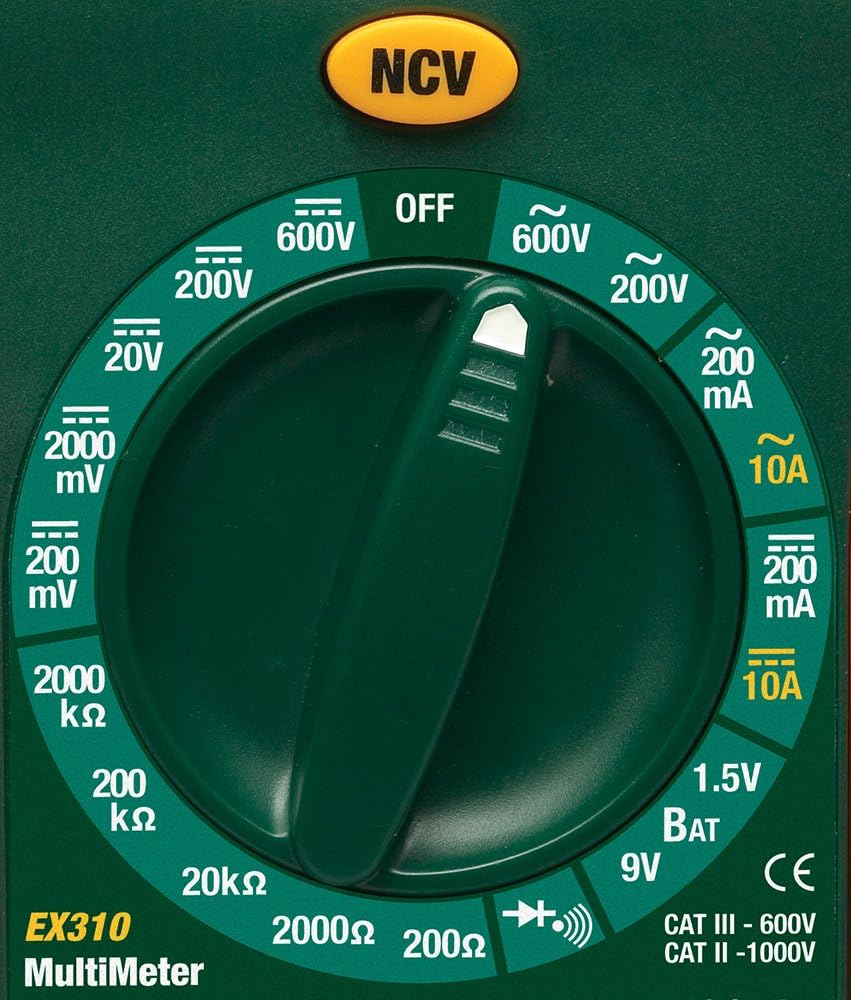
Image: Close-up of the Extech EX310's function dial, illustrating the various measurement ranges and functions such as voltage, current, resistance, diode, continuity, and battery test.
- Pantalla LCD: Muestra lecturas de medición, unidades e indicadores de función.
- Interruptor de función: Rotary dial to select the desired measurement function and range.
- Botón NCV: Activates the Non-Contact VoltagFunción de detección electrónica.
- Tomas de entrada: Terminals for connecting test leads (COM, VΩmA, 10A).
6. Configuración
6.1. Instalación de la batería
- Asegúrese de que el multímetro esté apagado.
- Localice la tapa del compartimiento de la batería en la parte posterior del medidor.
- Desatornille el/los tornillo(s) de retención y retire la cubierta.
- Inserte una batería nueva de 9 V, observando la polaridad correcta.
- Vuelva a colocar la cubierta y asegúrela con el/los tornillo(s).
Aparecerá un indicador de batería baja en la pantalla cuando sea necesario reemplazar la batería.
6.2. Conexión de los cables de prueba
Conecte los cables de prueba a las tomas de entrada adecuadas:
- Inserte el cable de prueba negro en el COM (común) jack.
- Para la mayoría de las mediciones (Voltage, Resistance, Diode, Continuity, mA Current), insert the red test lead into the VΩmA Jacobo.
- Para mediciones de corriente alta (hasta 10 A), inserte el cable de prueba rojo en el 10A Jacobo.
7. Instrucciones de funcionamiento
Before making any measurement, ensure the test leads are correctly connected and the function switch is set to the desired range.
7.1. Vol. CA / CCtagMedición electrónica
- Set the function switch to the desired ACV (~) or DCV (---) range (e.g., 200V, 600V).
- Conecte el cable de prueba rojo al conector VΩmA y el cable de prueba negro al conector COM.
- Toque las sondas de prueba en los puntos del circuito donde el voltajetage debe medirse.
- Leer el vol.tage valor en la pantalla LCD.
7.2. Medición de corriente CA/CC
Precaución: Never attempt to measure current on a circuit with voltage present across the current terminals. This can blow the fuse or damage the meter.
- Apague la alimentación al circuito.
- Set the function switch to the desired ACA (~) or DCA (---) range (e.g., 200mA, 10A).
- Connect the red test lead to the appropriate current jack (VΩmA for mA, 10A for 10A) and the black test lead to the COM jack.
- Abra el circuito donde se va a medir la corriente y conecte el medidor en serie.
- Aplique energía al circuito y lea el valor actual en la pantalla LCD.
7.3. Medida de resistencia
- Asegúrese de que el circuito o componente esté desenergizado.
- Set the function switch to the desired Resistance (Ω) range (e.g., 200Ω, 20kΩ).
- Conecte el cable de prueba rojo al conector VΩmA y el cable de prueba negro al conector COM.
- Toque las sondas de prueba sobre el componente o circuito que se va a medir.
- Lea el valor de resistencia en la pantalla LCD.

Image: The Extech EX310 Multimeter displaying a reading while test leads are connected to a circuit board, demonstrating a typical measurement scenario.
7.4. Prueba de diodos
- Ensure the component is de-energized.
- Set the function switch to the Diode (→|) position.
- Conecte el cable de prueba rojo al conector VΩmA y el cable de prueba negro al conector COM.
- Toque la sonda roja en el ánodo y la sonda negra en el cátodo del diodo.
- Leer el vol adelantetage drop on the LCD. Reverse the probes to check for an open circuit (OL).
7.5. Prueba de continuidad
- Asegúrese de que el circuito o componente esté desenergizado.
- Set the function switch to the Continuity (→))) position.
- Conecte el cable de prueba rojo al conector VΩmA y el cable de prueba negro al conector COM.
- Toque las sondas de prueba a través del circuito o componente.
- An audible tone will sound if continuity exists (resistance below approximately 30Ω).

Imagen: Un primer plano view of the Extech EX310 Multimeter with its test leads connected to an internal electronic circuit, demonstrating precise measurement capabilities.
7.6. Vol sin contactotagDetección de e (NCV)
- Coloque el interruptor de función en cualquier posición.
- Press and hold the NCV button.
- Move the top of the meter (where the NCV sensor is located) close to the suspected AC voltage source (e.g., wire, outlet).
- A red LED will illuminate and an audible beeper will sound, increasing in intensity as the meter gets closer to the live AC voltage.

Image: A hand holding the Extech EX310 Multimeter near an electrical wall outlet, demonstrating the use of the Non-Contact Voltage (NCV) detection feature to identify live circuits.
7.7. Battery Test (1.5V/9V)
- Set the function switch to the 1.5V BAT or 9V BAT position.
- Conecte el cable de prueba rojo al conector VΩmA y el cable de prueba negro al conector COM.
- Touch the red probe to the positive terminal and the black probe to the negative terminal of the battery.
- Leer el volumen de la bateríatage en la pantalla LCD.
8. Mantenimiento
8.1. Reemplazo de la batería
Refer to Section 6.1 for detailed instructions on replacing the 9V battery when the low battery indicator appears.
8.2. Reemplazo de fusibles
If the current measurement functions cease to operate, the internal fuse(s) may need replacement. The fuses are typically located beneath the battery compartment. Refer to the full product manual for specific fuse ratings and replacement procedures. Always replace with fuses of the identical type and rating.
8.3. Limpieza
Limpie periódicamente la carcasa con un paño húmedo.amp Paño y detergente suave. No utilice abrasivos ni disolventes. Asegúrese de que el medidor esté completamente seco antes de usarlo.
9. Solución de problemas
- Sin pantalla: Check the 9V battery. Ensure it is correctly installed and has sufficient charge.
- Lecturas incorrectas: Verify that the function switch is set to the correct measurement type and range. Ensure test leads are properly connected and making good contact with the circuit.
- La medición actual no funciona: Check the internal fuse(s). Refer to the Maintenance section for fuse replacement.
- NCV no detecta: Ensure the NCV button is pressed and held. Confirm the presence of AC voltage (100-600 VAC) in the area being tested.
10. Especificaciones
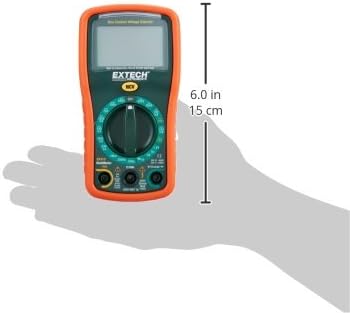
Image: Diagram illustrating the physical dimensions of the Extech EX310 Multimeter, showing a length of 6.0 inches (15 cm).
| Especificación | Valor |
|---|---|
| Marca | Extec |
| Número de modelo | EX310 |
| Tipo de medida | Multímetro |
| Estilo | Rango manual |
| Precisión básica | +/-0.5% |
| Mostrar | 2000-Count LCD |
| Clasificación de seguridad | UL listed CAT III - 600V, CAT II - 1000V |
| Fuente de poder | Batería de 9 V |
| Dimensiones del artículo (largo x ancho x alto) | 5.7 x 1.6 x 2.9 pulgadas (14.5 x 4.1 x 7.4 cm) |
| Peso del artículo | 0.704 onzas (0.02 kilogramos) |
| Componentes incluidos | Test leads, 9 Volt battery, tilt stand |
11. Información de garantía
The Extech EX310 Mini Digital Multimeter is covered by a Garantía de 1 años en piezas y mano de obra. from the date of purchase. Please retain your proof of purchase for warranty claims. This warranty covers manufacturing defects and workmanship under normal use.
12. Atención al cliente
For technical assistance, troubleshooting beyond this manual, or warranty service, please contact Extech customer support. Refer to the official Extech websitio o embalaje del producto para obtener la información de contacto más actualizada.


