Introducción
This manual provides detailed instructions for the setup, operation, maintenance, and troubleshooting of your DigiTech RP70 Guitar Multi-Effects Processor. The RP70 is designed to offer a wide range of guitar tones and effects, powered by the AudioDNA2 processor. It includes various amp models, cabinet types, distortion stompboxes, modulation effects, delays, reverbs, and special effects, along with a built-in drum machine and tuner.
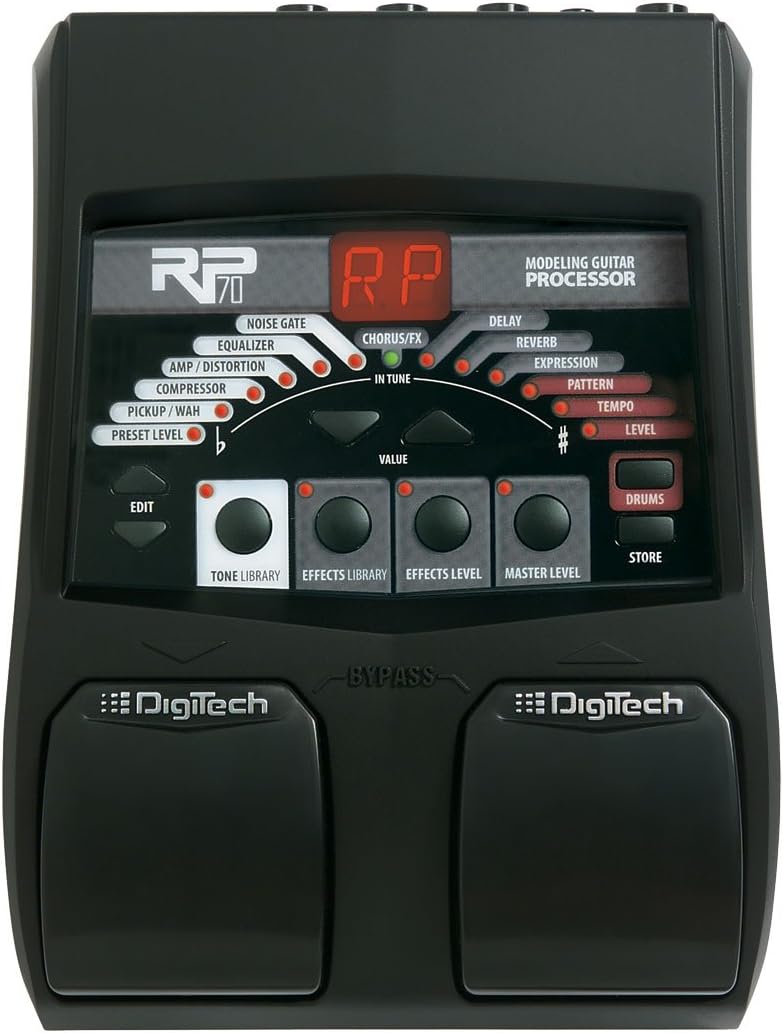
This image displays the DigiTech RP70 Guitar Multi-Effects Processor. The unit is black with a central display showing 'RP70' and 'MODELING GUITAR PROCESSOR'. Various effect indicators like Noise Gate, Equalizer, Amp/Distortion, Compressor, Pickup/Wah, Preset Level, Chorus/FX, Delay, Reverb, Expression, Pattern, Tempo, and Level are arranged in an arc around a 'VALUE' knob. Below the display are buttons for 'EDIT', 'TONE LIBRARY', 'EFFECTS LIBRARY', 'EFFECTS LEVEL', 'MASTER LEVEL', 'DRUMS', and 'STORE'. Two large footswitches are located at the bottom, labeled 'DigiTech' with a 'BYPASS' indicator between them.
Configuración
Conexión de energía
- Ensure the RP70 is powered off before connecting the power supply.
- Connect the included 9V DC, 1.3A power adapter to the '9V AC' input jack on the rear panel of the RP70.
- Conecte el adaptador de corriente a una toma de corriente estándar.
Conexiones de audio
- Entrada de guitarra: Connect your guitar to the 'INPUT' jack on the RP70 using a standard 1/4-inch instrument cable.
- Amplifier/Mixer Output: Connect the 'OUTPUT' jack of the RP70 to your guitar amplifier's input or a mixer using a standard 1/4-inch instrument cable. For direct connection to a mixer or recording device, ensure the 'AMP/MIXER' switch (if present) is set to 'MIXER' to engage cabinet simulation.
- Auriculares: For silent practice, connect stereo headphones to the 'PHONES' jack. The Master Level knob will control headphone volume.
Instrucciones de funcionamiento
Controles básicos
- Interruptores de pie: The two large footswitches at the bottom are used to navigate through presets. The left footswitch typically moves down through presets, and the right footswitch moves up. Pressing both simultaneously often activates the tuner or bypass mode.
- Perilla de VALOR: This central knob is used to adjust parameter values when editing effects or settings.
- EDIT Button: Engages the edit mode for modifying effect parameters.
- Botón TIENDA: Saves your customized presets.
- DRUMS Button: Activates and controls the built-in drum machine.
- TONE LIBRARY Button: Accesses a library of pre-configured tone settings.
- EFFECTS LIBRARY Button: Accesses a library of pre-configured effect settings.
- EFFECTS LEVEL Knob: Adjusts the overall level of the effects in a preset.
- MASTER LEVEL Knob: Controls the overall output volume of the RP70.
Preajustes de navegación
The RP70 features 100 factory presets. Use the left and right footswitches to scroll through these presets. The display will show the current preset number.
Editing Effects
- Select the preset you wish to edit.
- Press the 'EDIT' button to enter edit mode.
- Use the 'TONE LIBRARY' or 'EFFECTS LIBRARY' buttons to select the type of effect or tone you want to modify (e.g., Amp/Distortion, Chorus/FX, Delay, Reverb). The corresponding indicator light will illuminate.
- Turn the 'VALUE' knob to adjust the parameters of the selected effect. The display will show the parameter value.
- Adjust the 'EFFECTS LEVEL' and 'MASTER LEVEL' knobs as needed.
- To save your changes, press the 'STORE' button. You can choose to save it to the current preset location or a new one.
Uso de la caja de ritmos
Press the 'DRUMS' button to activate the built-in drum machine. The RP70 includes 40 drum patterns. Use the 'VALUE' knob to select different patterns and adjust their tempo. The 'TEMPO' indicator will flash to show the current tempo.
Usando el sintonizador
To access the tuner, typically press and hold both footswitches simultaneously. The display will show tuning information, and the 'IN TUNE' indicator will light up when your string is in tune. Strum a single string to tune it, then repeat for other strings.
Mantenimiento
- Limpieza: Use a soft, dry cloth to clean the exterior of the RP70. Avoid using abrasive cleaners or solvents, as these can damage the finish.
- Almacenamiento: When not in use for extended periods, store the RP70 in a dry, cool environment away from direct sunlight and extreme temperatures. Disconnect the power supply.
- Interruptores de pie: The footswitches are designed for durability, but avoid excessive force. If a footswitch becomes unresponsive, refer to the troubleshooting section.
Solución de problemas
Sin salida de sonido
- Verifique todas las conexiones de cables (guitarra a entrada, salida a amplifier/mixer, power supply).
- Ensure the power adapter is correctly connected and the unit is receiving power.
- Verify that the 'MASTER LEVEL' knob on the RP70 is turned up.
- Check the volume settings on your guitar and amplificador/mezclador.
- If using headphones, ensure they are properly plugged in and the 'MASTER LEVEL' is adjusted.
- Confirm the RP70 is not in 'BYPASS' mode or 'TUNER' mode.
Unexpected or Undesired Effects
- Review the current preset settings. It may contain effects you are not expecting.
- Try selecting a different factory preset to see if the issue persists.
- If you have edited a preset, ensure you saved it correctly.
- Perform a factory reset (refer to the full manual for specific instructions, as this varies by model).
Footswitch Unresponsive
- Ensure the unit is powered on and functioning otherwise.
- Check for any physical obstructions around the footswitch.
- If a footswitch becomes intermittently or completely unresponsive, it may indicate a mechanical issue requiring professional service.
Presupuesto
| Característica | Detalle |
|---|---|
| Marca | Tecnología digital |
| Número de modelo | RP70 |
| Peso del artículo | 1.3 libras |
| Dimensiones del producto | 7 x 2.5 x 8.75 pulgadas |
| Formato de señal | Cosa análoga |
| Volumentage | 9 voltios |
| Ampanhelo | 1.3 Amps (based on power adapter information from reviews, product spec lists 12 Amps which is likely incorrect for a 9V pedal) |
| Efectos incluidos | 12 Amp Types, 8 Cabinet Types, 6 Distortion Stompboxes, 32 Effects, Wah, Modulation, Delay, Reverb |
| Máquina de tambor | 40 patrones |
| Ajustes preestablecidos | 100 |
Garantía y soporte
Para obtener información detallada sobre la garantía y soporte técnico, consulte el sitio web oficial de DigiTech. website or the documentation included with your product at the time of purchase. Specific warranty terms may vary by region and retailer.
You can often find additional resources, FAQs, and contact information for customer service on the manufacturer's official support pages.


