1. Introducción
This manual provides detailed instructions for the setup, operation, and maintenance of your TFA 35.1089 Digital Wireless Weather Station. This device offers a comprehensive overview of current weather conditions and forecasts, enhancing your daily planning.
The weather station features a wireless outdoor sensor for accurate external temperature readings, a clear display for indoor temperature, and a radio-controlled clock for precise timekeeping. Please read this manual thoroughly before using the product to ensure optimal performance and longevity.
2. Contenido del paquete
- TFA 35.1089 Digital Wireless Weather Station (Main Unit)
- Wireless Remote Temperature Sensor
- Batteries (5 x AA, included)
- Manual de usuario
3. Características del producto
- Weather forecast display using intuitive symbols.
- Large, easy-to-read display with indoor and outdoor temperature.
- Atmospheric pressure trend indicator.
- Maximum and minimum temperature memory for both indoor and outdoor readings.
- Radio-controlled clock for automatic time synchronization.
- Alarm function with snooze capability.
- Wireless outdoor temperature sensor for flexible placement.
4. Configuración
4.1 Instalación de la batería
- Open the battery compartment on the back of the main unit and the remote sensor.
- Insert the included AA batteries, observing the correct polarity (+/-).
- Cierre los compartimentos de la batería de forma segura.
4.2 Colocación de sensores
Place the remote sensor in a shaded, dry location outdoors, protected from direct sunlight and precipitation, to ensure accurate temperature readings. The maximum transmission range is approximately 30 meters (100 feet) in open air. Avoid placing the sensor near large metal objects or electrical appliances that may interfere with the wireless signal.
4.3 Sincronización inicial
After installing batteries, the main unit will automatically search for the remote sensor and the radio-controlled time signal (DCF). This process may take several minutes. Ensure both units are within range of each other during initial setup.
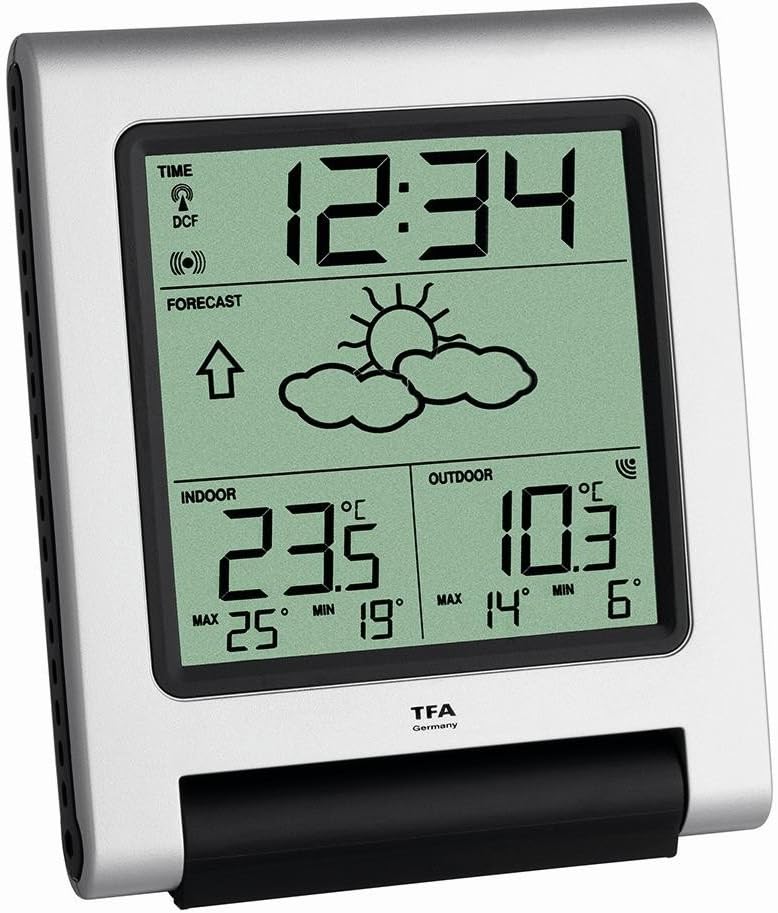
Figure 1: Main Unit Display Overview
This image shows the main unit's display. The top section displays the radio-controlled time (12:34) and DCF signal indicator. The middle section shows the weather forecast (sun and clouds) with an atmospheric pressure trend arrow. The bottom left displays indoor temperature (23.5°C) with maximum (25°C) and minimum (19°C) records. The bottom right displays outdoor temperature (10.3°C) with maximum (14°C) and minimum (6°C) records.
5. Instrucciones de funcionamiento
5.1 Información en pantalla
La pantalla de la unidad principal está dividida en varias secciones:
- Time (Top): Displays the current time, synchronized via DCF radio signal. A signal icon indicates successful reception.
- Forecast (Middle): Shows weather forecast symbols (e.g., sun, clouds, rain) and an arrow indicating atmospheric pressure trend (rising, stable, falling).
- Indoor (Bottom Left): Displays the current indoor temperature and the recorded maximum (MAX) and minimum (MIN) indoor temperatures.
- Outdoor (Bottom Right): Displays the current outdoor temperature received from the remote sensor, along with the recorded maximum (MAX) and minimum (MIN) outdoor temperatures.
5.2 Configuración de la alarma
Refer to the specific buttons on your device (usually labeled 'MODE', 'SET', 'ALARM') to access and adjust the alarm settings. Typically, you will press an 'ALARM' button to enter alarm setting mode, then use '+' or '-' buttons to set the desired alarm time. Confirm your selection to activate the alarm. The snooze function is usually activated by pressing any button (except 'ALARM OFF') when the alarm sounds.
5.3 Viewing Max/Min Temperatures
Press the 'MAX/MIN' button (or similar) to cycle through the current, maximum, and minimum recorded temperatures for both indoor and outdoor readings. To reset the max/min records, hold down the 'MAX/MIN' button for a few seconds.
6. Mantenimiento
6.1 Reemplazo de batería
When the battery indicator appears on the display, replace all batteries in both the main unit and the remote sensor with new AA batteries. Ensure correct polarity. It is recommended to replace batteries in both units simultaneously to maintain optimal performance.
6.2 Limpieza
Limpie la estación meteorológica y el sensor con un paño suave.amp paño. No utilice limpiadores abrasivos ni disolventes, ya que pueden dañar la pantalla oasing. Ensure no moisture enters the battery compartments or electronic components.
7. Solución de problemas
| Problema | Posible causa | Solución |
|---|---|---|
| No hay visualización de temperatura exterior. | Remote sensor out of range, low batteries, or interference. | Relocate sensor closer to main unit. Replace batteries in sensor. Avoid sources of interference. Manually re-sync if necessary (refer to device-specific instructions). |
| Time not synchronizing (DCF icon flashing or absent). | Weak DCF signal, interference, or incorrect time zone setting. | Move main unit to a location with better signal reception (e.g., near a window). Avoid electronic devices. Check manual for manual time setting or time zone adjustment. |
| Lecturas de temperatura inexactas. | Sensor expuesto a la luz solar directa, fuentes de calor o humedad. | Relocate sensor to a shaded, dry, and well-ventilated area. Ensure main unit is not near heat sources. |
| La pantalla está en blanco o tenue. | Baterías bajas. | Reemplace todas las baterías en la unidad principal. |
8. Especificaciones
- Número de modelo: 35-1089
- Marca: TFA
- Dimensiones del producto: 4.5 x 11.9 x 13.6 cm
- Peso del producto: 415 gramos
- Fuente de energía: Batería
- Tipo de batería: 5 x AA (incluidas)
- Funcion especial: Alarma con repetición
- Material: Varios materiales
- Color: Plata
9. Garantía y soporte
For warranty information and technical support, please refer to the documentation provided with your purchase or contact TFA customer service directly. Keep your proof of purchase for any warranty claims.


