1. Introducción
The DigiTech RP1000 is an advanced integrated-effects switching system designed for guitarists seeking comprehensive control over their sound. This unit seamlessly integrates with your existing amplifier and stompboxes, providing a versatile platform for tone shaping and performance.
Las características principales incluyen:
- Controlable amp and stompbox loops for integrating external gear.
- Capacidad de eludir el control interno amplifiers and cabinets with a single button.
- Over 160 distinct amplifier models, cabinet simulations, stompboxes, and effects.
- 14 heavy-duty metal footswitches for robust performance.
- Built-in expression pedal for real-time control of various parameters.
- 24-bit 44.1kHz sample rate for high-fidelity audio processing.
- Integrated Phrase Looper with 20 seconds of record time.

Figura 1: Frente view of the DigiTech RP1000, showcasing the display, control knobs, and footswitches.
2. Configuración
2.1 Conexión de alimentación
Connect the included 9-volt power adapter to the '9V AC' input jack on the rear panel of the RP1000. Plug the adapter into a standard AC power outlet. Ensure the power supply meets the specified voltage requisitos para evitar daños.
2.2 Conexiones de audio
The RP1000 offers various input and output options for integration into your guitar rig:
- Entrada de guitarra: Connect your guitar to the 'INPUT' jack.
- Amp Bucle: Utilice el 'AMP LOOP' Send and Return jacks to integrate your amppre del lificanteamp section into the RP1000's signal chain. This allows the RP1000's effects to be placed before or after your ampes preamp.
- Stomp Loop: The 'STOMP LOOP' Send and Return jacks allow you to incorporate external stompbox pedals into the RP1000's signal path.
- Salidas: Connect the 'LEFT/MONO OUTPUT' and 'RIGHT OUTPUT' 1/4-inch jacks to your amplifier, mixer, or audio interface. XLR outputs are also available for direct connection to a PA system or recording console.
- Salida de auriculares: For silent practice, connect headphones to the 'HEADPHONE' jack.
2.3 Conexión USB
Connect the RP1000 to your computer using a USB cable. This connection facilitates firmware updates, patch management, and direct recording capabilities.
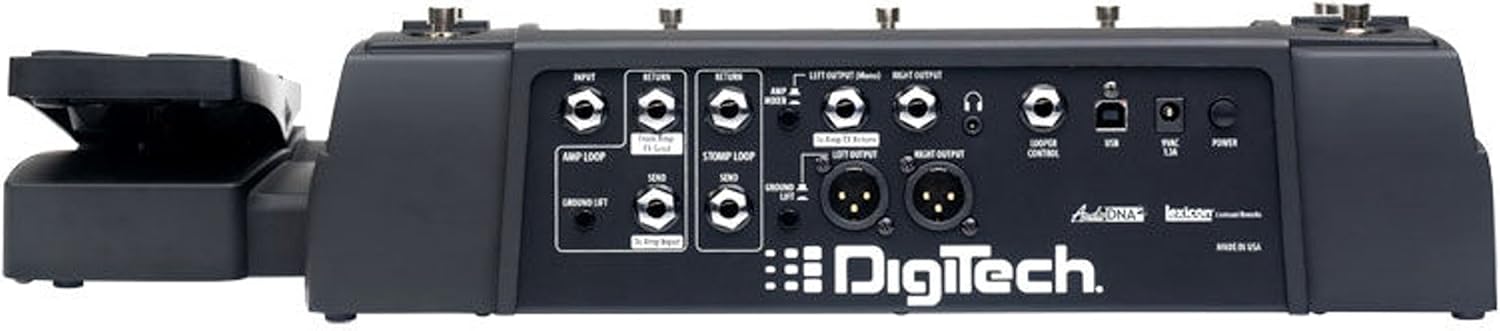
Figura 2: Rear panel of the DigiTech RP1000, showing various input and output jacks for connectivity.
3. Instrucciones de funcionamiento
3.1 Controles generales
- Interruptores de pie: The RP1000 features 14 heavy-duty footswitches for patch selection, effect toggling, and mode changes.
- Pedal de expresión: The built-in expression pedal can be assigned to control various effects parameters such as wah, volume, or Whammy effects.
- Display and Knobs: The large LED display provides visual feedback, while dedicated knobs allow for intuitive parameter adjustments.
3.2 Stompbox and Amp Bucles
The RP1000's exclusive Stompbox and Amp loops allow you to integrate your favorite external pedals and amppre del lificanteamp into the digital signal chain. This ensures your preferred analog tones are preserved while benefiting from the RP1000's extensive effects processing. These loops can be activated or bypassed within your presets.
3.3 Amp/Cabinet Bypass
For users who prefer to utilize their amplifier's natural tone, the RP1000 includes an Amp/Cabinet bypass switch. This feature allows you to disable the internal amplifier and cabinet simulations, ensuring that your amplifier's unique sound remains prominent in the signal path.
3.4 Pedalboard Mode
The Pedalboard option transforms footswitches 6 through 10 into individual stompbox-style effect on/off controls. This mode provides immediate access to effect toggling, mimicking a traditional pedalboard setup. When combined with the Amp/Cabinet Bypass, the RP1000 can function as 100 distinct pedalboards, offering flexibility for live performance.
3.5 Looper de frases
The built-in Phrase Looper allows for on-the-fly performance loops. With 20 seconds of record time, you can create layered guitar parts for practice, composition, or live performance. Controls for Stop, Play, and Overdub facilitate seamless loop creation.
3.6 Effects and Presets
The RP1000 offers a vast array of over 160 amplifier models, cabinet simulations, stompboxes, and effects. These can be combined and saved as presets, allowing for instant recall of complex tone configurations. Refer to the detailed software manual (available on the DigiTech website) for in-depth editing and preset management.
4. Mantenimiento
- Limpieza: Utilice un paño suave y seco para limpiar el exterior de la unidad. Evite limpiadores abrasivos o disolventes.
- Almacenamiento: Store the RP1000 in a cool, dry environment away from direct sunlight and extreme temperatures.
- Sistema de organización de cables: Ensure all cables are properly routed and secured to prevent damage or tripping hazards.
5. Solución de problemas
- Sin energía: Verify the power adapter is securely connected to both the unit and a working power outlet.
- Sin sonido: Check all audio cable connections. Ensure input and output levels are appropriately set. Confirm that the master volume is not muted or set too low.
- Unexpected Effects: If effects are behaving unexpectedly, check the current preset settings. Ensure the expression pedal is not inadvertently controlling a parameter.
- Problemas de software: For issues related to computer connectivity or software, ensure you have the latest drivers and software installed from the DigiTech websitio.
For further assistance, consult the comprehensive manual available on the DigiTech websitio o comuníquese con el servicio de atención al cliente de DigiTech.
6. Especificaciones
| Característica | Especificación |
|---|---|
| Peso del artículo | 11.9 libras (5.4 kg) |
| Dimensiones del producto | 24 x 6 x 13 pulgadas (61 x 15.2 x 33 cm) |
| Número de modelo | RP1000 |
| Interfaz de hardware | USB |
| Formato de señal | Cosa análoga |
| Volumentage | 9 voltios |
| Ampanhelo | 160 Amps (internal processing) |
| Samptasa | 24 bits 44.1 kHz |
7. Garantía y soporte
Warranty information for the DigiTech RP1000 is typically included with your purchase documentation. For detailed warranty terms, product registration, and technical support, please visit the official DigiTech webSitio web o contacte con el departamento de atención al cliente. Conserve su comprobante de compra para reclamaciones de garantía.


