1. Introducción
This manual provides essential information for the safe and effective use of your Leica D-Lux 4 Safari Special Edition Digital Camera. Please read it thoroughly before using your camera and keep it for future reference. The Leica D-Lux 4 Safari is a limited edition digital camera featuring a distinctive Safari Green color and a special case, designed for high-quality digital photography.
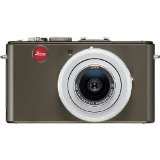
Figure 1: Leica D-Lux 4 Safari Special Edition Digital Camera. This image displays the compact digital camera with its distinctive green finish and lens.
2. Configuración
2.1. Instalación de la batería
- Asegúrese de que la cámara esté apagada.
- Localice la tapa del compartimiento de la batería en la parte inferior de la cámara.
- Deslice el pestillo para abrir la cubierta.
- Inserte la batería proporcionada, asegurándose de la orientación correcta como se indica dentro del compartimento.
- Cierre la tapa del compartimiento de la batería de forma segura hasta que encaje en su lugar.
2.2. Inserción de la tarjeta de memoria
The camera supports SD and SDXC memory cards for storing photos and videos.
- Con la cámara apagada, abra la tapa del compartimiento de la batería/tarjeta de memoria.
- Insert the memory card into the designated slot with the label facing the correct direction (usually towards the front of the camera). Push until it clicks into place.
- Cierre la tapa del compartimento.
2.3. Encendido inicial
Press the power button to turn on the camera. Follow any on-screen prompts to set the date, time, and language.
3. Instrucciones de funcionamiento
3.1. Fotografía básica (apuntar y disparar)
- Encendido: Presione el botón de encendido.
- Seleccionar modo: Use the mode dial to select "Automatic" for general use.
- Enfocar: Point the camera at your subject. The camera will automatically focus using contrast detection.
- Captura: Presione el botón del obturador hasta la mitad para enfocar y luego presiónelo completamente para tomar una fotografía.
3.2. Grabación de video
- Seleccionar modo: Turn the mode dial to "Movie" mode.
- Iniciar/Detener grabación: Press the dedicated video record button to start and stop recording. The camera records in 1080p at 30 frames per second.
- Estabilización de imagen digital: The camera features digital image stabilization to reduce blur during video recording.
3.3. Funcionalidad de zoom
The camera features 2.5x optical zoom. Use the zoom lever (typically around the shutter button) to zoom in or out. Digital zoom is also available up to 16x.
3.4. Modos de disparo avanzados
Explore various modes via the mode dial:
- Modo horizontal: Optimizado para tomas panorámicas amplias.
- Control de exposición manual: For experienced users to manually adjust aperture and shutter speed.
- Configuración de balance de blancos: Customize white balance for accurate color reproduction under different lighting conditions.
3.5. Conectividad
- Wifi: Connect your camera to a Wi-Fi network for wireless transfer of images and remote control via a compatible smartphone app. Refer to the camera's on-screen menu for Wi-Fi setup.
4. Mantenimiento
4.1. Limpieza de la cámara
- Cuerpo de cámara: Utilice un paño suave y seco para limpiar el cuerpo de la cámara. Para la suciedad difícil, limpie ligeramenteampEnjuague el paño con agua. Evite productos químicos agresivos.
- Lente: Use a lens brush to remove dust, then gently wipe with a microfiber lens cloth. For smudges, use a specialized lens cleaning solution.
- Pantalla: Wipe the LCD screen with a soft, dry microfiber cloth.
4.2. Cuidado de la batería
- Always use the original Leica charger and battery.
- Evite exponer la batería a temperaturas extremas.
- Guarde la batería en un lugar fresco y seco cuando no esté en uso.
5. Solución de problemas
5.1. La cámara no se enciende
- Asegúrese de que la batería esté completamente cargada y correctamente insertada.
- Intente utilizar una batería diferente completamente cargada si está disponible.
5.2. Mala calidad de imagen
- Compruebe si la lente está limpia y libre de manchas o polvo.
- Ensure adequate lighting for your shot.
- Adjust shooting modes or exposure settings if necessary.
5.3. Problemas de conectividad Wi-Fi
- Verify that Wi-Fi is enabled on the camera and your smartphone.
- Ensure the camera is within range of the Wi-Fi network.
- Reinicie tanto la cámara como su teléfono inteligente.
6. Especificaciones
| Característica | Detalle |
|---|---|
| Marca | Leica |
| Nombre del modelo | D Lux4 Safari |
| Resolución total de imagen fija | 12 MP |
| Tecnología de fotosensor | CMOS |
| Zoom óptico | 2.5x |
| Zoom digital | 16x |
| Apertura máxima | 2.8 milímetros |
| Estabilización de imagen | Digital |
| Apoyado File Formato | JPEG, SIN PROCESAR |
| Resolución de vídeo | 1080p |
| Velocidad de cuadros | 30 FPS |
| Tamaño de pantalla | 3 pulgadas |
| Tecnología inalámbrica | Wifi |
| Material del recinto | Metal |
| Color | Verde |
| Pilas incluidas | Sí |
7. Garantía y soporte
7.1. Información de garantía
The Leica D-Lux 4 Safari Special Edition Digital Camera comes with a Garantía del fabricante de 3 añosEsta garantía cubre defectos de materiales y mano de obra en condiciones normales de uso. Conserve su comprobante de compra para reclamaciones de garantía.
7.2. Atención al cliente
For technical assistance, troubleshooting, or service inquiries, please visit the official Leica website or contact their customer support. You can find detailed contact information on the Leica websitio o en la documentación incluida con su cámara.


