1. Introducción
The Antec TruePower TPQ-1200 is a high-performance 1200-watt power supply designed for demanding computer systems. It features an 80 PLUS Silver certification, indicating high energy efficiency, and provides stable power delivery through its six +12V rails. This manual provides essential information for the safe installation, operation, and maintenance of your TPQ-1200 power supply.
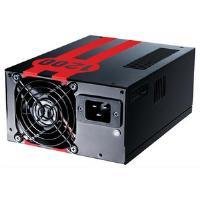
Image 1.1: The Antec TruePower TPQ-1200 Power Supply unit, showcasing its design and modular connectors.
2. Información de seguridad
Please read and understand all safety instructions before installing or operating the power supply. Failure to do so may result in personal injury or damage to your equipment.
- Desconecte siempre el cable de alimentación del tomacorriente de pared antes de instalar, quitar o limpiar la fuente de alimentación.
- Esta fuente de alimentación está diseñada exclusivamente para computadoras personales. No la utilice para ningún otro fin.
- No abra la fuente de alimentación casing. Alto volumentagHay es en el interior y no hay piezas que el usuario pueda reparar. Al abrir la casing anulará la garantía.
- Asegúrese de que su sistema informático esté correctamente conectado a tierra.
- Evite operar la fuente de alimentación en entornos de alta humedad o temperaturas extremas.
- Keep the power supply away from liquids and sources of heat.
3. Contenido del paquete
Verifique que su paquete contenga los siguientes elementos:
- Antec TruePower TPQ-1200 Power Supply Unit
- Modular Cable Set (PCIe, SATA, Molex, Floppy)
- Cable de alimentación de CA
- Tornillos de montaje
- Manual de usuario (este documento)
If any items are missing or damaged, please contact your retailer or Antec customer support.
4. Características
The Antec TruePower TPQ-1200 power supply offers advanced features for reliable and efficient performance:
- 1200 vatios de potencia continua: Proporciona ample power for high-end gaming and workstation systems.
- 80 PLUS Silver Certified: Achieves up to 88% efficiency, reducing heat generation and operating costs.
- Six +12V Rails: Delivers stable and clean power to critical components.
- Gestión avanzada de cables: Semi-modular design allows for cleaner builds and improved airflow.
- PowerCache High Performance Capacitors: Enhances stability and transient response.
- Ultra-Quiet Pulse Width Modulation (PWM) Fan: Provides efficient cooling with minimal noise.
- Industrial Grade Protection Circuitry: Incluye protección contra sobrecorriente (OCP), sobrevoltajetage Protección (OVP), bajo Voltage Protection (UVP), Short Circuit Protection (SCP), Over Power Protection (OPP), and Over Temperature Protection (OTP).
5. Configuración e instalación
Follow these steps carefully to install your Antec TruePower TPQ-1200 power supply.
5.1 Lista de verificación previa a la instalación
- Ensure your computer case supports an ATX power supply.
- Reúna las herramientas necesarias: destornillador Phillips.
- Unplug your computer from the wall outlet and discharge any residual power by pressing the power button.
5.2 Montaje de la fuente de alimentación
- Carefully place the power supply into the designated PSU bay in your computer case. Ensure the fan is oriented correctly (typically facing down for bottom-mounted PSUs, or according to case design for top-mounted).
- Align the screw holes on the power supply with those on the case.
- Secure the power supply using the provided mounting screws. Do not overtighten.
5.3 Conexión de cables de alimentación
Connect the necessary cables to your motherboard and components. The TPQ-1200 features both fixed and modular cables.
- 24-Pin ATX Motherboard Power: Connect the main 24-pin connector to the corresponding port on your motherboard. Ensure it clicks into place.
- 8-Pin EPS12V (CPU) Power: Connect the 8-pin (or 4+4 pin) EPS12V connector to the CPU power port on your motherboard.
- PCIe (Graphics Card) Power: For graphics cards requiring additional power, connect the appropriate 6-pin or 6+2 pin PCIe modular cables from the power supply to your graphics card(s).
- Alimentación SATA: Connect SATA modular cables to your SATA hard drives, SSDs, and optical drives.
- Molex (Peripheral) Power: Use Molex modular cables for older peripherals or case fans that require this connector type.
- Sistema de organización de cables: Coloque los cables de forma ordenada detrás de la bandeja de la placa base o en otras áreas designadas de su gabinete para mejorar el flujo de aire y la estética.
5.4 Encendido inicial
- Asegúrese de que todas las conexiones sean seguras.
- Conecte el cable de alimentación de CA a la fuente de alimentación y luego a un tomacorriente de pared con conexión a tierra.
- Coloque el interruptor de encendido en la parte posterior de la fuente de alimentación en la posición “ENCENDIDO” (I).
- Encienda su computadora.
6. Instrucciones de funcionamiento
The Antec TruePower TPQ-1200 is designed for continuous operation within its specified limits. Ensure adequate ventilation around your computer case to prevent overheating. The intelligent PWM fan will adjust its speed based on the power supply's temperature to maintain optimal cooling and noise levels.
Always shut down your computer properly through the operating system before turning off the power supply switch or unplugging the AC cord.
7. Mantenimiento
El mantenimiento regular ayuda a garantizar la longevidad y el rendimiento óptimo de su fuente de alimentación.
- Limpieza de polvo: Periodically (e.g., every 6-12 months), disconnect the power supply from the wall outlet and use compressed air to gently clean dust from the fan grille and ventilation openings. Do not open the power supply casing.
- Inspección de cables: Revise ocasionalmente todas las conexiones del cable de alimentación para asegurarse de que estén seguras y libres de daños.
8. Solución de problemas
If you encounter issues with your power supply, refer to the following troubleshooting guide:
| Problema | Posible causa | Solución |
|---|---|---|
| La computadora no se enciende. | AC power cord not connected or loose. Power supply switch is OFF. Faulty power supply. | Ensure AC cord is firmly connected. Flip PSU switch to 'ON' (I). Test with another power supply if possible. |
| El sistema se enciende pero se apaga inmediatamente. | Overload, short circuit, or overheating. | Check for short circuits (e.g., loose screws). Ensure adequate ventilation. Disconnect non-essential components to check for overload. |
| Inestabilidad del sistema o reinicios aleatorios. | Insufficient power, faulty component, or power supply issue. | Verify all power connectors are secure. Ensure total system wattage does not exceed PSU capacity. Test components individually if possible. |
| Fuerte ruido del ventilador de la fuente de alimentación. | Dust accumulation, fan malfunction, or high load. | Clean dust from the fan grille. If noise persists and is excessive, contact support. |
If troubleshooting steps do not resolve the issue, contact Antec customer support for further assistance.
9. Especificaciones
Detailed technical specifications for the Antec TruePower TPQ-1200 power supply:
- Nombre del modelo: TruePower TPQ-1200
- Salida Wattage: 1200 vatios
- Factor de forma: ATX12V
- Tipo de conector: ATX
- Eficiencia: 80 PLUS Silver Certified
- Método de enfriamiento: Air (PWM Fan)
- Número de fans: 1
- Dispositivos compatibles: Ordenador personal
- Peso del artículo: 4.96 libras (2.25 kg)
- Dimensiones del paquete: 12.91 x 9.84 x 5.59 pulgadas (32.8 x 25 x 14.2 cm)
- Fecha de primera disponibilidad: 17 de abril de 2012
10. Garantía y soporte
Para obtener información sobre la garantía y soporte técnico, consulte el sitio web oficial de Antec. webSitio web o contacte directamente con el servicio de atención al cliente. Los términos y condiciones de la garantía pueden variar según la región y la fecha de compra.
Oficial de Antec Websitio: www.antec.com