1. Introducción
Thank you for choosing the Ground Zero GZIA 4115HPX 4-Channel Car Audio Ampmás duradero. Esta amplifier is designed to deliver high-quality audio performance for your vehicle's sound system. This manual provides essential information for the proper installation, operation, and maintenance of your ampLea este manual detenidamente antes de intentar la instalación o el funcionamiento para garantizar un rendimiento y una seguridad óptimos.
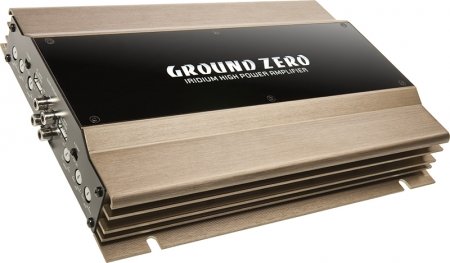
Figure 1: Ground Zero GZIA 4115HPX 4-Channel Car Audio Amplifier. This image displays the external casing de la amplifier, highlighting its compact design and heat sink fins.
2. Instrucciones de seguridad
Información de seguridad importante: Improper installation or use can lead to serious injury, damage to the amplificador, o daños a su vehículo.
- Desconecte siempre el terminal negativo de la batería del vehículo antes de iniciar cualquier trabajo eléctrico.
- Asegúrese de que todo el cableado esté correctamente enrutado y asegurado para evitar pinchazos, rozaduras o cortocircuitos.
- Use appropriate gauge wiring for power, ground, and speaker connections as recommended by the manufacturer.
- Install a fuse or circuit breaker on the main power wire as close to the battery as possible.
- Evite montar el ampNo mantenga el dispositivo en lugares expuestos a la luz solar directa, calor excesivo, humedad o polvo.
- No opere el ampSi el dispositivo está dañado o no funciona correctamente, busque asistencia profesional.
- Mantener el amplifier's ventilation areas clear to prevent overheating.
3. Configuración e instalación
La instalación adecuada es crucial para el rendimiento y la longevidad de su ampSi no está seguro de alguna parte del proceso de instalación, consulte a un instalador profesional de audio para automóviles.
3.1 Desembalaje
Retire con cuidado el amplifier from its packaging. Inspect the unit for any signs of damage that may have occurred during shipping. Retain the packaging for future transport or service needs.
3.2 Montaje
The GZIA 4115HPX amplifier is designed for surface mount installation. Choose a mounting location that is:
- Secure and stable, preventing vibration.
- Bien ventilado para permitir una adecuada disipación del calor.
- Protegido de la humedad y la luz solar directa.
- Accesible para cableado y ajustes.
Utilice los tornillos de montaje proporcionados para asegurar el amplifier to a solid surface in your vehicle. Ensure no existing wiring, fuel lines, or brake lines are damaged during drilling.
3.3 conexiones de cableado
Refer to the connection diagrams below for proper wiring. All connections should be tight and secure to prevent signal loss or electrical issues.
3.3.1 Cableado de alimentación y tierra
- Potencia (B+): Connect a suitable gauge power cable directly from the positive terminal of the vehicle's battery to the amplifier's B+ terminal. Install an inline fuse (not included) within 18 inches (45 cm) of the battery.
- Tierra (GND): Conecte un cable de tierra de calibre adecuado desde el amplifier's GND terminal to a clean, unpainted metal surface of the vehicle's chassis. Ensure a good electrical connection. The ground cable should be as short as possible.
- Remoto (REM): Conecte un cable de encendido remoto desde la salida remota de la unidad principal a la ampTerminal REM del energizador. Este cable enciende el ampEncienda y apague el amplificador con la unidad principal.
3.3.2 Cableado de altavoces
The GZIA 4115HPX is a 4-channel amplifier. Connect your speakers to the corresponding speaker output terminals (CH1, CH2, CH3, CH4). Ensure correct polarity (+ to + and - to -) for each speaker.
- For stereo operation, connect one speaker per channel.
- For bridged operation (e.g., for a subwoofer), refer to the specific bridging instructions on the amplifier or in a detailed wiring diagram.
3.3.3 Conexiones de entrada RCA
Conecte los cables RCA desde el preamplificador de su unidad principal.amp salidas a la ampTomas de entrada RCA del amplificador (INPUT CH1/2, INPUT CH3/4).

Figura 2: Interna view of the Ground Zero GZIA 4115HPX amplifier's circuit board. This image shows the internal components, including capacitors, resistors, and the transformer, which are responsible for audio processing and power delivery.

Figura 3: Detalle interno view of the Ground Zero GZIA 4115HPX amplifier. This image provides a closer look at the power supply section and output stage components, indicating the amplifier's robust construction.
3.4 Ajustes iniciales
Before powering on, ensure all connections are correct and secure.
- Control de ganancia: Set the gain controls (LEVEL) on the amplifier to their minimum position.
- Configuración de cruce: Si tu amplifier has built-in crossovers (HPF/LPF), set them according to your speaker type. For full-range speakers, you might use the HPF (High Pass Filter) to protect them from low frequencies. For subwoofers, use the LPF (Low Pass Filter).
4. Operar el Ampmás vivaz
Una vez instalado, el amplifier will turn on automatically with your head unit via the remote wire.
4.1 Setting Gain Levels
The gain control is not a volume knob; it matches the output voltage de su unidad principal a la sensibilidad de entrada de la ampmás duradero.
- Gire el volumen de la unidad principal a aproximadamente el 75-80% de su máximo.
- Aumente lentamente el ampControle la ganancia del amplificador hasta que escuche una ligera distorsión, luego reduzca el volumen ligeramente hasta que el sonido sea claro.
- Repita para todos los canales si hay controles de ganancia independientes.
4.2 Adjusting Crossovers and Bass Boost
- Filtro de paso alto (HPF): Used for full-range speakers to block low frequencies that they cannot reproduce effectively. Adjust to protect speakers and improve clarity.
- Filtro de paso bajo (LPF): Used for subwoofers to allow only low frequencies to pass through. Adjust to blend with your main speakers.
- Refuerzo de graves: Use sparingly. Excessive bass boost can lead to distortion and potential damage to speakers or the amplifier. Adjust to enhance low-frequency response as desired, but avoid overdriving the system.
5. Mantenimiento
The Ground Zero GZIA 4115HPX ampEl elevador requiere un mantenimiento mínimo.
- Limpieza: Limpie periódicamente el exterior del ampLimpie el limpiador con un paño suave y seco para eliminar el polvo. No utilice productos químicos agresivos ni limpiadores abrasivos.
- Ventilación: Asegúrese de que el amplifier's heat sink fins and surrounding area remain free of obstructions to allow for proper airflow and cooling.
- Verificación de conexión: Revise ocasionalmente todas las conexiones de energía, tierra, control remoto y parlantes para asegurarse de que permanezcan firmes y libres de corrosión.
6. Solución de problemas
Si tiene problemas con su amplifier, consulte la siguiente guía de solución de problemas antes de contactar al soporte.
| Problema | Posible causa | Solución |
|---|---|---|
| Amplifier does not turn on (no power indicator). |
|
|
| No hay sonido de los altavoces. |
|
|
| Calidad de sonido distorsionada o deficiente. |
|
|
| Amplifier overheats (protection light on). |
|
|
7. Especificaciones
The following are the technical specifications for the Ground Zero GZIA 4115HPX 4-Channel Car Audio Ampmás duradero:
| Característica | Detalle |
|---|---|
| Número de modelo | GZIA 4115HPX |
| Número de canales | 4 |
| Output Channel Quantity | 4 |
| Volumentage | 14.4 voltios |
| Quétage (máx.) | 500 vatios |
| Tipo de montaje | Montaje en superficie |
| Peso del artículo | 2 kilogramo 900 gramo |
| Dimensiones del paquete | 43.4 x 25 x 7.9 cm |
| ASIN | B006VTSQ8C |
8. Información de garantía
Ground Zero products are designed and manufactured to the highest quality standards. For detailed warranty terms and conditions, please refer to the warranty card included with your product or visit the official Ground Zero webSitio. Conserve su comprobante de compra para cualquier reclamación de garantía.
9. Atención al cliente
If you require further assistance or have questions not covered in this manual, please contact Ground Zero customer support or your authorized dealer. Contact information can typically be found on the official Ground Zero websitio.


