1. Introducción
This manual provides comprehensive instructions for the installation, operation, and maintenance of your ZENEC ZE-NC620DMH 2-DIN Navigation Receiver. Designed specifically for motorhomes and caravans, this device integrates advanced navigation with multimedia functionalities. Please read this manual thoroughly before using the product to ensure correct operation and to prevent damage.
2. Información de seguridad
- Instalación: Ensure installation is performed by a qualified technician to avoid damage to the vehicle or the device. Incorrect installation can lead to malfunction or accidents.
- Fuente de alimentación: Connect the device only to a 12V DC vehicle power supply with a negative ground.
- Operación mientras se conduce: No utilice el dispositivo de forma que le distraiga de la conducción. Priorice siempre la seguridad vial.
- Limpieza: Utilice un paño suave y seco para limpiar. No utilice limpiadores abrasivos ni disolventes.
- Temperatura: Evite exponer el dispositivo a temperaturas extremas o luz solar directa durante períodos prolongados.
3. Producto terminadoview
The ZENEC ZE-NC620DMH is a versatile 2-DIN navigation and multimedia system. It features a 6.2-inch touchscreen display and various input/output options.
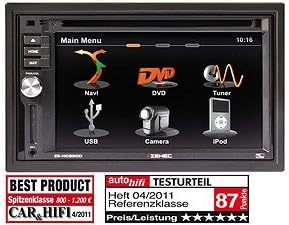
Figura 3.1: Interfaz del menú principal. This image displays the primary menu screen of the ZENEC ZE-NC620DMH. Key functions are accessible via touch icons, including Navigation (Navi), DVD playback, Radio Tuner, USB media, Camera input, and iPod connectivity. The top right corner shows the current time (10:16).
3.1 Funciones del menú principal
- Navegación: Access the integrated navigation system with specialized POIs for campres.
- DVD: Play DVDs and CDs via the built-in optical drive.
- Sintonizador: Select and listen to radio stations.
- USB: Conecte dispositivos de almacenamiento USB para reproducción multimedia.
- Cámara: View input from a connected rearview or front camera.
- iPod: Connect and control compatible iPod/iPhone devices for audio playback.
4. Configuración
4.1 Instalación
The ZE-NC620DMH is designed for dashboard mounting in vehicles with a 2-DIN slot. Professional installation is highly recommended. Ensure all wiring connections (power, ground, speakers, antenna, GPS antenna, external microphone, camera inputs, USB) are secure and correctly polarized according to the wiring diagram provided in the separate installation guide.
4.2 Configuración inicial
- Encendido: Turn on your vehicle's ignition. The device should power on automatically.
- Selección de idioma: Siga las instrucciones en pantalla para seleccionar su idioma preferido.
- Hora y fecha: Establezca la zona horaria, la fecha y la hora correctas.
- Configuración GPS: Asegúrese de que la antena GPS esté instalada en un lugar con una vista despejada. view of the sky. The system will acquire satellite signals automatically.
- Emparejamiento Bluetooth: To pair your mobile phone, navigate to the Bluetooth menu, enable pairing mode on your phone, and select the ZE-NC620DMH from the list of available devices.
5. Instrucciones de funcionamiento
5.1 Sistema de navegación
- Tap the "Navi" icon on the main menu to launch the navigation software.
- Introduzca su destino utilizando el teclado en pantalla.
- Select route preferences (e.g., fastest, shortest, avoid tolls).
- The system provides turn-by-turn voice guidance and visual map display.
- Access specialized POIs (Points of Interest) for campers, such as campsites, service stations, and parking areas.
5.2 Multimedia Playback (DVD/CD, USB, iPod)
- DVD/CD: Insert a disc into the slot. The device will automatically switch to DVD/CD mode. Use the on-screen controls for playback.
- USB: Connect a USB flash drive to the designated USB port. Tap the "USB" icon to browse and play media files (audio, video, imágenes).
- iPod: Connect your iPod/iPhone using a compatible cable. Tap the "iPod" icon to access your music library and control playback.
5.3 Sintonizador de radio
- Tap the "Tuner" icon to access the radio.
- Utilice la función de escaneo para encontrar estaciones disponibles o sintonizar manualmente una frecuencia.
- Guarde sus estaciones favoritas como preajustes para un acceso rápido.
5.4 Entrada de cámara
- Si una traseraview La cámara está conectada, la pantalla cambiará automáticamente a la cámara. view Cuando el vehículo se pone en marcha atrás.
- Tap the "Camera" icon to manually view the camera feed (if supported by your camera setup).
6. Mantenimiento
- Limpieza de pantalla: Limpie suavemente la pantalla táctil con un paño suave que no deje pelusa. Para manchas difíciles, limpie ligeramenteampEnjuague el paño con agua o un limpiador de pantallas. No rocíe líquidos directamente sobre la pantalla.
- Actualizaciones de software: Periodically check the ZENEC website for available software and map updates to ensure optimal performance and the latest navigation data.
- Unidad de disco: Keep the disc slot free from dust and debris. Avoid inserting damaged or dirty discs.
7. Solución de problemas
| Problema | Posible causa | Solución |
|---|---|---|
| Sin poder | Fusible quemado, cableado incorrecto, conexión suelta. | Check vehicle fuses. Verify power and ground connections. Consult an installer. |
| No hay señal GPS | Antena GPS obstruida o desconectada. | Ensure antenna has a clear view del cielo. Compruebe la conexión de la antena. |
| Sin audio | Volumen demasiado bajo, silencio activado, problema de cableado del altavoz. | Sube el volumen. Comprueba el estado de silencio. Verifica las conexiones de los altavoces. |
| La pantalla táctil no responde | Fallo temporal del software. | Perform a soft reset (refer to installation guide for reset button location, usually a small pinhole). |
If problems persist after attempting these solutions, please contact ZENEC customer support or a qualified service center.
8. Especificaciones
- Marca: Zenec
- Nombre del modelo: ZENEC ZE-NC620DMH
- Tipo de servicio del vehículo: Camión (Note: Optimized for Motorhome/Caravan use)
- Tamaño de pantalla: 6.2 pulgadas
- Característica especial: Adaptation for motorhomes and caravans
- Tecnología de conectividad: Bluetooth, USB
- Tipo de mapa: Europa
- Componentes incluidos: CD/DVD player, external microphone
- Modo de salida de audio: Estéreo
- Tipo de montaje: Montaje en tablero de instrumentos
9. Garantía y soporte
For warranty information, please refer to the warranty card included with your product or visit the official ZENEC website. Technical support and service inquiries should be directed to your authorized ZENEC dealer or the ZENEC customer service department.
Conserve su comprobante de compra para reclamos de garantía.


