1. Producto terminadoview
The Eaton TR7740W-K is a combination USB charger and tamper-resistant AC receptacle designed for convenient charging of electronic devices and safe power access. This device integrates two USB charging ports and a standard 125V AC outlet into a single unit, eliminating the need for bulky adapters.
Las características principales incluyen:
- Dual USB ports for charging most electronic devices.
- Energy-efficient design compared to traditional plug-in adapters.
- LED indicator light to show charging status; turns off upon full charge.
- 15A 125V tamper-resistant AC receptacle, compliant with 2011 NEC Article 406.12 for child safety.
- UL approved tampLas persianas resistentes al agua evitan la inserción de objetos extraños.
- Backwire clamps on side terminals for easy installation with #12 and #14 AWG wire.
- Designed to replace existing standard duplex receptacles.
2. Información de seguridad
ADVERTENCIA: To avoid fire, shock, or death, turn off power at the circuit breaker or fuse box and test that power is off before wiring. This device must be installed in accordance with national and local electrical codes.
- Desconecte siempre la alimentación antes de realizar cualquier instalación o mantenimiento.
- Use only with copper wire. Do not use with aluminum wire.
- Asegúrese de que todas las conexiones de cables estén seguras.
- Este dispositivo es solo para uso en interiores.
- No exceda las clasificaciones eléctricas máximas del dispositivo.
- Si no está seguro de alguna parte de estas instrucciones, consulte a un electricista calificado.
Advertencia de la Proposición 65: Este producto puede contener sustancias químicas que el estado de California reconoce como causantes de cáncer y defectos de nacimiento u otros daños reproductivos.
3. Contenido del paquete
- Eaton TR7740W-K Combination USB Charger Receptacle (White)
- (3) Pre-stripped 6-inch wire leads
- Herrajes de instalación (tornillos)
4. Configuración e instalación
Installation should be performed by a qualified individual. Follow these steps carefully:
- Apagar la energía: Locate the circuit breaker or fuse box controlling the outlet where you intend to install the receptacle. Turn off the power to that circuit. Verify power is off using a voltage probador.
- Retire el receptáculo viejo: Unscrew and carefully pull the existing receptacle from the wall box. Disconnect the wires from the old receptacle. Note the wire connections: typically, black (hot), white (neutral), and bare copper or green (ground).
- Prepare los cables: If necessary, strip approximately 1/2 inch (12.7 mm) of insulation from the ends of the circuit wires. The TR7740W-K includes pre-stripped wire leads for convenience.
- Conexiones de cable:
- Conectar el cable de tierra de cobre verde o desnudo from the wall box to the green ground screw on the new receptacle.
- Conectar el cable blanco (neutro) from the wall box to the silver screw terminal or the white pre-stripped wire lead on the new receptacle.
- Conectar el cable negro (caliente) from the wall box to the brass screw terminal or the black pre-stripped wire lead on the new receptacle.
- For backwire clamps, insert the stripped wire end fully into the clamp opening and tighten the screw firmly.
- Receptáculo de montaje: Vuelva a colocar con cuidado el receptáculo cableado en la caja de pared. Fíjelo con los tornillos de montaje incluidos.
- Instalar placa de pared: Coloque la placa de pared decorativa (no incluida) sobre el receptáculo.
- Restaurar energía: Vuelva a encender la energía en el disyuntor o en la caja de fusibles.

Imagen 1: Frente view of the Eaton TR7740W-K, highlighting the USB ports and AC outlet.
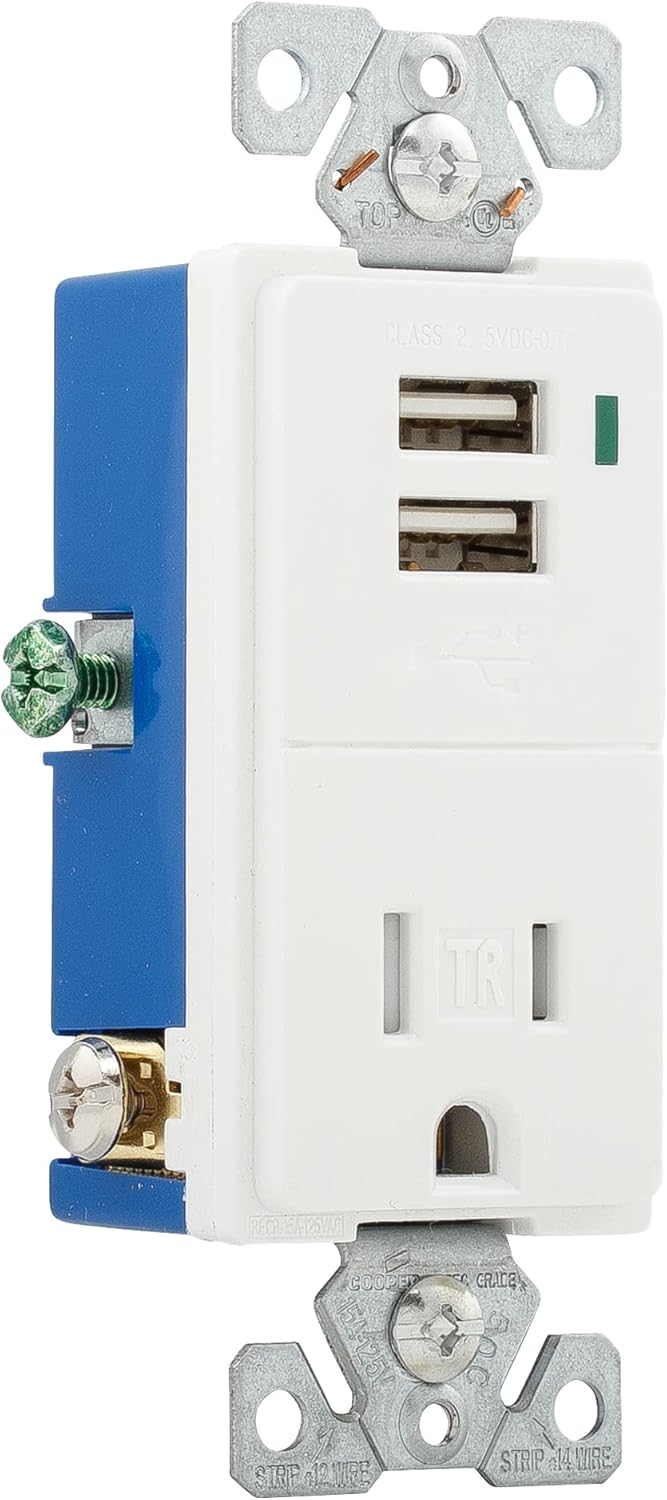
Imagen 2: Lateral view of the Eaton TR7740W-K, illustrating the wiring terminals for installation.
5. Instrucciones de funcionamiento
Using your Eaton TR7740W-K combination receptacle is straightforward:
- Carga USB: Insert your device's USB charging cable into one of the two USB ports. The LED indicator light will glow to confirm that the device is charging. The light will turn off when the device reaches a full charge.
- Alimentación CA: Plug any standard 125V AC appliance or charger into the tamper-resistant AC outlet. The tamper-resistant shutters require simultaneous pressure on both slots to open, preventing single-object insertion for enhanced safety.
The USB ports provide a total output of 0.7A (700mA) at 5V DC. While suitable for most smartphones and smaller electronic devices, some high-current devices like certain tablets (e.g., older iPads) may charge slower or not at full speed due to their higher power requirements.
6. Mantenimiento
The Eaton TR7740W-K requires minimal maintenance:
- Limpieza: Desconecte la alimentación antes de limpiar. Limpie la superficie con un paño suave.amp Paño. No utilice limpiadores abrasivos ni disolventes.
- Inspección: Periodically inspect the receptacle for any signs of damage, loose connections, or discoloration. If any issues are found, turn off power and consult a qualified electrician for repair or replacement.
7. Solución de problemas
| Problema | Posible causa | Solución |
|---|---|---|
| No power to AC outlet or USB ports. | Disyuntor disparado o fusible fundido. Conexión de cableado suelta. | Check and reset the circuit breaker or replace the fuse. Turn off power and check wire connections. |
| USB device not charging or charging slowly. | Device requires higher current than supplied (0.7A total). Faulty USB cable. Device not properly connected. | Verify device's charging requirements. Use a different USB cable. Ensure cable is fully inserted. Note that some high-power devices may charge slower. |
| LED indicator not glowing when charging. | Device is fully charged. Faulty LED. | Check if the device is already fully charged. If not, and the device is charging, the LED may be faulty (does not affect charging function). |
| Difficulty inserting plug into AC outlet. | Tamper-resistant shutters engaged. | Apply firm, even pressure to both prongs of the plug simultaneously to engage the shutters. Do not force. |
8. Especificaciones
| Característica | Detalle |
|---|---|
| Número de modelo | TR7740W-K |
| Marca | Comer |
| AC Receptacle Rating | 15 A, 125 V CA |
| Salida USB | 5V DC, 0.7A (700mA) total |
| Alambrado | Conexión a tierra de 2 polos y 3 cables |
| Color | Blanco |
| Material | Cobre |
| Certificaciones | UL Listed, NEMA |
| Dimensiones del producto | Approximately 9.01 x 4.4 x 6.61 inches (overall package) / 1.9 x 3.8 x 5.9 inches (device) |
| Peso del artículo | 4.2 onzas |
9. Garantía y soporte
Para obtener información sobre la garantía y soporte técnico, consulte el sitio web oficial de Eaton. website or contact Eaton customer service directly. Keep your purchase receipt as proof of purchase for any warranty claims.
Servicio al cliente de Eaton: Por favor visite www.eaton.com Para obtener datos de contacto y más información sobre el producto.


