1. Introducción
The Genius GX-Gaming SW-G2.1 3000 is a 2.1 channel speaker system designed to enhance audio experiences for gaming, music, and movies. It features a powerful subwoofer for deep bass and two satellite speakers for clear mid and high-range sounds. The system includes a dedicated control box for convenient adjustments and multiple input options for various devices.
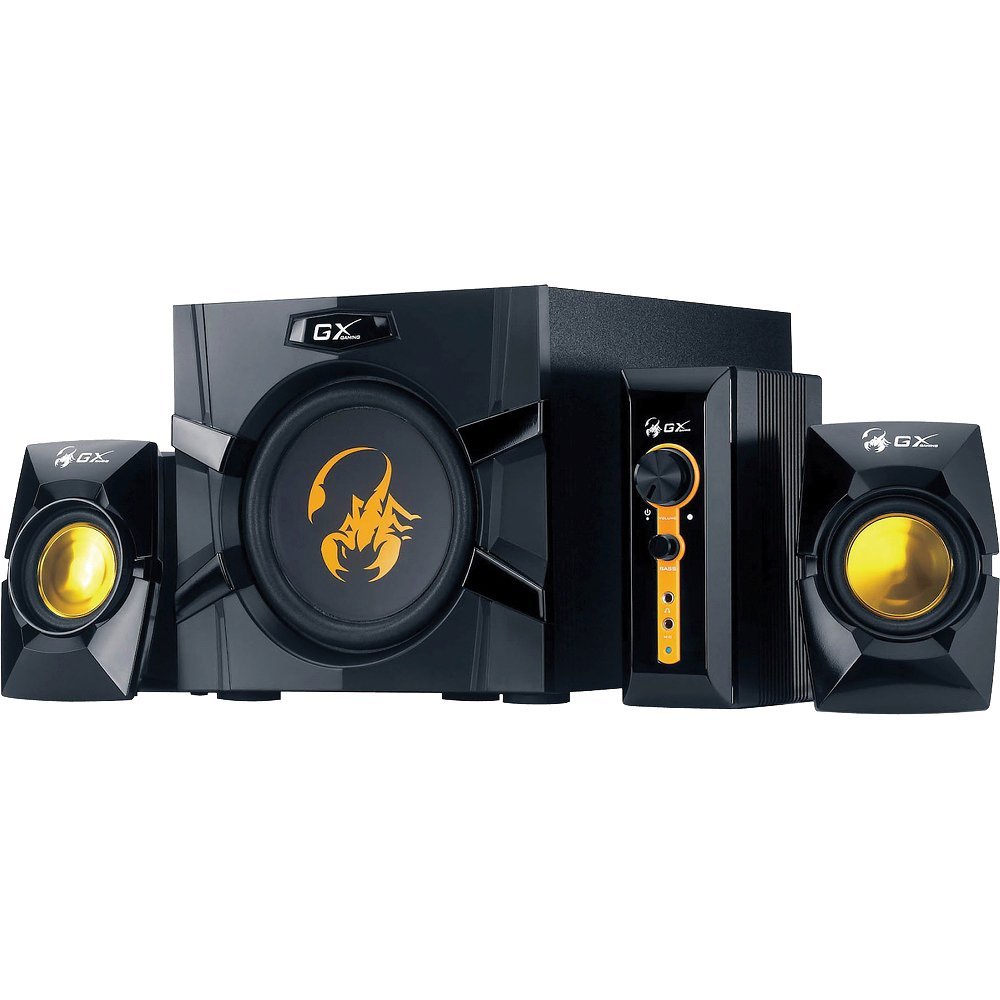
An image showing the Genius GX-Gaming SW-G2.1 3000 speaker system, featuring the subwoofer, two satellite speakers, and the control unit.
2. Contenido del paquete
Verifique que todos los artículos enumerados a continuación estén incluidos en su paquete:
- One (1) Wooden Cabinet Subwoofer
- Dos (2) altavoces satélite
- One (1) Control Box
- One (1) Stereo RCA to 3.5mm Audio Cable
- One (1) 3.5mm Plug Audio Cable
- One (1) Microphone Jack Cable
- One (1) Headphone Jack Cable
- One (1) Multi-language User Manual
3. Características del producto
- Potencia de salida total: 70 vatios (RMS)
- Subwoofer: Wooden cabinet with a 6.5-inch driver for deep bass
- Altavoces satélite: Two curvaceous speakers with 3-inch metal drivers for clear mid and high tones
- Caja de control: Independent controls for volume and bass adjustment
- Conectividad: Two input jacks (3.5mm standard and two RCA) for PC, TV, DVD, and game devices
- Conectores de audio: Dedicated microphone jack for online communication and headphone jack for private listening
- Respuesta de frecuencia: 35 Hz ~ 20K Hz
- Relación señal / ruido: 85 dB
- Modo de ahorro de energía: Automatically enters sleep mode after 1 minute of inactivity. To resume, ensure audio input device volume is at least 50%.
4. Instrucciones de configuración
- Posicionamiento de los altavoces: Place the subwoofer on a stable surface, preferably on the floor, for optimal bass. Position the satellite speakers on either side of your listening area, facing you.
- Conectar altavoces satélite: Connect the cables from the two satellite speakers to the corresponding output ports on the subwoofer.
- Conectar la caja de control: Plug the control box cable into the designated port on the subwoofer.
- Conectar fuente de audio:
- For PC, MP3/CD players: Use the 3.5mm audio cable to connect your device's audio output to the 3.5mm input on the control box.
- For Game Consoles, DVD Players, TV: Use the stereo RCA to 3.5mm cable. Connect the RCA ends to your device's audio output and the 3.5mm end to the corresponding input on the control box.
- Conecte la electricidad: Plug the subwoofer's power cord into a standard electrical outlet (110V or 220V AC, depending on your region).
- Encendido: Turn on the power switch, usually located on the subwoofer. The system is now ready for use.
5. Instrucciones de funcionamiento
- Control de volumen: Use the large knob on the control box to adjust the overall volume of the speaker system.
- Control de graves: Use the dedicated bass knob on the control box to increase or decrease the subwoofer's bass output.
- Uso del micrófono: Connect a microphone to the MIC jack on the control box for online communication.
- Uso de auriculares: Plug your headphones into the headphone jack on the control box for private listening. This will mute the speakers.
- Modo de ahorro de energía: If the system enters sleep mode due to inactivity, ensure your audio input device's volume is set to 50% or higher, then adjust the system's volume using the control box to resume audio.
6. Mantenimiento
- Limpieza: Use a soft, dry cloth to clean the surfaces of the speakers and control box. Avoid using liquid cleaners or abrasive materials.
- Colocación: Keep the speakers away from direct sunlight, heat sources, and excessive moisture. Ensure adequate ventilation around the subwoofer.
- Sistema de organización de cables: Asegúrese de que todos los cables estén conectados de forma segura y no enredados ni pellizcados para evitar daños.
- Almacenamiento: Si va a almacenar el sistema durante un período prolongado, desconéctelo de la alimentación y guárdelo en un lugar fresco y seco.
7. Solución de problemas
- Sin sonido:
- Ensure the power cable is securely plugged in and the power switch is on.
- Check all audio cables are correctly connected between the source device, control box, and subwoofer.
- Verify the volume knob on the control box is turned up.
- Ensure the audio source device (PC, TV, etc.) is playing audio and its volume is not muted or too low.
- If in Power Saving Mode, increase the audio source device's volume to at least 50%.
- Sonido distorsionado:
- Reduce the volume on both the speaker system and the audio source device.
- Adjust the bass level on the control box.
- Asegúrese de que los cables de los altavoces no estén dañados ni mal conectados.
- Un altavoz no funciona:
- Verifique la conexión del altavoz satélite que no funciona al subwoofer.
- Test with another audio source or swap the satellite speaker connections (if possible) to isolate the issue.
8. Especificaciones técnicas
| Potencia de salida total | 70 vatios (RMS) |
| Energía satelital | 2 x 15 vatios |
| Potencia del subwoofer | 40 vatios |
| Unidades de controlador | Satellites: 2 x 3 inches, Subwoofer: 1 x 6.5 inches |
| Respuesta de frecuencia | 35 Hz ~ 20K Hz |
| Relación señal a ruido | 85 dB |
| Dimensiones del subwoofer (An x Al x Pr) | 230 x 314 x 215 mm (aprox. 9 x 12.4 x 8.5 pulgadas) |
| Satellite Dimensions (WxHxD) | 99 x 115 x 143 mm |
| Controller Dimensions (WxHxD) | 60 x 154 x 170 mm |
| Peso del sistema | 4.66 kg (aproximadamente 10.27 libras) |
| Fuente de poder | 110V o 220V AC |
| Dispositivos compatibles | Personal Computer, Television, DVD Players, Game Consoles, MP3/CD players |
| Tomas de entrada | 3.5mm standard input, two RCA jacks |
| Método de control | Knobs/Buttons (listed as 'Touch' in some specifications) |
9. Garantía y soporte
This Genius GX-Gaming SW-G2.1 3000 speaker system comes with a Garantía limitada. For specific details regarding warranty coverage, duration, and terms, please refer to the warranty card included in your product packaging or visit the official Genius websitio.
For technical support, troubleshooting assistance, or service inquiries, please contact Genius customer support through their official website or the contact information provided in your product documentation. When contacting support, please have your product model number (SW-G2.1 3000) and purchase information readily available.


