Introducción
This manual provides detailed instructions for the setup, operation, and maintenance of your One For All OARH01B Single Device Universal Remote Control. This remote is designed to provide simplified control for your television, featuring an intuitive layout and essential functions.
Características del producto
The One For All OARH01B remote control is engineered for ease of use and reliability. Key features include:
- Large, Easy-to-Use Buttons: Designed for comfortable handling and clear visibility.
- Intuitive Key Grouping: Buttons are logically arranged with easy-to-recognize icons for quick access to functions.
- Glow Keys: Volume, Channel, and Sleep keys illuminate for easy identification in low-light conditions.
- Braille Support: Tactile indicators for Power, Channel, and Volume buttons enhance accessibility.
- Funcionalidad integral: Includes dedicated keys for Menu, Sleep, Input, Closed Captioning (CC), and Previous Channel.
- Digital Sub-Channel Capability: Supports navigation of digital sub-channels (e.g., 59.1) for modern TV programming.
- Compartimiento seguro de la batería: Features a secure screw for the battery door, preventing accidental opening.
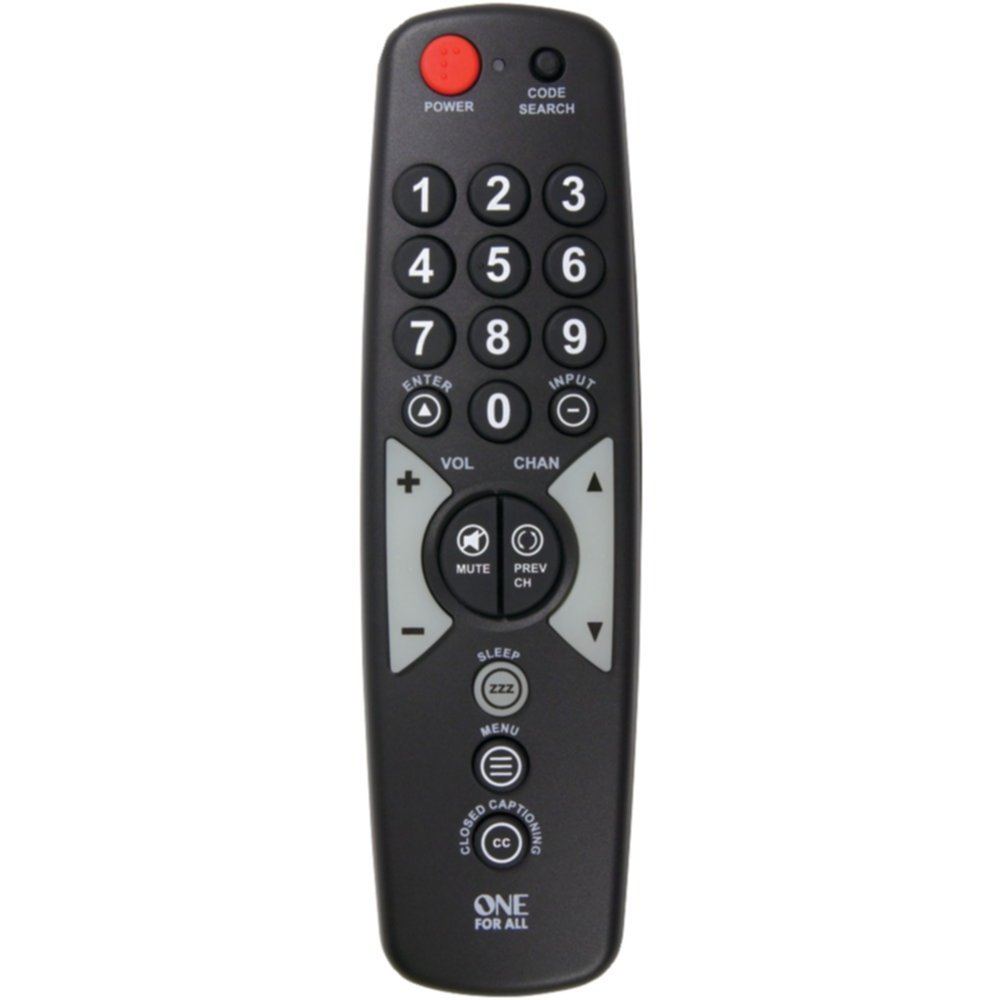
A black universal remote control with large, clearly labeled buttons. The top features a red power button and a code search button. Below are the numeric keypad (0-9), followed by navigation buttons for volume, channel, enter, and input. Mute and previous channel buttons are centrally located. Further down are buttons for sleep, menu, and closed captioning. The 'ONE FOR ALL' logo is at the bottom.
Introducción: Instalación de la batería
Para comenzar a utilizar el control remoto, primero debe instalar las baterías.
- Ubique el compartimiento de la batería en la parte posterior del control remoto.
- Using a small screwdriver, carefully remove the secure screw from the battery compartment door.
- Deslice la puerta del compartimiento de la batería para abrirla.
- Insert two (2) AAA batteries (not included), ensuring the positive (+) and negative (-) terminals align with the indicators inside the compartment.
- Close the battery compartment door and re-insert the secure screw to fasten it.
Nota: Utilice siempre baterías nuevas y deseche las baterías viejas de forma responsable.
Setup: Programming the Remote
Your One For All OARH01B remote control needs to be programmed to operate your specific television. There are typically two methods for programming:
Método 1: Entrada directa de código
- Turn on the television you wish to control.
- Mantenga pulsado el BÚSQUEDA DE CÓDIGO botón en el control remoto hasta que se ilumine la luz indicadora.
- Refer to the code list provided with your remote (or available online from One For All) and find the 3-digit code for your TV brand.
- Enter the 3-digit code using the number buttons on the remote. The indicator light should turn off after the last digit is entered.
- Apunte el control remoto a su televisor y presione el botón FUERZA button. If the TV turns off, the remote is successfully programmed.
- Si el televisor no responde, repita el proceso con el siguiente código indicado para su marca.
Method 2: Auto Code Search
- Turn on the television you wish to control.
- Mantenga pulsado el BÚSQUEDA DE CÓDIGO botón en el control remoto hasta que se ilumine la luz indicadora.
- Presione el FUERZA button once. The indicator light will flash, indicating the remote is searching for a code.
- Point the remote at your TV and wait. The remote will send power codes to your TV every few seconds.
- As soon as your TV turns off, immediately press the INGRESAR button to save the code. If you wait too long, the remote may pass the correct code.
- Test the remote's functions (Volume, Channel, etc.). If all functions work correctly, programming is complete. If not, repeat the auto search process.
Operación del control remoto
Once programmed, your One For All OARH01B remote provides control over your television's primary functions.
- FUERZA: Enciende o apaga tu televisor.
- Teclado numérico (0-9): Se utiliza para ingresar directamente números de canal.
- ENTRAR: Confirma la selección de canal o las opciones del menú.
- ENTRADA: Cycles through available video inputs on your TV (e.g., HDMI 1, AV, Component).
- VOL (+/-): Increases or decreases the television's volume.
- MUDO: Silences the television's audio.
- CHAN (Up/Down): Cambia el canal de televisión hacia arriba o hacia abajo.
- ANTERIOR CH: Cambia a la versión anterior viewcanal ed.
- DORMIR: Activates the TV's sleep timer function (if available).
- MENÚ: Accesses the television's on-screen menu. Use VOL and CHAN buttons to navigate menu options, and ENTER to select.
- CLOSED CAPTIONING (CC): Activa o desactiva los subtítulos.
Solución de problemas
Si tiene problemas con su control remoto, consulte las siguientes soluciones comunes:
- El control remoto no responde:
- Compruebe que las baterías estén correctamente instaladas y tengan suficiente carga. Reemplácelas si es necesario.
- Asegúrese de que haya una línea de visión despejada entre el control remoto y el sensor infrarrojo del televisor. Retire cualquier obstrucción.
- El control remoto no controla el televisor:
- The remote may not be programmed correctly for your TV. Re-attempt the programming steps (Direct Code Entry or Auto Code Search).
- If using Direct Code Entry, try other codes listed for your TV brand.
- Specific Functions Not Working (e.g., Input, Menu):
- Some advanced TV functions may not be fully supported by all universal remotes. Verify if your TV model is fully compatible with the remote's features.
- When navigating TV menus, remember that VOL and CHAN buttons often serve as navigation arrows. Press ENTER to confirm selections.
- Indicator Light Not Functioning:
- Esto suele indicar que la batería está baja. Reemplace las baterías.
Mantenimiento
Para garantizar la longevidad y el rendimiento óptimo de su control remoto, siga estas pautas de mantenimiento:
- Limpieza: Limpie el control remoto con un paño suave y seco. Para suciedad difícil de eliminar, limpie ligeramenteampEnjuague el paño con agua o una solución limpiadora suave y séquelo inmediatamente. Evite usar limpiadores abrasivos o disolventes.
- Reemplazo de batería: Replace batteries promptly when the remote's performance degrades or the indicator light fails to illuminate. Always replace both batteries at the same time.
- Almacenamiento: Guarde el control remoto en un lugar fresco y seco, alejado de la luz solar directa, temperaturas extremas y alta humedad.
- Evite las gotas: Proteja el control remoto contra impactos físicos, ya que esto puede dañar los componentes internos.
Presupuesto
| Especificación | Detalle |
|---|---|
| Marca | Uno para todos |
| Modelo | OARH01B |
| Dispositivos compatibles | Televisión |
| Número máximo de dispositivos compatibles | 1 |
| Fuente de poder | Funciona con pilas |
| Pilas necesarias | 2 x AAA (no incluido) |
| Tipo de conector | Infrarrojo |
| Dimensiones (LxAnxAl) | 17.8 x 2.5 x 5.1 centímetros |
| Peso del artículo | 104 gramos |
Garantía y soporte
Your One For All OARH01B Universal Remote Control comes with a Garantía limitada de por vida. For specific terms and conditions, please refer to the warranty documentation included with your purchase or visit the official One For All websitio.
For further assistance, troubleshooting tips, or to find the latest device codes, please visit the Soporte de One For All websitio. You may also contact their customer service for personalized support.


