1. Introducción
Thank you for choosing the TFA 30.5027.02 Digital Thermometer/Hygrometer. This device is designed to accurately measure and display indoor temperature and humidity, providing a clear indication of the comfort level in your environment. Its ultra-flat design and high-gloss surface make it a discreet and functional addition to any room. Please read this manual carefully to ensure proper setup and operation.
2. Información de seguridad
- Conserve este manual de instrucciones para futuras consultas.
- Este dispositivo está diseñado únicamente para uso en interiores.
- Do not expose the device to extreme temperatures, direct sunlight, moisture, or strong vibrations.
- No sumerja el dispositivo en agua ni en otros líquidos.
- Do not attempt to open or modify the device. This will void the warranty.
- Mantenga las baterías fuera del alcance de los niños. Si se ingiere, busque atención médica inmediata.
- Deseche las baterías usadas de acuerdo con las normas locales.
- Limpie el dispositivo con un paño suave y seco.amp Paño. No utilice limpiadores abrasivos ni disolventes.
3. Contenido del paquete
Compruebe que todos los componentes estén presentes y sin daños:
- 1x TFA 30.5027.02 Digital Thermometer/Hygrometer
- 1x CR2 Lithium Battery (pre-installed or separate)
- 1x Manual de instrucciones (este documento)
4. Producto terminadoview
The TFA 30.5027.02 features a clear digital display showing current temperature and humidity. It also includes a comfort level indicator and a maximum/minimum value memory function.

Figura 1: Frente view of the TFA 30.5027.02 Digital Thermometer/Hygrometer. The display shows temperature in Celsius and relative humidity percentage, along with a comfort level icon.
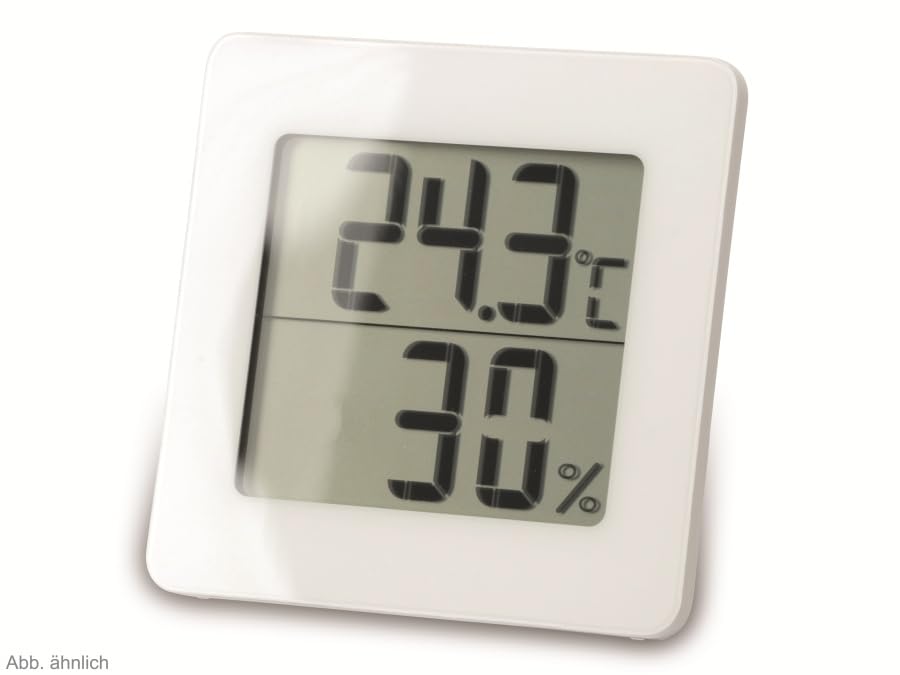
Figura 2: Alternar view of the TFA 30.5027.02 showing different temperature and humidity readings, demonstrating the device's clear digital display.
Características principales:
- Digital display for temperature (°C) and humidity (% RH)
- Ultra-flat design with high-gloss finish
- Comfort level indicator (smiley icon)
- Maximum and minimum value memory function
- Montaje en pared
5. Configuración
5.1 Instalación de la batería
- Localice la tapa del compartimiento de la batería en la parte posterior del dispositivo.
- Retire la cubierta deslizándola o haciendo palanca con cuidado para abrirla.
- Insert one CR2 Lithium battery, ensuring the correct polarity (+/-) as indicated inside the compartment.
- Vuelva a colocar la tapa del compartimiento de la batería de forma segura.
- The device display should activate, showing current temperature and humidity readings.
5.2 Colocación inicial
For accurate readings, place the thermometer/hygrometer in a location free from direct sunlight, drafts, or heat sources. The device can be placed on a flat surface or mounted on a wall using the integrated mounting hole on the back.
- Montaje en pared: Use a small screw (not included) suitable for your wall type. Hang the device securely.
- Colocación de la mesa: Ensure the device is stable on a flat, level surface.
6. Instrucciones de funcionamiento
6.1 Visualización sobreview
The large digital display shows two main values:
- Pantalla superior: Current temperature in degrees Celsius (°C).
- Pantalla inferior: Humedad relativa actual en porcentajetage (% HR).
- Indicador de nivel de comodidad: A small icon (e.g., a smiley face) indicates the current indoor climate comfort level based on temperature and humidity.
6.2 Función máx./mín.
The device records the maximum and minimum temperature and humidity values measured since the last reset. To access these values:
- Presione el MÁXIMO/MÍNIMO button (if present, typically on the back or side). The display will show the maximum recorded temperature and humidity.
- Presione el MÁXIMO/MÍNIMO botón de nuevo para view La temperatura y humedad mínimas registradas.
- Presione el MÁXIMO/MÍNIMO Presione el botón por tercera vez para regresar a las lecturas actuales.
Para restablecer los valores MÁX/MÍN, mantenga presionado el botón MÁXIMO/MÍNIMO button for a few seconds while viewing the MAX or MIN values. The memory will clear, and new maximum and minimum values will begin recording from that point.
6.3 Indicador de nivel de comodidad
The comfort level indicator provides a quick visual reference for indoor climate conditions:
- Cara feliz: Indicates optimal comfort (e.g., 20-25°C and 40-70% RH).
- Cara neutra: Indicates acceptable but not optimal conditions.
- Cara triste: Indicates uncomfortable conditions (e.g., too dry, too humid, too hot, or too cold).
Note: Specific ranges for comfort levels may vary slightly by model. Refer to the device's display for the exact icon representation.
7. Mantenimiento
7.1 Limpieza
Limpie el dispositivo con un paño suave, ligeramente damp cloth. Do not use abrasive cleaning agents, solvents, or alcohol, as these can damage the surface and display.
7.2 Reemplazo de batería
When the battery power is low, a low battery indicator (if available) will appear on the display. Replace the battery as follows:
- Abra la tapa del compartimento de la batería en la parte posterior del dispositivo.
- Retire la batería de litio CR2 vieja.
- Insert a new CR2 Lithium battery, observing the correct polarity (+/-).
- Cierre la tapa del compartimento de la batería.
Note: After battery replacement, the device may reset, and MAX/MIN values will be cleared.
8. Solución de problemas
| Problema | Posible causa | Solución |
|---|---|---|
| No hay pantalla o la pantalla es tenue | La batería está muerta o insertada incorrectamente. | Replace the battery with a new CR2 Lithium battery, ensuring correct polarity. |
| Lecturas inexactas | Device is placed in an unsuitable location (e.g., near a window, heat source, or vent). | Relocate the device to a stable indoor environment away from direct influences. Allow 15-30 minutes for readings to stabilize. |
| Comfort indicator always shows the same face | Environmental conditions are consistently outside or within a specific comfort range. | This indicates the device is functioning correctly. Adjust your indoor environment if desired. |
9. Especificaciones
- Número de modelo: 30.5027.02
- Marca: TFA
- Color: Blanco
- Dimensiones del producto (L x An x Al): 10 x 1.2 x 8.2 cm (3.94 x 0.47 x 3.23 pulgadas)
- Peso del artículo: 70 gramos (2.47 onzas)
- Batería: 1 x CR2 Litio (incluida)
- Tipo de montaje: Montaje en pared
- Operational Humidity Range: 20% a 95% HR
- Upper Rated Temperature: 50 °C (122 °F)
- Precisión de temperatura: ±1 °C
- Precisión de lectura de temperatura: ±1 °C
10. Garantía y soporte
For warranty information and customer support, please refer to the terms and conditions provided by your retailer or contact the manufacturer directly. Keep your proof of purchase for any warranty claims.
Fabricante: TFA Dostmann GmbH & Co. KG
For further assistance, please visit the official TFA websitio o comuníquese con su departamento de servicio al cliente.


