Introducción
This manual provides comprehensive instructions for the safe and efficient use of your Marmitek BoomBoom 560 Bluetooth Over-Ear Headphones. These headphones offer excellent digital sound quality with clear mid-tones and deep bass, along with passive noise reduction for an immersive audio experience. Please read this manual thoroughly before operating the device.

Image: Marmitek BoomBoom 560 Bluetooth Over-Ear Headphones, black, shown from a slight angle.
Contenido del paquete
Compruebe que todos los artículos enumerados a continuación estén presentes en su paquete:
- 1x Marmitek BoomBoom 560 Bluetooth Over-Ear Headphones
- 1x Micro USB to USB charging cable
- 1x 3.5mm Mini-jack audio cable (160 cm)
- 1x Manual de usuario (este documento)

Image: Visual representation of the Marmitek BoomBoom 560 package contents, including the headphones, charging cable, audio cable, and user manual.
Producto terminadoview:Controles y puertos
Familiarize yourself with the controls and ports on your BoomBoom 560 headphones:
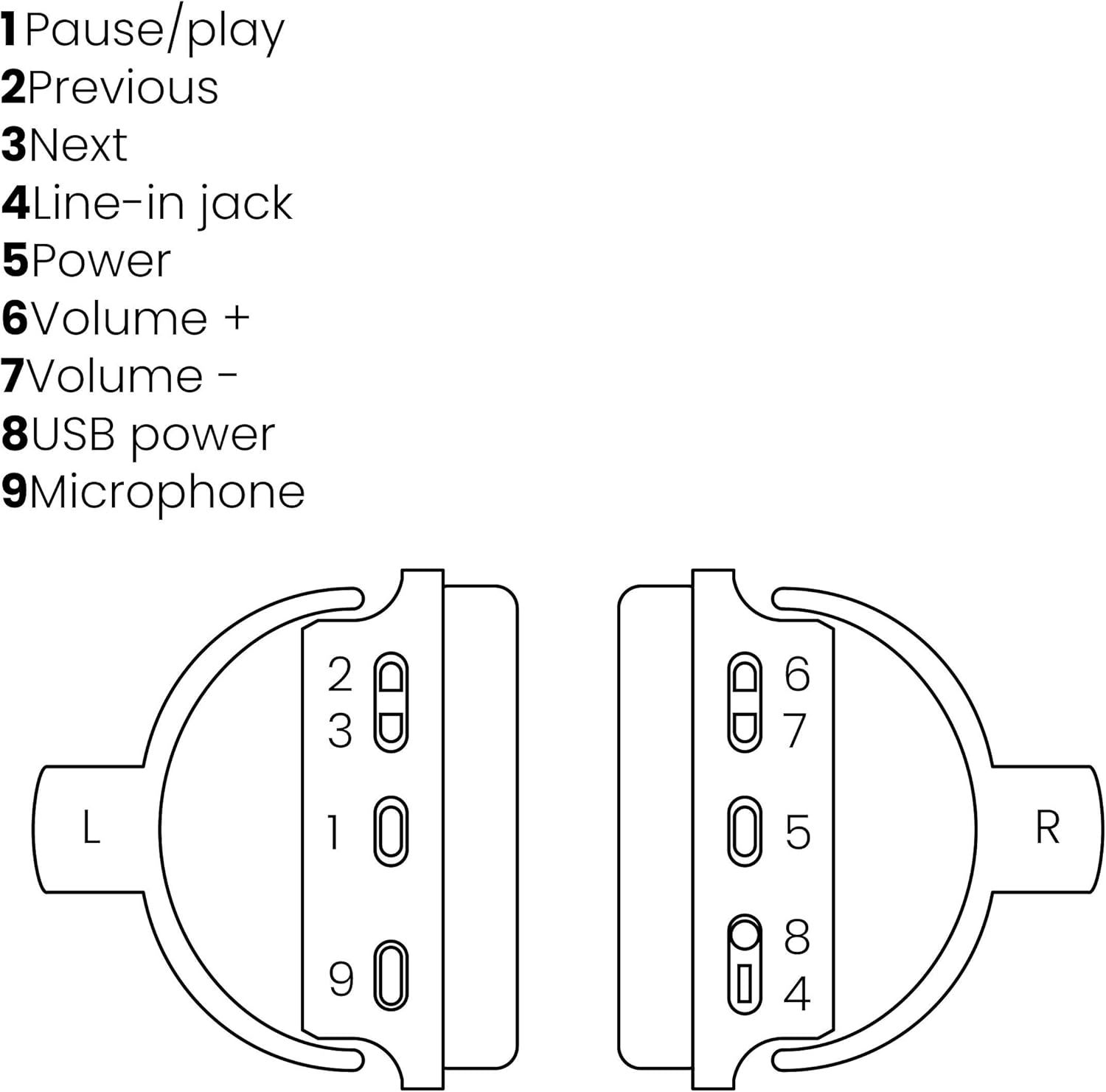
Image: A line drawing illustrating the left and right ear cup controls and ports, numbered for identification.
- Botón Pausa/Reproducir: Controla la reproducción de música.
- Botón de pista anterior: Salta a la canción anterior.
- Botón de pista siguiente: Salta a la siguiente canción.
- Conector de entrada de línea: Para conexión de audio por cable utilizando el cable de 3.5 mm.
- Botón de encendido: Turns the headphones on/off and initiates Bluetooth pairing.
- Volumen + Botón: Aumenta el volumen.
- Volumen - Botón: Disminuye el volumen.
- Puerto de alimentación USB: For charging the headphones using the Micro USB cable.
- Micrófono: Micrófono incorporado para llamadas manos libres.
Configuración
1. Carga de los auriculares
Before first use, fully charge your headphones. Connect the Micro USB end of the charging cable to the USB Power Port (8) on the headphones and the standard USB end to a USB power adapter (not included) or a computer's USB port. The LED indicator will show charging status. A full charge provides over 8 hours of playback time.
2. Emparejamiento Bluetooth
Para conectar sus auriculares de forma inalámbrica a un dispositivo con Bluetooth:
- Asegúrese de que los auriculares estén apagados.
- Mantenga pulsado el Botón de encendido (5) until the LED indicator flashes blue and red, indicating pairing mode.
- En su teléfono inteligente, tableta u otro dispositivo Bluetooth, habilite Bluetooth y busque los dispositivos disponibles.
- Select "BoomBoom 560" from the list of found devices.
- Una vez conectado, el indicador LED parpadeará en azul lentamente.

Image: Illustration depicting various Bluetooth-enabled devices (laptop, smartphone, tablet) wirelessly transmitting audio to the headphones.
3. Conexión por cable
If Bluetooth is not available or the battery is depleted, you can use the included 3.5mm audio cable. Connect one end of the cable to the Line-in Jack (4) on the headphones and the other end to the audio output of your device.
Instrucciones de funcionamiento
Encendido/apagado
- Para encender: Mantenga pulsado el Botón de encendido (5) for approximately 3 seconds until the LED indicator flashes blue.
- Para apagar: Mantenga pulsado el Botón de encendido (5) durante aproximadamente 3 segundos hasta que el indicador LED se apague.
Reproducción de música
- Reproducir/Pausa: Presione el Pause/Play Button (1) una vez.
- Pista siguiente: Presione el Next Track Button (3) una vez.
- Pista anterior: Presione el Previous Track Button (2) una vez.
Gestión de llamadas
When connected via Bluetooth, you can manage phone calls using the built-in microphone (9):
- Responder/Finalizar llamada: Presione el Pause/Play Button (1) una vez.
- Rechazar llamada: Mantenga pulsado el Pause/Play Button (1) durante aproximadamente 2 segundos.
Control de volumen
- Aumenta el volumen: Presione el Volume + Button (6).
- Disminuir volumen: Presione el Volume - Button (7).

Image: A user enjoying music or media with the Marmitek BoomBoom 560 headphones while relaxing at home.
Mantenimiento
Para garantizar la longevidad y el rendimiento óptimo de sus auriculares:
- Limpie los auriculares con un paño suave y seco. No utilice limpiadores abrasivos ni disolventes.
- Evite exponer los auriculares a temperaturas extremas, humedad o luz solar directa.
- Guarde los auriculares en un lugar fresco y seco cuando no los use.
- No intente desmontar o reparar los auriculares usted mismo, ya que esto anulará la garantía.
Solución de problemas
If you encounter issues with your BoomBoom 560 headphones, refer to the following common solutions:
- Sin energía: Asegúrese de que los auriculares estén completamente cargados. Conéctelos a una fuente de alimentación mediante el cable de carga USB.
- No se puede emparejar a través de Bluetooth:
- Asegúrese de que los auriculares estén en modo de emparejamiento (LED parpadeando en azul y rojo).
- Ensure your Bluetooth device's Bluetooth function is enabled and within range (typically 10 meters).
- Try turning off and on both the headphones and your Bluetooth device.
- Delete "BoomBoom 560" from your device's Bluetooth list and attempt to pair again.
- Sin sonido:
- Verifique los niveles de volumen tanto en los auriculares como en el dispositivo conectado.
- Asegúrese de que los auriculares estén correctamente emparejados o que el cable de audio de 3.5 mm esté conectado de forma segura.
- Si usa Bluetooth, intente desconectarlo y volver a conectarlo.
- Mala calidad de sonido:
- Acérquese a su dispositivo Bluetooth para reducir la interferencia.
- Asegúrese de que no haya obstáculos entre los auriculares y el dispositivo.
- Verifique la fuente de audio para detectar problemas de calidad.
- Loose Earcup Bracket: If the earcup bracket feels loose, handle the headphones with care. Avoid excessive force when adjusting or folding. If the issue persists and affects functionality, contact customer support.
Presupuesto
| Nombre del modelo | Boom Boom 560 |
| Número de modelo | 8122 |
| Marca | Marmitek |
| Tecnología de conectividad | Wireless (Bluetooth), Wired (3.5mm jack) |
| Compatibilidad Bluetooth | Sí |
| Factor de forma | Sobre la oreja |
| Material | Cuero (auriculares) |
| Características especiales | Reducción de ruido |
| Tecnología de micrófono | Omni (Built-in) |
| Descripción de la batería | Iones de litio (Li-Ion) |
| Duración de la batería | Over 8 hours (approx.) |
| Relación señal-ruido (SNR) | 82 dB |
| Dimensiones del producto | 23 x 5 x 18 cm; 100 g |
Garantía y soporte
Marmitek products are designed and manufactured to high quality standards. For information regarding warranty terms and conditions, please refer to the documentation provided with your purchase or visit the official Marmitek websitio.
Para obtener más ayuda o soporte técnico, visite el sitio web Marmitek Store on Amazon or the official Marmitek support channels.

Image: Logo indicating "Dutch Quality" and compliance with "EU European Standards".


