Introducción
This manual provides essential instructions for the safe and efficient operation of your VisionTek Pitbull RockDoc Power Portable MP3 Speaker. Please read this manual thoroughly before using the device and retain it for future reference.
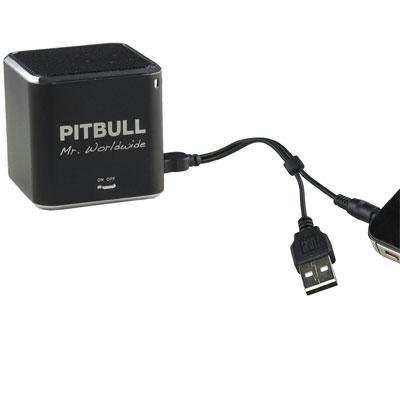
This image displays the compact, black cube-shaped Pitbull RockDoc Power Portable MP3 Speaker. The front face features the 'PITBULL Mr. Worldwide' logo and an 'ON OFF' switch. An integrated cable with a USB connector and a 3.5mm audio jack is shown connected to the speaker, ready for charging or audio input.
Características del producto
- Diseño portátil: Compacto y liviano para fácil transporte.
- Reproductor MP3 integrado: Features 4GB of internal memory for direct music playback.
- Conectividad inalámbrica: Supports Bluetooth for audio streaming from compatible devices.
- Wired Audio Input: Includes a 3.5 mm audio jack for connecting non-Bluetooth devices.
- Funciona con pilas: Operates on an internal battery for cordless use.
- Sistema de altavoces de 1 vías: Proporciona una salida de audio clara.
Configuración
Carga del altavoz
- Locate the integrated USB cable attached to the speaker.
- Conecte el extremo USB-A del cable a un puerto USB con alimentación (por ejemplo, computadora, adaptador de pared USB).
- The speaker's indicator light will illuminate to show charging status. Refer to the device for specific light indications.
- Una vez completamente cargado, desconecte el cable USB.
Encendido/apagado
- To power on, slide the 'ON OFF' switch to the 'ON' position.
- To power off, slide the 'ON OFF' switch to the 'OFF' position.
Conexión de fuentes de audio
Your speaker supports three primary methods for audio input:
1. Using Internal 4GB Memory (MP3 Playback)
- To load music onto the internal 4GB memory, connect the speaker to a computer using the USB cable. The speaker should appear as a removable storage device.
- Arrastre y suelte su audio MP3 files into the speaker's storage.
- Una vez files are transferred, safely eject the speaker from your computer.
- The speaker will automatically play files from its internal memory when powered on and no other audio source is connected.
2. Conexión Bluetooth
- Asegúrese de que el altavoz esté encendido.
- Active Bluetooth en su teléfono inteligente, tableta u otro dispositivo compatible.
- Buscar available Bluetooth devices. The speaker should appear as "Pitbull RockDoc" or similar.
- Select the speaker from the list to pair. A confirmation sound or light indication may occur upon successful pairing.
3. 3.5 mm Audio Jack Connection
- Locate the integrated 3.5 mm audio jack on the speaker's cable.
- Connect this jack to the headphone output or audio-out port of your external audio device (e.g., MP3 player, phone, laptop).
- Ensure the speaker is powered on. Audio will be routed through this connection.
Instrucciones de funcionamiento
Controles básicos de reproducción
The speaker features basic controls for media playback. These controls typically include:
- Reproducir/Pausa: Presione para iniciar o pausar la reproducción de audio.
- Pista siguiente: Press to skip to the next audio file.
- Pista anterior: Presione para regresar al comienzo de la pista actual o a la pista anterior.
- Control de volumen: Adjust the volume level. (Specific button layout not provided, assume standard controls).
Note: When connected via Bluetooth or 3.5mm audio jack, playback controls on the speaker may control the connected device, or you may need to control playback directly from the source device.
Mantenimiento
Limpieza
- Limpie el exterior del altavoz con un paño suave, seco y sin pelusa.
- No utilice limpiadores abrasivos, disolventes ni productos químicos fuertes.
- Evite que entre humedad en las aberturas.
Almacenamiento
- Guarde el altavoz en un lugar fresco y seco, alejado de la luz solar directa y de temperaturas extremas.
- Si va a almacenarlo durante un período prolongado, asegúrese de que la batería esté parcialmente cargada (alrededor del 50%) para prolongar su vida útil.
Solución de problemas
| Problema | Posible causa | Solución |
|---|---|---|
| Sin poder | La batería está agotada | Cargue el altavoz mediante el cable USB. |
| No hay sonido del altavoz | Volume too low; Incorrect input source; Device not paired (Bluetooth); Cable not connected (3.5mm) | Increase speaker volume; Ensure correct mode (internal MP3, Bluetooth, or AUX); Re-pair Bluetooth device; Check 3.5mm cable connection. |
| El emparejamiento de Bluetooth falla | El altavoz no está en modo de emparejamiento; Dispositivo demasiado lejos; Interferencia | Ensure speaker is discoverable; Move device closer to speaker; Turn off other Bluetooth devices. |
| no se puede transferir files a 4 GB de memoria | Incorrect USB connection; Driver issue; Memory full | Ensure speaker is connected to computer via USB; Try a different USB port/cable; Check available memory space. |
Presupuesto
| Característica | Detalle |
|---|---|
| Número de modelo | 900584 |
| Tipo de altavoz | 1-Way Portable Speaker |
| Memoria interna | 4 GB (para reproducción de MP3) |
| Conectividad | Bluetooth, 3.5 mm Audio Jack |
| Fuente de poder | Funciona con pilas |
| Potencia máxima de salida del altavoz | 3 vatios |
| Peso del artículo | 159 gramos |
| Dimensiones del producto (LxAnxAl) | 5 x 5 x 4.9 cm |
| Fabricante | ALMACENAMIENTO MASIVO VISIONTEK |
Información de garantía
For detailed warranty information regarding your VisionTek Pitbull RockDoc Power Portable MP3 Speaker, please refer to the warranty card included with your purchase or contact the manufacturer directly. Amazon's buying options mention a 'Warranty Policy', indicating manufacturer coverage.
Apoyo
If you require technical assistance or have questions not covered in this manual, please contact VisionTek Mass Storage, the manufacturer of this product. Contact details can typically be found on their official websitio o embalaje del producto.


