1. Información de seguridad
Welding and cutting activities can be hazardous. Always follow proper safety precautions to prevent injury. This helmet provides eye and face protection during welding and cutting operations. It is crucial to use additional personal protective equipment (PPE) as recommended for your specific task.

Figura 1: Essential Personal Protective Equipment for Welding and Cutting. This infographic illustrates the importance of wearing safety glasses, welding gloves, a welding jacket, appropriate pants, safety boots, and ear protection in addition to the welding helmet.
Pautas generales de seguridad:
- Protección ocular: Always wear approved safety glasses (ANSI Z87.1 compliant) under your welding helmet. The auto-darkening lens protects against arc flash, but safety glasses provide impact protection.
- Protección de la cabeza: If required, wear a cap or other head covering to protect your head and neck from sparks and heat.
- Protección de mano: Use welding gloves to protect hands from heat, sparks, and electrical shock.
- Protección corporal: Wear a flame-resistant welding jacket, long-sleeved shirts, and pants without cuffs to prevent sparks from entering.
- Protección de los pies: Wear steel-toe boots or other protective footwear.
- Protección auditiva: Use earplugs or earmuffs to protect against loud noise.
- Ventilación: Asegúrese de que haya una ventilación adecuada para evitar la inhalación de humos peligrosos.
- Inspeccionar el equipo: Before each use, inspect the helmet for damage, cracks, or loose parts. Replace any damaged components immediately.
2. Configuración y ajuste
Proper setup ensures comfort and maximum protection. Follow these steps to prepare your welding helmet for use.
2.1 Ajuste del arnés
Adjust the headgear to fit snugly and comfortably on your head. The helmet should stay in the raised position when not welding and easily drop into the working position with a nod of your head.
- Ajuste de tamaño: Rotate the knob at the back of the headgear to adjust the circumference for a secure fit.
- Top Strap Adjustment: Ajuste la correa superior para colocar el casco correctamente en su cabeza, asegurándose de que viewEl área de la nariz está a la altura de los ojos.
- Ajuste de distancia: Adjust the distance between the helmet shell and your face using the side knobs. This prevents the helmet from hitting your nose or chin when lowered.
- Ajuste de inclinación: Some headgears allow for tilt adjustment. Set it to your preferred angle for optimal viewing y comodidad.
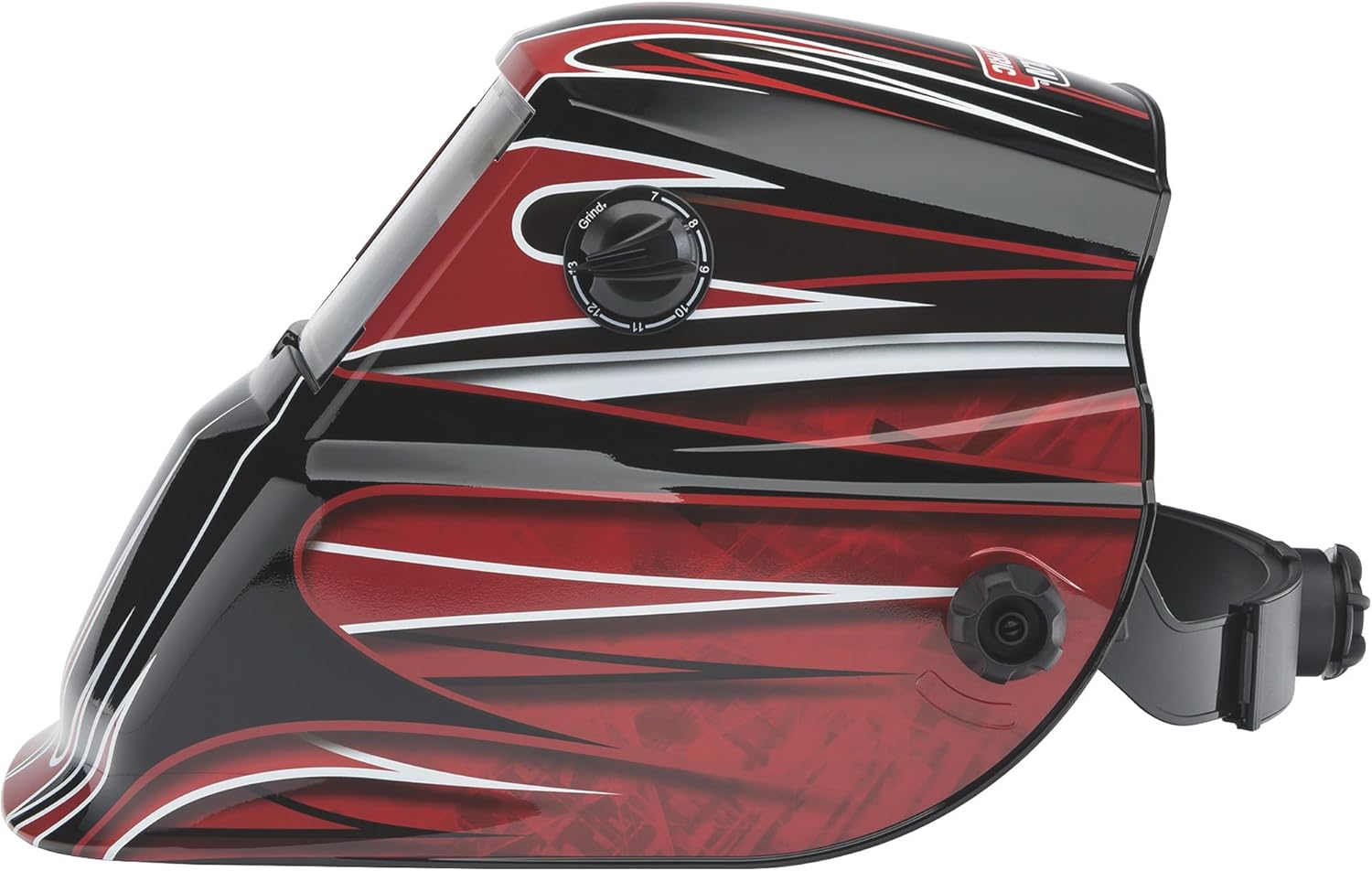
Figura 2: Lado view of the helmet, illustrating the headgear adjustment knob on the side for proper fit and balance.
2.2 Auto-Darkening Lens (ADF) Installation/Check
The auto-darkening filter (ADF) is pre-installed. Ensure it is clean and free from damage. This model does not require user-replaceable batteries for the ADF, as it is solar-powered.

Figura 3: Interno view of the Auto-Darkening Filter (ADF) module, showing controls for sensitivity and delay, along with a test button and low battery indicator. This unit is solar-powered and does not require battery replacement.
3. Operación
This section details how to operate your auto-darkening welding helmet effectively and safely.
3.1 Encendido / Apagado
The auto-darkening filter (ADF) is solar-powered and automatically activates when exposed to light. There is no manual on/off switch. Ensure the solar cells on the front of the helmet are not obstructed.
3.2 Shade Adjustment (Variable Shade 7-13)
The helmet features a variable shade range from 7 to 13, allowing you to select the appropriate shade level for different welding processes and amperages. The shade level is adjusted via an external knob.
- Locate the external knob on the side of the helmet.
- Rotate the knob to select the desired shade number (7-13). Refer to welding safety standards for recommended shade levels for your specific application.

Figura 4: External control knob for selecting variable shade levels (7-13) and activating grind mode.
3.3 Grind Mode
The helmet includes a grind mode feature, which locks the ADF in a light state (typically shade 3 or 4) for grinding operations. This prevents the lens from darkening, allowing clear vision without removing the helmet, while still providing impact protection.
- Rotate the external knob to the "Grind" position.
- Ensure the lens remains in the light state before beginning grinding.
- Remember to switch back to a welding shade before resuming welding operations.
3.4 Ajuste de sensibilidad
The sensitivity control adjusts how much light is required to trigger the auto-darkening function. This is useful for different ambient light conditions and welding processes.
- Locate the sensitivity knob on the internal ADF module (refer to Figure 3).
- Turn the knob towards 'H' (High) for lower amperage welding or when working in low ambient light.
- Turn the knob towards 'L' (Low) for high amperage welding or when working in bright ambient light to prevent false triggering.
3.5 Delay Adjustment
The delay control determines how long the lens stays dark after the welding arc extinguishes. This prevents eye fatigue from residual glow and protects against bright flashes from adjacent welding operations.
- Locate the delay knob on the internal ADF module (refer to Figure 3).
- Set a shorter delay for tack welding or when moving quickly between welds.
- Set a longer delay for high ampsoldadura media o cuando el charco de soldadura permanece brillante durante un período prolongado.
3.6 Función de prueba
The ADF module includes a test button to verify the auto-darkening function before welding. Pressing this button should momentarily darken the lens to the selected shade level.
- Press the "TEST" button on the internal ADF module (refer to Figure 3).
- The lens should darken and then return to its light state. If it does not, refer to the Troubleshooting section.

Figura 5: The Lincoln Electric Auto-Darkening Welding Helmet K3063-1 in use during a welding application, demonstrating proper eye and face protection.
4. Mantenimiento
Regular maintenance ensures the longevity and proper function of your welding helmet.
4.1 Limpieza del casco
- Carcasa del casco: Limpie la carcasa del casco con una solución de agua y jabón suave. Evite disolventes fuertes o limpiadores abrasivos.
- Outer Cover Lens: Wipe the outer cover lens with a soft, clean cloth. If heavily scratched or pitted, replace it immediately.
- Inner Cover Lens: Clean the inner cover lens with a soft, clean cloth. Replace if scratched or damaged.
- Filtro de oscurecimiento automático (ADF): Gently wipe the ADF surface with a soft, dry cloth. Do not use cleaning solutions on the ADF itself. Ensure the solar cells are clean and unobstructed.
4.2 Replacing Cover Lenses
Cover lenses protect the ADF from sparks and spatter. Replace them regularly when they become scratched, pitted, or dirty to maintain clear vision.
- Retire con cuidado el marco de retención o los clips que sostienen la lente de cubierta en su lugar.
- Retire la cubierta de lente vieja.
- Insert a new, clean cover lens, ensuring it is properly seated.
- Reinstall the retaining frame or clips securely.
4.3 Almacenamiento
Store the helmet in a clean, dry place away from direct sunlight, extreme temperatures, and corrosive materials. Protect the ADF from impact and scratches.
5. Solución de problemas
If you encounter issues with your welding helmet, refer to the following common problems and solutions.
| Problema | Posible causa | Solución |
|---|---|---|
| La lente no se oscurece cuando se activa el arco. |
|
|
| La lente parpadea o se oscurece intermitentemente. |
|
|
| Mala visibilidad a través de la lente. |
|
|
| Helmet is uncomfortable or unstable. |
|
|
6. Especificaciones
Key technical specifications for the Lincoln Electric Auto-Darkening Welding Helmet K3063-1.
- Modelo: K3063-1
- Marca: Lincoln Eléctrico
- Viewárea de trabajo: 1.73 x 3.82 pulgadas
- Variable Shade Range: 7-13
- Estado de la luz: (Typically Shade 3 or 4 in Grind Mode)
- Fuente de energía: Solar-powered (no user-replaceable batteries required)
- Material: Policarbonato (PC)
- Peso del artículo: Approximately 0.01 Ounces (Note: This weight appears to be a data entry error. Actual helmet weight is typically much higher.)
- Dimensiones del producto: Aproximadamente 10 x 10 x 10 pulgadas
- Código postal: 015082913339
- Características especiales: Lightweight, Grind Mode, Adjustable Sensitivity, Adjustable Delay
7. Información de garantía
According to the product information, this item comes with Sin garantía. Please refer to your point of purchase for their return or exchange policies if applicable.
8. Atención al cliente
For further assistance, technical questions, or to inquire about replacement parts, please contact Lincoln Electric customer service. You can typically find contact information on the official Lincoln Electric websitio o a través de su minorista de productos.
Recursos en línea: Visit the official Lincoln Electric website for product manuals, FAQs, and support contact details.


