Introducción
The JENSEN CD-490 is a portable stereo CD player equipped with an AM/FM stereo radio and an auxiliary line-in. It features a top-loading CD player with an LED track display, skip/search/repeat functions, and programmable memory. The unit includes a telescopic antenna for radio reception, a foldable carrying handle for portability, and a stereo headphone jack. An auxiliary input allows connection of external audio devices such as MP3 players.
Información importante de seguridad
ADVERTENCIA: Este producto contiene sustancias químicas reconocidas por el estado de California como causantes de cáncer y defectos de nacimiento u otros daños reproductivos.
Siga siempre las precauciones básicas de seguridad al utilizar aparatos eléctricos para reducir el riesgo de incendio, descarga eléctrica y lesiones personales. Conserve este manual para futuras consultas.
Qué incluye
- JENSEN CD-490 Portable Stereo CD Player with AM/FM Radio
- Cable de alimentación de CA
- Manual del propietario
Producto terminadoview
Familiarize yourself with the controls and features of your JENSEN CD-490 unit.
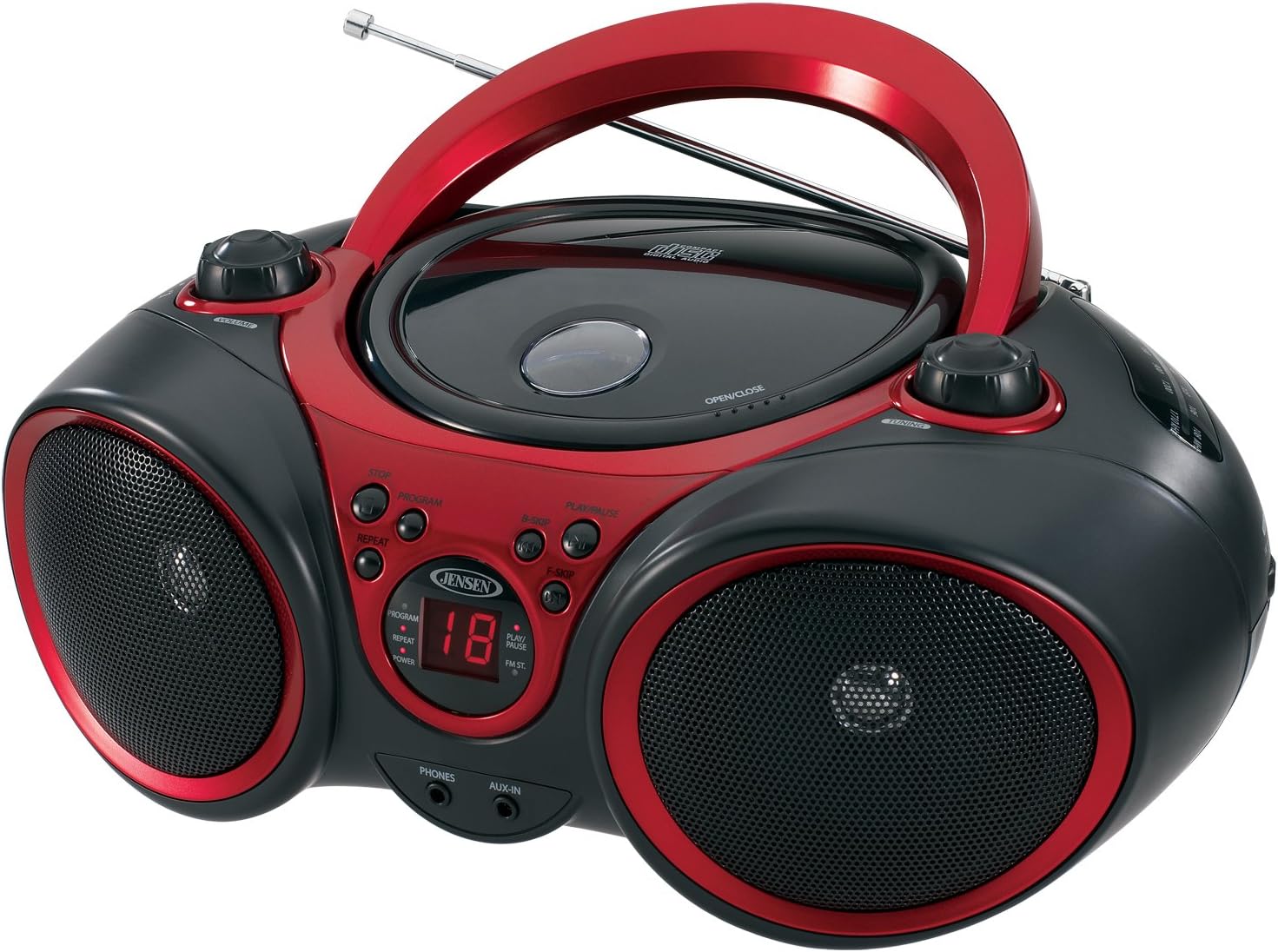
Imagen: Frente view of the JENSEN CD-490 unit, showing the CD compartment, speakers, control buttons, and display.
Controles del panel frontal:
- Perilla de VOLUMEN: Ajusta el nivel de salida de audio.
- Botón Detener: Detiene la reproducción del CD.
- Botón PROGRAMA: Se utiliza para programar pistas de CD.
- Botón REPEAT: Repite la pista actual o todas las pistas.
- Botón B-SKIP: Skips backward through CD tracks.
- Botón REPRODUCIR / PAUSA: Inicia o pausa la reproducción del CD.
- Botón F-SKIP: Skips forward through CD tracks.
- Pantalla LED: Shows CD track number and function indicators (PROGRAM, REPEAT, POWER, PLAY/PAUSE, FM ST).
- Conector de TELÉFONOS: Para conectar auriculares estéreo.
- Toma AUX-IN: Para conectar dispositivos de audio externos.
Controles del panel superior:
- Compartimento de CD: Top-loading area for compact discs.
- OPEN/CLOSE Latch: Libera la tapa del compartimento del CD.
- Perilla de SINTONIZACIÓN: Adjusts AM/FM radio frequency.
Controles del panel lateral:
- Interruptor de FUNCIÓN: Selects between RADIO, CD/AUX IN, and OFF modes.
- Selector de banda AM/FM: Selecciona entre las bandas de radio AM y FM.
Características del panel trasero:
- Entrada de alimentación de CA: Para conectar el cable de alimentación de CA.
- Compartimento de la batería: Admite 8 baterías 'C' (UM-2) para funcionamiento portátil.
- Antena telescópica: Antena extensible para recepción de radio FM.
Configuración
Encendido de la unidad:
The CD-490 can be powered by either AC power or batteries.
Alimentación CA:
- Ensure the unit is in the OFF position using the FUNCTION switch.
- Connect the AC power cord to the AC power input on the rear of the unit.
- Plug the other end of the AC power cord into a standard AC 120V/60Hz wall outlet.
Energía de la batería:
- Ensure the unit is in the OFF position.
- Abra la tapa del compartimiento de la batería ubicada en la parte inferior de la unidad.
- Insert 8 'C' (UM-2) size batteries (not included), ensuring correct polarity (+/-).
- Cierre bien la tapa del compartimento de la batería.
Configuración de la antena:
For optimal FM radio reception, fully extend the telescopic antenna. For AM reception, the unit has a built-in antenna, so no adjustment is typically needed.
Operating the CD Player
The CD-490 supports standard audio CDs and CD-R/RW discs.
- Set the FUNCTION switch to the 'CD/AUX IN' position.
- Press the 'OPEN/CLOSE' latch to open the CD compartment lid.
- Place an audio CD into the compartment with the label side facing up.
- Close the CD compartment lid firmly until it clicks. The LED display will show the total number of tracks on the CD.
- Press the 'PLAY/PAUSE' button to begin playback. The current track number will appear on the LED display.
- Ajuste la perilla 'VOLUMEN' al nivel de escucha deseado.
- To pause playback, press the 'PLAY/PAUSE' button. Press it again to resume.
- To skip to the next track, press the 'F-SKIP' button. To go back to the beginning of the current track or the previous track, press the 'B-SKIP' button.
- To stop playback, press the 'STOP' button.
Función de repetición:
- During playback, press the 'REPEAT' button once to repeat the current track. The 'REPEAT' indicator will light up.
- Press the 'REPEAT' button a second time to repeat all tracks on the CD. The 'REPEAT' indicator will flash.
- Press the 'REPEAT' button a third time to cancel the repeat function.
Reproducción programada:
- In STOP mode, press the 'PROGRAM' button. The 'PROGRAM' indicator will light up and '00' will flash on the display.
- Use the 'F-SKIP' or 'B-SKIP' buttons to select your desired track.
- Press the 'PROGRAM' button again to confirm the track. The display will show the next program number.
- Repita los pasos 2 y 3 para programar hasta 20 pistas.
- After programming, press the 'PLAY/PAUSE' button to start programmed playback.
- To cancel programmed playback, press the 'STOP' button twice.
Operating the AM/FM Radio
- Set the FUNCTION switch to the 'RADIO' position.
- Select either 'AM' or 'FM' using the AM/FM band selector switch.
- Extend the telescopic antenna for FM reception. Adjust its position for best reception.
- Gire la perilla 'TUNING' para seleccionar la estación de radio deseada.
- Ajuste la perilla 'VOLUMEN' al nivel de escucha deseado.
Uso de la entrada auxiliar
The AUX-IN jack allows you to connect an external audio device (e.g., MP3 player, smartphone) to play through the CD-490's speakers.
- Set the FUNCTION switch to the 'CD/AUX IN' position.
- Connect one end of a 3.5mm audio cable (not included) to the AUX-IN jack on the front of the CD-490.
- Conecte el otro extremo del cable de audio al conector de auriculares o al conector de salida de línea de su dispositivo de audio externo.
- Encienda su dispositivo de audio externo y comience la reproducción.
- Adjust the volume on both your external device and the CD-490's 'VOLUME' knob for optimal sound.
Mantenimiento y cuidado
- Mantenga la unidad alejada de la luz solar directa, fuentes de calor y exceso de polvo o humedad.
- Limpie la unidad con un paño suave y seco. No utilice limpiadores abrasivos ni disolventes.
- Para limpiar la lente del CD, utilice un limpiador de lentes de CD disponible en el mercado.
- Si utiliza baterías, retírelas si la unidad no se utilizará durante un período prolongado para evitar fugas.
Solución de problemas
| Problema | Posible causa | Solución |
|---|---|---|
| Sin poder | Cable de CA no conectado; baterías agotadas o insertadas incorrectamente. | Verifique la conexión del cable de CA; reemplace las baterías o asegúrese de que la polaridad sea correcta. |
| CD does not play / 'NO DISC' error | CD inserted incorrectly; CD is dirty or scratched; Unit in wrong function mode. | Re-insert CD with label side up; Clean or replace CD; Set FUNCTION switch to 'CD/AUX IN'. |
| Mala recepción de radio | Antena no extendida/ajustada; señal débil. | Extend and adjust FM telescopic antenna; Reposition the unit for better signal. |
| No hay sonido desde AUX-IN | Audio cable not connected; Volume too low on external device or unit. | Ensure audio cable is securely connected; Increase volume on both devices. |
Presupuesto
- Modelo: CD-490
- Fuente de energía: AC 120V/60Hz or 8 x 'C' (UM-2) batteries (not included)
- Potencia de salida: 2 x 1.5W RMS
- Compatibilidad de CD: CD, CD-R / RW
- Bandas de radio: Estéreo AM/FM
- Conectividad: Auxiliary Input Jack, Stereo Headphone Jack
- Dimensiones (L x An x Al): 12.7 x 9.1 x 5.8 pulgadas
- Peso: 3.4 libras
- Fabricante: Spectra Merchandising Internacional, Inc.
- Primero disponible: 14 de mayo de 2003
Garantía y soporte
Specific warranty information and customer support contact details are typically provided with your product packaging or on the manufacturer's official webSitio. Consulte estos recursos para obtener la información más precisa y actualizada.
Vídeo del producto
Mire este video oficial del producto para obtener una visión generalview of the JENSEN CD-490 Stereo.
Vídeo: Un overview of the JENSEN CD-490 Portable Stereo CD Player, highlighting its features and design.


