1. Introducción
This manual provides instructions for the APEX LD200RM remote control, designed for use with various APEX LCD and LED television models. This remote control offers full functionality for your compatible APEX television, ensuring convenient operation of all features.
Compatible APEX TV Models:
- LD3249
- LD3288, LD3288T, LD3288M
- LD4077, LE4077M
- LD4088
- LD4688
- LE3212, LE3212D
- LE4012
- LE4612
- LE3242
- LE3942
- LE40B12
- LE4243
- LE4643
- LE5043
2. Configuración
2.1 Instalación de la batería
The APEX LD200RM remote control requires two (2) AA batteries for operation. Follow these steps to install the batteries:
- Ubique la tapa del compartimiento de la batería en la parte posterior del control remoto.
- Presione la pestaña hacia abajo y deslice la cubierta hacia afuera.
- Inserte dos baterías AA, asegurándose de que los terminales positivo (+) y negativo (-) estén alineados correctamente con las marcas dentro del compartimiento.
- Deslice la tapa del compartimiento de la batería nuevamente a su lugar hasta que encaje firmemente.
Nota: Reemplace siempre ambas baterías a la vez. No mezcle baterías nuevas y usadas, ni baterías de diferentes tipos.
2.2 Uso inicial
The APEX LD200RM remote control is an original replacement and typically does not require any programming or pairing. Once batteries are installed, point the remote control towards your compatible APEX television and begin operation.
3. Instrucciones de funcionamiento
This section details the functions of the buttons on your APEX LD200RM remote control.
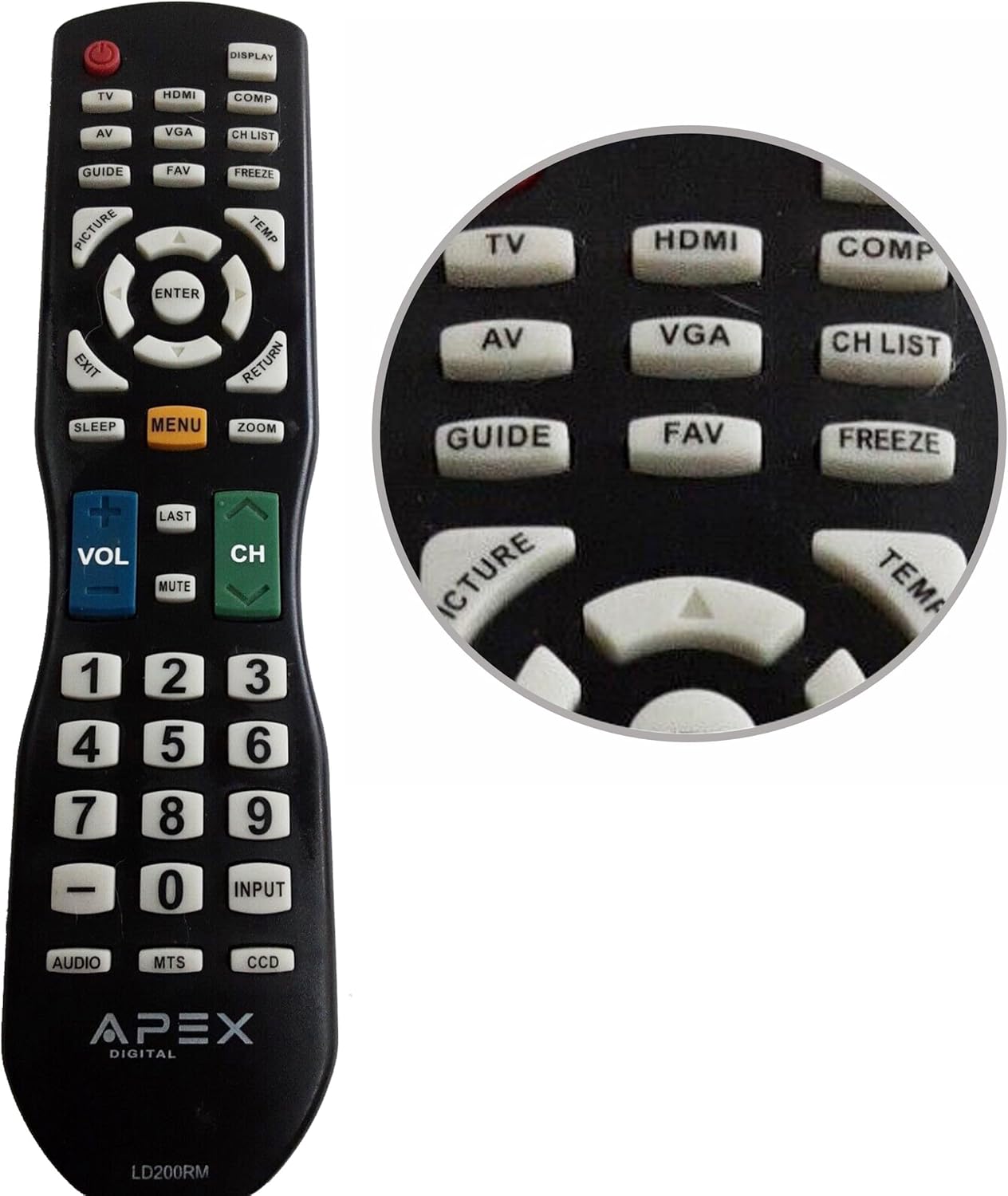
Figure 1: APEX LD200RM Remote Control Layout. This image displays the entire remote control, highlighting the arrangement of its various function buttons, including power, input selection, navigation, volume, channel, and numeric keypad.

Figure 2: Close-up of APEX LD200RM Remote Control Top Buttons. This image provides a detailed view of the upper section of the remote, focusing on buttons such as TV, HDMI, AV, VGA, COMP, CH LIST, DISPLAY, GUIDE, FAV, FREEZE, PICTURE, TEMP, MENU, ENTER, EXIT, RETURN, SLEEP, and ZOOM.
3.1 Power and Input Selection
- ENCENDIDO (botón rojo): Enciende o apaga la televisión.
- TELEVISOR: Selects the TV tuner input.
- HDMI: Selects the HDMI input.
- AV: Selects the Audio/Video input.
- VGA: Selects the VGA input.
- COMPRAR: Selects the Component video input.
- MONITOR: Muestra información en pantalla.
3.2 Channel and Volume Control
- VOL (+/-): Aumenta o disminuye el nivel de volumen.
- CH (Arriba/Abajo): Cambia el canal de televisión hacia arriba o hacia abajo.
- ÚLTIMO: Vuelve al anterior viewcanal ed.
- MUDO: Silencia o reactiva el audio del televisor.
- LISTA CH: Muestra la lista de canales.
3.3 Menú y navegación
- MENÚ: Abre el menú principal del televisor.
- ENTRAR: Confirms a selection within the menu.
- Botones de flecha (arriba/abajo/izquierda/derecha): Navega por las opciones del menú y ajusta la configuración.
- SALIDA: Sale del menú actual o de la visualización en pantalla.
- DEVOLVER: Vuelve al menú o pantalla anterior.
3.4 Numeric Keypad and Special Functions
- 0-9 (botones numéricos): Ingresa directamente los números de canal.
- ENTRADA: Recorre las fuentes de entrada disponibles.
- GUÍA: Muestra la guía electrónica de programación (si está disponible).
- Favoritos: Accede a canales favoritos.
- CONGELAR: Congela la imagen actual en la pantalla.
- IMAGEN: Ajusta la configuración de la imagen.
- TEMPERATURA: (Function may vary by model, often related to picture temperature or a specific mode).
- DORMIR: Configura el temporizador de apagado.
- ENFOCAR: Ajusta el nivel de zoom de la pantalla.
- AUDIO: Selects audio modes or tracks.
- MTS: Multi-channel Television Sound (stereo/SAP).
- CCD: Closed Captioning Display.
4. Mantenimiento
4.1 Reemplazo de batería
When the remote control's performance degrades or it stops responding, it is likely time to replace the batteries. Refer to Section 2.1 for detailed battery installation instructions. Always use fresh AA batteries.
4.2 Limpieza
Para limpiar el control remoto, utilice un paño suave y seco. Para la suciedad difícil, frote ligeramente.ampLimpie el paño con agua o un limpiador suave no abrasivo. Evite usar productos químicos fuertes o materiales abrasivos, ya que pueden dañar la superficie o los componentes internos del control remoto.
4.3 Almacenamiento
Store the remote control in a cool, dry place away from direct sunlight and extreme temperatures. If the remote will not be used for an extended period, it is advisable to remove the batteries to prevent leakage and potential damage.
5. Solución de problemas
- El control remoto no responde:
- Asegúrese de que las baterías estén instaladas correctamente con la polaridad correcta (+/-).
- Reemplace las baterías viejas con baterías AA nuevas.
- Verifique si hay obstrucciones entre el control remoto y el sensor infrarrojo del televisor.
- Ensure you are within the effective range of the television's IR receiver.
- Algunos botones no funcionan:
- Esto podría indicar que la batería está baja. Reemplace las baterías.
- Asegúrese de que el control remoto esté limpio y que no haya residuos alojados debajo de los botones.
- Verify that the button function is applicable to your specific TV model. Some functions may not be supported by all compatible TVs.
- Television is not turning on/off:
- Confirme que el televisor esté enchufado a una toma de corriente que funcione.
- Try using the power button directly on the television to rule out a TV issue.
6. Especificaciones
| Característica | Detalle |
|---|---|
| Número de modelo | LD200RM |
| Marca | Ápex |
| Dispositivos compatibles | APEX LCD & LED Televisions |
| Fuente de poder | 2 pilas AA (no incluidas) |
| Dimensiones del producto | 10 x 6 x 2 pulgadas (aproximadamente) |
| Peso del artículo | 3.2 onzas (aproximadamente) |
| Color | Negro |
| Característica especial | Diseño ergonómico |
7. Información de garantía
This APEX LD200RM remote control typically comes with a 30-day warranty from the date of purchase. This warranty covers manufacturing defects. For specific details regarding warranty claims, returns, or replacements, please refer to your purchase documentation or contact the seller directly.
8. Soporte
If you encounter issues not covered in this manual or require further assistance, please contact the retailer or the manufacturer's customer support. When contacting support, please have your product model number (LD200RM) and your television model number readily available.


