Introducción
This manual provides essential instructions for the safe and efficient use of your ONKYO RC-1000M Audio Remote Control. Please read this manual thoroughly before using the product and retain it for future reference.
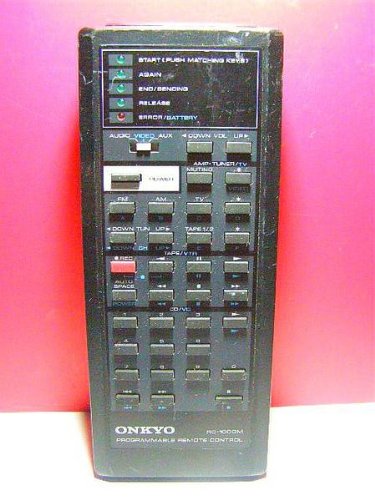
Image: The ONKYO RC-1000M Audio Remote Control, a black rectangular device with various control buttons.
Configuración
1. Instalación de la batería
- Ubique la tapa del compartimiento de la batería en la parte posterior del control remoto.
- Deslice la cubierta hacia abajo o presione el pestillo para abrirla.
- Inserte dos pilas AAA (no incluidas), asegurándose de que los terminales positivo (+) y negativo (-) estén alineados con los indicadores dentro del compartimiento.
- Vuelva a colocar la tapa del compartimiento de la batería, asegurándose de que encaje firmemente en su lugar.
Nota: Utilice siempre pilas nuevas y reemplácelas a la vez. No mezcle pilas nuevas y usadas ni pilas de distintos tipos.
2. Initial Pairing (If Applicable)
The ONKYO RC-1000M is typically pre-programmed for compatible ONKYO audio devices. No manual pairing is usually required. If the remote does not respond, ensure your audio device is powered on and within range. Refer to your ONKYO audio component's manual for specific remote control compatibility and setup instructions if issues persist.
Instrucciones de funcionamiento
The RC-1000M remote control provides comprehensive control over your ONKYO audio system. Point the remote control directly at the main unit's remote sensor.
- FUERZA: Press to turn the audio component on or off.
- SELECTOR DE ENTRADA: Use dedicated buttons (e.g., CD, TUNER, DVD) to switch between audio input sources.
- VOLUMEN +/-: Ajusta el nivel del volumen principal.
- MUDO: Temporarily silences the audio output. Press again to restore sound.
- PLAY/PAUSE/STOP/SKIP: Control playback functions for compatible media players (e.g., CD player, network player).
- MENU/ENTER/NAVIGATION: Access and navigate on-screen menus of your ONKYO audio component.
For detailed functions of specific buttons, refer to the instruction manual of the ONKYO audio component you are controlling.
Mantenimiento
Limpieza
Wipe the remote control with a soft, dry cloth. Do not use abrasive cleaners, waxes, or solvents. Avoid spraying liquids directly onto the remote control.
Reemplazo de batería
If the remote control's range decreases or it becomes unresponsive, replace the batteries as described in the "Battery Installation" section. Dispose of used batteries according to local regulations.
Almacenamiento
When storing the remote control for extended periods, remove the batteries to prevent leakage and potential damage to the unit.
Solución de problemas
| Problema | Posible causa | Solución |
|---|---|---|
| El control remoto no funciona. |
|
|
| Remote control operates intermittently. |
|
|
Presupuesto
- Modelo: RC-1000M
- Marca: ONKIO
- Fuente de alimentación: DC 3V (AAA batteries x 2)
- Rango de operación: Approximately 7 meters (23 feet) under normal conditions.
- Dimensiones (Aprox.): Not specified in product data.
- Peso aproximado.): Not specified in product data.
Las especificaciones están sujetas a cambios sin previo aviso para mejorar.
Garantía y soporte
For warranty information, technical support, or service inquiries, please refer to the documentation included with your ONKYO audio component or visit the official ONKYO webSitio. Conserve su recibo de compra como comprobante para reclamaciones de garantía.
ONKYO oficial Websitio: www.onkyo.com