1. Introducción
This manual provides detailed instructions for the installation, operation, and maintenance of your Axis P1355 Surveillance/Network Camera. The Axis P13 series offers high-performance fixed cameras designed for both indoor and outdoor surveillance, delivering superb image quality with H.264 compression. These models support HDTV 720p/1080p video and are equipped with features like Wide Dynamic Range and Day/Night functionality for clear imaging in various lighting conditions. Specific models within the P13 series, including HDTV 720p, incorporate Axis Lightfinder technology for enhanced low-light sensitivity, while HDTV 1080p and 5-megapixel cameras feature P-iris control for optimized depth of field and lens resolution.
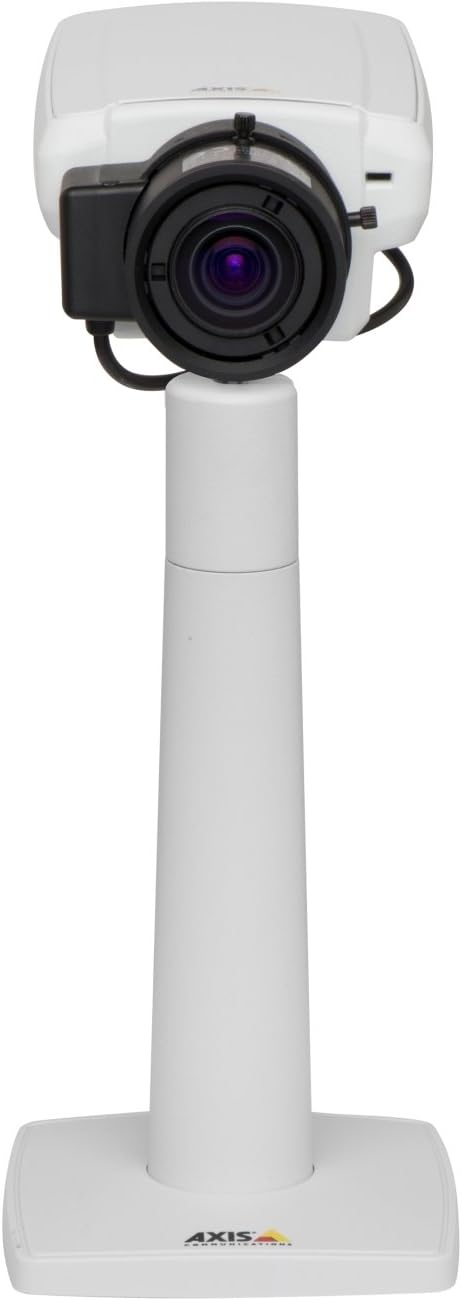
Figura 1: The Axis P1355 Surveillance Camera shown mounted on its stand. This image illustrates the camera's physical appearance and typical mounting configuration.
2. Información de seguridad
Please read all safety instructions before installing or operating the camera.
- Ensure the power source matches the camera's requirements to prevent electrical hazards.
- La instalación debe ser realizada por personal calificado de acuerdo con los códigos eléctricos locales.
- No exponga la cámara a temperaturas extremas, humedad o ambientes corrosivos.
- Evite la exposición directa de la lente a fuentes de luz fuertes, como el sol, ya que esto puede dañar el sensor de imagen.
- Disconnect power before cleaning or servicing the camera.
3. Configuración e instalación
The Axis P1355 camera is designed for both indoor and outdoor use and supports various mounting options.
3.1 Montaje
The camera is typically designed for wall mount installation. Ensure the mounting surface is strong enough to support the camera's weight (approximately 2 pounds). Use appropriate screws and anchors for the chosen surface.
- Select a suitable location for optimal surveillance coverage.
- Fije firmemente el soporte de montaje a la pared.
- Mount the camera onto the bracket, ensuring it is firmly in place.
- Adjust the camera's angle for the desired field of view.
3.2 Conexiones
The Axis P1355 camera primarily uses wired connectivity for reliable data transmission and power.
- Conexión de energía: Connect the provided power adapter to the camera's power input and then to a suitable electrical outlet. The camera operates on a corded electric power source.
- Conexión de red: Connect an Ethernet cable from the camera's network port to your network switch or router. This provides wired connectivity for video streaming and control.
- Wireless Connectivity (Optional/Configuration): While primarily wired, the camera supports Wi-Fi for certain configurations. Refer to the Axis product documentation for specific wireless setup instructions if applicable to your model variant.
4. Instrucciones de funcionamiento
Once installed and connected, the Axis P1355 camera can be configured and operated via a network interface.
4.1 Acceso inicial y configuración
- Use the Axis IP Utility or a similar network discovery tool to find the camera's IP address on your network.
- Abrir una web Navegador e ingrese la dirección IP de la cámara para acceder a su web interfaz.
- Log in using the default credentials (refer to Axis documentation for default username/password, typically 'root' and 'pass' or similar, which should be changed immediately).
- Follow the on-screen prompts to set up basic network settings, date/time, and user accounts.
4.2 Video Monitoring and Features
- Vivir View: Access the live video feed through the web interface or compatible video management software.
- Resolución: The camera supports video capture resolutions up to 720p and effective video resolutions of 1080 pixels, with effective still resolution of 2 MP.
- Color and Monochrome Modes: The camera can operate in both color and monochrome (black and white) modes, automatically switching based on light conditions or configured manually.
- Visión nocturna: Utilize the integrated night vision capabilities for surveillance in low-light or complete darkness.
- Zoom óptico: Adjust the optical zoom for detailed views of specific areas.
- P-Iris Control: For models equipped with P-iris, this feature allows precise control over the iris position to optimize depth of field and lens resolution, enhancing image sharpness. This can be configured via the web interfaz.
- Formato de vídeo: Video is typically captured in MP4 format.
- Mando a distancia: The camera supports remote control for various settings and adjustments.
5. Mantenimiento
Regular maintenance ensures optimal performance and longevity of your Axis P1355 camera.
- Limpieza: Limpie suavemente la lente y la carcasa de la cámara con un paño suave.amp Paño. Evite limpiadores abrasivos o disolventes.
- Actualizaciones de firmware: Periodically check the Axis Communications webSitio para actualizaciones de firmware. Mantener el firmware actualizado garantiza el acceso a las últimas funciones, parches de seguridad y mejoras de rendimiento.
- Inspección de cables: Regularly inspect all cables for signs of wear or damage, especially for outdoor installations.
- Comprobación ambiental: Asegúrese de que el entorno operativo de la cámara permanezca dentro de los rangos de temperatura y humedad especificados.
6. Solución de problemas
This section addresses common issues you might encounter with your Axis P1355 camera.
- Sin energía:
- Verify the power adapter is securely connected to both the camera and a working power outlet.
- Compruebe el cable de alimentación en busca de daños.
- Sin conexión de red:
- Ensure the Ethernet cable is properly connected to the camera and the network switch/router.
- Check network switch/router status.
- Confirm the camera has a valid IP address and is on the same network segment as your viewdispositivo de ing.
- Mala calidad de imagen:
- Limpiar la lente de la cámara.
- Adjust focus and zoom settings via the web interfaz.
- Check lighting conditions; enable night vision or adjust exposure settings if necessary.
- Ensure P-iris control is correctly configured for optimal sharpness (if applicable).
- No se puede acceder Web Interfaz:
- Verify the camera's IP address.
- Ensure your computer is on the same network as the camera.
- Try restarting the camera and your network equipment.
7. Especificaciones
| Característica | Detalle |
|---|---|
| Marca | Comunicaciones del eje |
| Número de modelo | Eje P1355 |
| Uso en interiores y exteriores | Interior, exterior |
| Tecnología de conectividad | Wired (Wi-Fi capable for certain configurations) |
| Característica especial | Visión nocturna |
| Fuente de poder | Eléctrico con cable (7.1 vatios) |
| Resolución de captura de video | 720p |
| Resolución de vídeo efectiva | 1080 píxeles |
| Resolución de imágenes fijas efectiva | 2 MP |
| Tipo de zoom | Optical Zoom (2.9x Optical) |
| Tipo de controlador | Iris (P-iris control) |
| Tipo de montaje | Montaje en pared |
| Dimensiones del producto (L x An x Al) | 3.07 x 5.94 x 1.69 pulgadas |
| Peso del artículo | 2 libras |
| Calificación de protección internacional | IP54 |
| Formato de captura de video | MP4 |
8. Garantía y soporte
For detailed warranty information and technical support, please refer to the official Axis Communications websitio o comuníquese directamente con su servicio de atención al cliente.
Fabricante: AXIS COMMUNICATION INC.
Websitio: www.axis.com (Por favor visite la página oficial website for the most current support resources, drivers, and documentation.)


