1. Introducción
This manual provides essential information for the safe and efficient installation, operation, and maintenance of your APEX AL-A300ATX 300W ATX12V Power Supply. Please read this manual thoroughly before installation and retain it for future reference.
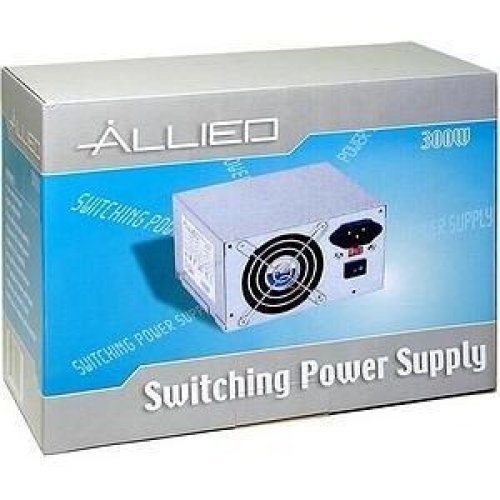
Image: The AL-A300ATX 300W ATX12V Power Supply shown in its retail packaging, indicating it is a "Switching Power Supply" from "ALLIED".
2. Información de seguridad
Always observe the following safety precautions to prevent injury or damage to the power supply or other components:
- Asegúrese de que la fuente de alimentación esté desconectada de la toma de CA antes de realizar la instalación o extracción.
- No abra la fuente de alimentación casing. Alto volumentages are present inside, even when disconnected. There are no user-serviceable parts.
- Install the power supply in a well-ventilated area. Do not block ventilation openings.
- Evite exponer la fuente de alimentación a la humedad o temperaturas extremas.
- Use only the cables provided or approved for use with this power supply.
- If the power supply is damaged or malfunctioning, discontinue use immediately and contact support.
3. Contenido del paquete
Verifique que todos los artículos estén presentes en el paquete:
- APEX AL-A300ATX 300W ATX12V Power Supply Unit
- Cable de alimentación de CA (puede variar según la región)
- Tornillos de montaje
- Manual de usuario (este documento)
4. Configuración e instalación
Siga estos pasos para instalar la fuente de alimentación en su sistema informático:
- Preparación:
- Apague la computadora y desenchufe el cable de alimentación de CA del tomacorriente de pared.
- Abra la carcasa de su computadora. Consulte el manual de la carcasa para obtener instrucciones específicas.
- Si va a reemplazar una fuente de alimentación existente, desconecte todos los cables de la fuente de alimentación antigua y retírela del gabinete.
- Montaje de la fuente de alimentación:
- Carefully slide the AL-A300ATX power supply into the designated PSU bay in your computer case.
- Align the screw holes on the power supply with those on the case.
- Asegure la fuente de alimentación utilizando los tornillos de montaje proporcionados.
- Cables de conexión:
- 24-Pin ATX Main Power Connector: Connect this large connector to the corresponding port on your motherboard. Ensure it clicks into place.
- CPU Power Connector (4-pin or 8-pin): Connect the appropriate CPU power cable to the CPU power port on your motherboard.
- Conectores de alimentación SATA: Connect these flat connectors to your SATA hard drives, SSDs, and optical drives.
- Conectores Molex (periféricos): Connect these 4-pin connectors to older drives or case fans if needed.
- PCI-E Power Connectors (if applicable): If your graphics card requires additional power, connect the appropriate PCI-E power cable from the PSU to the graphics card. This model is listed with a "24 Pin" PCI-Express Connector Configuration, implying the main ATX connector.
- Sistema de organización de cables: Coloque los cables de forma ordenada para mejorar el flujo de aire y la estética dentro de su carcasa.
- Comprobación final: Vuelva a verificar todas las conexiones para asegurarse de que estén seguras.
- Cerrar caso: Close your computer case and secure it.
5. Instrucciones de funcionamiento
Después de una instalación exitosa, siga estos pasos para encender su sistema:
- Conecte la alimentación de CA: Plug the AC power cord into the power supply's inlet and then into a grounded wall outlet or surge protector.
- Interruptor de alimentación: Locate the power switch on the back of the power supply (usually a rocker switch labeled "I" for ON and "O" for OFF). Ensure it is in the "ON" (I) position.
- Encender la computadora: Press the power button on your computer case. The system should now power on.
To turn off your computer, always use the operating system's shutdown procedure. Do not use the power supply's switch for regular shutdowns, as this can lead to data loss or system instability.
6. Mantenimiento
Un mantenimiento adecuado ayuda a garantizar la longevidad y el rendimiento óptimo de su fuente de alimentación:
- Limpieza de polvo: Periodically (every 3-6 months, depending on environment) clean dust from the power supply's fan and ventilation grilles using compressed air. Ensure the computer is powered off and unplugged before cleaning.
- Flujo de aire: Ensure that the computer case has adequate airflow and that the power supply's fan is not obstructed.
- Sistema de organización de cables: Maintain tidy cable routing to prevent obstruction of airflow.
7. Solución de problemas
Si tiene problemas con su fuente de alimentación, consulte los siguientes problemas y soluciones comunes:
| Problema | Posible causa | Solución |
|---|---|---|
| La computadora no se enciende. |
|
|
| El sistema se enciende pero se apaga inmediatamente. |
|
|
| El ventilador hace ruido o no gira. |
|
|
If the problem persists after attempting these solutions, contact APEX customer support or a qualified technician.
8. Especificaciones
| Característica | Detalle |
|---|---|
| Nombre del modelo | AL-A300ATX |
| Marca | APEX |
| Salida Wattage | 300 vatios |
| Factor de forma | ATX12V |
| Dispositivos compatibles | Ordenador personal |
| Tipo de conector | ATX (24 Pin PCI-Express Connector Configuration) |
| Método de enfriamiento | Aire |
| Vol. Mínimo de entradatage | 110 voltios (CA) |
| Peso del artículo | 3.64 libras |
| Dimensiones del paquete | 9.6 x 7.2 x 4.1 pulgadas |
| Fecha de primera disponibilidad | 22 de abril de 2014 |
9. Garantía y soporte
For information regarding warranty coverage, technical support, or service, please refer to the official APEX webSitio web o contacte directamente con el servicio de atención al cliente. Conserve su recibo de compra como comprobante.
APEX Contact Information: Please visit the official APEX webSitio para obtener los detalles de contacto y recursos de soporte más actualizados.


